
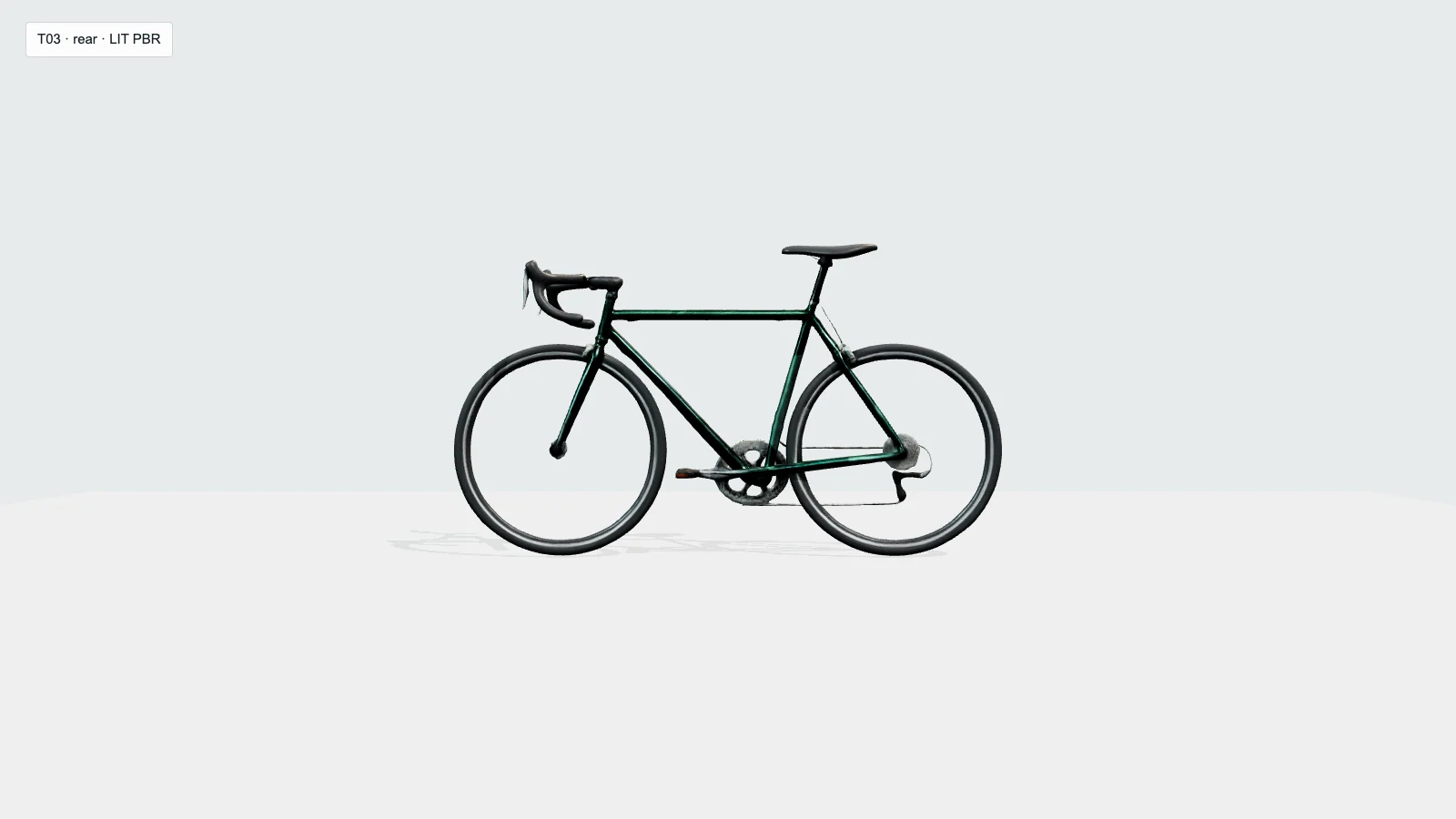
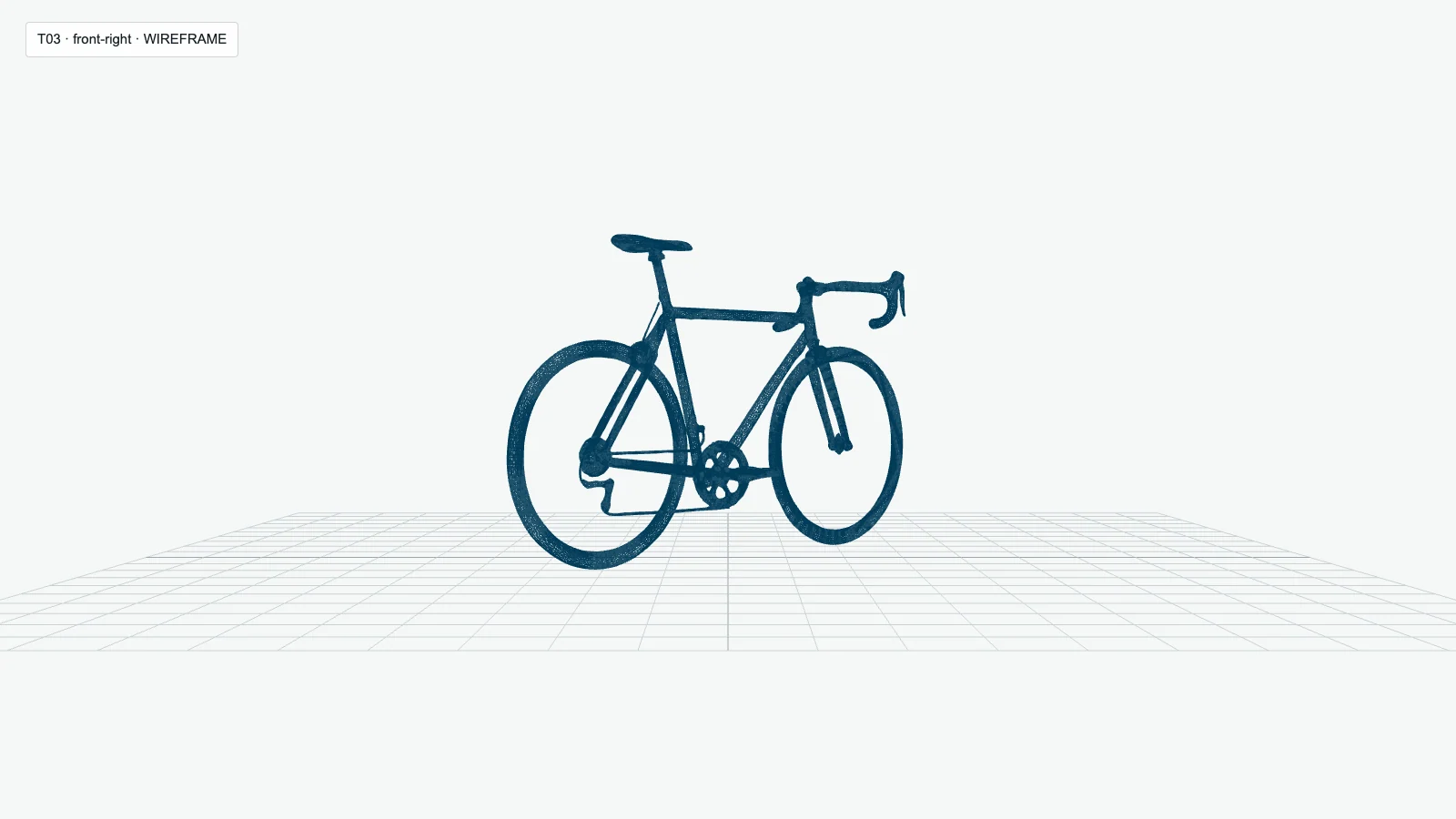
Kurze Antwort: Die getestete „Anywhere“-Route lieferte drei gültige, texturierte GLB-Dateien, von denen jedoch keine in der erstellten Form produktionsreif war. Die Route verwendete das Modell rodin-gen2, erreichte Replicate’s hyper3d/rodin, und hat die vorgelagerte Ebene wie folgt erfasst: Gen-2; dies sind keine Testergebnisse der Gen-2.5. Die Vintage-Kamera erzielte das beste Ergebnis und erhielt Teilweise; das Fahrrad war zwar unverkennbar, aber reparaturintensiv Teilweise; der angeblich einfache Becher Fehlgeschlagen da die Öffnung verschlossen war und die Halterung des Griffs abgebrochen war. Rodin eignet sich für Konzept-Meshes und Blockouts, bei denen eine gewisse Ungenauigkeit in der Nachbearbeitung akzeptabel ist, ist jedoch kein zuverlässiger Weg, um mit einem einzigen Klick fertige Assets zu erstellen.
Ich habe für jedes Bild die erste gültige Gen-2-Ausgabe beibehalten und acht beleuchtete Blickwinkel, acht Drahtgitter-Blickwinkel, die exportierte GLB-Datei, eingebettete Texturen sowie eine 48-Frame-Drehansicht überprüft. Die aktuelle Gen-2.5-Dokumentation wird separat behandelt, damit Leser das heutige Produkt bewerten können; sie darf jedoch nicht dazu verwendet werden, diese Ausgaben älterer Versionen neu zu kennzeichnen. Eine überzeugende Vorderansicht kann eine schlechte Rückseite, fehlende dünne Teile oder eine schwer zu bearbeitende Topologie verbergen.
Ein klares Ausgangsbild erleichtert die Interpretation der 3D-Aufgabe. Wenn das Ausgangskonzept überladen, mit Markenzeichen versehen, beschnitten oder visuell mehrdeutig ist, können Sie ein klareres Referenzbild erstellen im Bildarbeitsbereich von GlobalGPT, bevor es in Rodin übernommen wird. GlobalGPT unterstützt den damit verbundenen Workflow zur Bildvorbereitung; Rodin bleibt das Werkzeug, das für die Erstellung des 3D-Assets zuständig ist.
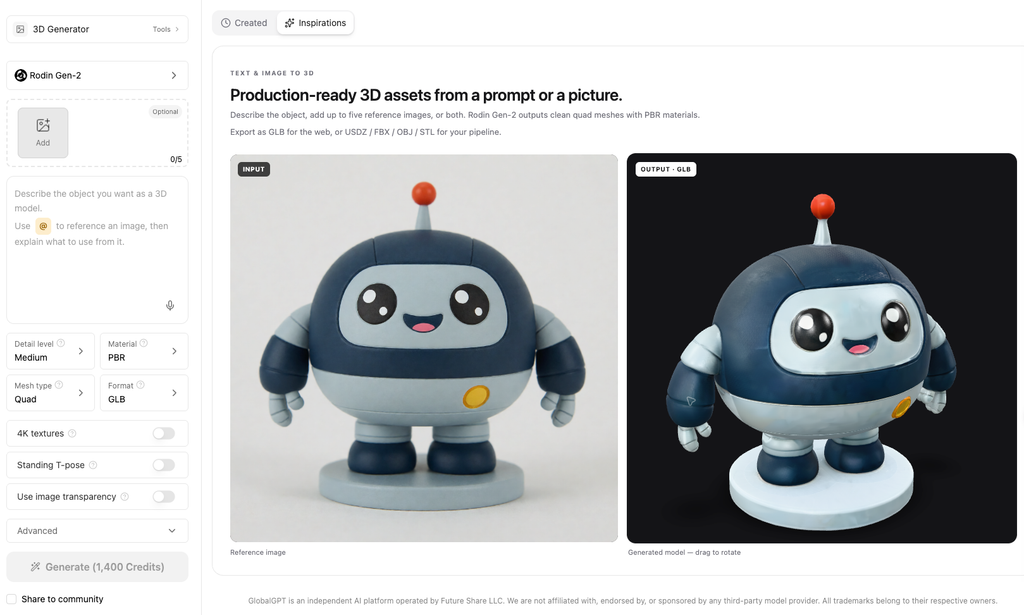
Was ist Hyper3D Rodin?
Hyper3D Rodin wandelt Text- oder Bildreferenzen in 3D-Assets um. Auf der offiziellen Website und in der API-Dokumentation, die am 9. September 2026 überprüft wurden, wird Rodin Gen-2.5 als aktuelle Produktfamilie aufgeführt. Dieses Datum ist wichtig, da ältere Rodin-Rezensionen möglicherweise Steuerelemente, Standardeinstellungen oder Generierungsfamilien beschreiben, die nicht mehr mit der aktuellen Dokumentation übereinstimmen.
Beim Vergleich von Claims müssen drei Bereiche getrennt betrachtet werden: die öffentliche Marketing-Website, die Gen-2.5-API-Dokumentation und der Web-Arbeitsbereich. Ein für die API dokumentierter Parameter ist nicht automatisch als Option oder Standardwert im Browser-Arbeitsbereich sichtbar.
Funktionen und Anwendungsbereich der Rodin Gen-2.5-API
Dokumentierte Gen-2.5-API-Oberfläche
Hierbei handelt es sich um API-Funktionen, nicht um bestätigte Standardwerte für den Web-Arbeitsbereich.
| Bildeingabe | Ein bis fünf Bilder. Laut Dokumentation wird das erste Bild zur Materialerzeugung verwendet, und es kann optional eine Textvorlage angegeben werden. |
|---|---|
| Generationsstufen | „Extrem niedrig“, „niedrig“, „mittel“, „hoch“ und „extrem hoch“. Laut Hyper3D entsprechen diese Stufen unterschiedlichen Geschwindigkeitsstufen und geometrischen Detailgraden; die Stufe „extrem hoch“ kann ein zusätzliches Netz mit bis zu 10 Millionen Flächen bereitstellen. |
| Netzmodi | Quad und Roh. Ein Modusname allein reicht nicht aus, um eine einwandfreie Topologie oder Produktionsreife zu gewährleisten. |
| Materialwerte | PBR, Schattiert, Alle, Hybrid, und Keine. |
| Texturoptionen | In der Dokumentation werden Kombinationen von 2K bis 12K beschrieben, je nach Texturmodus und Add-ons. |
| Direkte Geometrieformate | GLB, USDZ, FBX, OBJ und STL in der API-Dokumentation. Auf der Marketing-Seite von Hyper3D werden weitere Formate aufgeführt, daher sollte das eigentliche Web-Export-Menü separat überprüft werden. |
Quelle: Rodin Gen-2.5 – API-Dokumentation, abgerufen am 9. September 2026.
Wie dieser Testbericht „Hyper3D Rodin“ bewertet
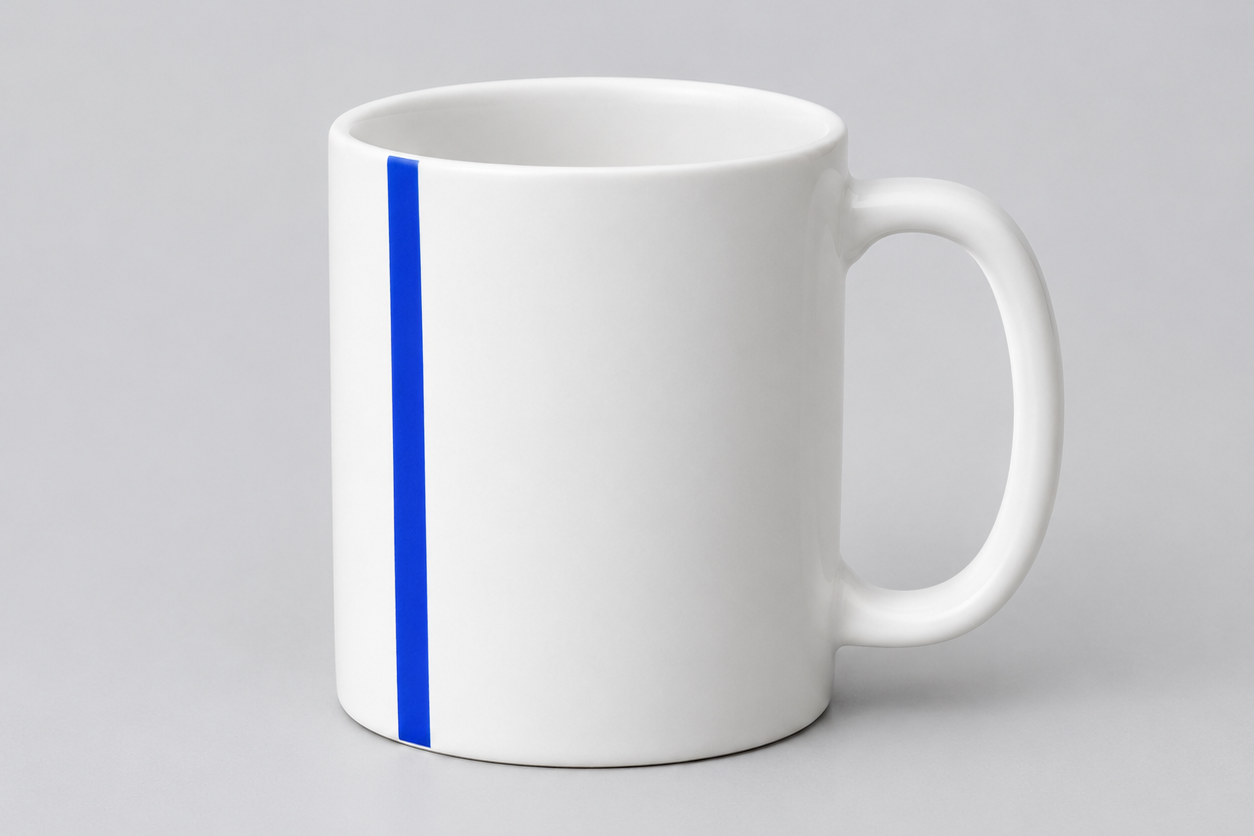
Im Praxistest kam Anywhere zum Einsatz rodin-gen2 Aufgabenroute, die über Replicate berichtete, hyper3d/rodin als Anbietermodell und Gen-2 als vorgelagerte Ebene. Gen-2.5 wurde nicht getestet. Das Protokoll verwendete drei markenlose Referenzbilder mit zunehmend komplexer Geometrie: einen Keramikbecher mit offenem Henkel, eine Vintage-Kamera mit kleinen Bedienelementen und unterschiedlichen Materialien sowie ein Rennrad mit Speichen, Pedalen, einer Kette und sich überlappenden Rahmenrohren. Jedes Bild weist eine vollständige Silhouette, einen neutralen Hintergrund und einen festen Datei-Hash auf, sodass sich die Eingabe zwischen den Durchläufen nicht ändern kann.
Die „First-Valid-Output“-Regel
Ein Ergebnis gilt als gültig, wenn der Auftrag abgeschlossen ist, ein nicht leeres 3D-Ergebnis liefert, das geöffnet werden kann, und dem richtigen Eingabedaten und Versuch zugeordnet werden kann. Ein gültiges Ergebnis bleibt in der Überprüfung erhalten, auch wenn seine Geometrie verzerrt ist, ein kleiner Teil fehlt, eine Textur verschmiert ist oder die Rückseite einer umfassenden Bereinigung bedarf. Wiederholungsversuche sind für Betriebsfehler wie einen fehlgeschlagenen Download oder eine fehlende Ausgabe vorgesehen, nicht zur Verbesserung des Erscheinungsbilds.
Anschließend werden bei der Überprüfung die Integrität der Silhouette, fehlende oder miteinander verschmolzene Teile, das Texturverhalten von vorne nach hinten, feine Details, die Drahtgitterstruktur, Materialien und UVs (sofern vorhanden), der Erfolg des Exports, die verstrichene Zeit sowie die Credits untersucht. Diese Aspekte werden separat betrachtet und nicht in einer Gesamtbewertung zusammengefasst.
Die drei Referenzbilder
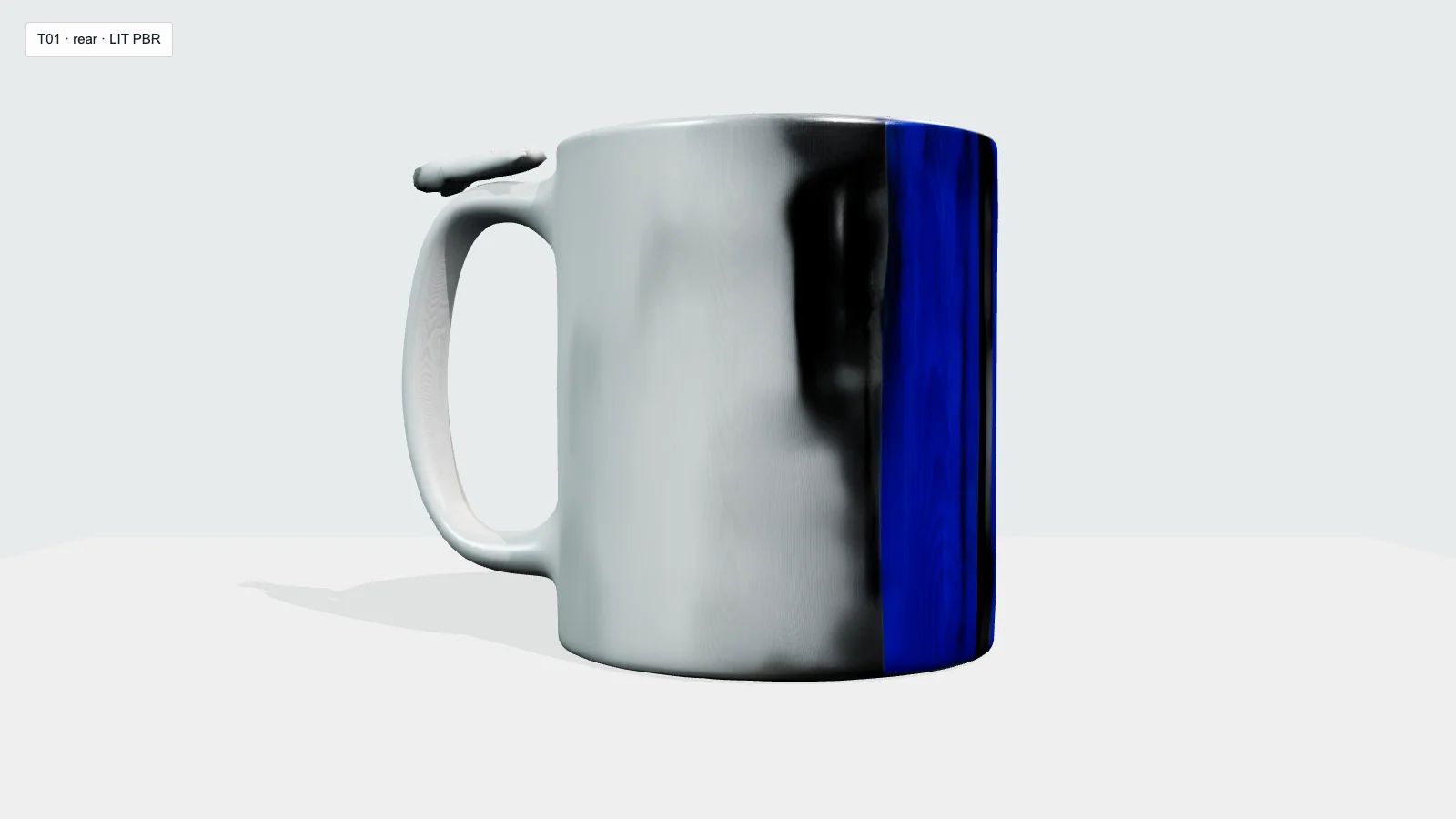
- Test 1, Keramiktasse: eine festgelegte Grundform für den Rand, die Grifföffnung, den Sockel, die Wandstärke und einen blauen Streifen, der nur auf einer Seite sichtbar ist.
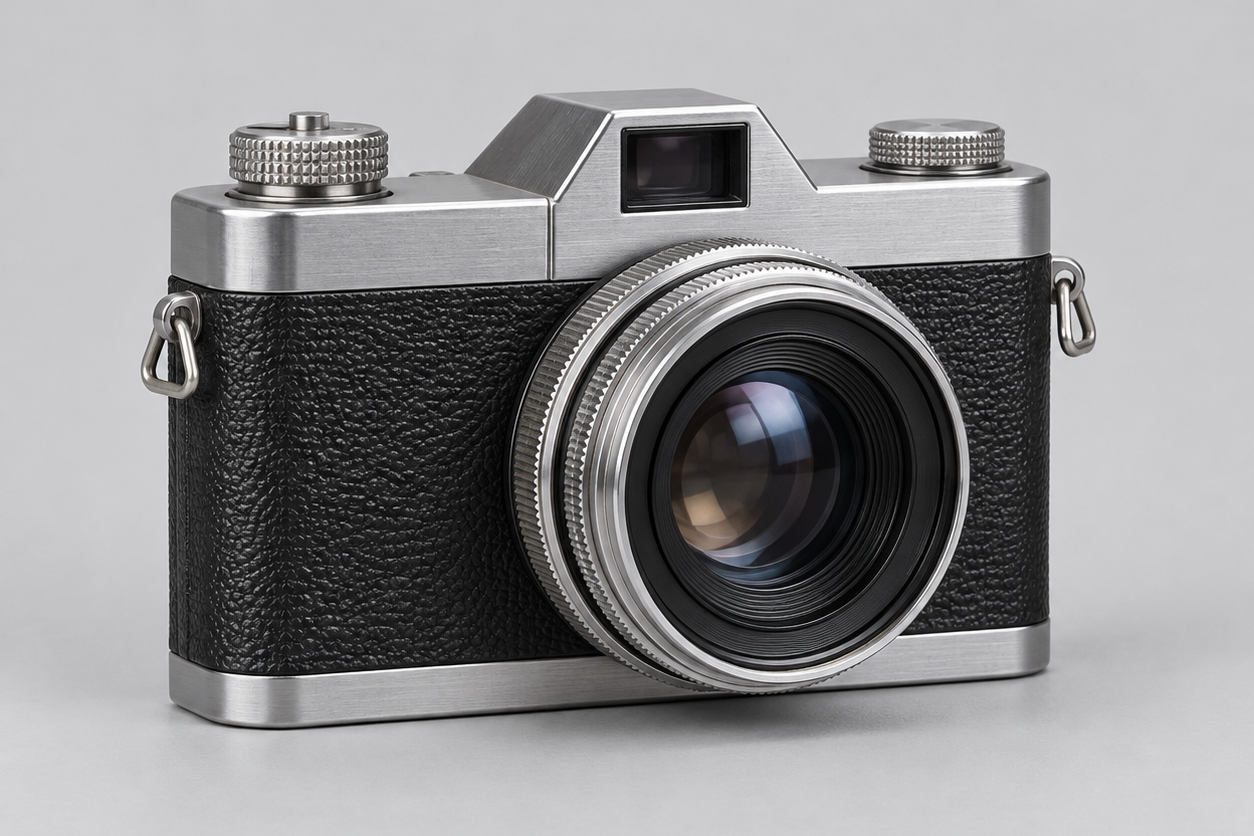
- Test 2, Vintage-Kamera: Eine detailreiche und aufwendige Aufgabe, die eine runde Linse, zwei obere Drehregler, zwei Riemenschlaufen sowie gebürstetes Metall, Glas und Lederstruktur umfasst.
- Test 3, Rennrad: Eine anspruchsvolle Aufgabe mit feinen Strukturen, die zwei Räder, Speichen, Rahmenrohre, Pedale, Kette, Zahnräder und offenen Negativraum umfasst.
Testergebnisse „Image-to-3D“: „Anywhere Route“, Gen-2-Stufe
Bei diesen Tests wurde das Anywhere-Modell verwendet. rodin-gen2, weitergeleitet an Replicate’s hyper3d/rodin, wobei die vorgelagerte Ebene wie folgt erfasst wurde: Gen-2. Es handelt sich nicht um Benchmark-Ergebnisse der Generation 2.5. Alle drei Dateien wurden geöffnet und gerendert, doch eine erfolgreiche Übertragung war noch nicht gleichbedeutend mit Produktionsreife.
| Test | Stufe | Status | Anbieterzeit | Streckenpreis | Urteil |
|---|---|---|---|---|---|
| T01-Becher | Gen-2 | Erfolg | 138,6 s | $0.40 | Fehlschlag |
| T02-Kamera | Gen-2 | Erfolg | 100,3 s | $0.40 | Teilweise |
| T03-Fahrrad | Gen-2 | Erfolg nach einem erneuten Versuch | 116,6 s | $0,40 für die erfolgreich erledigte Aufgabe | Teilweise |
Test 1: Keramikbecher Fehlschlag
- Status
- Erster gültiger GLB erfolgreich zur Auswertung gespeichert.
- Route und Einstellungen
- Überall
rodin-gen2Pfad zur Replikationhyper3d/rodin; vorgelagerte Ebene Gen-2; ein eingefrorenes Bild; leere Eingabeaufforderung. Die archivierte Antwort enthält keinen separaten Wert für die Anfragequalität. - Verstrichene Zeit
- 138,6 Sekunden Gesamtbearbeitungszeit laut Angaben des Dienstleisters.
- Streckenpreis
- Die erfolgreiche „Anywhere“-Routen-Aufgabe kostete $0,40. Dabei handelt es sich weder um einen Hyper3D-Verkaufspreis noch um eine Gutschriftumrechnung.
- Gezeigte Leistungsfähigkeit
- Die Grifföffnung und die Basis blieben erkennbar, und der GLB ließ sich mit integrierten Strukturen öffnen.
- Hauptmängel
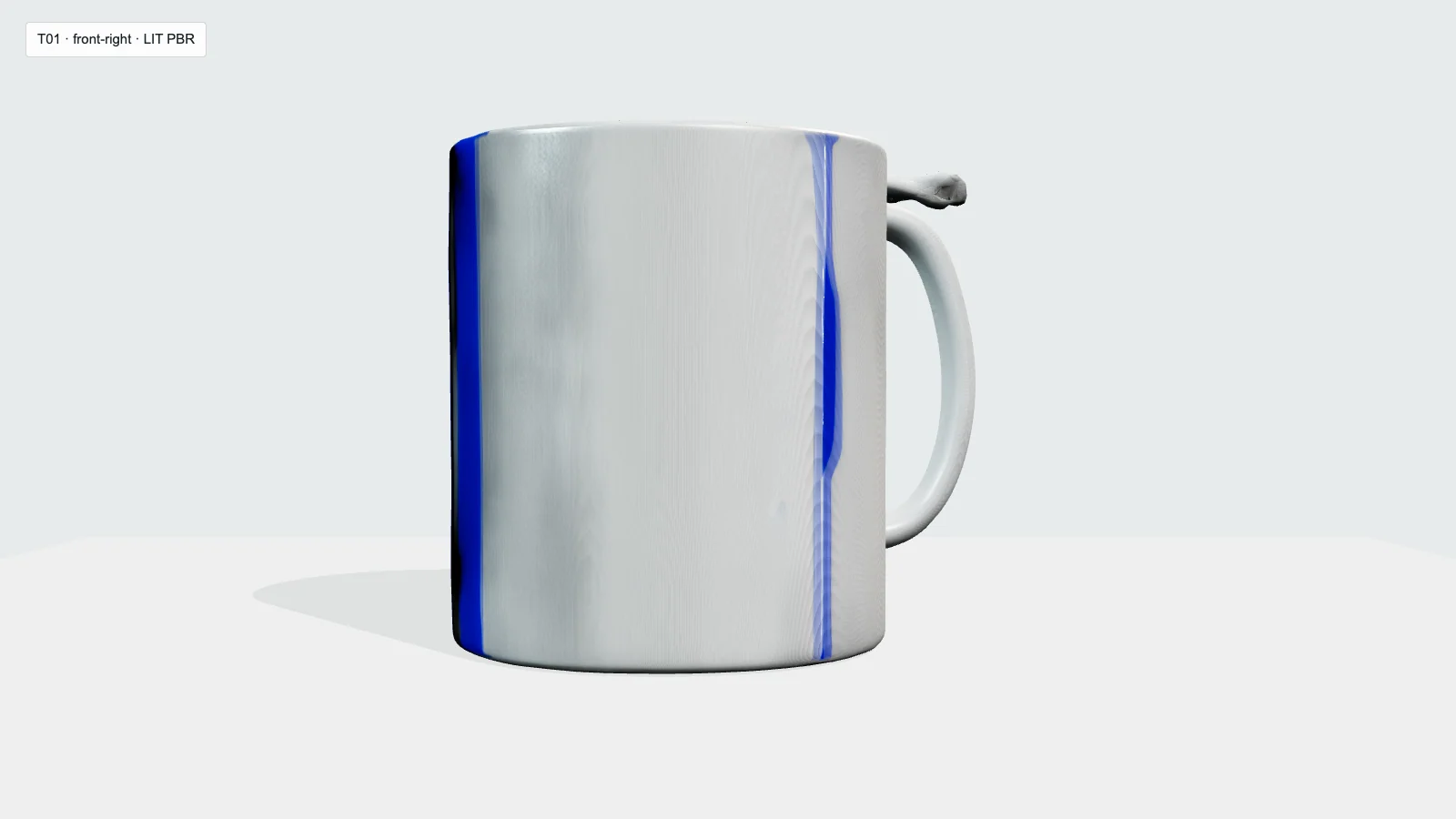
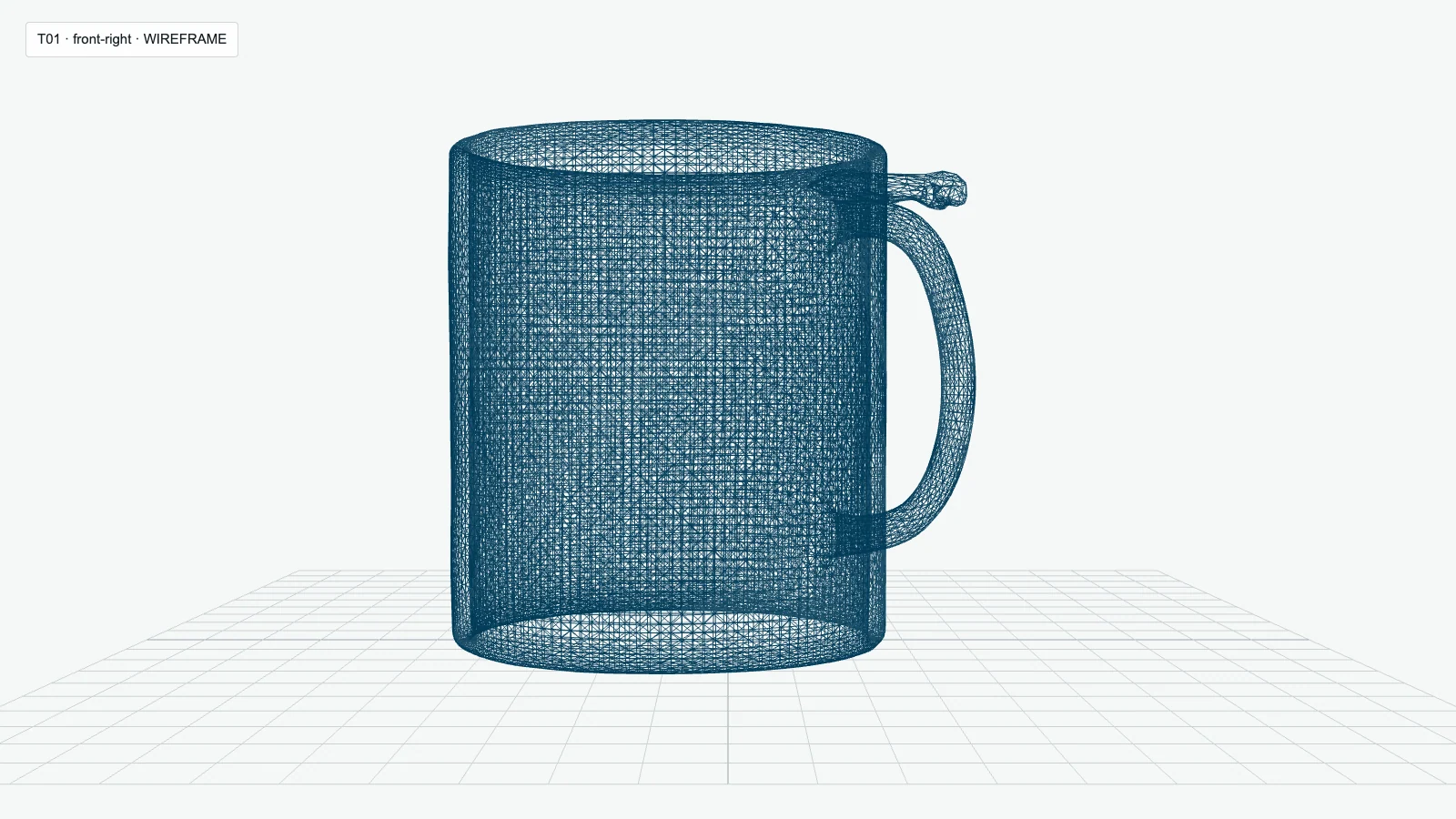
- Die Öffnung der Tasse war verschlossen, die obere Griffverbindung brach ab, der Tassenkörper nahm eine eckige Form an, und der schmale Streifen breitete sich auf den nicht sichtbaren Flächen zu breiten Streifen aus.
- Urteil
- Fehlgeschlagen. Hierfür sind eine Geometrie- und Texturrekonstruktion erforderlich, keine schnelle Bereinigung.
Test 2: Vintage-Kamera Teilweise
- Status
- Erster gültiger GLB erfolgreich zur Auswertung gespeichert.
- Route und Einstellungen
- Überall
rodin-gen2Pfad zur Replikationhyper3d/rodin; vorgelagerte Ebene Gen-2; ein Standbild; die Qualität der Aufzeichnung wurde wie folgt angegeben:mittel. - Verstrichene Zeit
- 100,3 Sekunden Gesamtbearbeitungszeit laut Angaben des Dienstleisters.
- Streckenpreis
- Die erfolgreiche „Anywhere“-Routen-Aufgabe kostete $0,40. Dabei handelt es sich weder um einen Hyper3D-Verkaufspreis noch um eine Gutschriftumrechnung.
- Gezeigte Leistungsfähigkeit
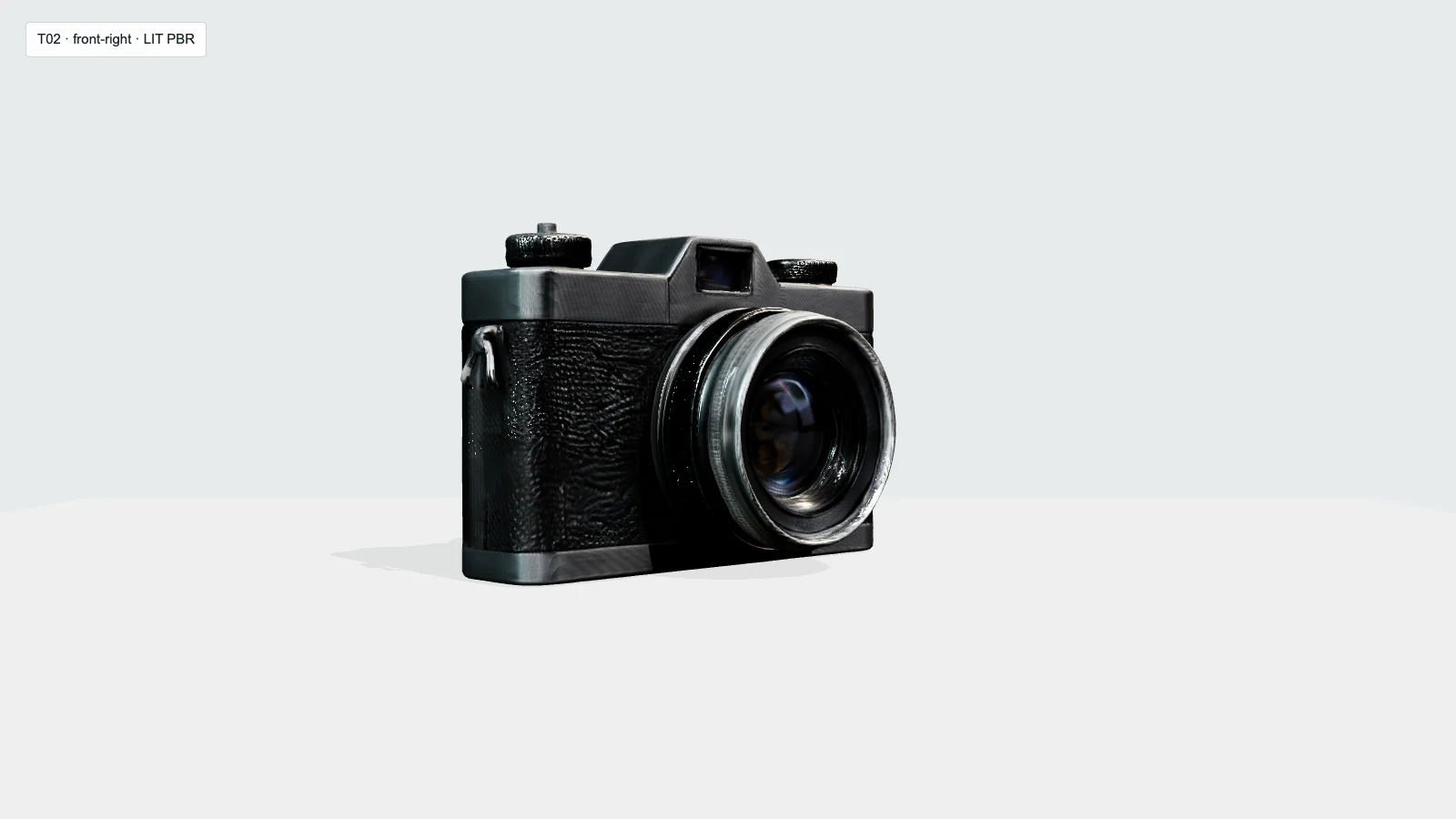
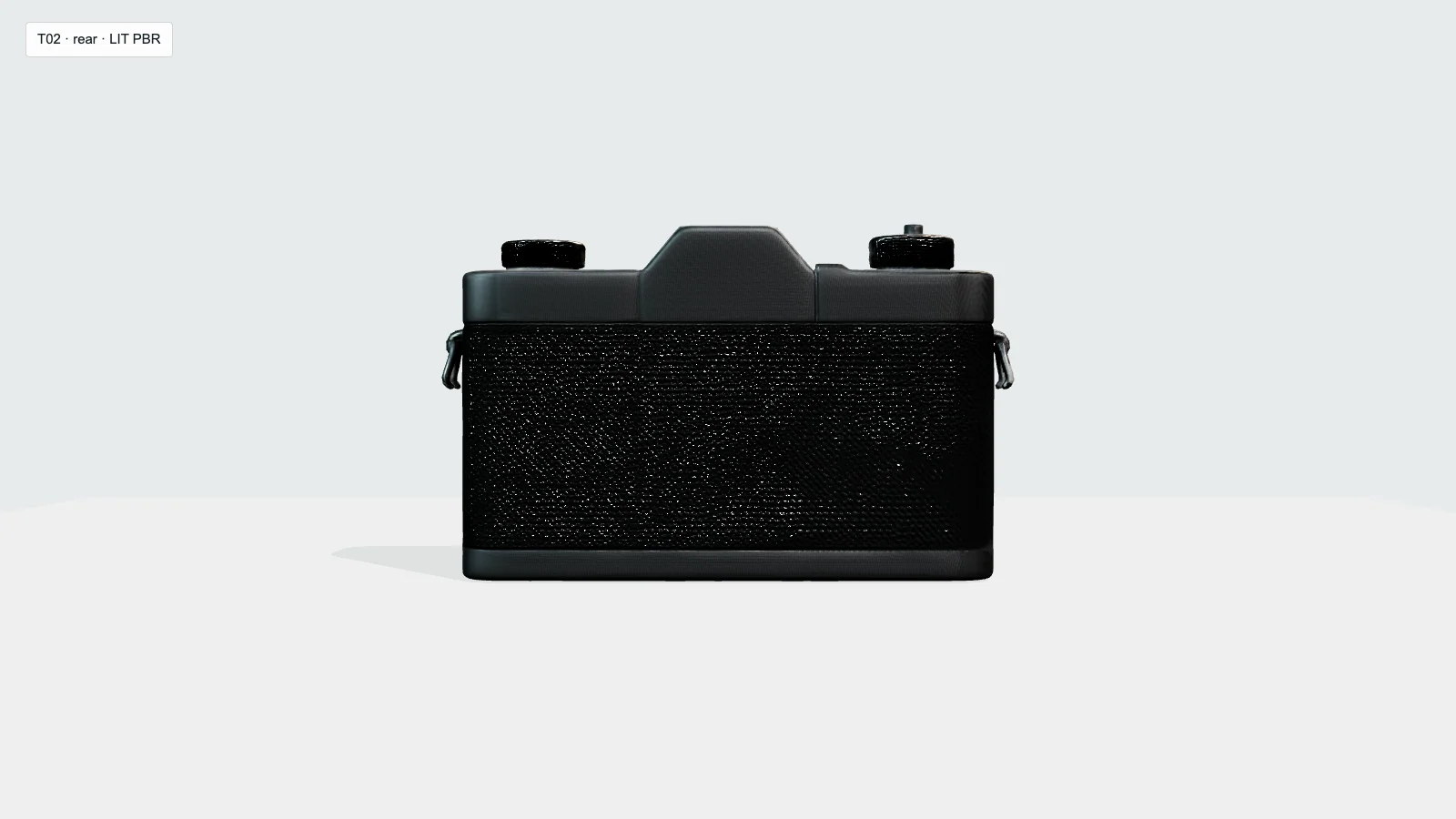
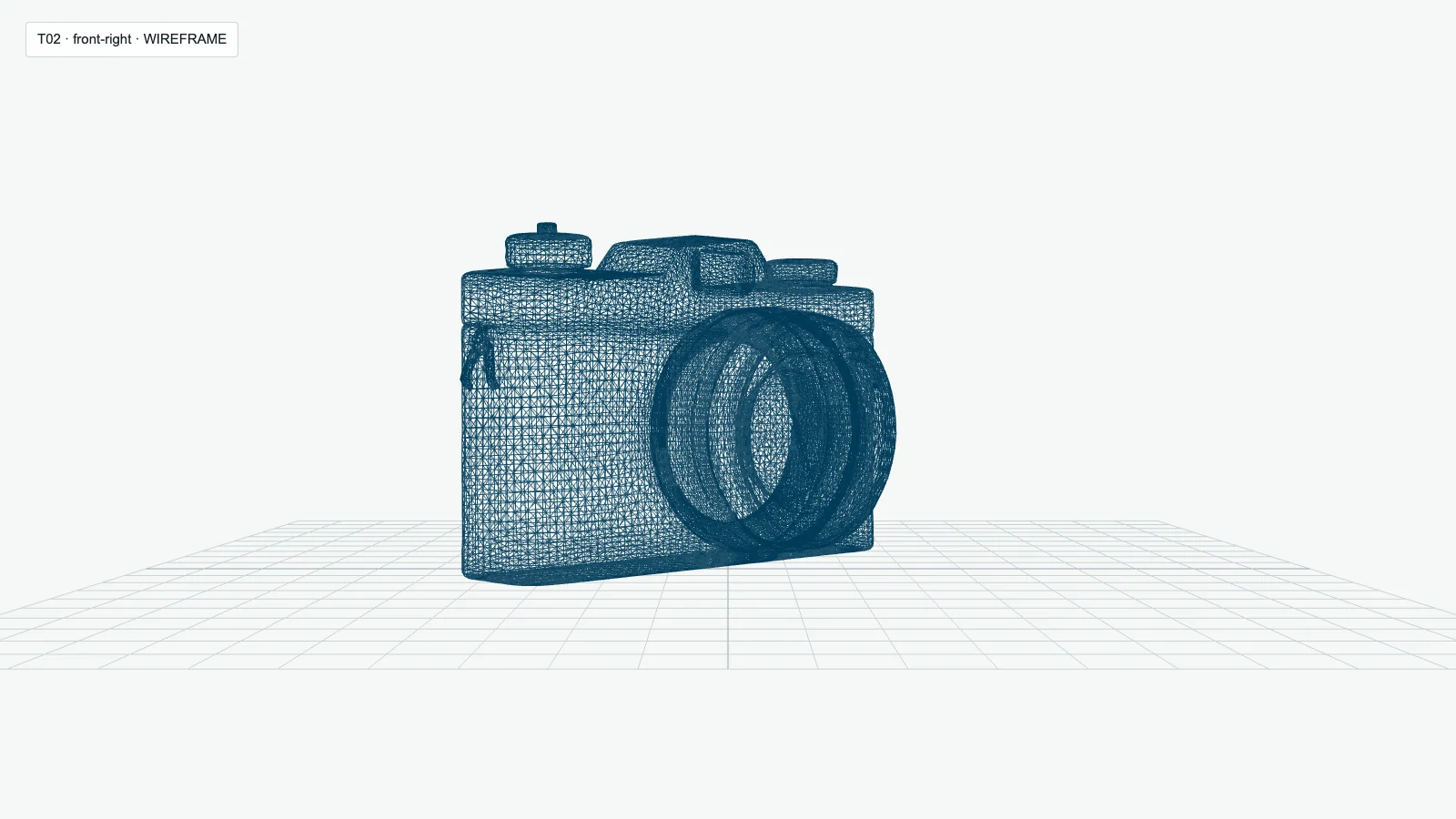
- Das Gehäuse, das zentrierte Objektiv, die Gehäuseschichten, die oberen Einstellräder, die Riemenösen und die Sucherwölbung sind erhalten geblieben; das Gerät hat die örtliche Wasserdichtheitsprüfung an den Schweißkanten bestanden.
- Hauptmängel
- Die Materialien wirkten zu dunkel und zu glänzend, und die Kanten der Linsen, die Rändelung der Drehknöpfe, die Schlaufen und die kleinen Verbindungsstücke wurden weicher dargestellt.
- Urteil
- Teilweise. Es ist das stärkste der drei und kann nach gezielter Überarbeitung als Konzeptvorlage verwendet werden.
Test 3: Rennrad Teilweise
- Status
- Erster gültiger GLB erfolgreich zur Auswertung gespeichert.
- Route und Einstellungen
- Überall
rodin-gen2Pfad zur Replikationhyper3d/rodin; vorgelagerte Ebene Gen-2; ein Standbild; die Qualität der Aufzeichnung wurde wie folgt angegeben:mittel. Die erste Übermittlung führte zu einem HTTP-Fehler 502 ohne Aufgaben-ID; der zulässige Wiederholungsversuch war erfolgreich. - Verstrichene Zeit
- 116,6 Sekunden von der Dienstleister angegebenen Gesamtbearbeitungszeit für die erfolgreich ausgeführte Aufgabe.
- Streckenpreis
- Die erfolgreiche „Anywhere“-Routen-Aufgabe kostete $0,40. Die fehlgeschlagene Einreichung hatte keine Aufgaben-ID; es wurde keine separate Gebühr festgestellt. Es handelt sich hierbei nicht um einen Hyper3D-Verkaufspreis oder eine Gutschriftumrechnung.
- Gezeigte Leistungsfähigkeit
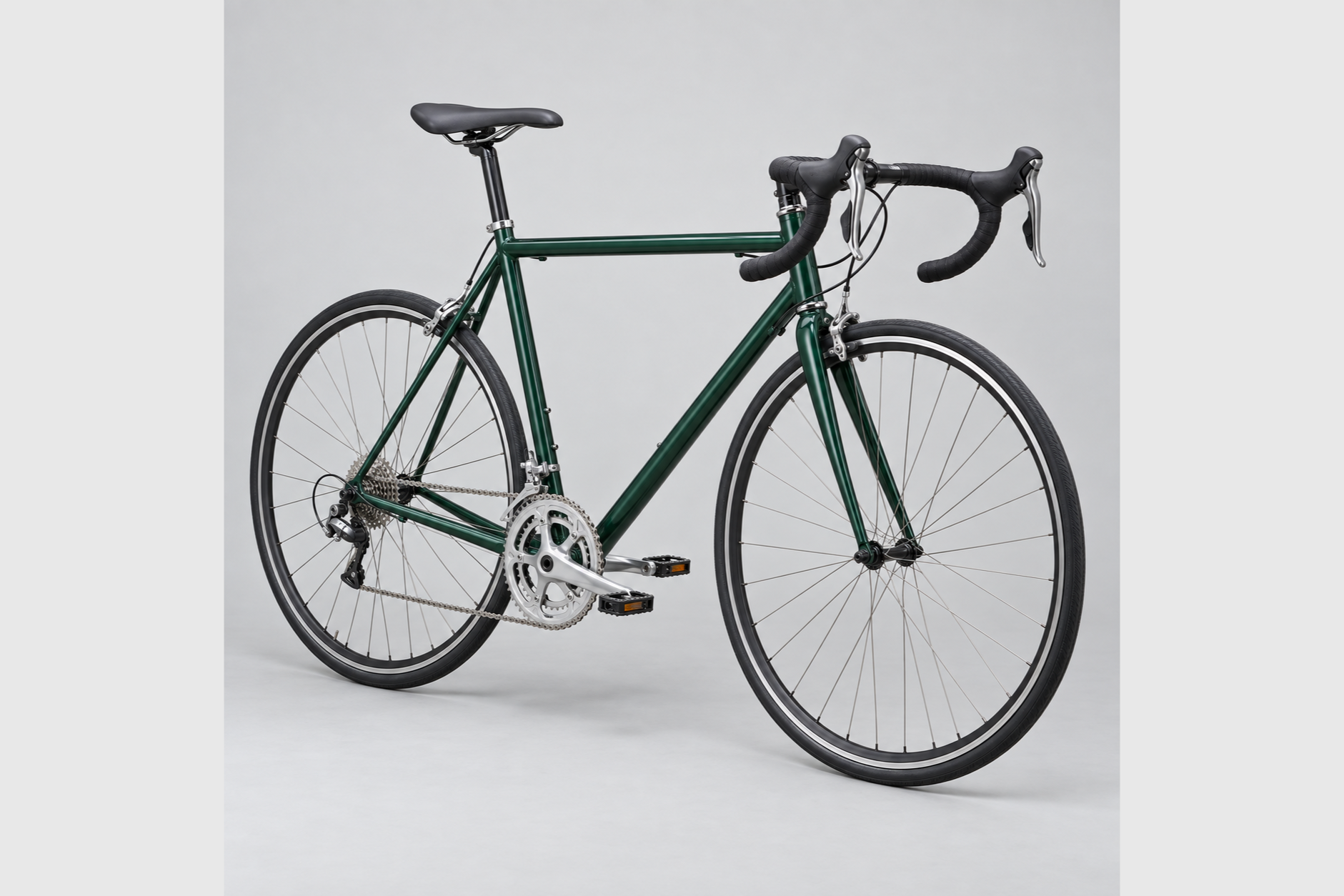
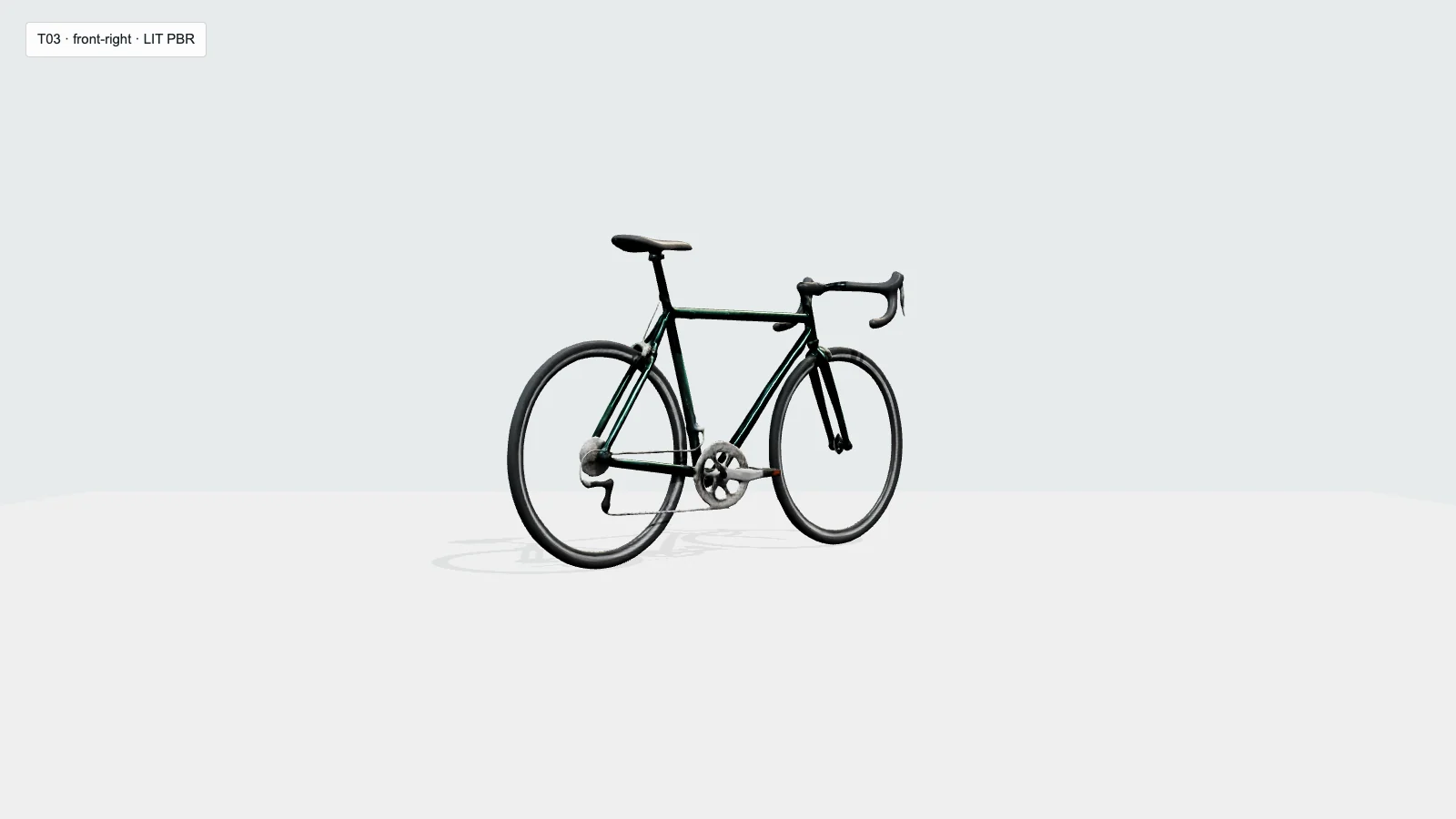
- Sowohl die Räder als auch der Diamantrahmen, die offenen Negativräume, die Gabel, der Lenker und der Sattel blieben erkennbar.
- Hauptmängel
- Fast alle Speichen waren verschwunden; zwei komplette Tretplatten waren nicht durchgehend erkennbar; die Kette, die Zahnräder und das Schaltwerk waren verformt.
- Urteil
- Teilweise. Es funktioniert als Silhouette oder Blockout, erfordert jedoch eine umfassende Überarbeitung der dünnen Teile und des Antriebsstrangs.
Geometrie, Topologie und Bearbeitbarkeit
Jede geöffnete GLB-Datei enthielt ein Mesh und ein Material sowie endliche UV-Koordinaten, Normalen und drei eingebettete PBR-Texturen mit einer Auflösung von 2048 × 2048. Die Kamera war die einzige Datei, die die lokale Prüfung auf wasserdichte, verschweißte Kanten bestand: Sie wies null Randkanten, null nicht-manifoldige Kanten und eine zusammenhängende Komponente auf. Die Tasse hatte 16 Randkanten, 13 nicht-manifoldige Kanten und vier Komponenten. Das Fahrrad wies zwei Randkanten und zwei nicht-manifold Kanten in einer Komponente auf.
Diese Werte beschreiben die Struktur, nicht die visuelle Korrektheit. Das klarere Kantenbild der Kamera stellte weder die weichen Konturen noch die Materialtrennung wieder her, während die Ein-Mesh-Verpackung des Bechers die Korrektur seiner abgedeckten Öffnung nicht vereinfachte. In allen drei Dateien machen ein Netz und ein Material teilespezifische Korrekturen weniger komfortabel als die Arbeit mit getrennten Komponenten. Die Kamera ist das einzige Ergebnis, das ich trotz begrenzter Bereinigung als brauchbar bezeichnen würde; der Becher muss rekonstruiert werden, und das Fahrrad lässt sich am besten als Blockout behandeln.
Texturqualität und Rückschlüsse auf die Rückseite
Die Einzelbildgenerierung füllte jede nicht sichtbare Oberfläche aus, doch keine dieser Rückansichten wurde durch das Quellbild gestützt. Die schlichte Rückseite der Kamera wirkte plausibel. Die Tasse wies den deutlichsten Projektionsfehler auf: Ihr schmaler Streifen auf der Vorderseite dehnte sich an den Seiten und auf der Rückseite zu blauen und schwarzen Streifen aus, während die weiße Keramik eine nicht zum Original gehörende Maserung annahm. Das Fahrrad behielt seinen dunkelgrünen Rahmen und die schwarzen Reifen bei, doch die Textur konnte die fehlenden Speichen und die verzerrte mechanische Geometrie nicht ausgleichen.
Betrachten Sie die generierte Rückseite als Vorschlag und nicht als gesicherte Referenz. Falls die Rückseite, sich wiederholende Teile oder exakte Materialgrenzen von Bedeutung sind, liefern Sie zusätzliche, konsistente Ansichten, sofern der aktuelle Arbeitsablauf dies zulässt, oder planen Sie manuelle Korrekturen ein.
Beobachtete Zeit, Routenkosten und Rodin-API-Guthaben
Der Anbieter gab Gesamtverarbeitungszeiten von 138,6 Sekunden für die Tasse, 100,3 Sekunden für die Kamera und 116,6 Sekunden für das Fahrrad an, was bei diesen drei gültigen Ergebnissen einen Durchschnitt von etwa 118,5 Sekunden ergibt. Hierbei handelt es sich um die auf der Anbieterseite gemessenen Aufgabenlaufzeiten. Die separat erfassten Intervalle bis zum lokalen Download waren für die Kamera und das Fahrrad länger, da sie die Abfrage und die Verfügbarkeit der Datei berücksichtigten.
Jede erfolgreiche „Anywhere“-Routen-Aufgabe kostete $0,40, was über die drei gültigen Ergebnisse hinweg insgesamt $1,20 ergab. Hierbei handelt es sich um den beobachteten Routenpreis, nicht um einen verifizierten Hyper3D-Verkaufspreis, einen Hyper3D-Guthabenabzug oder eine Umwandlung von Wallet-Guthaben in Bargeld. Die erste Fahrradübermittlung lieferte einen HTTP-Fehler 502 ohne Aufgaben-ID zurück; der einzige zulässige operative Wiederholungsversuch war erfolgreich, und es wurde keine separate Gebühr für diese fehlgeschlagene Übermittlung festgestellt. Drei gültige Assets aus vier Übermittlungen sind eine zu kleine Stichprobe für eine Zuverlässigkeitsquote, doch der Fehler ist Teil des beobachteten Arbeitsablaufs.
Rodin Gen-2.5: Erläuterung der API-Credits
In der API-Dokumentation zu Hyper3D Gen-2.5 ist eine Grundgebühr von 0,5 Credits pro Generation aufgeführt. Die dokumentierte Stufe „Extreme-High“ kostet zusätzlich 0,5 Credits, und die Option „Extreme-High Textur“ kostet zusätzlich 2,0 Credits. Diese Aufschläge sind kumulativ.
Diese Formel gilt für die API-Dokumentation. Sie legt nicht fest, was im Web-Arbeitsbereich für einen bestimmten Auftrag angezeigt oder abgezogen wird, und sie kann nicht in einen verlässlichen Geldbetrag umgerechnet werden, ohne die Quelle und den Kaufkurs der Credits zu kennen.
Kostenvoranschlag für die API-Dokumentation
Rodin Gen-2.5 API-Kreditrechner
Schätzen Sie die dokumentierten API-Gutschriften für eine oder mehrere Generationen. Dieses Tool liest weder Ihre Kontodaten aus noch berechnet es einen Barpreis.
Geschätzter Gesamtbetrag
0.5 Kredite
| Grundwert pro Generation | 0.5 |
|---|---|
| Stufen-Erweiterung | 0.0 |
| Textur-Add-on | 0.0 |
| Pro Generation | 0.5 |
| Anzahl der Generationen | 1 |
Nur Basisgenerierung.
Dieser Rechner schätzt die Gutschriften aus dem Rodin Gen-2.5 – API-Dokumentation Stand: 9. September 2026. Dies ist keine Abrechnungszusage und stimmt möglicherweise nicht mit den im Hyper3D-Web-Workspace angezeigten Kosten überein. Überprüfen Sie die aktuelle API-Dokumentation und die im Workspace angezeigten Kosten, bevor Sie einen Auftrag einreichen.
Preise und kommerzielle Nutzung von Hyper3D Rodin
Hyper3D unterscheidet zwischen Abonnementmodellen, direkten Kreditkäufen und Gebühren für die API-Generierung. Diese Begriffe beziehen sich auf unterschiedliche Aspekte: Ein Abonnement beschreibt den Kontozugang und die Vorteile des Tarifs, der Preis für einen direkten Kreditkauf beschreibt eine Möglichkeit, ein Wallet aufzuladen, und die API-Formel beschreibt, wie eine Gen-2.5-Anfrage Kredite verbrauchen kann.
Übersicht über die Jahresabrechnung, abgerufen am 10. September 2026. Preise und Vertragsbedingungen können sich ändern; bitte überprüfen Sie vor dem Kauf die aktuelle Seite.
| Angebot | Angegebener Preis | Umfang |
|---|---|---|
| Kostenlos | $0 | Der kostenlose Tarif ist auf der Preisseite aufgeführt. |
| Direkte Gutschriften | $1,50 pro Kreditpunkt | Der auf der Preisseite angegebene Kaufkurs für direkte Gutschriften; es handelt sich hierbei nicht um einen einheitlichen Umrechnungskurs für jedes Guthaben. |
| Ersteller, Jahresübersicht | $24/Monat, wird jährlich unter der Nummer $288 in Rechnung gestellt | Auswahl der jährlichen Abrechnung. |
| Geschäft, Jahresübersicht | $96/Monat, in Rechnung gestellt als $1.152 jährlich | Auswahl der jährlichen Abrechnung. |
Quelle: Preise für Hyper3D, Jahresübersicht, Stand: 10. September 2026. Unbestätigte Monatszahlen wurden bewusst nicht berücksichtigt.
Was die Bedingungen über Rodins Produktion aussagen
So verwenden Sie Hyper3D Rodin für die Umwandlung von Bildern in 3D-Modelle
1. Bereiten Sie das Referenzbild vor
Wählen Sie ein klares Motiv, dessen gesamte Silhouette sich innerhalb des Bildausschnitts befindet. Ein einfarbiger Hintergrund, gleichmäßige Beleuchtung, eine scharfe Fokussierung und sichtbare Abstände zwischen dünnen oder voneinander getrennten Teilen machen die beabsichtigte Struktur besser erkennbar. Entfernen Sie Logos, Text, nicht zum Motiv gehörende Requisiten, auffällige Reflexionen und abgeschnittene Ränder, sofern diese für das Bildmaterial nicht unerlässlich sind.
Ein einzelnes Bild kann nicht jede Oberfläche zeigen. Entscheiden Sie, welche Details bekannt sind, welche abgeleitet werden müssen und welche eine zusätzliche Ansicht erfordern. Wenn die Quelle selbst KI-generiert ist, sollten Sie zunächst die Genauigkeit eines KI-generierten Referenzbildes verbessern Somit sind die Objektanzahl, die Platzierung der Teile und der gesamte Umriss vor Beginn des 3D-Schritts festgelegt.
2. Überprüfen Sie die aktuellen Eingangs- und Erzeugungsoptionen
Öffnen Sie den aktuellen Rodin-Workflow und machen Sie sich mit den angezeigten Optionen vertraut, bevor Sie etwas absenden. Vergewissern Sie sich, wie viele Bilder die Benutzeroberfläche akzeptiert, welche Generationsfamilie ausgewählt ist, welche Geometrie- und Materialoptionen verfügbar sind und ob die Benutzeroberfläche eine geschätzte Gutschrift anzeigt. Gehen Sie nicht davon aus, dass API-Parameter im Web-Arbeitsbereich dieselben Namen oder Standardwerte haben.
3. Laden Sie die Referenz hoch und fügen Sie nur nützliche Hinweise hinzu
Laden Sie das genehmigte Quellbild oder einen einheitlichen Multiview-Satz hoch. Falls der aktuelle Workflow ein Eingabefeld vorsieht, nutzen Sie dieses, um die Identität oder Struktur zu verdeutlichen, anstatt das System aufzufordern, dem Bild zu widersprechen. Behalten Sie die genaue Eingabedatei und die Einstellungen bei, damit das Ergebnis reproduzierbar ist.
4. Einmal generieren, dann das gesamte Objekt überprüfen
Behalten Sie das erste gültige Ergebnis bei. Betrachten Sie es aus der Vorder-, Seiten-, Rück- und Diagonalansicht. Überprüfen Sie Öffnungen, dünne Teile, Kontaktpunkte, wiederholte Elemente und Materialnähte. Selbst eine überzeugende Vorderansicht kann verschmolzene Geometrie oder unplausible, nicht sichtbare Flächen verbergen.
5. Ein angebotenes Format exportieren und erneut öffnen
Wählen Sie ein Format, das der aktuelle Arbeitsbereich tatsächlich unterstützt, speichern Sie den ursprünglichen Download und öffnen Sie ihn in dem vom Ziel-Workflow verwendeten Viewer oder 3D-Editor. Vergewissern Sie sich, dass Geometrie vorhanden ist, und überprüfen Sie Objektstruktur, Materialien, UVs, Texturdateien und Topologie, sofern diese vom Tool angezeigt werden. Das erfolgreiche Öffnen einer Datei ist nur eine erste Überprüfung und kein Beweis dafür, dass sie für die Produktion bereit ist.
Einschränkungen und für wen Rodin geeignet ist
Die größte Einschränkung bei diesem Test war nicht die Dateiübermittlung, sondern die Kluft zwischen einer erkennbaren Vorschau und einem bearbeitbaren Asset. Einfache Geometrien waren nicht automatisch sicher: Die Tasse bestand eine Identitätsprüfung beim Öffnen nicht. Dünne Strukturen waren noch unzuverlässiger, da das Fahrrad fast alle Speichen und den Großteil seiner Antriebslogik verlor. Rückseiten aus einzelnen Bildern wurden stets abgeleitet, und ein Netz mit einem einzigen Material erhöhte den Aufwand für lokale Teilkorrekturen.
| Passform | Am besten für | Warum |
|---|---|---|
| Gute Passform | Konzeptkünstler, schnelle Blockouts, Hintergrundrequisiten, frühe Visualisierung | Eine schnelle Lieferung und gut erkennbare Formen können bei zu erwartenden Nachbearbeitungen Zeit bei der anfänglichen Modellierung sparen. |
| Bedingte Anpassung | Produktkonzepte mit klaren Silhouetten und zurückhaltenden Details | Die Kamera behielt zwar ihr Erscheinungsbild bei, doch an den Materialien und den Kleinteilen gab es noch einiges zu verbessern. |
| Schlechte Passform | Präzisionsfertigung, montagefertige Bauteile, mechanische Modelle im Detail, druckfertige Teile | Topologie, verdeckte Flächen, Öffnungen und dünne Mechanismen müssen überprüft werden und erfordern unter Umständen eine Rekonstruktion. |
Hyper3D Rodin – Häufig gestellte Fragen
Was ist Hyper3D Rodin?
Hyper3D Rodin ist das System von Deemos zur Erzeugung von 3D-Assets anhand von Text- oder Bildvorlagen. Auf der offiziellen Website und in der API-Dokumentation, die am 9. September 2026 überprüft wurden, wird Rodin Gen-2.5 als aktuelle Produktfamilie angegeben.
Ist Hyper3D Rodin kostenlos?
Die jährliche Preisübersicht von Hyper3D zeigte bei einer Überprüfung am 9. September 2026 einen kostenlosen Tarif mit der Bezeichnung „$0“ an. Außerdem wurden die kostenpflichtigen Tarife „Creator“ und „Business“ aufgeführt. Die aktuellen Limits und Leistungen finden Sie auf der Seite mit den aktuellen Tarifen.
Wie viele Credits verbraucht ein Rodin der Generation 2.5?
In der API-Dokumentation zu Gen-2.5 sind 0,5 Credits für eine Basisgeneration aufgeführt, zuzüglich 0,5 für die Stufe „Extreme-High“ und 2,0 für „Extreme-High Textur“. Diese API-Formel unterscheidet sich von der in diesem Test betrachteten Abrechnung nach dem „Anywhere“-Ansatz.
Wie lange dauert eine Rodin-Generation?
Bei den drei gültigen Aufgaben in diesem Test lagen die vom Anbieter gemeldeten Zeiten zwischen 100,3 und 138,6 Sekunden, wobei der Durchschnitt bei etwa 118,5 Sekunden lag. Warteschlangen, Abfragen, die Verfügbarkeit von Downloads, die Modellstufe und die Komplexität der Eingaben können die End-to-End-Wartezeit verlängern.
Kann Rodin aus einem Bild ein 3D-Modell erstellen?
Ja. Bei allen drei Tests konnten aus einem einzigen Bild GLB-Dateien erstellt werden, die sich öffnen ließen. Die Qualität variierte stark: Die Kamera lieferte das beste Ergebnis, beim Fahrrad war eine Rekonstruktion dünner Teile erforderlich, und beim Becher scheiterte die Datei bei einer grundlegenden Öffnungsprüfung.
Welche 3D-Formate werden in der Rodin Gen-2.5-API dokumentiert?
In der API-Dokumentation werden GLB, USDZ, FBX, OBJ und STL als direkte Geometrieformate aufgeführt. Auf der Marketingseite von Hyper3D werden weitere Formate genannt, was jedoch nicht garantiert, dass jedes Format in jedem Arbeitsbereich oder Tarif enthalten ist.
Darf ich Rodin-Modelle kommerziell nutzen?
Auf den Seiten zu Preisen und Funktionen von Hyper3D werden die Vorteile der kostenpflichtigen Tarife für die kommerzielle Nutzung beschrieben, und in den Nutzungsbedingungen heißt es, dass Deemos die Nutzung der Rodin-Ergebnisse nicht einschränkt, sofern die Nutzungsbedingungen, geltendes Recht und die Bedingungen Dritter eingehalten werden. Außerdem müssen Sie über die Rechte an dem von Ihnen hochgeladenen Material verfügen. Prüfen Sie die aktuellen Tarifdetails und Nutzungsbedingungen im Hinblick auf Ihre Situation.
Eignet sich Rodin für Spiel-Assets oder den 3D-Druck?
Verwenden Sie die Ausgabe als Ausgangspunkt, nicht als automatische Freigabe. In diesem Test hat nur die Kamera die lokale Prüfung auf wasserdichte Kanten bestanden, und selbst dabei wurden ein Mesh und ein Material mit vereinfachten Details verwendet. Überprüfen Sie vor der Produktion den Maßstab, die Geometrie des Verteilers, die Wandstärke, getrennte Teile, die UV-Mapping-Aufteilung, die Materialien sowie die Ziel-Engine oder den Slicer.
Endgültiges Urteil
Die getestete Gen-2-Route erhielt eine vorsichtige Empfehlung für schnelle Konzeptarbeiten, nicht jedoch für die Produktion per Ein-Klick. Sie lieferte drei gültige, texturierte GLBs in jeweils etwa zwei Minuten Anbieterzeit, und die Kamera zeigte, dass ein klares Einzelbild einen nützlichen Teil der Produktidentität bewahren kann. Derselbe Test deckte zudem eine verschlossene Öffnung am Becher und erhebliche Detailverluste an dünnen Bauteilen des Fahrrads auf. Diese Ergebnisse beziehen sich auf den aufgezeichneten „Anywhere-to-Replicate“-Gen-2-Ablauf und sollten nicht als Maßstab für Gen-2.5 dargestellt werden. Dieser Bereich ist zu groß, um auf eine Überprüfung oder Bereinigungsplanung zu verzichten.
Verwenden Sie Rodin, wenn ein klar erkennbares Ausgangsmodell wichtig ist und ein Mitarbeiter jeden Winkel, jede Topologie, jedes Material und jede verdeckte Fläche überprüft. Betrachten Sie die Vorschau nicht als Nachweis für die Druckreife, die Rig-Bereitschaft oder die präzise mechanische Genauigkeit. Für die begleitende Recherche, die Vorbereitung von Referenzbildern und den kreativen Arbeitsablauf können Sie Weiter in GlobalGPT; die eigentliche 3D-Erstellung und die Überprüfung der Assets bleiben separate Schritte.





