
Beginnen Sie mit dem CLI-Workflow, nach dem die Nutzer suchen, und wechseln Sie dann zu GlobalGPT’s leistungsstärkerem Qwen3.8-Max CLI, wenn Ihre Projekte einen längeren Kontext, eine tiefgreifendere Programmierung und eine mehrstufige Ausführung erfordern.
So greifen Sie auf Qwen 3.6 Plus zu
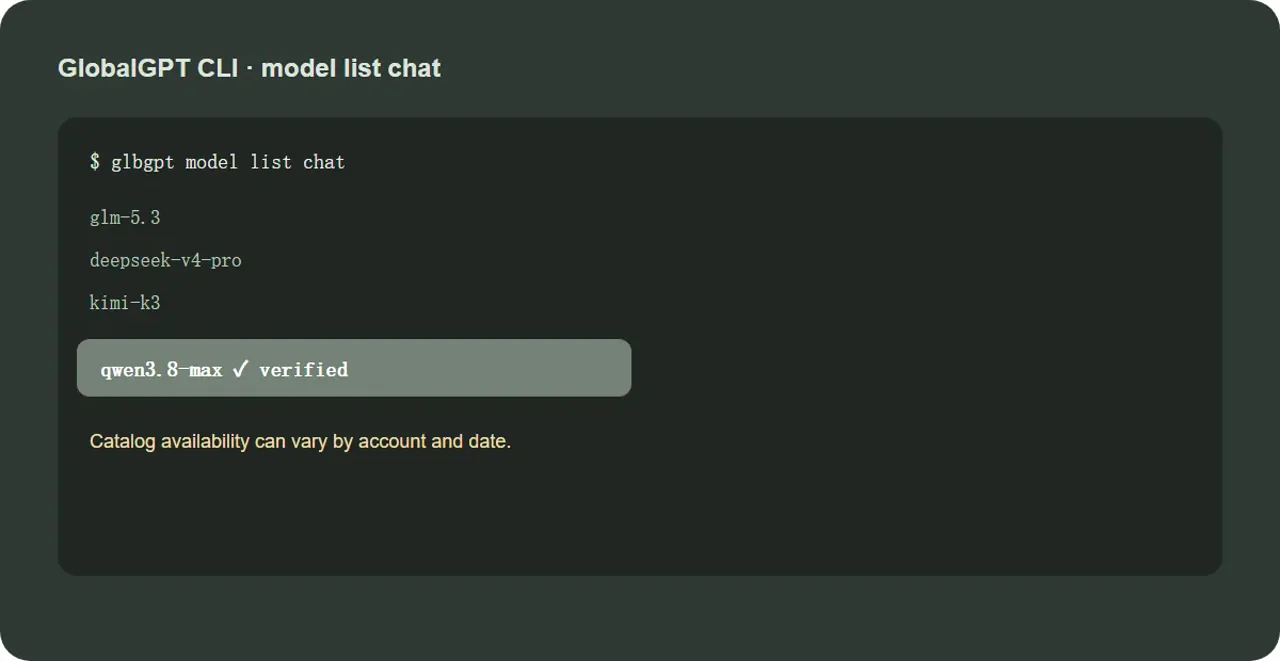
Um auf Qwen 3.6 Plus zuzugreifen, wählen Sie zunächst einen offiziellen Web- oder API-Anbieter aus und vergewissern Sie sich, dass Ihr Konto das Modell bereitstellt, bevor Sie versuchen, es von einem Terminal aus aufzurufen. Für einen CLI-Workflow installieren Sie die CLI des Anbieters, melden Sie sich an und führen Sie folgenden Befehl aus: glbgpt Modellliste Chat, und kopieren Sie die genaue Modell-ID „Qwen 3.6 Plus“, die für Ihr Konto zurückgegeben wurde. Führen Sie anschließend eine kleine, schreibgeschützte Anfrage mit glbgpt exec "Erkläre diese Datei, ohne sie zu bearbeiten." -m. Sollte das Modell nicht aufgeführt sein, versuchen Sie bitte nicht, eine ID zu erraten: Die Verfügbarkeit variiert je nach Anbieter, Konto und Datum. Im aktuellen GlobalGPT-Katalog, der für diesen Leitfaden überprüft wurde, qwen3.6-plus war nicht aufgeführt, während qwen3.8-max war verfügbar. Damit ist die Qwen3.8-Max-CLI von GlobalGPT die praktische Weiterentwicklung für die Programmierung mit langen Kontexten, die Repository-Analyse und die schrittweise agentische Arbeit.
Kurze Antwort: Überprüfen Sie zunächst, ob Ihr aktueller CLI-Katalog „Qwen 3.6 Plus“ enthält. Führen Sie in einem GlobalGPT-Arbeitsbereich folgenden Befehl aus: glbgpt Modellliste Chat Bevor Sie eine Modell-ID annehmen. Wenn Qwen 3.6 Plus aufgeführt ist, melden Sie sich an und rufen Sie es über den kompatiblen CLI-Workflow auf. Für einen leistungsfähigeren Entwickler-Workflow bietet GlobalGPT eine bessere Qwen3.8-Max CLI Ein Ansatz für die Programmierung auf Repository-Ebene, Arbeiten mit langem Kontext und agentische Aufgaben.
Kann man über eine CLI auf Qwen 3.6 Plus zugreifen?
Ja, aber der CLI-Zugriff hängt vom jeweiligen Endpunkt und Katalog ab, den Sie verwenden. Qwen Chat ist der einfachste Weg über den Browser. OpenRouter und Alibaba Cloud Model Studio sind API-basierte Lösungen. Eine CLI fügt eine Terminalebene hinzu: Sie authentifizieren sich einmal, wählen eine Modell-ID aus und senden dann Eingabeaufforderungen, Dateien oder Projektanweisungen, ohne zwischen Browser-Registerkarten wechseln zu müssen. Der wichtige Unterschied besteht darin, dass ein CLI-Befehl nur gültig ist, wenn das Modell im Live-Katalog hinter diesem Befehl vorhanden ist.
Sehen Sie sich zunächst die CLI-Modellliste an, melden Sie sich dann an und verwenden Sie die aufgeführte Modell-ID „Qwen 3.6 Plus“. Für umfangreichere Entwicklungsarbeiten ist die CLI „Qwen3.8-Max“ des Modells GlobalGPT die bessere Wahl, sofern sie in Ihrem Account-Katalog aufgeführt ist.
Was Sie vor der Installation benötigen
Terminal: macOS, Windows PowerShell, Linux-Shell oder ein gleichwertiges Terminal. Konto: ein Konto mit Zugriff auf den ausgewählten Anbieter. Modellkatalog: der genaue Modellname oder die ID, die vom Anbieter zurückgegeben wird. Wichtige Hygienemaßnahmen: Speichern Sie API-Schlüssel in Umgebungsvariablen oder im Anmeldeprozess des Anbieters, niemals in einem Repository oder auf einem Screenshot.
Installieren und anmelden
1 · Überprüfen Sie die CLI-Identität
Dadurch wird überprüft, ob die CLI installiert ist und ob eine Sitzung verfügbar ist.
2 · Verfügbare Chat-Models entdecken
Suchen Sie nach „Qwen 3.6 Plus“, bevor Sie einen Befehl eingeben, der diese ID voraussetzt. Kataloge können je nach Konto, Datum oder Zugriffsebene variieren.
3 · Installieren, wenn der Befehl fehlt
Verwenden Sie diese Option nur, wenn Ihr Terminal meldet, dass „glbgpt“ nicht gefunden wurde. Führen Sie anschließend „glbgpt login“ selbst aus; der Anmeldevorgang öffnet einen Browser.
Führen Sie Ihre erste Qwen 3.6 Plus CLI-Aufgabe aus
Nachdem die Modellliste die genaue ID bestätigt hat, verwenden Sie den Befehl zur Modellausführung der CLI mit dieser ID. Kopieren Sie keine Modell-ID aus einem Suchausschnitt, wenn Ihr eigener Katalog eine andere Schreibweise zurückgibt. Eine sichere erste Aufgabe ist eine schreibgeschützte Auswertung einer kleinen Datei.
4 · Erste Aufgabe (nur Lesezugriff)
Ersetzen Sie den Platzhalter durch die genaue ID, die in Ihrem Katalog angezeigt wird. Starten Sie zunächst im schreibgeschützten Modus, damit Sie die Antwort überprüfen können, bevor Sie Änderungen zulassen.
Häufige Probleme mit Qwen 3.6 Plus CLI
Modell nicht gefunden
Ausführen glbgpt Modellliste Chat Noch einmal: Ein Modellname in einer AIO-Antwort, einem Social-Media-Beitrag oder auf einer Anbieterseite garantiert nicht, dass Ihr Konto dieselbe Route bereitstellt.
Fehler bei der Anmeldung oder beim Token
Ausführen glbgpt whoami, dann vollenden glbgpt-Anmeldung selbst. Geben Sie niemals ein Passwort in eine Eingabeaufforderung, ein öffentliches Ticket oder einen WordPress-Artikel ein.
Die Antwort kommt zu langsam oder bricht vorzeitig ab
Reduzieren Sie die erste Aufgabe, fordern Sie eine schrittweise Ausgabe an und überprüfen Sie das Anbieterlimit. Ein CLI-Timeout kann eher auf ein Endpunkt- oder Budgetproblem zurückzuführen sein als darauf, dass das Modell die Aufgabe nicht abschließen kann.
Wann Qwen3.8-Max CLI die bessere Wahl ist
„Qwen 3.6 Plus“ ist die Abfrage, mit der Benutzer beginnen. Wenn es jedoch um eine umfangreiche Codebasis, einen langwierigen Migrationsplan, wiederholte Tool-Aufrufe oder einen Überprüfungszyklus über viele Dateien hinweg geht, bietet GlobalGPT ein besseres Qwen3.8-Max-CLI-Erlebnis: einen leistungsfähigeren Modellpfad, der für komplexe Programmierung, kontextintensive Arbeit und mehrstufige Ausführung ausgelegt ist.
Kartendateien, Risiken und Einstiegspunkte.
Teile die Arbeit in Etappenziele auf.
Führen Sie gezielte Änderungen mit Genehmigung durch.
Führen Sie die Tests durch und überprüfen Sie die Unterschiede.
Ausführen glbgpt Modellliste Chat und suche nach qwen3.8-max. Sofern diese Funktion in Ihrem Konto verfügbar ist, ist sie der naheliegende nächste Schritt für eine intensivere Arbeit mit der Befehlszeile.
Qwen3.8 – Max CLI-Ausgangspunkt
Durch den stufenweisen Aufbau bleibt der erste Durchlauf überprüfbar, und bei der Aktualisierung geht es um die Qualität des Arbeitsablaufs und nicht nur um eine Modellbezeichnung.
Qwen 3.6 Plus CLI im Vergleich zu Qwen3.8-Max CLI
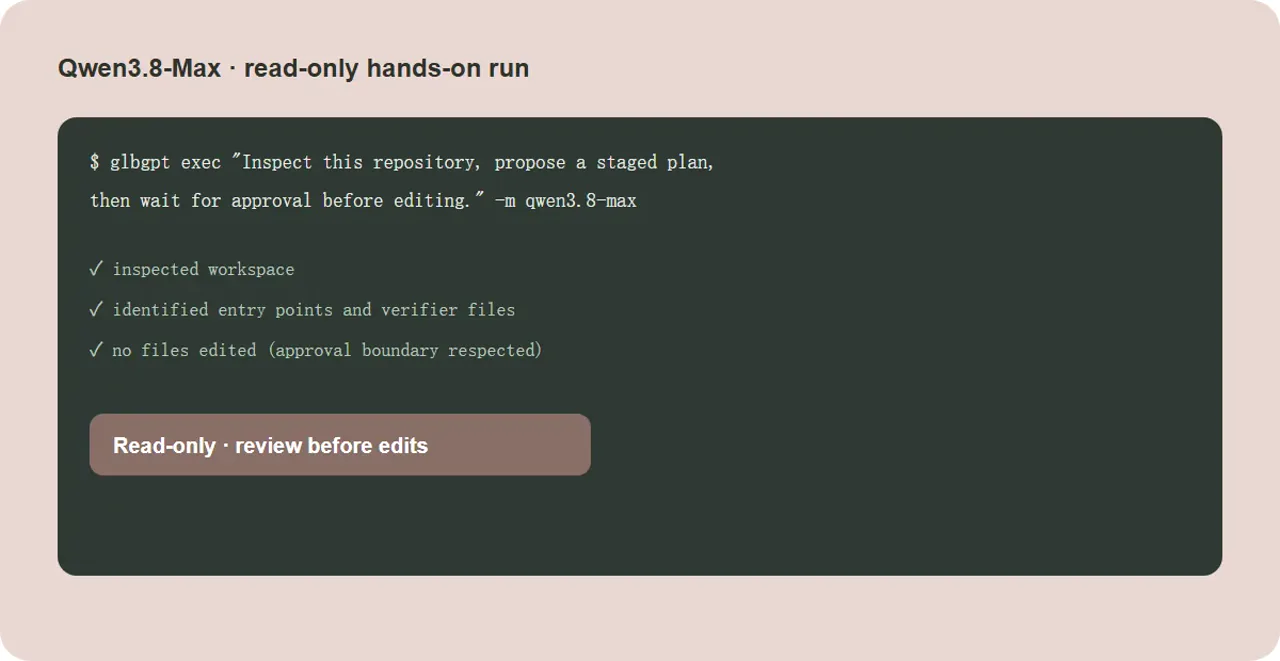
Lese-only-Testläufe werden gegen die verifizierten Daten ausgeführt qwen3.8-max Katalogeintrag. Es wurden keine Repository-Dateien geändert.
Aufforderung: Überprüfen Sie den Kontext dieses Repositorys und geben Sie eine übersichtliche Übersicht über mögliche Einstiegspunkte, Testbefehle und die ersten drei Dateien zurück, die Sie überprüfen würden. Nehmen Sie keine Änderungen vor.
Bei diesem Durchlauf wurde der Arbeitsbereich überprüft und es wurden mögliche Einstiegspunkte, testbezogene Pfade sowie Builder- und Verifier-Dateien vor jeder Bearbeitungsgrenze ermittelt.
Aufforderung: Sie prüfen gerade einen kleinen Retry-Helper. Erläutern Sie die möglichen Korrektheitsrisiken, schlagen Sie einen minimalen Patch vor und listen Sie drei Tests auf, die erfolgreich sein sollten. Bearbeiten Sie keine Dateien.
Der Durchlauf suchte nach Dateien und Symbolen im Zusammenhang mit Wiederholungsversuchen und gab anschließend eine auf die Überprüfung ausgerichtete Antwort zurück, ohne den Arbeitsbereich zu verändern.
Aufforderung: Entwerfen Sie einen stufenweisen Plan für eine zweistündige CMS-Migration mit zwei Technikern. Berücksichtigen Sie dabei Verantwortliche, Zeitrahmen, Go/No-Go-Prüfpunkte, Rollback-Prüfpunkte und die abschließende Verifizierung. Bearbeiten Sie keine Dateien.
Ausgabe ausschließlich zu Planungszwecken zur Bewertung von Struktur, Gates und Genehmigungsgrenzen, bevor Änderungen zugelassen werden.
Qwen 3.6 Plus CLI – Häufig gestellte Fragen
Wie erhalte ich Zugriff auf Qwen 3.6 Plus?
Rufen Sie die offizielle Web-Route oder einen API-kompatiblen Anbieter auf und überprüfen Sie anschließend die genaue CLI-Modell-ID in Ihrem Account-Katalog, bevor Sie den Aufruf ausführen.
Kann ich Qwen 3.6 Plus über ein Terminal nutzen?
Ja, wenn Ihr Anbieter das Modell über eine API-kompatible CLI bereitstellt. Beginnen Sie mit den Befehlen „glbgpt whoami“ und „glbgpt model list chat“ und verwenden Sie anschließend die zurückgegebene ID.
Was ist, wenn „qwen3.6-plus“ in meinem Katalog fehlt?
Geben Sie keine erratene Modell-ID ein. Nutzen Sie den offiziellen Web-/API-Zugang oder wechseln Sie zu einem Modell, das Ihr aktueller Katalog validiert, beispielsweise „qwen3.8-max“, sofern verfügbar.
Warum sollte man GlobalGPT Qwen3.8-Max CLI verwenden?
Qwen3.8-Max ist das leistungsstärkere Upgrade für die Kontextkodierung, die Repository-Prüfung, stufenweise Pläne sowie Test- und Überprüfungszyklen. Sehen Sie sich den Live-Katalog zu GlobalGPT an, bevor Sie das Upgrade durchführen.
Sind Sie bereit für den Weg zu einer leistungsfähigeren CLI?
Schlagen Sie im Modellkatalog unter „GlobalGPT“ nach, wählen Sie „Qwen3.8-Max“ (sofern verfügbar) aus und beginnen Sie mit einer reinen Leseaufgabe, bevor Sie die Bearbeitungsfunktion aktivieren.
Geöffnet GlobalGPT




