
The best all-in-one AI video subscription covers the stages you repeatedly use: script, reference images, motion, sound and revisions. It should also make clear where you still need a separate editor, a team workspace or a specialist presenter tool. A large model menu is useful, but it is not the same thing as a complete, approved video.
For 2026, GlobalGPT is a compelling starting point for creators who combine text, image, video and audio work. Runway deserves consideration for generative-video collaboration, HeyGen for presenter and localization workflows, and Synthesia for structured business videos. Each can cover several stages; the sensible choice depends on which stages dominate your projects.
GlobalGPT is particularly useful when a project spans several production stages: Yukie can help develop the brief, while Canvas keeps visual references and review notes together. You can prepare scripts, images, clips and audio within one subscription, then assemble the approved assets in the editing workflow that suits your project.
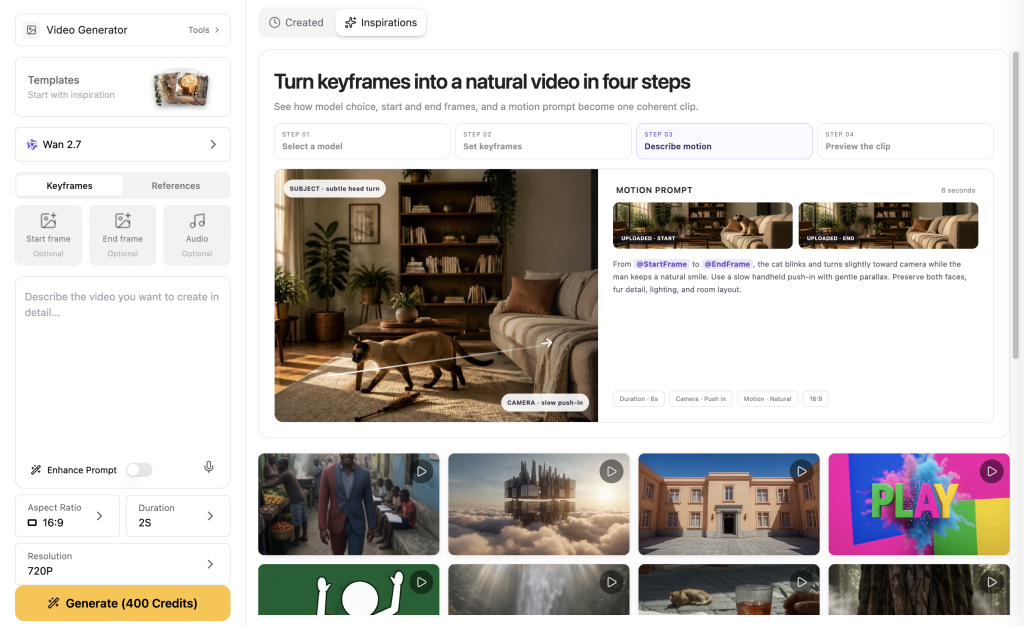
What should “all in one” include?
| Production stage | Useful capability | The result you should keep |
|---|---|---|
| Brief and script | Research, text models, revision context | Approved claims, audience, hook and spoken script |
| Visual preparation | Erstellung und Bearbeitung von Bildern | Product or character references with clear rights |
| Bewegung | Suitable video models and reference inputs | Approved clips, including model and settings |
| Ton | Speech, music or sound effects as needed | Separate licensed tracks and final script |
| Review and variation | Asset organization, notes, reruns and crop tools | Named approved and rejected versions |
| Final assembly | Timeline editing or a compatible external editor | Playable master, captions, language and size variants |
Three questions make a subscription easier to evaluate. Can it create the assets you actually need? Can you revise them without losing the brief and references? Can you get those assets into the final delivery format? A “yes” to the first question alone often leaves the expensive part of production untouched.
GlobalGPT: the strength is the connected creative workload
A video project often begins as text: a customer problem, a product fact, a campaign hook or a scene description. GlobalGPT lets you work on that material with text models before choosing the image, video and audio models for the next stage. That is useful for a creator whose day includes far more than clicking Generate Video.
Yukie is the task-oriented part of the workflow. A useful request describes the audience, deliverable, source material, restrictions and acceptable cost before asking for media. The brief can be revised before the expensive generation step. Canvas serves a different purpose: keeping visual material, branches and notes visible together so a new variation starts from the right reference.
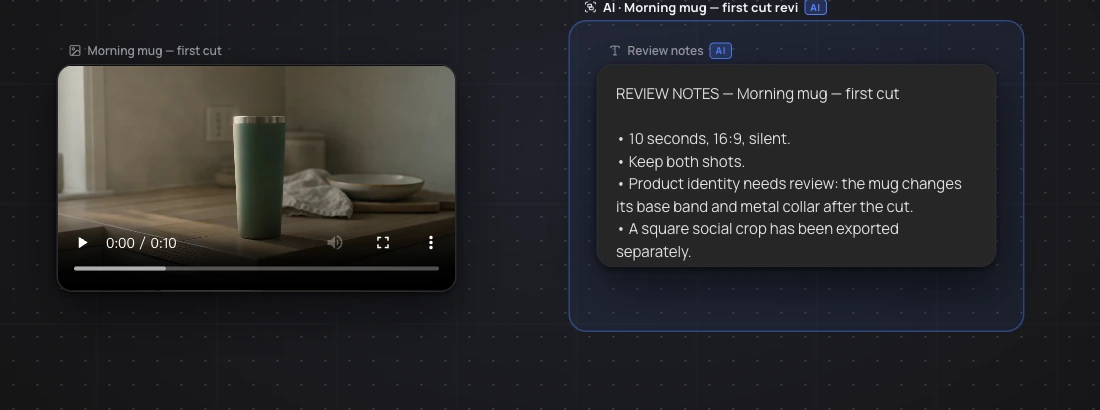
The distinction helps set realistic expectations. “Open in Canvas” is useful for taking an asset into a visual workspace; it does not prove that every downstream model automatically inherits the whole conversation. Similarly, a media attachment passed to Yukie is a starting point for the next instruction, not an automatic approval to regenerate or publish it.
| Aufgabe | Strecke GlobalGPT | Practical boundary |
|---|---|---|
| Turn an idea into a brief | Text models or Yukie | Verify facts and approve the script before production |
| Prepare the product look | Erstellung und Bearbeitung von Bildern | Keep the real reference if product accuracy matters |
| Generate a shot | Video model or a suitable Studios preset | Model, duration and resolution affect credits and output |
| Retain visual review context | Canvas with the relevant assets and notes | Organization is not a substitute for a timeline edit |
| Add narration | Audio Generator and a speech model | Voiceover still needs timing and mix review |
| Translate or adapt a format | Dedicated video tools where suitable | Each operation needs its own quote and output check |
How the other subscriptions differ
Runway is also a multi-model creative platform, with agent-assisted work and audio capabilities. Its shared project and review facilities are particularly relevant when several people work together. HeyGen’s value is strongest around the speaker: reusable presenters, language versions and translation review. Synthesia emphasizes structured presentation, templates and business communication. None should be reduced to “only does one thing” just to make a comparison easier.
| Plattform | Useful starting workload | Public monthly plan examples | Check separately |
|---|---|---|---|
| GlobalGPT | Mixed scripts, visual concepts, videos and audio | Current promotional Basic $8.90 / Pro $15 / Unlimited $37 | Exact access and credit quote; selected-model unlimited conditions |
| Startbahn | Generative creative production | Standard $15 / Pro $35 / Max $95 | Team seats and required credits |
| HeyGen | Presenter-led video and localization | Creator $29 / Pro from $49 | Language review, commercial plan and seats |
| Synthesia | Structured business explainers | Starter $29 / Pro $89 | Plan-specific usage, collaboration and personalization |
This table compares entry options rather than equivalent allowances. Credits are different currencies across vendors: 1,000 credits in one product does not mean the same amount of finished video in another. A seat-based plan and a solo subscription also buy different collaboration rights. Translate the offer into your actual workload before deciding which is cheaper.
Read the GlobalGPT price page without mistaking access for unlimited use
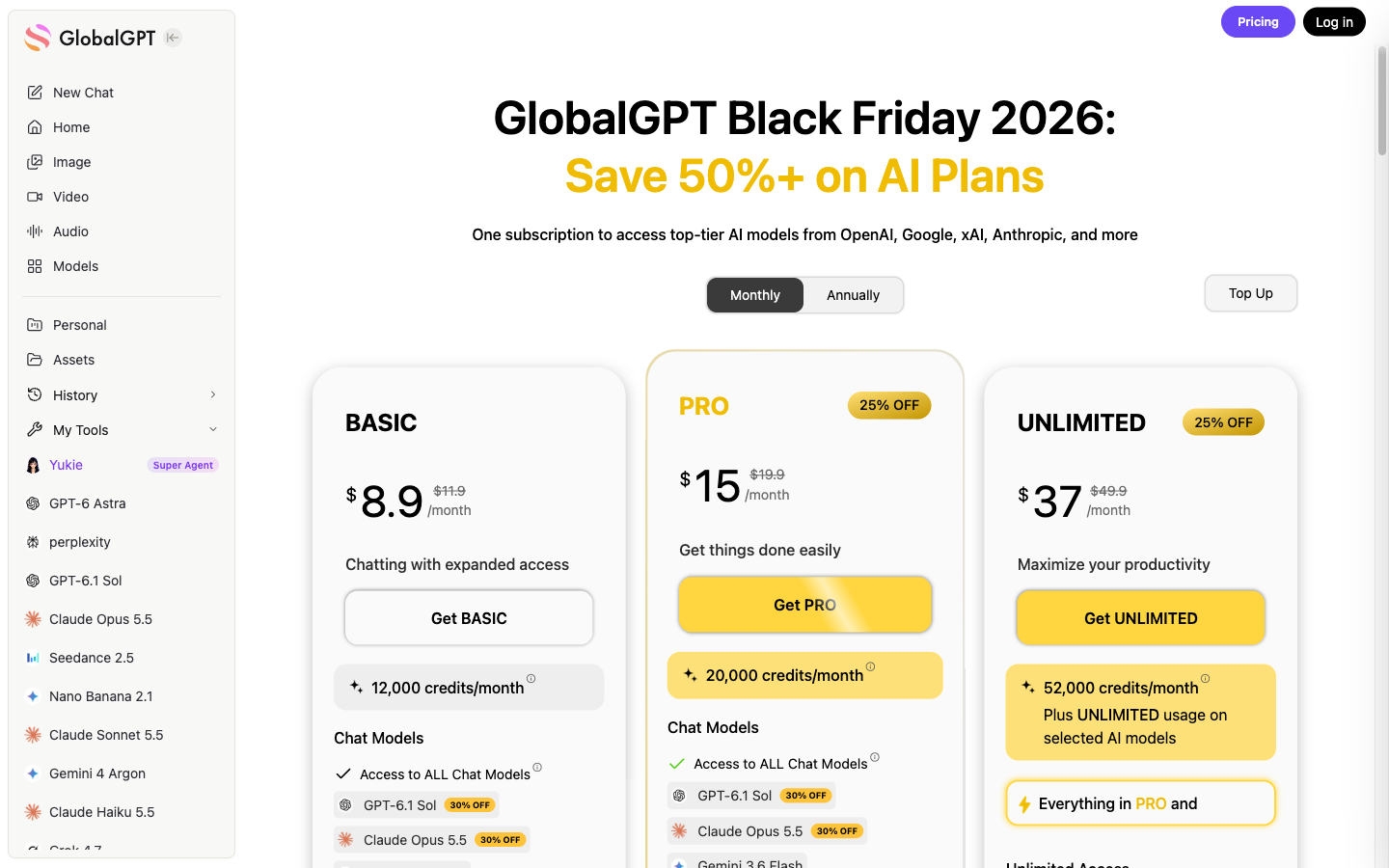
The monthly cards showed 12,000 credits for Basic, 20,000 for Pro and 52,000 for Unlimited. The Unlimited wording applies to models marked for unlimited access; premium models can still consume credits. Do not use the plan name to promise unlimited generation of every video model.
The same page showed crossed-out reference prices of $11.90, $19.90 and $49.90. A crossed-out price and an annual “per month” display do not establish your renewal charge. Confirm billing period, total charged, renewal terms and the included models at checkout. For a video-heavy workload, check the actual model quote rather than choosing the lowest card just because it has a video heading.
A real production chain: the Cedar launch concept
For this guide we used a fictional Cedar lamp concept to connect the stages. The asset set contains two product reference images, short image-to-video requests and English, Spanish and French narration. The final demonstration combines approved portions with still frames, captions and a closing card. It is an editorial concept, not a real product campaign or a conversion experiment.
We assembled the final cut in an external editor, using the separate generated footage and voiceover. This is a practical way to use a broad subscription: develop the creative assets together and retain your preferred timeline editor for precise cuts, captions and mixing.
The full raw product shots were not all suitable for literal catalog use. A constrained camera prompt still produced too much push-in and removed defining product details from the later frame. Using a short usable section and a stable reference image is an explicit edit decision, not evidence that the complete generation perfectly preserved the product.
The initial narration also included an angle-adjustment phrase that the fixed-stem visual did not substantiate. The assembled cut removes that phrase. This is a useful review lesson: polishing a script and generating a plausible image in the same platform does not ensure they agree. Compare the spoken claim with what the viewer can actually see.
Where Yukie and Canvas help with revisions
Use Yukie to turn a vague request into an inspectable plan: “Produce a ten-second concept with two shots, no invented product specifications, and a separate square delivery.” Review the planned output and cost before committing. After generation, ask for a specific change rather than a broad improvement request that may redo everything.
Use Canvas to preserve relationships: source reference, candidate clip, selected segment and the review reason. Keep a failed version labeled as failed. In our earlier October 14 mug case, a square revision changed the framing but did not repair cross-shot product inconsistencies. The notes made that distinction visible, which is more useful than quietly replacing the first result.
For a finished project, retain the clean footage, voiceover, subtitle file and assembly project alongside the final export. That makes a new language or a changed CTA a controlled revision. A collection of isolated generated files becomes a workflow when their source, purpose and approval state remain connected.
A cost worksheet for your own video month
Estimate cost per approved video
Editable planning example, not a vendor quote or measured production cost. Include all rejected takes in your generation spending. Use a currency consistently.Plan a realistic month: how many scripts, reference images, generated shots, voice tracks and approved final videos do you need? Include the extra editor or stock license you will keep. Add a rejection allowance based on your pilot, not a vendor’s most attractive demo. For teams, add the required seats before comparing totals.
For example, ten final videos may need more than ten clips if each contains two generated shots. Language edits may reuse those clips but require new narration and captions. Conversely, one reusable product master may serve several placements. Count the operations your actual workflow performs instead of multiplying a headline cost by the number of files delivered.
A fair trial before committing annually
- Choose one representative project, including its normal revision request. Use the actual product reference and rights requirements.
- Record which stages the subscription covers and which still require another tool or human specialist.
- Inspect current model quotes and keep a log of successful and rejected generations.
- Export the final video and its supporting assets. Check playback, captions and the intended phone layout.
- Repeat with a small change to the script or format. Compare the effort to revise with the effort to start over.
If you need SSO, client-isolated permissions, no-training terms or a formal approval trail, add those to the trial criteria. A creative account should not be assumed to satisfy enterprise governance merely because it supports many models. Where those requirements are absent, avoid paying for a complicated team setup you will not use.
Which all-in-one subscription is the best fit?
Wählen Sie GlobalGPT as a starting point when your video work genuinely spans scripting, images, motion and audio, and you want Yukie and Canvas to keep that work organized. Choose a specialist-led workflow when the recurring bottleneck is a presenter, a formal shared review process or a structured training template.
For broader non-video uses, our Umfassender Leitfaden zum KI-Abonnement covers a different decision. For video, evaluate the entire path to a usable export. The subscription earns its place when it reduces repeated work without hiding the remaining editing, review and rights responsibilities.
Useful documentation and current plans
Häufig gestellte Fragen
Does all-in-one mean a video is automatically ready to publish?
No. It means several production stages are available together. Product accuracy, editing, rights, captions and final approval still need attention.
Are all GlobalGPT video models unlimited?
No. Unlimited access applies only to the selected models marked for it. Premium models can still use credits; check the current model quote.
Did Canvas automatically assemble the example video?
No. GlobalGPT supplied generated assets, while the finished example was assembled in an external editing step. The article distinguishes those stages.
Should I buy an annual subscription immediately?
Run a representative project and revision first. Compare actual usage, required tools and final-output quality, then check the annual charge and renewal terms.