Sora 2 Status on August 3, 2026: Consumer App, API, and GlobalGPT
GlobalGPT currently provides a stable Sora 2 entry. This is a separate GlobalGPT platform route, not the discontinued OpenAI consumer app or direct billing through OpenAI’s deprecated Videos API. The same video workspace also gives you Veo 3.1, Grok Imagine, Kling 3.0, and Wan 2.7 when another model fits the shot better.
Before trying to fix a Sora 2 content violation, check whether you are using an official Sora route, an API route, or a third-party model hub. OpenAI’s current public pages show three important updates.
| Route | Status on August 3, 2026 | Price and limits | What it means |
|---|---|---|---|
| OpenAI consumer web/app | Discontinued worldwide on April 26, 2026 | No current consumer subscription price applies; ChatGPT plans do not restore the retired Sora web/app experience. | Old invite, waitlist, region, and ChatGPT Pro access instructions are historical. |
| OpenAI Videos API | Deprecated; scheduled to shut down on September 24, 2026 | sora-2: $0.10/sec Standard or $0.05/sec Batch at 720p. sora-2-pro: $0.30/$0.50/$0.70 Standard or $0.15/$0.25/$0.35 Batch at 720p/1024p/1080p. | New generations run up to 20 seconds; extensions can reach 120 seconds total. Treat this as a migration window. |
| GlobalGPT Sora 2 route | Live as a separate GlobalGPT platform route | GlobalGPT lists Basic at $11.9 monthly or $5.8/month with annual billing; Pro at $19.9 or $10.8; Unlimited at $49.9 or $25. It separately advertises up to 25 seconds and no-watermark output for Sora 2 Pro. | This is not the retired OpenAI consumer app and not direct OpenAI API billing. |
Sora 2 content restrictions are safety and rights-protection rules that limit what the model can generate. They commonly affect prompts involving copyrighted characters, music, real people, explicit content, or unsafe scenarios. The best fix is to make the request original, consent-based, and clearly framed.
OpenAI’s Sora 2 launch page now states that the Sora product is no longer available as of April 26, 2026. OpenAI’s developer docs still list ‘sora-2’ and ‘sora-2-pro’ for API video generation, but they also say the Sora 2 video models and Videos API are deprecated and will shut down on September 24, 2026.
This guide explains why Sora 2 blocks prompts, how to rewrite prompts without violating policies, and when to switch to alternatives.
Need a working video model now? Try GlobalGPT now to compare Veo 3.1, Grok Imagine 1.5, Sora-style workflows, Wan 2.7, Kling 3.0, and image-to-video options in one place. Right now, there’s a promotion with discounts of up to 50%.

In this guide
- Sora 2 Status on August 3, 2026: Consumer App, API, and GlobalGPT
- Why Sora 2 Blocks Some Prompts
- 22 Practical Ways I Avoid Sora Content Violations (From Real Testing)
- 1. Describe characters instead of naming copyrighted IP
- 22. Use Sora 2 Alternatives
- How to Rewrite a Blocked Sora 2 Prompt Safely
- How to Deal with Sora 2’s Copyright and Trademark Restrictions
- Practical Workflow and Platform Advice to Bypass Content Violations
- Sora 2 Social Platform and Cameo Feature: Stricter Content Moderation
- Sora 2 Safety Update: No Video Generation from Images That Include People
- Other Sora 2 Restrictions: Region and Country Availability
- Other Sora 2 Restrictions: Usage Limits and Feature Restrictions
- Why GlobalGPT is the Ultimate Workaround for Sora 2 Restrictions
- Sora 2 Alternatives: When to Use Veo 3.1, Grok Imagine, Nano Banana, and Other Models
- Final Thoughts: Responsible Creativity Wins
- FAQs About Sora 2 Content Restrictions
Why Sora 2 Blocks Some Prompts
Sora 2 restrictions exist for three overlapping reasons: safety, likeness rights, and copyright control. OpenAI’s API documentation says the video API enforces restrictions on copyrighted characters and music, real people, human-likeness uploads, and input images with human faces. OpenAI’s Sora help content also reminds users that uploaded images or videos must be content they own or have the necessary rights to use.
For creators, that means many blocks are not random. A prompt may fail because it asks for:
- a named copyrighted character or franchise;
- a celebrity, public figure, or recognizable real person;
- a face upload without proper consent;
- a song, music cue, logo, or branded asset;
- graphic, sexual, or otherwise unsafe content;
- a scene that sounds realistic enough to create identity, abuse, or misinformation risk.
The safest workaround is not to evade those rules. It is to restate the idea as an original scene with original characters, licensed or owned references, and clear cinematic direction.
If you don’t want to be limited by Sora 2’s content restrictions, we’ve researched a wide range of AI video generation tools and found the 12 best alternatives to Sora 2.
22 Practical Ways I Avoid Sora Content Violations (From Real Testing)
After spending a lot of time generating videos with Sora, I noticed that many “content violation” warnings are not caused by unsafe ideas but by specific keywords, recognizable IP references, or overly realistic prompts.
Through repeated testing and prompt iteration, I found several practical ways to reduce these violations and get prompts approved more consistently.
Below are the most effective techniques I’ve personally used when working with Sora.
1. Describe characters instead of naming copyrighted IP
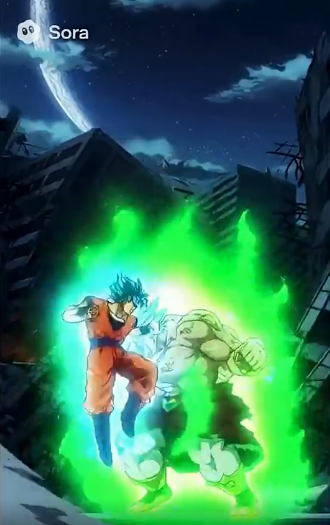
One of the most reliable techniques is to avoid directly naming well-known characters or franchises.
Instead of writing a specific character name, describe the appearance, clothing, and setting in detail.
For example, rather than naming a well-known cartoon character, I describe the character’s physical traits and environment. This communicates the visual idea without triggering obvious copyright filters.
| Trademarked Character | Safe Alternative Prompt |
|---|---|
| SpongeBob | “A cheerful yellow sponge wearing square pants living under the sea in a bright cartoon world.” |
| Mickey Mouse | “A cute cartoon mouse with round ears exploring a whimsical castle.” |
| Naruto | “A young ninja wearing orange training in a village surrounded by mountains.” |
2. Modify Images Before Upload
If you want to animate real faces or copyrighted visuals, modifying the image before uploading can reduce similarity detection.
In practice, I often edit images first using tools like Photoshop, Canva, or AI image generators.
Some useful techniques include:
- Applying anime, cartoon, or sketch filters
- Blending multiple references into a composite image
- Adding artistic effects such as watercolor, neon glow, or pixelation
These changes break the direct realism that moderation systems often detect.
Example workflow:
Turn a selfie into a manga-style illustration, then upload the modified image to Sora instead of the original photo.
3. Replace brand names with “inspired by” descriptions
Another effective strategy is switching from direct references to broader inspiration language.
Instead of referencing a specific movie or franchise, I describe the scene as being inspired by a particular genre, era, or style.
For example, a prompt can reference a desert wasteland action world without mentioning the specific film that inspired it.
4. Use “original character” language
When creating characters, I often include phrases like:
“original character”
“my OC character”
This frames the request as something new rather than derivative, which can help reduce similarity-related moderation triggers.
5. Focus on traits instead of identity
Rather than attempting to recreate a recognizable person or character, I describe neutral visual attributes such as:
- hairstyle
- clothing
- mood
- posture
- lighting
- environment
This approach turns the prompt into a design description rather than an attempt to replicate a specific identity.
6. Add a “Things to Avoid” section
One technique that surprisingly helped reduce false positives was adding a small block at the end of the prompt listing elements to avoid.
For example:
Things to avoid:
- nudity
- text on screen
- cartoon cutout animation
- low-quality rendering
This sometimes helps clarify intent when the model misinterprets fantasy designs or body-like textures.
7. Explicitly state that characters are fully clothed
Sometimes fantasy characters trigger nudity filters unintentionally.
To prevent this, I explicitly add phrases like:
“fully clothed”
“wearing armor”
“covered in fitted clothing”
This works particularly well for elemental creatures, mannequins, demons, or stylized fantasy beings.
8. Use cinematic filmmaking language
Sora tends to respond better to prompts written like film direction rather than casual descriptions.
For example, I use wording such as:
- subject
- camera angle
- cinematic lighting
- scene composition
- environmental atmosphere
This helps position the request as a filmmaking prompt instead of a potentially unsafe request.
9. Add clarification that the content is safe for work
Sometimes I include short clarifications such as:
“safe for work scene”
“non-explicit cinematic moment”
This can reduce the chance of the system misinterpreting the prompt.
10. Frame the scene as parody or satire
When referencing recognizable themes, I sometimes clarify that the scene is a parody or comedic interpretation.
This helps signal that the content is not intended to reproduce copyrighted media directly.
11. Explain that the scene belongs to a story or film
Another trick is to frame the prompt as part of a larger narrative.
For example, describing the scene as part of a fictional screenplay, a novel sequence, or a cinematic story moment.
Adding narrative context often improves prompt acceptance.
12. Reframe risky actions as simulations
If a scene could be interpreted as dangerous, I sometimes explain that it is a controlled scenario such as:
- a virtual reality simulation
- a staged training exercise
- a fictional cinematic effect
This reduces the likelihood of safety warnings.
13. Translate prompts into another language
In some tests, translating prompts into languages such as Chinese, Korean, or Japanese slightly changed how the moderation system interpreted the request.
However, this approach can sometimes influence the visual style of generated characters.
14. Retry the exact same prompt
Interestingly, I’ve seen the same prompt fail once and succeed on the next attempt without any changes.
Because of this, simply retrying the prompt occasionally works.
15. Change only one or two sensitive words
Often the problem is a single word.
Replacing a few terms can make a big difference.
Examples include changing words like:
violent → intense action
seductive → dramatic
Small wording changes can prevent moderation triggers.
16. Use AI to rewrite the prompt
Sometimes I run a prompt through an AI assistant first and ask it to rewrite the request without referencing copyrighted names.
This helps convert fan-style prompts into neutral descriptive prompts.
17. Use structured prompts
In some cases, restructuring prompts into clearly separated sections improves results.
For example:
Scene
Environment
Lighting
Character description
Structured prompts can help the model interpret the request more clearly.
Want fewer dead ends? Try the same prompt across Sora-style, Veo 3.1, Grok Imagine, Wan, Kling, and other AI video models inside GlobalGPT. This helps you compare motion, style, audio, and prompt acceptance without rebuilding your workflow from scratch.
18. Avoid uploading copyrighted source images
If an uploaded image already contains recognizable characters or IP material, moderation systems are much more likely to trigger.
Using original or modified source images works better.
19. Combine multiple references
Blending multiple design references into a single character concept can reduce the chance of the system detecting similarity to an existing character.
This approach often produces more unique results as well.
20. Design original characters
The most reliable long-term solution is simply creating original characters and environments.
When prompts focus on new designs rather than existing franchises, violations occur far less frequently.
21. Upload / Cameo–based method (conceptual)
Another line of discussion involves using platform-allowed personalization/upload features (for example, uploading an image for Cameo) to attempt to achieve a similar visual effect.
22. Use Sora 2 Alternatives
For a route-by-route decision, compare the current Sora 2 shutdown alternatives before choosing a long-term video model.
Sometimes the easiest way to deal with repeated content violations is simply switching to another AI video model. Some models, such as Wan 2.7, have significantly fewer prompt restrictions and can generate many scenes that Sora 2 may block while still delivering comparable visual quality.
On GlobalGPT, you can access Wan 2.7 and other advanced video models directly, allowing you to test the same prompt across multiple engines and quickly find the one that produces the best result.
Today, several models provide Sora-level video generation quality, and some even allow more flexible prompts and fewer restrictions.
Here are some of the most popular AI video generation models available right now:
| AI Video Model | Key Strength | Best For |
|---|---|---|
| Kling AI | Advanced motion rendering and smooth frame transitions | Cinematic storytelling and action scenes |
| Google Veo | High-end cinematic generation built on Google’s Vertex AI | Professional film-style video output |
| Wan 2.7 | Fewer prompt restrictions with strong generation quality | Complex scenes that may trigger moderation elsewhere |
| Runway | Integrated AI video editing and generation suite | Creative production workflows |
| Seedance 2.0 | High-quality cinematic video generation with strong scene consistency and realistic motion | Story-driven videos, marketing visuals, and cinematic content creation |
| Luma | Realistic 3D scene generation with cinematic camera motion and high visual fidelity | Photorealistic environments, cinematic storytelling, and high-end video production |
One important advantage of using multiple models is flexibility. If one platform blocks a prompt or produces inconsistent results, switching to another model can often solve the issue instantly.
Key Takeaway
Most Sora content violations are not caused by unsafe ideas but by how prompts are phrased.
In practice, the most effective strategies involve:
- avoiding direct IP references
- describing visual traits instead of identities
- clarifying creative intent
- and designing more original concepts.
With these techniques, it becomes much easier to generate complex cinematic scenes without constantly triggering moderation warnings.
How to Rewrite a Blocked Sora 2 Prompt Safely
Use this four-step pattern when Sora shows a content violation:
- Identify the likely trigger: copyrighted name, real person, face upload, violent wording, sexual wording, brand asset, or ambiguous body description.
- Replace identity with original description: describe the character’s role, wardrobe, silhouette, era, mood, and environment without naming protected IP or real people.
- Add creative intent: explain that the scene is fictional, safe for work, original, and not intended to depict a real person or existing franchise.
- Use film language: specify shot type, lens feel, lighting, motion, setting, duration, and visual style.
Example:
Instead of: "Make a Sora video of [famous superhero] fighting in Times Square."
Use: "Create an original cinematic scene of a masked urban guardian in a rain-soaked neon city square. The character wears a dark technical suit with no logos or franchise symbols. Use a wide tracking shot, dramatic reflections, practical street lighting, and non-graphic action choreography."
How to Deal with Sora 2’s Copyright and Trademark Restrictions
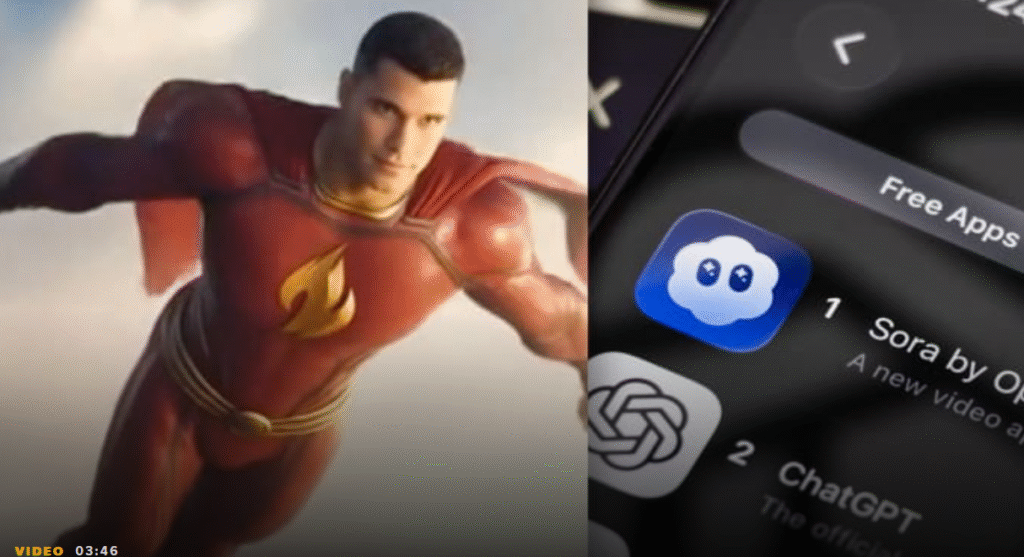
Sora 2 also prevents the use of copyrighted intellectual property (IP).
If you’re trying to create a video inspired by a famous franchise, use non-infringing descriptive prompts. For example:
In practice, these safe alternatives allow creators to maintain audience recognition while avoiding copyright strikes.
For instance, in a short animation test, replacing “Mickey Mouse” with the safe alternative prompt preserved audience engagement and narrative context without triggering content blocks.
Practical Workflow and Platform Advice to Bypass Content Violations
Frequent content violations or guardrail warnings can slow creative workflows. One practical approach is to integrate Sora 2 via an all-in-one AI video platform that streamlines access, minimizes restrictions, and eliminates watermark concerns.
During tests, this approach reduced the need to rewrite prompts repeatedly, saving hours in short video production.
For example, generating a 20-second promotional video with synchronized dialogue, ambient sounds, and transitions was completed in 40% less time compared to using Sora 2 directly with repeated content warnings.
This method ensures creators can focus on storytelling and visual quality rather than navigating content policy nuances.
Sora 2 Social Platform and Cameo Feature: Stricter Content Moderation
Historical context: These paragraphs and the image describe the former Sora social feed and Cameo interface. OpenAI discontinued the consumer web and app experiences worldwide on April 26, 2026; they are retained only to explain why moderation became stricter before the shutdown.
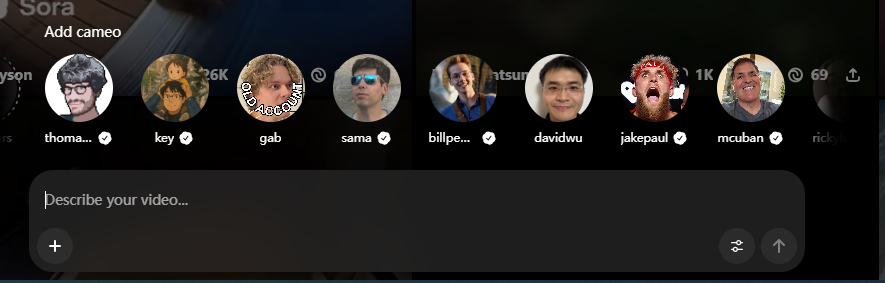
Sora 2 now includes social features that allow users to share AI-generated videos in a public feed. With the addition of these social capabilities, content moderation has become more stringent to ensure all shared videos comply with community guidelines and safety standards.
The Cameo feature enables creators to insert their own face and voice into videos, providing a personalized touch for storytelling or marketing content.
Cameo requires multi-step verification, including live video liveness checks and verbal attestation, to prevent impersonation.
For example, during testing, users must turn their head, blink, and speak a number sequence, ensuring that automated or deepfake inputs are blocked.
Once verification is complete, creators can use their likeness in Sora 2 videos and grant permission for other users to use it, opening collaborative possibilities without compromising safety.
Sora 2 Safety Update: No Video Generation from Images That Include People

The Strict Ban on Unauthorized Likeness Uploads
OpenAI has officially confirmed an important limitation for Sora 2:
“For safety, we don’t create videos from images that include people.”
This update means users can no longer upload photos or portraits featuring real individuals to generate videos. The restriction is part of OpenAI’s expanded content-safety and privacy policy, designed to prevent misuse of realistic human likenesses or deepfake-style scenes.
In practice, Sora 2’s moderation system automatically detects any image containing facial features or identifiable human patterns. If such content is uploaded, generation will halt, and a warning prompts the user to adjust their input.
The decision aims to ensure responsible AI use and comply with global privacy, consent, and copyright frameworks.
Other Sora 2 Restrictions: Region and Country Availability
Historical context: The January 2026 country and invite details below describe the former consumer rollout. After the worldwide April 26, 2026 shutdown, those country lists and invite rules no longer provide consumer access.
As of January 2026, Sora 2 is still not globally available. Access is limited to a small number of countries, including the United States, Canada, Japan, South Korea, Taiwan, Thailand, and Vietnam.
Even in these regions, users typically need an official invite code to use the service.
Since OpenAI has not announced a launch timeline for many countries, including the UK, regional and country restrictions remain one of the biggest barriers to accessing Sora 2.
Other Sora 2 Restrictions: Usage Limits and Feature Restrictions
Historical context: The daily-generation, ChatGPT Pro, and watermark paragraphs below describe the former consumer product. Current official access is the separately billed, deprecated API through September 24, 2026; GlobalGPT pricing and platform limits are separate.
Sora 2 comes with clear limits on both usage and features.
Free users can typically generate videos only 10 to 15 times per day, and long queues often lead to heavy waiting times or failed generations.
More advanced features are locked behind Sora 2 Pro, which is only available through a ChatGPT Pro subscription priced at $200 per month.
At the moment, all videos generated through the official Sora 2 and Sora 2 Pro platforms include watermarks. If you need watermark-free videos, third-party platforms such as GlobalGPT may be an alternative to consider.
Why GlobalGPT is the Ultimate Workaround for Sora 2 Restrictions
Historical context: This comparison refers to the former OpenAI consumer app. The consumer app ended April 26, 2026; the current GlobalGPT route is separate.
While OpenAI’s official app provides a powerful sandbox, professional creators often find the standard limits—such as watermarks and 20-second caps—restrictive for high-end production. GlobalGPT addresses these pain points by integrating Sora 2 Pro, the most advanced version of the model available in 2026.
- Extended Cinematic Length: Generate up to 25 seconds of continuous, physically accurate video in a single pass.
- Production-Ready Output: Unlike the standard version, Sora 2 Pro on GlobalGPT allows for watermark-free exports, saving hours in post-production.
- Highest Fidelity: Experience the leap from standard 480p/720p generations to 1080p and 4K ultra-realistic textures, optimized for large-format digital sensor emulation.
GlobalGPT allows you to harness these pro-tier capabilities alongside 100+ other models like GPT-5.6 Sol and Claude Opus 5, ensuring your workflow remains uninterrupted by invite codes or localized access barriers.
Sora 2 Alternatives: When to Use Veo 3.1, Grok Imagine, Nano Banana, and Other Models
Sometimes the best solution is not another Sora rewrite. If Sora keeps blocking a prompt, or if official Sora access is unavailable for your account, switch the task to a model that fits the output you actually need.
For cinematic video generation, try Veo 3.1. Google says Veo 3.1 adds richer audio, stronger prompt adherence, more narrative control, enhanced realism, and access through Flow, Gemini API, Vertex AI, and the Gemini app. This makes it a strong choice for story-driven clips, branded scenes, transitions, and production-style videos.
For fast social-style image-to-video experiments, try Grok Imagine. It is useful when you want short, expressive visual clips and quick iteration. Use it responsibly: do not create non-consensual likenesses, sexualized real-person edits, or deepfake-style content.
For image-first workflows, thumbnails, concept frames, character sheets, and product visuals, use Nano Banana, Nano Banana 2. A practical workflow is to create an original concept image in Nano Banana, then animate the approved frame in a video model.
For many creators, the winning setup is not one model. It is a multi-model workflow: draft an image in Nano Banana, animate it in Veo 3.1 or Grok Imagine, then compare output quality across several GlobalGPT video models before publishing.
| Task | Best alternative | Why it fits |
|---|---|---|
| Cinematic video with audio, continuity, and production control | Veo 3.1 | Strong choice for narrative clips, richer audio, references, scene extension, and polished video storytelling. |
| Quick social-style animation from an image | Grok Imagine | Better for fast experiments and expressive short clips, with extra care around consent and likeness safety. |
| Character concept, storyboard frame, product visual, or thumbnail | Nano Banana | Better when the job is a still image or visual concept rather than full video generation. |
| Faster image iteration and variations | Nano Banana 2 | Useful for efficient image drafts before moving into video. |
| Comparing multiple video models | Sora alternatives guide | Helps readers move from a blocked Sora prompt to a model that better fits cost, style, speed, and restrictions. |
Final Thoughts: Responsible Creativity Wins
Learning how to work around Sora 2’s content restrictions is really about understanding the tool’s ethics and design.
By adapting your language, staying compliant with policies, and thinking creatively within the rules, you can unlock Sora 2’s full potential without triggering filters.
Historical context: This 2025 recommendation is retained as time-stamped context. The direct Seedance links now point to the current Hub review, price, and access pages.
If you’re looking to maximize your content reach in 2025, Sora 2 offers the ultimate solution. For aspiring creators, you can also master create viral AI videos like a pro by checking out this Seedance 2.0 review
, ensuring your content reaches more viewers and engages your audience like never before. If you are curious about the investment required, you can find details on how much is Seedance 2.0
to plan your budget. Once you are ready to start, follow the guide on how to access Seedance 2.0 to begin your journey.
In the end, responsible innovation isn’t about bypassing limits—it’s about mastering them.
Ready to move past Sora dead ends? Compare current AI video routes on GlobalGPT and choose the model that fits the project before rebuilding your prompt again.
FAQs About Sora 2 Content Restrictions
Is Sora 2 still available as of August 3, 2026?
OpenAI says the Sora product is no longer available as of April 26, 2026. Its API docs still list sora-2 and sora-2-pro, but say Sora 2 video models and the Videos API will shut down on September 24, 2026.
How much does Sora 2 cost through the API?
OpenAI lists Sora API video pricing per second: sora-2 720p costs $0.10/sec, while sora-2-pro costs $0.30/sec at 720p, $0.50/sec at 1024p, and $0.70/sec at 1080p. Batch pricing is lower.
Can I use Sora 2 or Sora alternatives in GlobalGPT?
GlobalGPT is best positioned as a multi-model workspace for testing Sora-style video workflows and alternatives. Use it to compare Veo 3.1, Grok Imagine, Wan, Kling, Nano Banana image workflows, and other models before choosing one.
How do I access AI video models if official Sora is unavailable?
Start with a model hub such as GlobalGPT or use official routes for each provider when available. For most creators, the practical path is to test Veo 3.1, Grok Imagine, Wan, Kling, and Nano Banana-to-video workflows side by side.
How do I pay for AI video generation?
Payment depends on the route. Official APIs usually charge by model, duration, resolution, or credits. A platform such as GlobalGPT can simplify access by letting users test multiple models through one account instead of managing every provider separately.
Why does Sora 2 reject copyrighted characters?
Sora 2 can reject prompts naming copyrighted characters, music, brands, or franchise assets. The safer fix is to create an original character with descriptive traits, original wardrobe, original setting, and no protected names or logos.
Can I upload a real person’s photo to Sora?
Be careful. OpenAI says uploads must be content you own or have rights to use, and its API docs say human-likeness uploads or input images with human faces are restricted or rejected by default. Use owned or consent-based assets.
What is the best Sora 2 alternative?
For cinematic video, use Veo 3.1. For fast image-to-video tests, try Grok Imagine. For concept frames, thumbnails, products, or storyboard images, start with Nano Banana or Nano Banana 2 before animating the approved image.