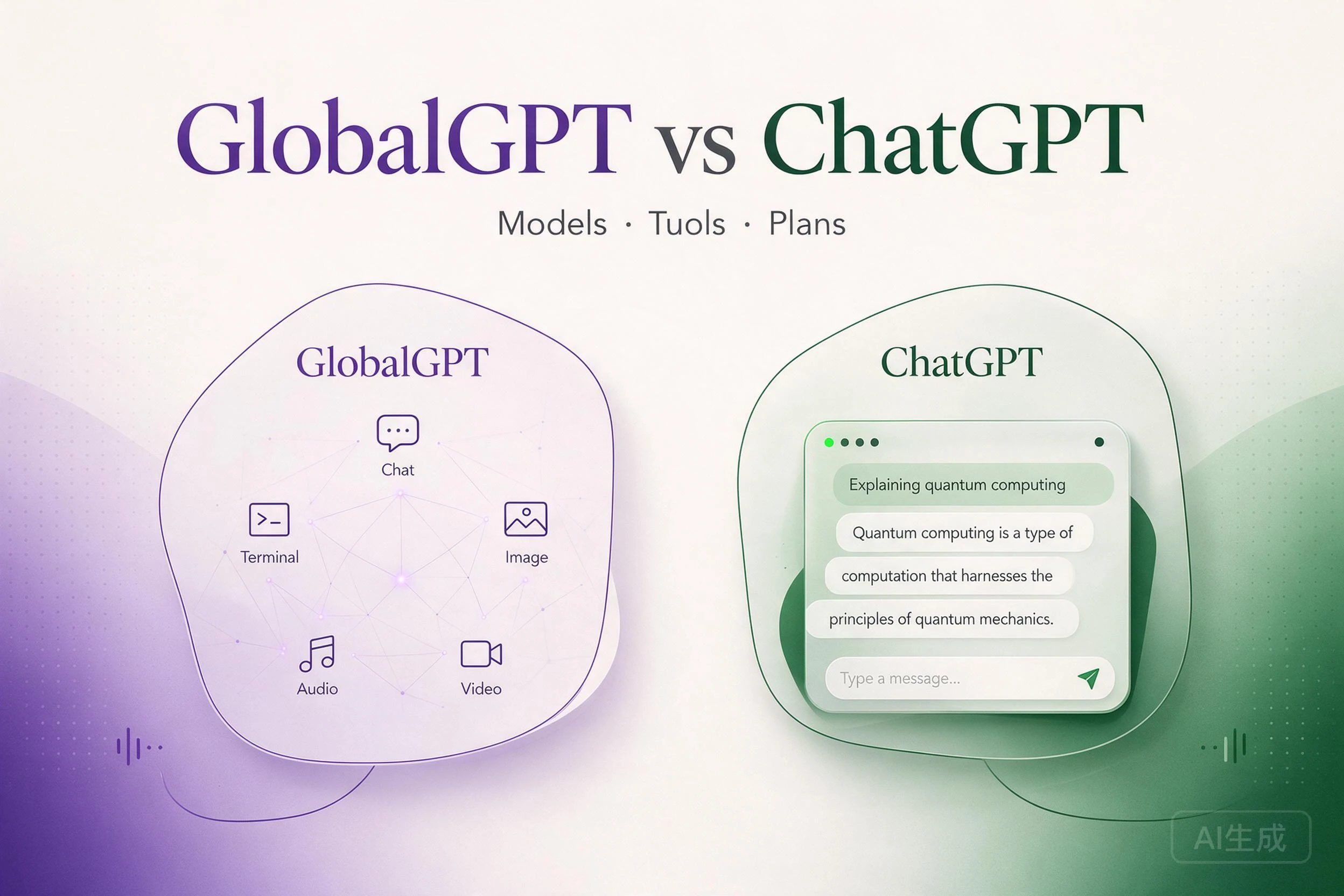
Als GlobalGPT je toegang geeft tot GPT-modellen, waarin verschilt het dan van ChatGPT? Het antwoord begint met een onderscheid dat gemakkelijk over het hoofd wordt gezien: Een AI-model en de app die je gebruikt om er toegang toe te krijgen, zijn twee verschillende dingen.
ChatGPT is het eigen AI-product van OpenAI. GlobalGPT is een afzonderlijk multi-modelplatform dat via API's modelmogelijkheden in zijn eigen interface integreert. GlobalGPT maakt gebruik van OpenAI-modellen via API-integraties; uw GlobalGPT-abonnement wordt hierdoor niet omgezet in een ChatGPT-abonnement.
Als je wilt schrijven, verschillende modellen wilt verkennen en creatieve AI-tools wilt gebruiken zonder ontwikkelaarsaccounts aan te maken, Bekijk de beschikbare modellen en tools van GlobalGPT. Deze vergelijking laat zien wat je krijgt, waarin de producten van elkaar verschillen en wanneer een gecombineerd abonnement financieel gezien de moeite waard kan zijn.
Snel antwoord: GlobalGPT is een onafhankelijk, op API’s gebaseerd platform voor meerdere modellen; ChatGPT is een eigen product van OpenAI. GlobalGPT brengt ondersteunde modellen van verschillende aanbieders samen met tools voor beeld, video en audio, visuele workflows en gepersonaliseerde briefings. De weergegeven maandelijkse Pro-prijs is $15, tegenover ChatGPT Plus voor $20 – een 25% lagere abonnementsprijs per 20 september 2026. CLI-toegang ondersteunt ook scripts en integraties met compatibele AI-agenten.
De abonnementen hebben verschillende functies en gebruikslimieten. De onderstaande schermafbeeldingen geven een overzicht van de gebruikersinterfaces; dit is geen benchmark voor de uitvoerkwaliteit of voor het exporteren van voltooide video’s.
GlobalGPT versus ChatGPT in één oogopslag
| Wat je vergelijkt | GlobalGPT | ChatGPT |
|---|---|---|
| Product | Een onafhankelijk platform dat diverse AI-modellen en -tools samenbrengt in één werkruimte. | De eigen AI-toepassing en productervaring van OpenAI. |
| Toegang tot model | Een selectie van modellen van verschillende aanbieders, afhankelijk van het aanbod op het platform en je abonnement. | De modellen en modi die OpenAI binnen uw ChatGPT-abonnement beschikbaar stelt. |
| Wat de interface toevoegt | Modelselectie en taakgerichte tools voor de gehele bibliotheek met ondersteunde modellen. | De standaardinterface, tools en integraties van OpenAI; de beschikbaarheid hiervan verschilt per abonnement. |
| Configuratie voor ontwikkelaars | Voor normaal internetgebruik is het niet nodig om API-code te schrijven. | Voor normaal gebruik van de app hoef je geen API-code te schrijven. |
| Abonnement | Betaalt voor toegang tot GlobalGPT en de daarbij inbegrepen vergoedingen. | Betaalt voor het betreffende ChatGPT-abonnement en de daarin inbegrepen bundels. |
| De beste reden om het te overwegen | U wilt via één dienst gebruikmaken van verschillende modelfamilies en creatieve tools. | Je wilt het eigen product van OpenAI rechtstreeks gebruiken. |
Het gebruik van een GPT-model betekent niet dat je ChatGPT kopieert
Er zijn drie namen die vaak door elkaar worden gehaald:
- OpenAI: het bedrijf dat de modellen en ChatGPT ontwikkelt.
- GPT: een reeks AI-modellen.
- ChatGPT: De toepassing van OpenAI voor het gebruik van zijn modellen en tools.
OpenAI biedt ook API’s aan, zodat ontwikkelaars andere applicaties kunnen bouwen met behulp van de modellen van OpenAI.
Een API is een verbinding tussen softwarediensten. In een typische AI-toepassing voer je een verzoek in, de toepassing stuurt dit door naar een modeldienst en het resultaat wordt via de interface van de toepassing teruggestuurd. OpenAI’s Snelstartgids voor ontwikkelaars legt deze bouwwijze vast aan de hand van modellen.
EEN VEREENVOUDIGDE API-WERKSTROOM
Uw verzoek → GlobalGPT-interface → model-API → resultaat in GlobalGPT
Het model biedt AI-mogelijkheden. De applicatie zorgt voor de gebruikerservaring, de workflow en het account waarmee je hier toegang toe krijgt. Dit illustreert het concept, niet elke stap van een productiesysteem.
Dat is het onderscheidende kenmerk van de aanpak van GlobalGPT: het creëert een aparte ervaring rond functies die via een API toegankelijk zijn. Een app van een derde partij die gebruikmaakt van een API is niet, louter omdat het een app van een derde partij is, een illegale kopie van de consumentenapp van de aanbieder. API-integratie impliceert op zichzelf evenmin een goedkeuring of een officiële samenwerking.
Op de website van GlobalGPT wordt vermeld dat het een onafhankelijk platform is dat wordt beheerd door Future Share LLC, en dat het geen banden heeft met, wordt aanbevolen door of wordt gesponsord door externe modelaanbieders.
Waarom antwoorden kunnen verschillen, zelfs bij een vergelijkbare modelnaam
Het onderliggende model vormt slechts een deel van de ervaring. Instructies, de gespreksgeschiedenis, beschikbare hulpmiddelen, generatie-instellingen en de exacte modelversie kunnen allemaal van invloed zijn op het antwoord. Toegang tot een GPT-model via GlobalGPT mag daarom niet worden opgevat als een belofte van identieke ChatGPT-antwoorden of van alle ChatGPT-functies.
Verschillen in functies: waar GlobalGPT een meerwaarde biedt
Het belangrijkste voordeel van GlobalGPT is dat het modelkeuze, creatieve tools en taakworkflows combineert in één abonnement, met zowel web- als CLI-toegang. Je kunt kiezen uit ondersteunde aanbieders, werken met afbeeldingen, video en audio, creatieve stappen ordenen en ondersteunde tools gebruiken in scripts of compatibele AI-agenten.
Die combinatie komt goed van pas wanneer je werk verder gaat dan één enkel gesprek: voor een productlancering zijn teksten en beeldmateriaal nodig; voor een campagne op sociale media zijn verschillende formaten nodig; voor een nieuw artikel zijn bronnen en ideeën nodig. Video Editor, Agentic Canvas en AI RSS zijn voorbeelden van deze uitgebreidere toolkit.
| Wat telt | GlobalGPT | ChatGPT | Het praktische voordeel van GlobalGPT |
|---|---|---|---|
| Modelkeuze | Kies uit de ondersteunde opties GPT, Claude en Gemini via één account en één abonnement. | Maak gebruik van de modellen en modi die het product van OpenAI biedt. | Vergelijk verschillende modelfamilies zonder voor elke ondersteunde optie een aparte service te hoeven beheren. |
| Het maken van content en videowerk | Hulpmiddelen voor afbeeldingen, video en audio, Agentic Canvas-sjablonen en een toegangspunt tot de Video Editor. | De creatieve mogelijkheden, projecten en bijbehorende tools verschillen per abonnement. | Vind hulpmiddelen voor verschillende onderdelen van een campagne binnen dezelfde dienst. |
| Informatie en ideeën | AI RSS biedt gepersonaliseerde overzichten, kansen en bronnen die je kunt toevoegen. | Zoekfuncties, gekoppelde tools en geplande taken ondersteunen onderzoek en opvolging. | Gebruik een speciale briefingworkflow om materiaal te vinden voor je volgende opdracht. |
| Manieren om te werken | Gebruik de webinterface, de glbgpt-CLI of integraties met compatibele AI-agenten via MCP en Agent Skills. | De ChatGPT-app en de afzonderlijke ontwikkel- en programmeertools van OpenAI bieden verschillende manieren om ermee aan de slag te gaan. | Begin met de website en maak, naarmate uw behoeften toenemen, gebruik van de ondersteunde functies in scripts of compatibele agents. |
ChatGPT’s vergelijking van officiële plannen bevat onder meer redeneren, het creëren van afbeeldingen, diepgaand onderzoek, projecten en op maat gemaakte GPT’s. De handleidingen gaan ook in op gekoppelde tools en automatiseringen. Voor lezers die toegang willen tot verschillende aanbieders en diverse categorieën creatieve tools: GlobalGPT brengt al die opties samen in één eigen werkruimte.
1. Eén platform, verschillende modellen voor verschillende taken
GlobalGPT bundelt de opties GPT, Claude en Gemini in één multimodale dienst. Dit biedt u de mogelijkheid om schrijfstijlen, uitleg en benaderingen van een opdracht te vergelijken, zonder dat u voor elke ondersteunde optie een apart consumentenabonnement hoeft aan te schaffen.
Om modellen voor een concrete taak met elkaar te vergelijken:
- Geef twee beschikbare modellen dezelfde productbeschrijving.
- Vergelijk de duidelijkheid, de nauwkeurigheid en de mate waarin elk concept moet worden aangepast.
- Ga verder met het model dat het beste bij de taak past.
De exacte versies en inclusies zijn afhankelijk van de huidige catalogus en uw abonnement.
De ondersteunde modellen zijn beschikbaar via de webinterface van GlobalGPT, zodat u niet de API van elke aanbieder hoeft te implementeren. Eén account en één abonnement zijn voldoende voor de inbegrepen quota. Als die quota aan uw behoeften voldoen, kunt u hiermee ook het aantal afzonderlijke AI-abonnementen dat u beheert verminderen.
2. Maak inhoud en bewerk video's met tools die allemaal op één plek te vinden zijn
Op het startscherm van GlobalGPT staat een modelkiezer naast speciale toegangspunten voor beeldgeneratie, videogeneratie, audiogeneratie en videobewerking. Een maker kan hier tools vinden voor de teksten, afbeeldingen, filmpjes en audio van een campagne, zonder dat hij of zij voor elke categorie een aparte AI-website hoeft te beheren.
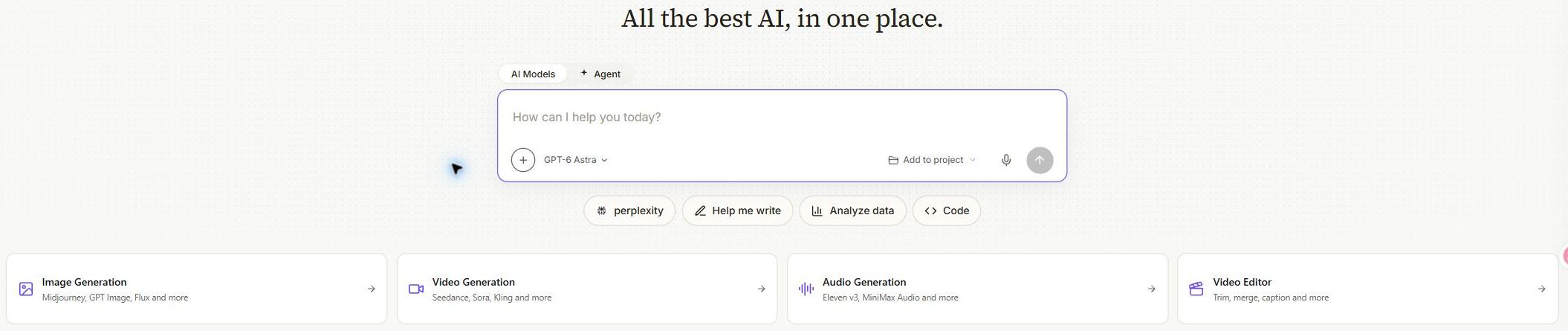
Voor een productaankondiging kun je de werkruimte gebruiken om:
- Schrijven: stel het lanceringsbericht en de bijbehorende tekst op.
- Beelden maken: Bekijk de productafbeeldingen voor de campagne.
- Video genereren: Probeer eens een korte promotiefilm.
- Audio voorbereiden: ontdek de mogelijkheden van geluid voor creatief werk.
Elke tool heeft zijn eigen instellingen en gebruikskosten, met toegangspunten binnen dezelfde dienst.
Organiseer de creatieve stappen met Agentic Canvas
Agentic Canvas biedt een visuele manier om opdrachten en media aan elkaar te koppelen. Tot de sjablonen behoren onder meer een productlanceringspakket, een social-mediacampagne, een IP-pakket voor personages en een uitlegfilmpje met voice-over. Voor beginners biedt een sjabloon een startstructuur voor een taak waarvoor anders meerdere afzonderlijke instructies nodig zouden zijn.
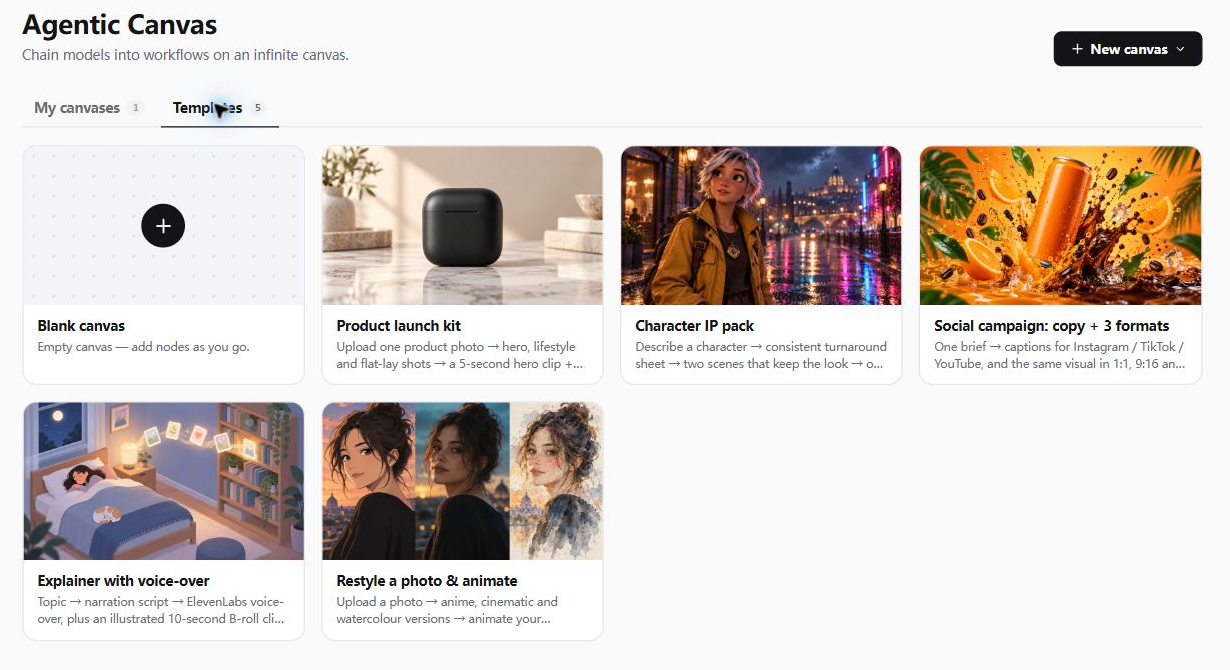
In de sjabloongalerij worden werkprocessen beschreven zoals:
- Sociale campagne: tekst en drie beeldformaten: 1:1, 9:16 en 16:9.
- Productlancering: campagnebeelden, een korte video en muziek.
Dit zijn voorbeeldworkflows; we hebben niet alle stappen voor dit artikel uitgevoerd.
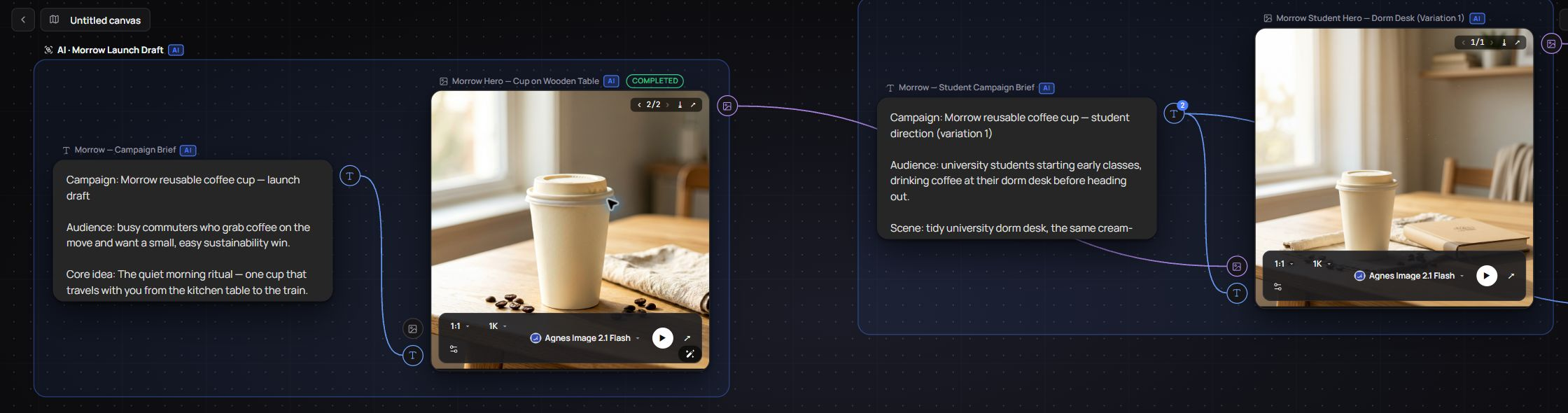
Het opgeslagen voorbeeld van de koffiecampagne illustreert het organisatorische voordeel: briefings en beeldvarianten blijven zichtbaar als onderling verbonden stappen. Daardoor is de creatieve structuur van een project gemakkelijker te volgen. Agentic Canvas is de workflowtool van GlobalGPT, los van de ontwerpservice Canva.
Geef videoprojecten een eigen projectruimte
GlobalGPT's Videobewerker breidt de toolkit uit tot buiten het startpunt voor het genereren van video’s. Op de startpagina worden het bijsnijden en ondertitels geïntroduceerd, en in het projectvenster zijn de formaten 16:9, 9:16 en 1:1 beschikbaar.
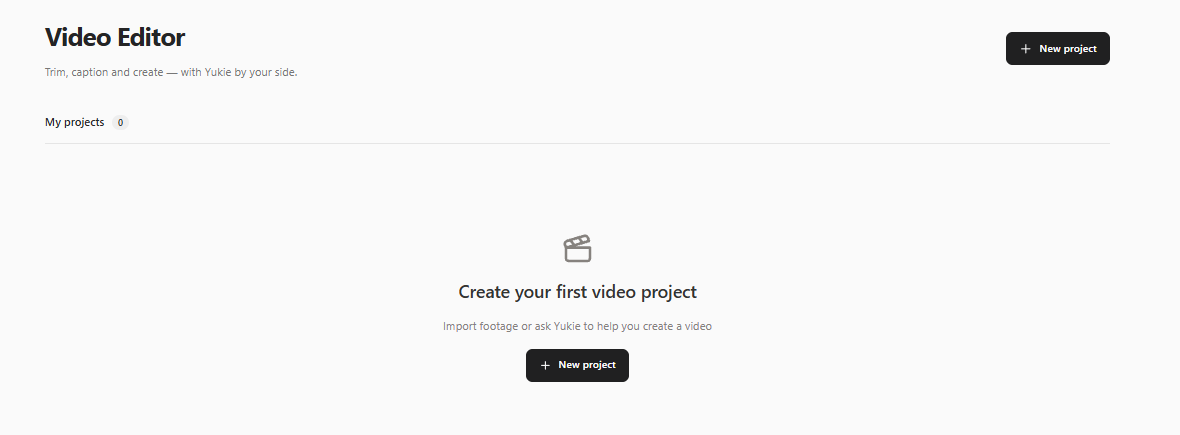
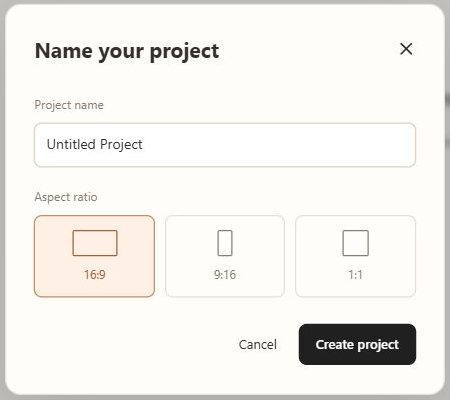
Voor iemand die filmpjes voor verschillende kanalen voorbereidt, bieden een apart project en de keuze van de beeldverhouding een duidelijk uitgangspunt. We hebben deze schermen bekeken; het bewerken op de tijdlijn, de nauwkeurigheid van de ondertitels en de uiteindelijke export zijn niet getest.
3. Vind nuttige informatie en ideeën voor content met AI RSS
AI RSS voegt informatieontdekking toe aan de werkruimte. Het introduceert gepersonaliseerde overzichten en mogelijkheden, met een dialoogvenster ‘Bronnen’ voor blogs, RSS-feeds en nieuwspagina’s die je wilt volgen.
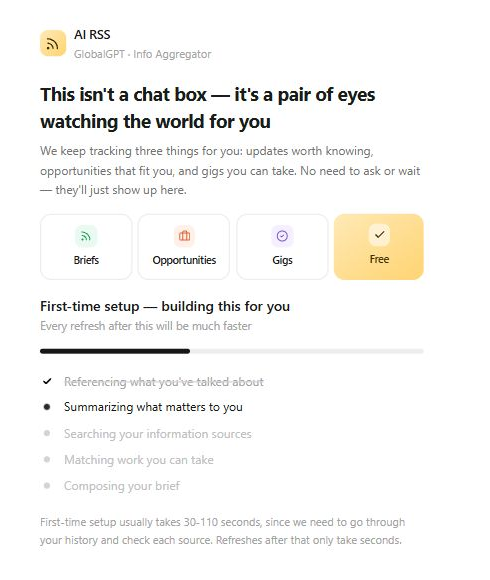
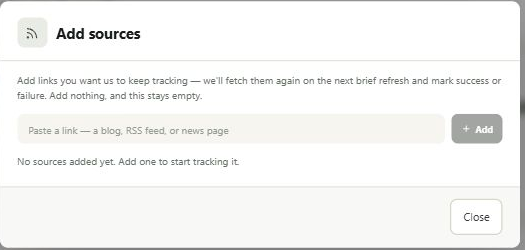
Een marketeer zou AI RSS kunnen gebruiken om:
- Volg een vakblad of een andere bron naar keuze.
- Ontdek een nuttig artikel in een gepersonaliseerde nieuwsbrief.
- Werk het verhaal uit tot een idee voor een artikel, nadat je de oorspronkelijke bron en de datum hebt gecontroleerd.
In het dialoogvenster ‘Bronnen’ staat dat toegevoegde links bij de volgende korte verversing worden opgehaald, waarbij wordt gemeld of dit is gelukt of niet.
4. Begin op het web en sluit vervolgens je eigen workflow aan
Begin in de browser als je een model wilt kiezen, een taak wilt beschrijven en direct gebruik wilt maken van de creatieve tools. Als je herhaalbare opdrachten of een integratie met een andere applicatie nodig hebt, biedt GlobalGPT ook een CLI en tools voor compatibele AI-agenten.
De glbgpt Met de opdrachtregelinterface kun je in een terminal opdrachten invoeren om:
- Gebruik de ondersteunde chatmodellen en bekijk de modelcatalogus.
- Maak afbeeldingen of video's.
- Controleer de taken voor het genereren van rapporten en download de voltooide resultaten.
Voor terugkerende taken biedt dit een handige aanvulling op de website. Een contentteam kan voor elke nieuwe opdracht een commando hergebruiken, een lokaal bestand als context toevoegen of een voltooide mediataken ophalen. Met deze commando’s kun je met ondersteunde modellen werken zonder voor elke aanbieder een aparte API-integratie te hoeven schrijven.
Een paar commando’s illustreren het idee
# Beschikbare chatmodellen weergeven
glbgpt model list chat

# Een afbeeldingsverzoek inschatten zonder het te genereren
glbgpt image "Een productfoto op een crèmekleurige achtergrond" --estimate

# Een bestaande voltooide taak bekijken en downloaden
glbgpt task show last
glbgpt task download last
In deze voorbeelden wordt gebruikgemaakt van gedocumenteerde CLI-opdrachten. Vragen over modellen en taken hebben betrekking op uw account; voor het downloaden is een voltooid resultaat vereist. De helptekst is voor dit artikel gecontroleerd; de voorbeelden zijn niet uitgevoerd als generatietests.
Voor scripts, glbgpt exec ondersteunt:
- Modelkeuze: kies het model dat voor het verzoek wordt ondersteund.
- Bestandscontext: voeg een lokale samenvatting of een ander relevant bestand toe.
- JSON-uitvoer: de resultaten weergeven in een formaat dat door scripts kan worden verwerkt.
Een herbruikbare opdracht kan elke nieuwe productbeschrijving door hetzelfde opstelproces leiden. Voor het genereren worden accounttegoed gebruikt; toegang via CLI leidt niet tot een extra onbeperkte toewijzing.
Koppel ondersteunde tools aan een compatibele AI-agent
Voor compatibele AI-agenten biedt GlobalGPT:
- MCP:
glbgpt mcpstelt chat- en mediageneratietools beschikbaar via een standaardverbinding die door compatibele applicaties kan worden gebruikt. - Vaardigheden van de agent: De meegeleverde instructies helpen programmeurs bij het gebruik van de GlobalGPT-tools.
Dit biedt een extra manier om GlobalGPT in uw bestaande workflow te integreren: een compatibele agent heeft vanuit de omgeving waarin u al werkt toegang tot de ondersteunde GlobalGPT-tools. Technisch onderlegde gebruikers kunnen deze mogelijkheden in hun workflow opnemen, terwijl beginners gewoon de website kunnen blijven gebruiken.
De geïnstalleerde CLI documenteert een kredietbudget voor het genereren van media voor MCP-sessies. De client moet nog worden geconfigureerd en geautoriseerd; we hebben de beschikbare commando’s getest, maar geen volledige integratie met elke agent.
Uitleg over abonnementen: wanneer kan GlobalGPT goedkoper uitvallen?
GlobalGPT, ChatGPT en het rechtstreekse gebruik van de API zijn verschillende aankopen. Een GlobalGPT-abonnement geeft toegang tot de dienst van GlobalGPT; het activeert geen betaald ChatGPT-account. Evenzo wordt met een ChatGPT-abonnement uw GlobalGPT-factuur niet betaald.
Voor rechtstreeks API-gebruik gelden aparte factureringsregels. Die van OpenAI’s Documentatie over API-prijzen geeft een overzicht van de tarieven op basis van verbruik, die per model en dienst verschillen. Deze tarieven mogen niet worden beschouwd als de prijs van een abonnement voor eindgebruikers.
Tegen de prijzen die op 20 september 2026 worden weergegeven, GlobalGPT Pro kost $15 per maand bij het maandabonnement, terwijl ChatGPT Plus $20 per maand kost. Dat is $5 minder per maand, ofwel 25% lager dan de abonnementsprijs van Plus. Het jaarlijkse Pro-aanbod van GlobalGPT komt neer op $10,80 per maand, 46% lager dan dezelfde Plus-benchmark, bij een jaarabonnement.
We hebben beide factureringsopties gecontroleerd op De prijspagina van GlobalGPT en de Plus-prijs in De officiële prijslijst van ChatGPT. Op de GlobalGPT-pagina worden kortingsbadges weergegeven; het gaat hier dus om actuele aanbiedingen en niet om geverifieerde vaste prijzen of verlengingsprijzen.
Een lagere abonnementsprijs voor een andere toolkit
GlobalGPT Pro vs. ChatGPT Plus · USD · Prijzen gecontroleerd op 20 september 2026
Maandelijkse aanbieding
Beide prijzen zijn per maand. GlobalGPT heeft momenteel een aanbieding.
25% lager · $5 minder per maand
Jaarlijkse aanbieding — jaarlijkse verbintenis
Het maandelijkse equivalent van het GlobalGPT-jaarabonnement vergeleken met het ChatGPT Plus-abonnement tegen de maandelijkse prijs daarvan.
46% lagere maandelijkse tegenwaarde
Voorbeeld voor 12 maanden: $129,60 versus $240,00 — een verschil van $110,40.
De horizontale balken beginnen bij $0 en maken gebruik van dezelfde schaal van $0 tot $20. In de jaarlijkse illustratie wordt het weergegeven, afgeronde maandelijkse equivalent van $10,80 vermenigvuldigd met 12 en vergeleken met $20 × 12. Dit is geen geverifieerd afrekentotaal. Voor de jaarlijkse aanbieding van GlobalGPT is een jaarlijkse verbintenis vereist.
De promotieprijzen voor GlobalGPT kunnen veranderen; de verlengingsprijzen zijn niet gecontroleerd. Functies, toegang tot modellen en gebruikslimieten verschillen. Deze cijfers vergelijken abonnementen, niet gelijke gebruiksquota of kosten per generatie. ChatGPT Free en Go zijn niet opgenomen in deze Plus-vergelijking. Belastingen worden niet vergeleken.
Bronnen: GlobalGPT-prijsinterface en Officiële prijslijst ChatGPT.
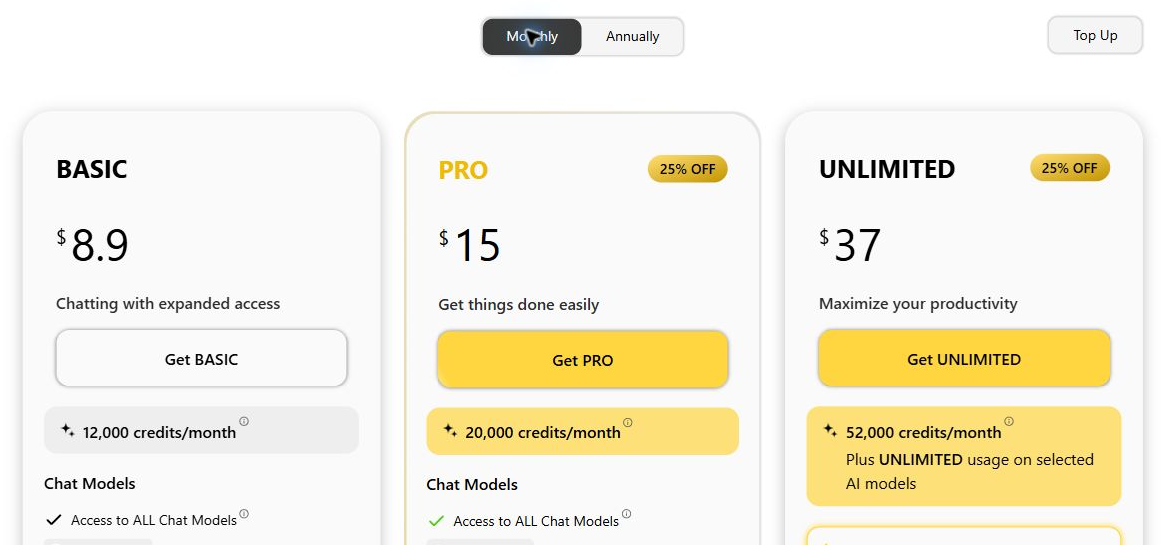
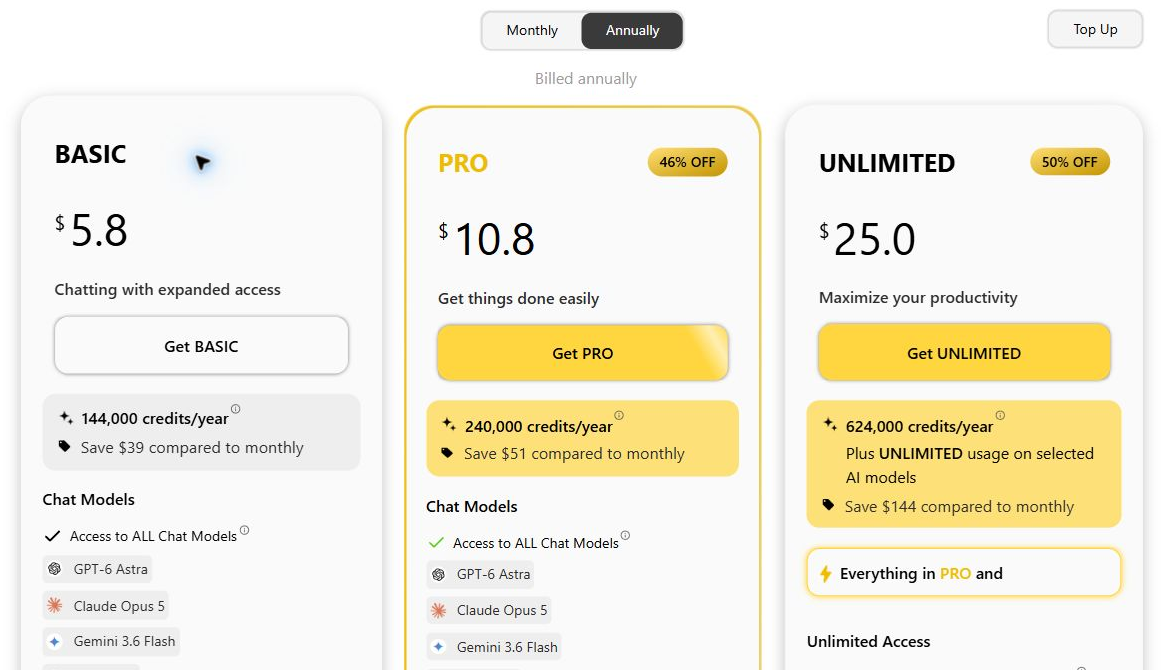
| Plan | Maandelijkse facturering | Jaarlijkse facturering: maandelijks equivalent | Weergegeven aftiteling |
|---|---|---|---|
| GlobalGPT Basis | $8,90/maand | $5,80/maand (omgerekend) | 12.000 per maand of 144.000 per jaar |
| GlobalGPT Pro | $15,00/maand, huidige aanbieding | $10,80/maand equivalent, huidige aanbieding | 20.000 per maand of 240.000 per jaar |
| GlobalGPT Unlimited | $37,00/maand, huidige aanbieding | $25,00/maand equivalent, huidige aanbieding | 52.000 per maand of 624.000 per jaar, plus een selectie van modellen met onbeperkt gebruik |
| ChatGPT Plus | $20,00/maand | Wordt in deze vergelijking niet gebruikt | Plan-specifieke limieten; geen GlobalGPT-credits |
De jaarlijkse krediettotalen betekenen niet dat alle kredieten in één keer worden toegekend; controleer de toewijzings- en resetregels. Kredieten zijn eenheden voor platformgebruik, geen dollars of een gelijkwaardige ChatGPT-berichtenlimiet. Controleer de modellen en kosten voor video, afbeeldingen en ander premium-materiaal voordat u zich abonneert.
Hoe het verschil er over een periode van 12 maanden uitziet
Op basis van de weergegeven tarieven ziet de berekening voor 12 maanden er als volgt uit:
- GlobalGPT Pro, maandelijkse facturering: $15 × 12 = $180, als het tarief ongewijzigd blijft.
- ChatGPT Plus, maandelijkse facturering: $20 × 12 = $240, als het tarief ongewijzigd blijft.
- GlobalGPT Pro, equivalent van een jaarabonnement: $10,80 × 12 = $129,60 — berekend op basis van het afgeronde geadverteerde tarief, geen geverifieerd totaalbedrag bij het afrekenen.
Dat levert een illustratief verschil op van $60 voor 12 maandelijkse Pro-betalingen, of $110,40 bij de berekening op basis van het jaarabonnement, tegenover $240 voor Plus.
In deze vergelijking zijn belastingen en extra verbruik niet meegerekend. ChatGPT biedt ook Free- en Go-abonnementen aan, dus GlobalGPT is niet in alle gevallen goedkoper dan elke ChatGPT-optie. GlobalGPT Unlimited kost volgens de weergegeven tarieven meer dan Plus. De relevante bewering hier is specifiek: De huidige aanbieding voor GlobalGPT Pro heeft een lagere abonnementsprijs dan die voor ChatGPT Plus.
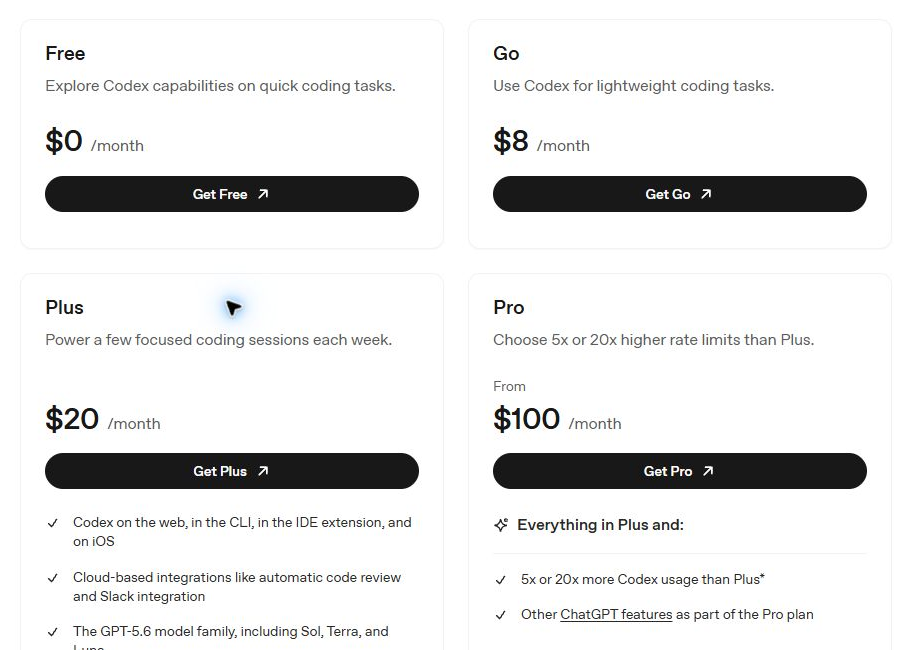
Controleer vóór de aankoop het te betalen totaalbedrag, de valuta, de belastingen, de verlengingsvoorwaarden en de inbegrepen modellen. De servicevoorwaarden er gelden ook voorwaarden inzake redelijk gebruik; de naam “Unlimited” mag niet worden opgevat als onbeperkte toegang tot alle modellen en functies.
Je kunt geld besparen door de tools die je daadwerkelijk gebruikt te bundelen
Als u anders voor meerdere AI-diensten zou moeten betalen, kan een GlobalGPT-abonnement uw totale abonnementskosten verlagen doordat het alle modellen en tools die u nodig hebt onder één dak biedt. Dat werkt alleen als het inbegrepen gebruiksvolume voldoende is en u daadwerkelijk kunt stoppen met het betalen voor de afzonderlijke diensten.
Als je alleen de ChatGPT-ervaring nodig hebt, is het aanschaffen van een abonnementsplan voor meerdere modellen een heel ander verhaal. Welke optie de beste prijs-kwaliteitverhouding biedt, hangt af van de functies die je gebruikt en het werk dat je binnen de beperkingen van elk plan kunt uitvoeren – niet alleen van welke prijs op het eerste gezicht het laagst is.
Een handige kostencheck
Vergelijk de totale kosten van de afzonderlijke abonnementen die u daadwerkelijk zou behouden met die van het GlobalGPT-abonnement dat u nodig hebt, plus eventueel extra gebruik en abonnementen die u nog steeds zou behouden.
Gebruik dezelfde factureringsperiode en valuta. Vergelijk de jaarlijkse kosten, verlengingsprijzen, belastingen en het inbegrepen verbruik voordat je een lagere geadverteerde maandelijkse tegenwaarde als besparing beschouwt.
Wat je moet controleren voordat je je abonneert
- Toegang tot het exacte model: Is de versie die u zoekt in dat abonnement inbegrepen?
- Beschikbaar saldo: Hoe worden chats, credits of generaties geteld, en wanneer worden ze gereset?
- Kosten van de taak: Zal beeld- of videomateriaal dezelfde prioriteit krijgen als chat, en hoe snel?
- Betrokkenheid: Wordt de weergegeven prijs maandelijks gefactureerd of is deze gekoppeld aan een jaarlijkse betaling? Wat gebeurt er bij verlenging?
- Termen die voor jou van belang zijn: Controleer de annuleringsvoorwaarden, de omgang met gegevens en eventuele regels voor het werk dat u van plan bent te doen.
Ga er niet vanuit dat “meer modellen” betekent dat je onbeperkt toegang hebt tot elk model. Begin met het kleinste abonnement dat aan je daadwerkelijke behoeften voldoet, en breid je abonnement pas uit als dat gezien je gebruik zinvol is.
Welke moet je kiezen?
Kies GlobalGPT voor meer modelkeuze en een bredere creatieve workflow
Overweeg GlobalGPT als je het volgende wilt:
- Kies modellen van verschillende ondersteunde aanbieders.
- Gebruik tools voor tekst, afbeeldingen, video en audio via één account.
- Organiseer creatief werk met sjablonen of koppel tools aan scripts en compatibele agents.
- Bundel betaalde diensten wanneer het inbegrepen gebruiksvolume aan uw behoeften voldoet.
Kies ChatGPT als je de originele ervaring van OpenAI wilt
Overweeg ChatGPT als:
- U geeft de voorkeur aan de productervaring die OpenAI creëert en in stand houdt.
- Uw workflow is afhankelijk van een specifieke functie van ChatGPT.
Toegang tot een onderliggend model elders is geen vervanging voor het controleren van die functie.
Je kunt beide gebruiken, maar als je beide abonnementen aanhoudt, gaan een deel van de mogelijke besparingen door het samenvoegen verloren. Begin met je belangrijkste taak, breng in kaart welke functies daarvoor nodig zijn en vergelijk de abonnementen aan de hand van die lijst.
Veelgestelde vragen
Is GlobalGPT hetzelfde als ChatGPT?
Nr. ChatGPT is een product van OpenAI. GlobalGPT is een afzonderlijk AI-platform voor meerdere modellen, met een eigen interface, account, tools en abonnement.
Is GlobalGPT een illegale kopie van ChatGPT?
GlobalGPT is ontworpen als een zelfstandig platform dat gebruikmaakt van model-API’s, en niet als een kopie van de ChatGPT-app. Het gebruik van een API om een afzonderlijk product te ontwikkelen is iets anders dan het kopiëren van dat product. Toegang tot de API houdt op zichzelf geen goedkeuring of samenwerking met OpenAI in.
Maakt GlobalGPT gebruik van de API van OpenAI?
GlobalGPT maakt via API-integraties gebruik van OpenAI-modellen, waardoor de mogelijkheden van deze modellen via het eigen platform beschikbaar worden gesteld. Welke modellen en gebruiksmogelijkheden voor u beschikbaar zijn, hangt af van de actuele catalogus en het abonnement van GlobalGPT.
Heb ik een betaald ChatGPT-abonnement nodig om GlobalGPT te kunnen gebruiken?
Nr. GlobalGPT heeft een eigen account en abonnement. Als je voor GlobalGPT betaalt, hoef je geen ChatGPT-abonnement aan te schaffen en krijg je ook geen betaald ChatGPT-account.
Zal een GPT-model op GlobalGPT dezelfde antwoorden geven als op ChatGPT?
Niet per se. De modelversie, instructies, de context van het gesprek, de instellingen en de beschikbare hulpmiddelen kunnen het resultaat beïnvloeden. Een gemeenschappelijke modelnaam garandeert geen identieke productervaring.
Is de GlobalGPT goedkoper dan de ChatGPT?
De weergegeven maandelijkse prijs voor het GlobalGPT Pro-abonnement bedroeg op 20 september 2026 $15, tegenover ChatGPT voor het Plus-abonnement bij $20: 25% lager. De jaarlijkse Pro-prijs kwam neer op $10,80 per maand, 46% lager dan de maandprijs van Plus, waarbij jaarlijkse facturering vereist is. Acties, functies en gebruikslimieten verschillen; ChatGPT Free en Go vallen buiten deze vergelijking met Plus.
Moet ik verstand hebben van API's om GlobalGPT te kunnen gebruiken?
Nee. Je kunt de webinterface gebruiken zonder API-code te schrijven. Het platform regelt de technische verbinding, zodat jij je op je taak kunt concentreren.
Zijn de privacyregels op beide platforms hetzelfde?
Ga er niet zomaar vanuit dat dit het geval is. Controleer de gebruiksvoorwaarden en het gegevensbeleid van de dienst die u gebruikt. Het API-beleid van een modelprovider alleen bepaalt niet hoe een onafhankelijk platform met uw gegevens omgaat.
Is Agentic Canvas hetzelfde als Canva?
Nee. Agentic Canvas is de visuele werkruimte van GlobalGPT, met onderling gekoppelde creatieve stappen en taaksjablonen. Canva is een aparte ontwerpservice; een GlobalGPT-abonnement mag niet worden opgevat als een Canva-abonnement.
Begin met de workflow die je nodig hebt
Als je op één plek verschillende modellen en creatieve tools wilt ontdekken, Bekijk om te beginnen de huidige catalogus van GlobalGPT. Kies een model voor een concrete taak, bekijk de benodigde capaciteit voor die taak en kies een abonnement dat aansluit bij het werk dat je verwacht te doen.