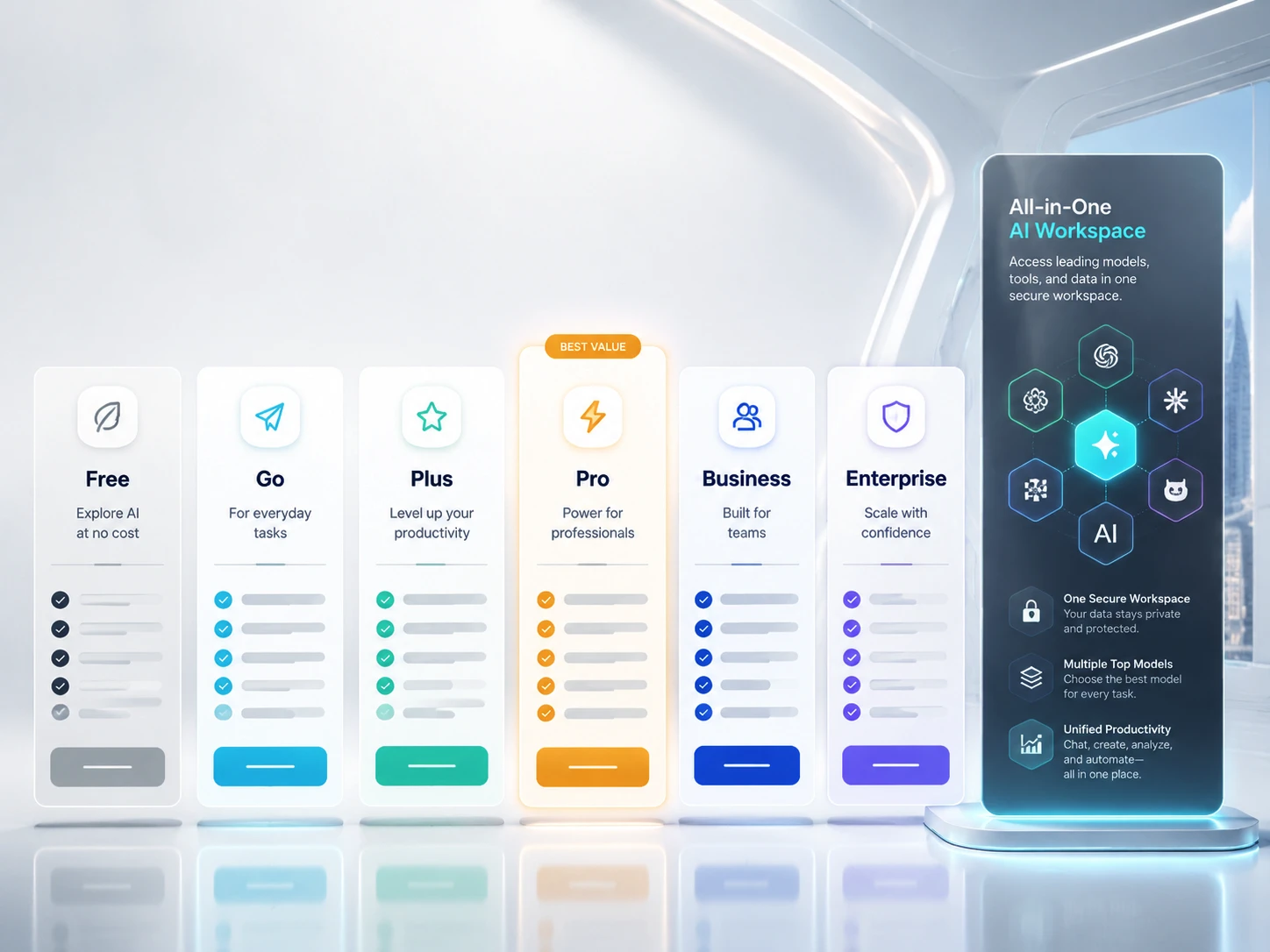
Se nel 2026 dovessi scegliere un abbonamento a ChatGPT, la scelta non si limiterebbe più semplicemente a “gratuito o a pagamento”.” I piani ora si differenziano per l'accesso ai modelli, il limite di utilizzo, la lunghezza del contesto, la creazione di immagini, la ricerca approfondita, l'accesso a Codex, i controlli del team e dal fatto che l'account sia destinato a una singola persona o a un'organizzazione.
La risposta è semplice: usa Gratuito per domande occasionali, Vai per conversazioni più lunghe a basso costo, ove disponibili, In più per la produttività quotidiana, Pro per attività di ricerca e programmazione complesse, Affari per gli spazi di lavoro di gruppo, e Impresa per la governance a livello aziendale. La soluzione migliore dipende meno dal logo presente nella pagina di pagamento e più dal limite specifico che si raggiunge per primo: messaggi, motivazioni, file, Codex, privacy o controllo amministrativo.
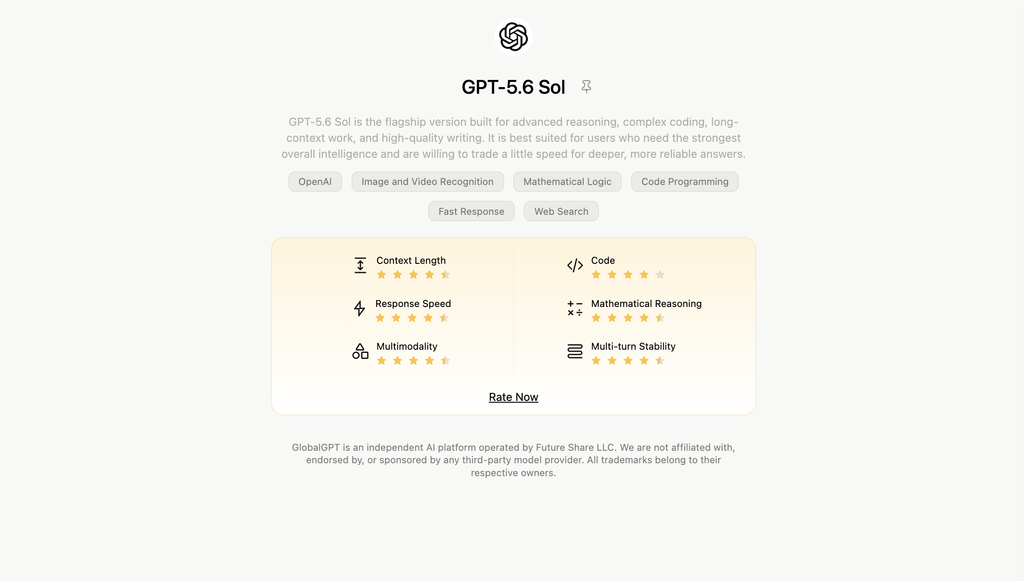
Se il tuo flusso di lavoro effettivo va oltre il solo ChatGPT, potrebbe essere utile anche uno spazio di lavoro multimodello. GlobalGPT offre agli utenti un unico account per GPT 5.6, Claude Opus 4.5, Gemini 3.5, Perplexity, strumenti per immagini e strumenti per video, con piani a partire da $5.8 al mese. Ciò non lo rende un sostituto dei controlli ufficiali Business o Enterprise di OpenAI, ma può rappresentare un’alternativa pratica per gli utenti stanchi di pagare diversi abbonamenti separati per l’IA.
Navigazione rapida
- Tabella comparativa dei piani di ChatGPT
- Cosa è cambiato nel 2026
- ChatGPT gratuito
- ChatGPT Go
- ChatGPT Plus
- ChatGPT Pro
- Modelli e contesto
- Business vs Enterprise
- Sora e ChatGPT
- Stanchezza da abbonamenti
- Alternativa a GlobalGPT
- Quale piano dovresti scegliere?
- FAQ
Tabella comparativa dei piani di ChatGPT 2026
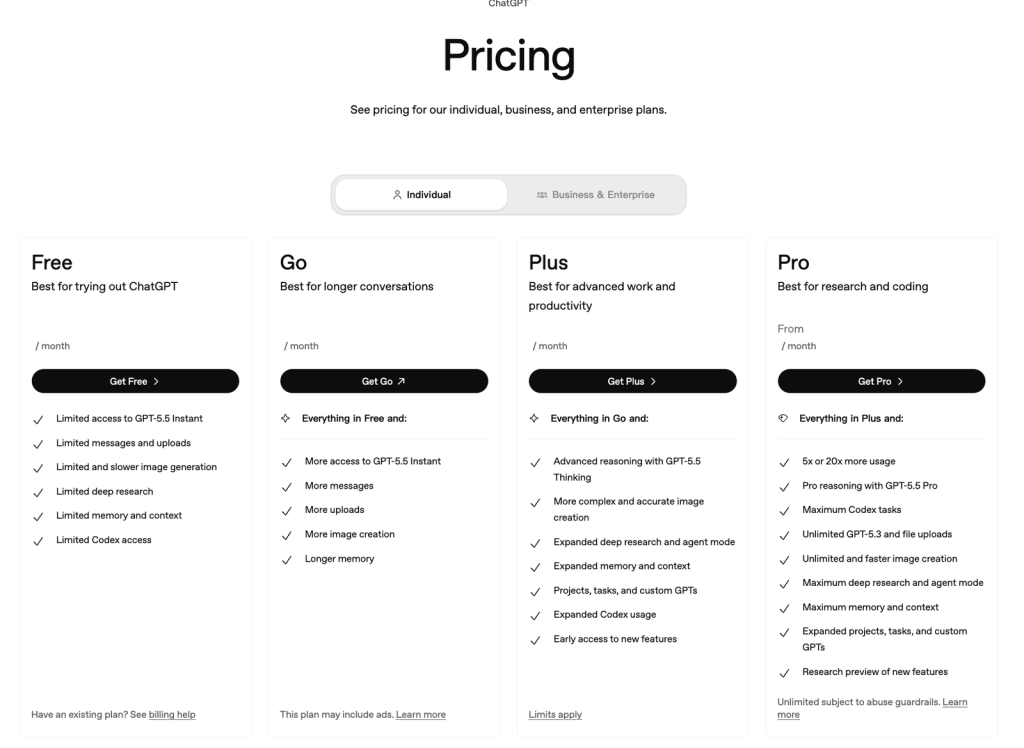
Ecco un confronto pratico tra i piani, prima di passare all'analisi dettagliata. I prezzi e la valuta possono variare a seconda del Paese, della modalità di fatturazione e del tipo di account, quindi ti consigliamo di controllare la pagina dei prezzi dal tuo account prima di effettuare l'acquisto.
| Piano | Il migliore per | Cosa si ottiene | Attenzione a |
|---|---|---|---|
| Gratuito | Provare ChatGPT o porre domande di tanto in tanto | Accesso limitato a GPT-5.5 Instant, limitazioni al caricamento di file, alla creazione di immagini, alla ricerca approfondita, alla memoria e all'accesso a Codex | I limiti di utilizzo vengono raggiunti rapidamente e gli utenti con account gratuiti potrebbero visualizzare annunci pubblicitari durante la fase di test pubblicitario di OpenAI |
| Vai | Utenti con un budget limitato che desiderano conversazioni informali più lunghe | GPT-5.5 Instant offre più vantaggi rispetto alla versione gratuita: più messaggi, più caricamenti, più creazione di immagini e una memoria più capiente | Non sblocca il livello completo di ragionamento, e gli account Go potrebbero essere inclusi nei test pubblicitari |
| In più | Scrittura quotidiana, studio, pianificazione, un po' di programmazione e produttività | Ragionamento avanzato con GPT-5.5 Thinking, creazione di immagini più complesse, ricerca approfondita ampliata e modalità agente, Progetti, Attività, GPT personalizzati e utilizzo esteso di Codex | I limiti rimangono in vigore, quindi le sessioni intense di ricerca o di programmazione possono comunque raggiungere un limite massimo |
| Pro | Ricerca approfondita, programmazione, sessioni prolungate e uso personale intensivo | Tutto ciò che è incluso nella versione Plus, oltre a un maggiore volume di utilizzo, accesso a GPT-5.5 Pro, numero massimo di attività Codex, ricerca approfondita e modalità agente senza limiti, e limiti di contesto più ampi | Si tratta ancora di un piano individuale, non di un prodotto completo per la governance del team |
| Affari | Team che necessitano di uno spazio di lavoro condiviso, di funzionalità di fatturazione e di controlli amministrativi | ChatGPT e Codex integrati in tutte le app, connettori, fatturazione centralizzata, controlli sulla spesa, SSO SAML e MFA, nonché dati aziendali non utilizzati per l'addestramento per impostazione predefinita | Il prezzo è da intendersi per utente e può essere indicato nella valuta locale; sono richiesti almeno due utenti |
| Impresa | Grandi organizzazioni con esigenze in materia di sicurezza, conformità e assistenza | Controlli aziendali quali SCIM, EKM, analisi dei dati, verifica del dominio, RBAC, supporto alla residenza dei dati, assistenza prioritaria, SLA, condizioni personalizzate e fatturazione | È necessario richiedere un preventivo personalizzato e contattare il responsabile delle vendite |
Cosa è cambiato negli abbonamenti a ChatGPT nel 2026?
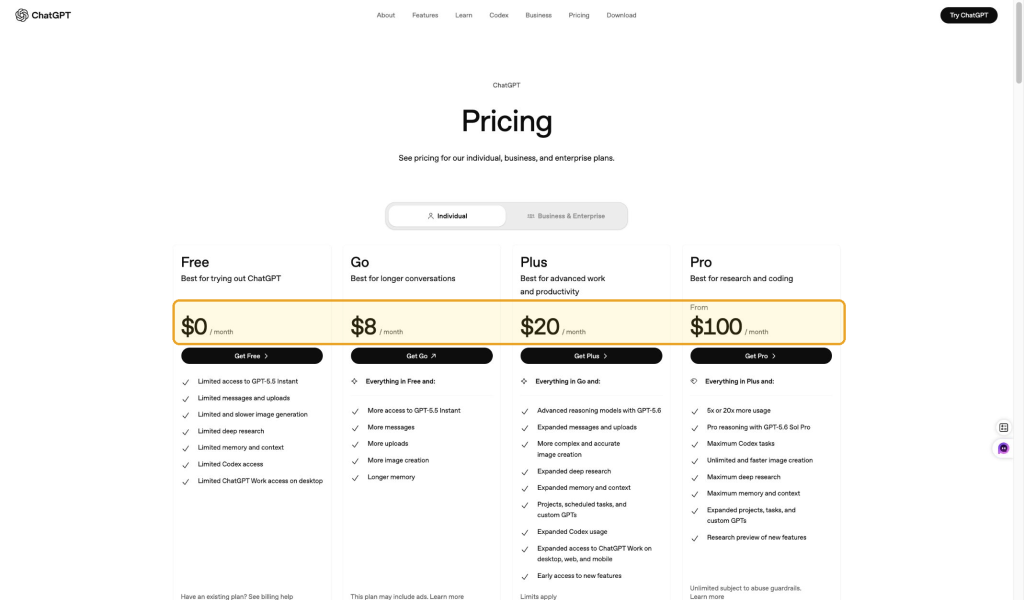
Il cambiamento più significativo del 2026 è che i piani ChatGPT sono ora distinti in modo più chiaro in base alla complessità del modello e al limite di utilizzo. I piani Free e Go sono più simili all’accesso immediato a GPT-5.5. Il piano Plus è pensato per attività quotidiane di livello avanzato con GPT-5.5 Thinking. Il piano Pro è destinato agli utenti che necessitano di un volume di utilizzo molto maggiore e dell’accesso a GPT-5.5 Pro.
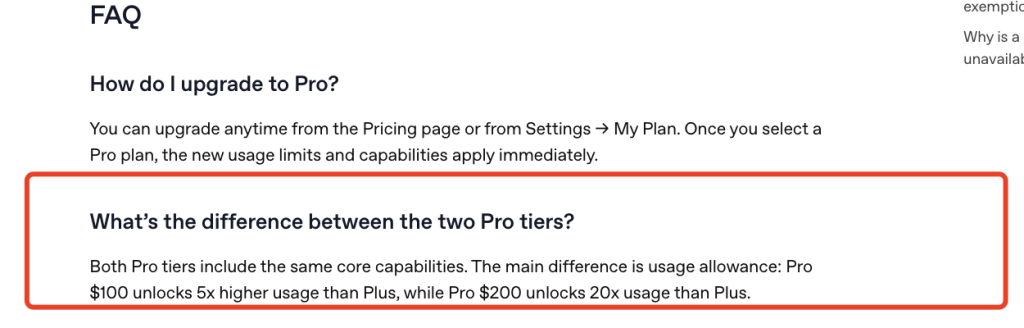
Il secondo cambiamento riguarda proprio Pro. Le FAQ di OpenAI su Pro indicano che i due livelli Pro includono le stesse funzionalità di base, ma differiscono per il limite di utilizzo: Pro $100 offre un limite di utilizzo 5 volte superiore rispetto a Plus, mentre Pro $200 offre un limite di utilizzo 20 volte superiore rispetto a Plus. Ciò significa che la scelta del piano Pro non si riduce più semplicemente a “$200 o niente”.
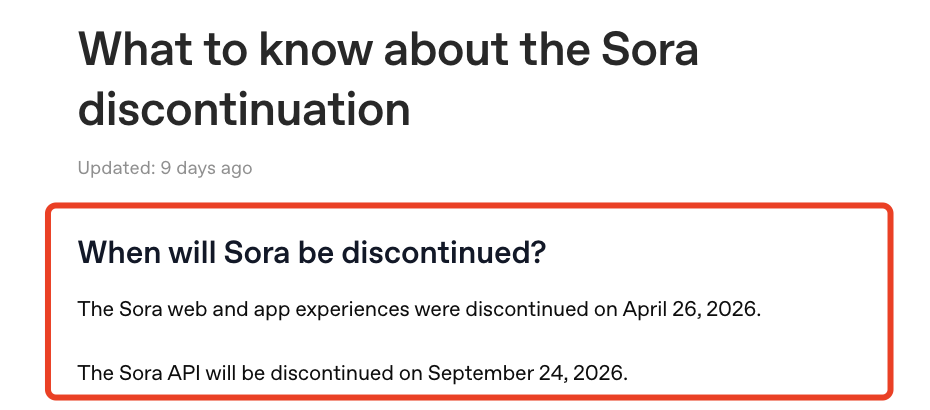
La terza novità riguarda Sora. La pagina di assistenza di OpenAI indica che i servizi web e l’app di Sora sono stati dismessi il 26 aprile 2026, mentre l’API di Sora verrà dismessa il 24 settembre 2026. Questo è importante perché nei confronti tra i vecchi abbonamenti Sora veniva spesso indicato come motivo per acquistare ChatGPT Plus o Pro. Nel 2026, il consiglio più prudente è quello di scegliere un piano ChatGPT per testo, ragionamento, ricerca, file, creazione di immagini, Codex e controlli di gruppo – non perché ci si aspetti che l’accesso a Sora via web o app sia un vantaggio permanente dell’abbonamento.
ChatGPT gratuito: l'ideale per un uso occasionale
ChatGPT Free rimane comunque il punto di partenza ideale se si pongono domande solo occasionalmente, si riassumono testi brevi, si provano prompt o si vuole verificare se ChatGPT si adatta al proprio flusso di lavoro. Offre un accesso limitato a GPT-5.5 Instant, un numero limitato di messaggi e upload, una generazione di immagini più lenta o più limitata, ricerche approfondite limitate, memoria e contesto limitati e accesso limitato a Codex.
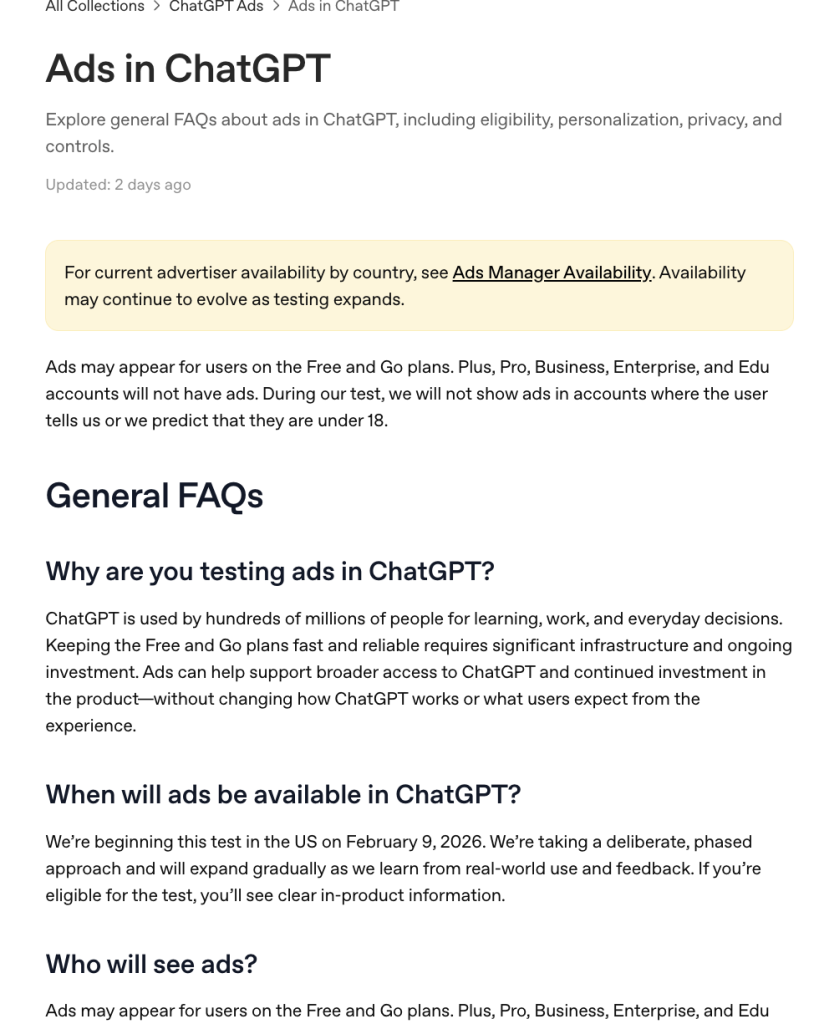
Il compromesso è semplice: la versione Free è utile finché non si raggiungono i limiti. Se ChatGPT fa parte del tuo lavoro quotidiano, dei tuoi studi, della tua attività di scrittura, ricerca o programmazione, la versione gratuita ti sembrerà spesso limitata. OpenAI precisa inoltre che, durante la fase di test pubblicitario, potrebbero apparire annunci pubblicitari per gli utenti dei piani Free e Go, mentre gli account Plus, Pro, Business, Enterprise ed Edu non ne saranno interessati.
ChatGPT Go: un piano economico con limiti reali
ChatGPT Go è il livello di abbonamento immediatamente superiore a quello gratuito nei mercati in cui è disponibile. È l'opzione ideale per gli utenti che desiderano un maggior numero di messaggi, più caricamenti, più creazione di immagini, una memoria più capiente e un accesso più ampio a GPT-5.5 Instant senza dover passare direttamente al piano Plus. Se stai principalmente cercando di capire se valga la pena passare a un abbonamento a pagamento, questo Confronto tra ChatGPT Go e la versione gratuita è il "Cleaner" che verrà letto successivamente.
Il limite fondamentale è la profondità del modello. Go non è la scelta giusta se avete bisogno di GPT-5.5 per ragionamenti complessi, programmazione avanzata, lunghi lavori analitici o ricerca avanzata. Può essere una buona soluzione per studenti, scrittori occasionali e utenti comuni che desiderano principalmente un accesso più fluido alla chat. Se state decidendo tra Go e altre opzioni a basso costo, il separato Recensione di ChatGPT Go è un'ulteriore lettura utile.
ChatGPT Plus: la scelta migliore per gli utenti quotidiani
ChatGPT Plus rimane la scelta più semplice per la maggior parte degli utenti privati che desiderano utilizzare ChatGPT come assistente quotidiano. Offre funzionalità avanzate di ragionamento grazie a GPT-5.5 Thinking, creazione di immagini più complesse e accurate, ricerca approfondita e modalità agente potenziate, memoria e contesto ampliati, Progetti, Attività, GPT personalizzati, utilizzo esteso di Codex e accesso anticipato alle nuove funzionalità.
Il piano Plus è quello da scegliere se il tuo lavoro prevede attività di scrittura, pianificazione, studio, pulizia dei dati, brainstorming, programmazione leggera o attività di ricerca ricorrenti. Il punto debole è che si tratta comunque di un piano personale con un limite massimo. Se la tua giornata prevede lunghe sessioni di programmazione, analisi ripetute di file o cicli di ricerca intensi, il piano Plus può sembrare adeguato ma non illimitato. Se speri che un’opzione annuale riduca il costo mensile, consulta la sezione dedicata Sconto sull'abbonamento annuale a ChatGPT Plus Analizza la situazione prima di aspettare l'offerta annuale.
ChatGPT Pro: per ricerche approfondite e programmazione
ChatGPT Pro è pensato per chi sa già di aver raggiunto i limiti della versione Plus. Offre un limite di utilizzo molto più elevato, accesso a GPT-5.5 Pro, il numero massimo di attività Codex, GPT-5.3 e caricamenti di file illimitati, creazione di immagini illimitata e più veloce, ricerca approfondita e modalità agente al massimo livello, memoria e contesto massimi, oltre a progetti, attività e GPT personalizzati ampliati.
La scelta del piano Pro dovrebbe basarsi sul carico di utilizzo, non sullo status. Se desideri semplicemente ottenere risposte migliori di tanto in tanto, il piano Plus è solitamente sufficiente. Se ChatGPT fa parte della tua attività professionale di ricerca, programmazione, analisi o lavoro con i clienti per l’intera giornata, il piano Pro può essere la scelta giusta. Le FAQ di OpenAI indicano che il piano Pro $100 offre un volume di utilizzo 5 volte superiore rispetto a Plus, mentre il piano $200 offre un volume di utilizzo 20 volte superiore rispetto a Plus. Se si confronta il piano a pagamento più economico con il piano personale di fascia più alta, il ChatGPT Go vs Pro L'analisi dettagliata rappresenta un confronto più diretto.
Accesso ai modelli e differenze di contesto
È nella tabella dei modelli che le differenze tra i piani risultano più evidenti. I piani Free e Go includono GPT-5.5 Instant, mentre GPT-5.5 Thinking è disponibile a partire dal piano Plus. GPT-5.5 Pro è riservato al piano Pro. Anche le finestre di contesto aumentano con l’aumentare del livello del piano, con il piano Pro che offre i limiti più elevati, come illustrato nella tabella dei prezzi allegata.
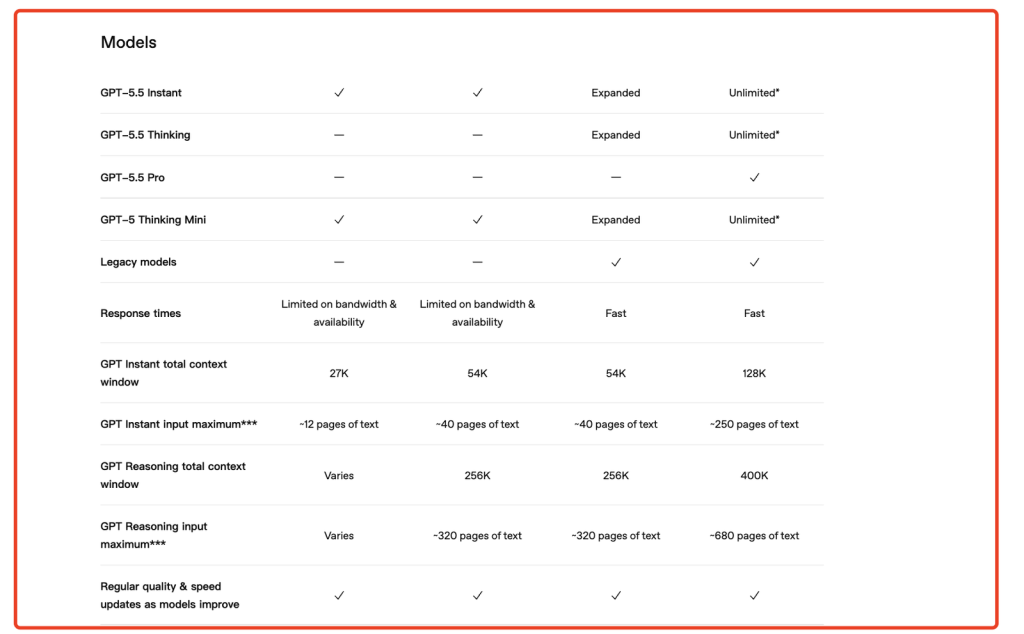
Per gli utenti comuni, la domanda fondamentale è se GPT-5.5 Thinking sia davvero necessario. Se vi limitate principalmente a scrivere e-mail, riordinare appunti, porre domande e riassumere testi brevi, la versione Instant potrebbe essere sufficiente. Se invece avete bisogno di una pianificazione più approfondita, di assistenza nella programmazione, di ragionamenti matematici o di analisi in più fasi, la versione Plus rappresenta la scelta più pratica.
ChatGPT Business vs Enterprise
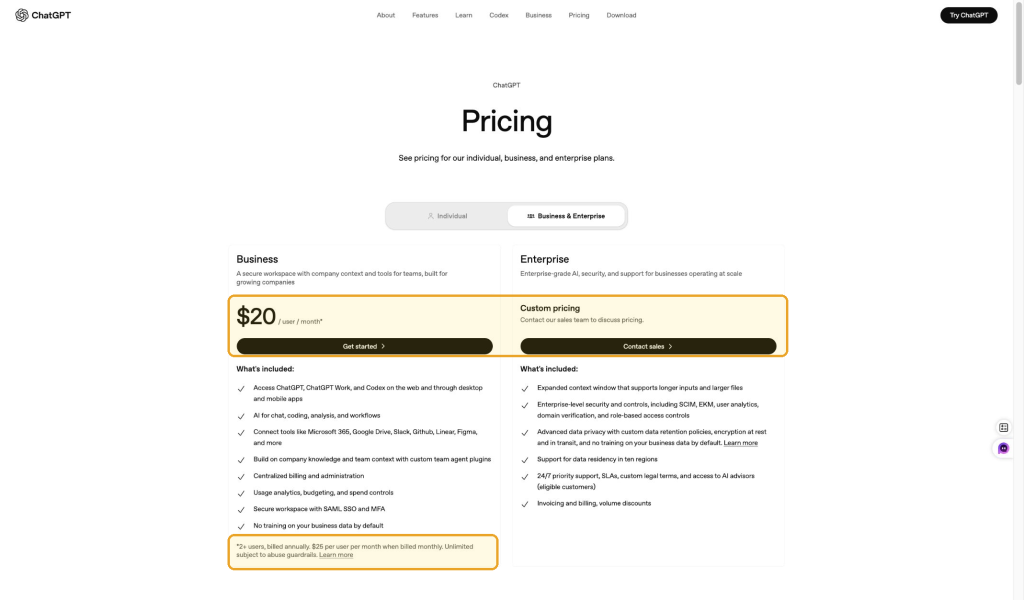
Business ed Enterprise non sono semplicemente una versione “migliorata” di Plus. Sono pensati per le organizzazioni. Business è pensato per i team che necessitano di uno spazio di lavoro condiviso e sicuro, un contesto aziendale, connettori, fatturazione centralizzata, gestione degli utenti, SSO SAML e MFA, analisi dell’utilizzo, definizione del budget, controlli sulla spesa e dati aziendali che, per impostazione predefinita, non vengono utilizzati a fini formativi.
Enterprise amplia queste funzionalità con una governance su scala più ampia: contesto esteso, controlli di sicurezza aziendali, SCIM, EKM, analisi degli utenti, verifica del dominio, controlli di accesso basati sui ruoli, supporto alla residenza dei dati, politiche di conservazione personalizzate, crittografia, assistenza prioritaria, SLA, termini legali personalizzati, sconti sul volume e fatturazione.
Se stai scegliendo un'azienda, il confronto più appropriato non è tra Plus e Pro. È piuttosto ChatGPT Plus vs Business, poiché i fattori determinanti sono la gestione dello spazio di lavoro, la gestione dei dati, la fatturazione, la sicurezza e l'amministrazione.
ChatGPT include ancora Sora?
Non scegliere un abbonamento a ChatGPT nel 2026 se ti aspetti di poter accedere a Sora tramite web o app. La pagina di assistenza di OpenAI indica che i servizi web e l'app di Sora sono stati dismessi il 26 aprile 2026 e che l'API di Sora verrà dismessa il 24 settembre 2026. Ciò rende la disponibilità di Sora una questione a sé stante, non un chiaro punto di forza per distinguere il piano Plus da quello Pro.
Se il tuo obiettivo è la creazione di video basati sull'intelligenza artificiale, verifica quali strumenti video sono disponibili nel prodotto che intendi acquistare. GlobalGPT, ad esempio, offre diversi strumenti per video e immagini nella propria area di lavoro, ma la gamma di modelli e le regole di accesso possono subire variazioni. Per ulteriori informazioni su questo cambiamento, consulta questa spiegazione di Perché Sora è scomparso da ChatGPT.
Il problema della "stanchezza da abbonamento"
Nel 2026, un problema sempre più diffuso è l’accumulo di abbonamenti. Un utente assiduo potrebbe ritrovarsi a pagare per ChatGPT, Claude, Gemini, Perplexity, un generatore di immagini e un generatore di video solo per coprire le proprie esigenze di scrittura, programmazione, ricerca, progettazione e lavoro creativo. Il costo mensile si accumula e il flusso di lavoro finisce per essere frammentato tra schede, accessi, pagine di fatturazione e sistemi di utilizzo. Se Claude fa parte del tuo stack, il separato Guida ai prezzi di Claude AI ti aiuta a valutare se valga la pena aggiungere un altro piano autonomo.
Ecco perché le piattaforme multimodello stanno diventando sempre più interessanti. Se si confronta ChatGPT con altri strumenti, un elenco più ampio di Alternative a ChatGPT può aiutarti a decidere se ti serve un abbonamento standard o uno spazio di lavoro più ampio.
GlobalGPT: un'alternativa "tutto in uno" più snella
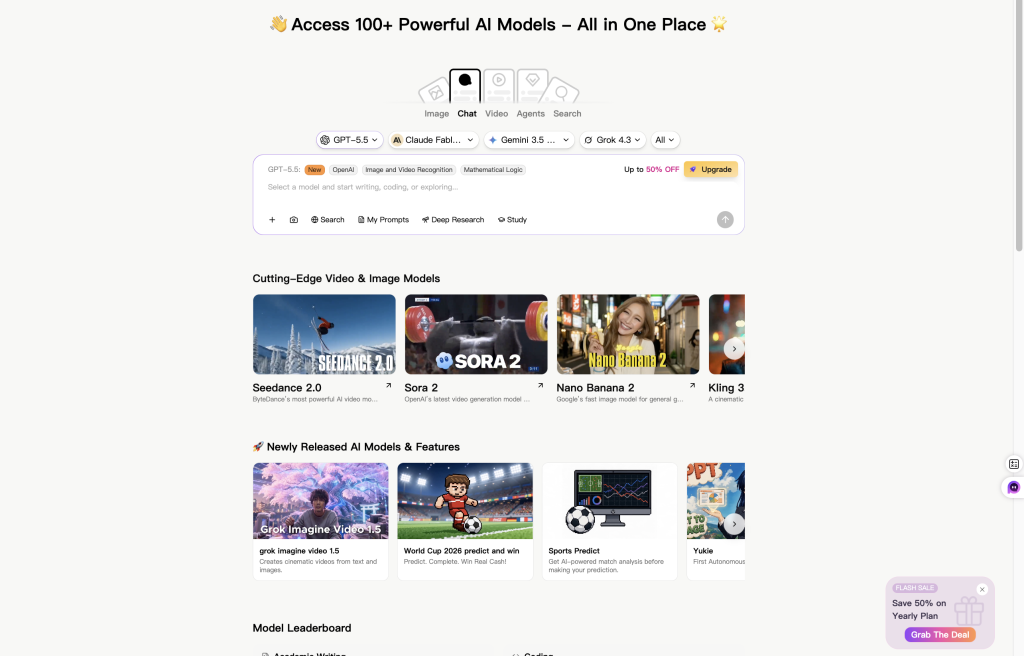
GlobalGPT è utile quando il tuo lavoro non si limita a ChatGPT. Offre agli utenti un'area di lavoro per GPT-5.5, Claude, Gemini, ricerca in stile Perplexity, strumenti per immagini, strumenti per video e altri modelli di IA. In pratica, ciò significa che puoi passare da un modello all’altro per la scrittura, la ricerca, la programmazione, la sintesi, la generazione di immagini e i flussi di lavoro video senza dover acquistare separatamente ogni abbonamento ufficiale.
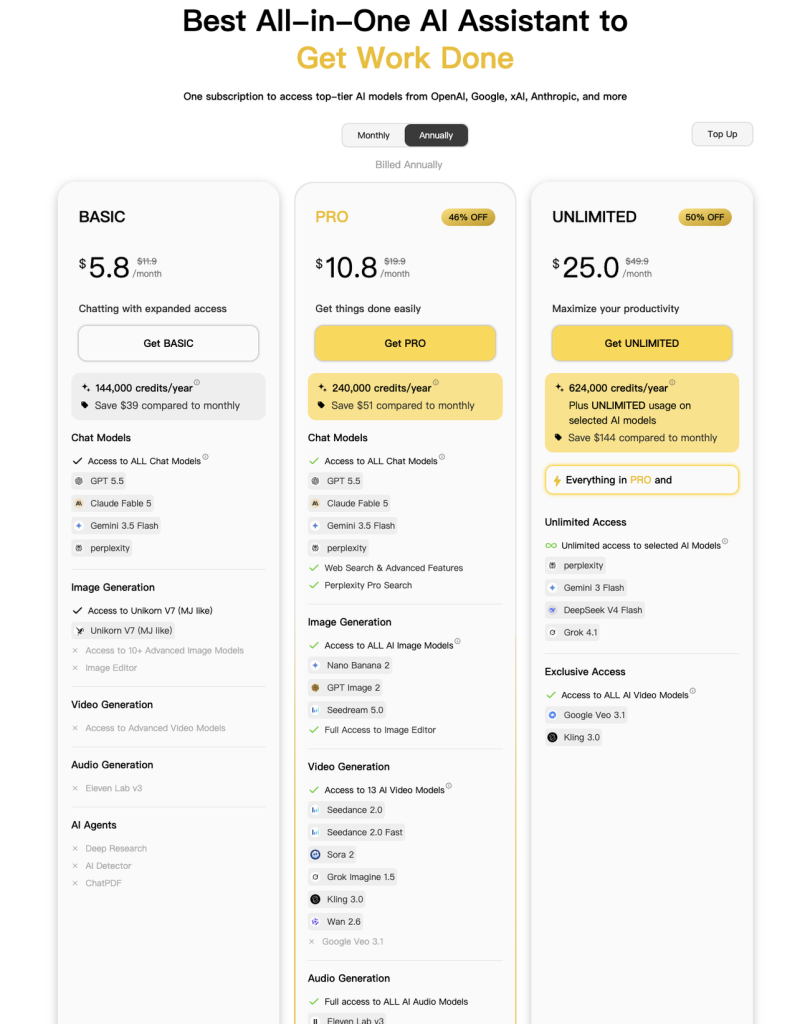
La differenza di prezzo è l’elemento di richiamo più evidente. Nella pagina dei prezzi che abbiamo acquisito, GlobalGPT propone un piano Basic a partire da $5,8 al mese, un piano Pro a $10,8 al mese e un piano Unlimited a $25 al mese. Questa offerta può risultare più allettante rispetto al pagamento separato di ChatGPT, Claude, Perplexity, strumenti per immagini e strumenti per video. Se ChatGPT Go è il vostro punto di riferimento in termini di budget, questo elenco di alternative più economiche a ChatGPT Go fornisce un contesto più economico
È importante chiarire i confini. GlobalGPT non è OpenAI e non sostituisce ChatGPT Business, la governance Enterprise, la fatturazione ufficiale delle API di OpenAI né i controlli amministrativi specifici per account. È meglio considerarlo come uno spazio di lavoro pratico e quotidiano per chi desidera accedere a diversi modelli all’avanguardia e strumenti creativi con un unico abbonamento.
Quale piano ChatGPT dovresti scegliere?
- Scegli "Gratis" se fai domande solo di tanto in tanto e non ti dispiacciono i limiti rigidi.
- Scegli "Vai" se desideri un piano più economico per conversazioni informali più lunghe, più caricamenti e più creazione di immagini, ma non hai bisogno di tutte le funzionalità di ragionamento.
- Scegli Plus se utilizzi ChatGPT quotidianamente per scrivere, studiare, pianificare, scrivere codice semplice, creare immagini, fare ricerche o migliorare la tua produttività.
- Scegli Pro Se hai già raggiunto i limiti della versione Plus e hai bisogno di un livello di utilizzo molto più elevato, GPT-5.5 Pro ti offre un contesto più ampio, il numero massimo di attività Codex e una maggiore capacità di ricerca o di programmazione.
- Scegli "Azienda" se il tuo team ha bisogno di controlli sugli spazi di lavoro condivisi, funzioni di amministrazione, connettori, fatturazione, SSO, MFA e dati aziendali che per impostazione predefinita non vengono utilizzati per la formazione.
- Scegli Enterprise se la vostra organizzazione necessita di soluzioni di sicurezza personalizzate, SCIM, EKM, residenza dei dati, accesso basato sui ruoli, condizioni legali personalizzate, SLA e assistenza negli appalti.
- Scegli GlobalGPT se il tuo problema principale è la proliferazione degli abbonamenti e desideri un unico spazio di lavoro più intuitivo per GPT, Claude, Gemini, ricerche in stile Perplexity e strumenti per immagini e video.
Domande frequenti
Vale la pena acquistare l'ChatGPT Plus nel 2026?
Di solito vale la pena prendere in considerazione Plus quando si utilizza ChatGPT quasi tutti i giorni e i limiti di Free ostacolano lo svolgimento delle attività concrete. È invece meno interessante per chi pone domande solo occasionalmente o per gli utenti che necessitano principalmente di funzionalità di amministrazione del team piuttosto che di funzionalità individuali.
ChatGPT Pro è illimitato?
Non interpretare un abbonamento di fascia alta come un utilizzo illimitato. I piani possono comunque prevedere limiti di utilizzo equo, di sicurezza, di prevenzione degli abusi, specifici per determinate funzionalità e limiti temporanei di capacità. Consulta i termini ufficiali vigenti e la scheda del piano.
ChatGPT Plus include crediti API?
Gli abbonamenti n. ChatGPT e la fatturazione relativa alle API sono distinti. L'utilizzo delle API viene addebitato in base all'account API e alla relativa struttura tariffaria.
Posso usufruire di uno sconto annuale su ChatGPT Plus?
Controlla la pagina di pagamento visualizzata nel tuo account. Non dare per scontato che esista un’opzione annuale o uno sconto solo perché un articolo di una fonte esterna ne parla; le opzioni di fatturazione possono variare a seconda del piano, dell’account e della regione.
Qual è il piano più adatto per un piccolo team?
Il livello Business è quello da prendere in considerazione quando le esigenze comprendono spazi di lavoro condivisi, fatturazione centralizzata, gestione degli utenti o controlli sui dati aziendali. Un insieme di account personali Plus o Pro non offre lo stesso livello di gestione.