
Anda tidak perlu membuat akun Nano Banana Pro terpisah. Nano Banana Pro adalah model pembuat gambar dari Google, jadi cara yang umum dilakukan adalah masuk menggunakan akun Google dan membukanya melalui produk Google yang didukung.
Perbedaan ini penting karena banyak situs web menggunakan “Nano Banana” dalam namanya, padahal bukan produk Google. Jika sebuah halaman meminta Anda untuk membuat nama pengguna Nano Banana terpisah, pastikan terlebih dahulu siapa yang mengoperasikan layanan tersebut sebelum memasukkan rincian pembayaran. Jalur akses resmi Google sendiri menggunakan akun Google yang sudah Anda miliki.
Jawaban singkat
Masuk menggunakan akun Google untuk menggunakan Nano Banana Pro melalui Gemini atau produk Google lain yang didukung. Jika Anda menggunakan generator khusus GlobalGPT, silakan masuk menggunakan akun GlobalGPT. Tidak ada alur pendaftaran resmi yang berdiri sendiri untuk nama pengguna, profil, atau OTP Nano Banana Pro.
Untuk alur kerja pembuatan gambar yang lebih langsung, Generator Nano Banana Pro dari GlobalGPT menempatkan model tersebut di dalam ruang kerja yang sama dengan alat-alat gambar, teks, video, dan audio lainnya. Ini merupakan jalur akun GlobalGPT, bukan pendaftaran Google Nano Banana yang terpisah.

Apakah Anda Membutuhkan Akun Nano Banana Pro Terpisah?
Tidak. Google menjelaskan Nano Banana Pro sebagai model pembuat dan pengedit gambar yang didukung oleh Gemini 3 Pro, bukan sebagai layanan mandiri dengan sistem akun tersendiri. Untuk akses pengguna umum, akun yang Anda perlukan biasanya adalah akun Google. Untuk mengakses GlobalGPT, Anda menggunakan akun GlobalGPT.
Artinya, tidak ada nama pengguna resmi Nano Banana Pro yang perlu didaftarkan, tidak ada profil terpisah yang perlu diisi, dan tidak ada proses OTP khusus untuk Nano Banana. Produk Google mungkin tetap meminta Anda untuk masuk, menyetujui syarat dan ketentuannya, mengonfirmasi usia Anda, atau memenuhi persyaratan regional dan paket layanan.
- Akun Google pribadi untuk Gemini dan Google AI Mode.
- Akun Workspace yang memenuhi syarat untuk fitur-fitur Workspace yang didukung.
- Pengaturan proyek dan penagihan Google Cloud hanya diperlukan jika Anda memilih jalur pengembang.
- Akun GlobalGPT jika Anda ingin menggunakan model tersebut di ruang kerja gambar GlobalGPT.
Cara Mendapatkan Nano Banana Pro Melalui Aplikasi Gemini
Bagi kebanyakan orang, Gemini merupakan titik awal resmi yang paling sederhana. Panduan akses Google edisi Desember 2025 menjelaskan rute berikut ini:
- Buka Gemini: Kunjungi aplikasi web Gemini di desktop atau buka aplikasi seluler Gemini.
- Masuk: Gunakan akun Google Anda. Anda sedang masuk ke Gemini, bukan membuat akun Nano Banana yang terpisah.
- Pilih pembuatan gambar: Pilih Membuat gambar.
- Pilih opsi gambar lanjutan: Di antarmuka peluncuran Google, fitur ini diberi label sebagai Berpikir model. Label antarmuka dapat berubah, jadi gunakan model atau opsi yang diidentifikasi oleh Google sebagai Nano Banana Pro.
- Masukkan perintah Anda: Jelaskan gambar yang ingin Anda buat atau unggah gambar saat antarmuka menawarkan fitur pengeditan.
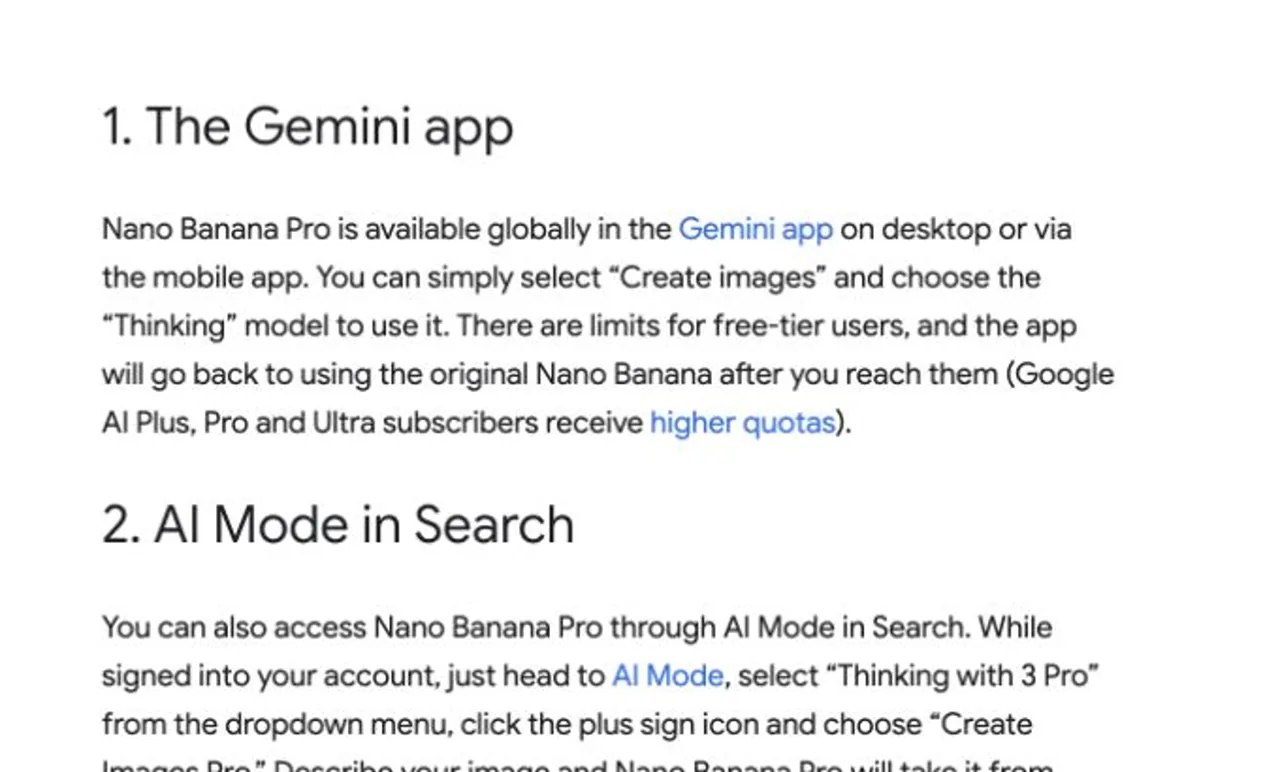
Dokumentasi paket terbaru dari Google memisahkan fitur pembuatan gambar standar dari beberapa fitur Nano Banana Pro. Jika opsi tersebut tidak tersedia atau proses pembuatan gambar dialihkan ke model lain, periksa detail paket dan pesan penggunaan yang ditampilkan di akun Gemini Anda sendiri, alih-alih berasumsi bahwa model tersebut tidak tersedia di mana pun.
Jalur Akses Resmi Google Lainnya
Google mencantumkan Nano Banana Pro di berbagai produknya. Pilihan yang tepat bergantung pada apakah Anda sedang membuat satu gambar, menyusun presentasi, bekerja di dalam akun perusahaan, atau mengintegrasikan model tersebut ke dalam perangkat lunak.
Matriks Keputusan Rute Akses Nano Banana Pro
Pilih jalur berdasarkan jenis akun dan tugas yang perlu Anda selesaikan.
Aplikasi Gemini AWAL YANG PALING MUDAH
Akun: Google
Terbaik untuk: Pembuatan gambar sehari-hari
Kondisi: Akses dan batasan bergantung pada akun dan paket yang aktif.
Mode AI dalam Pencarian
Akun: Google
Terbaik untuk: Gambar-gambar selama penelitian
Kondisi: Hanya tersedia di negara dan bahasa yang didukung.
NotebookLM
Akun: Google
Terbaik untuk: Dek dan infografik yang bersumber dari data aktual
Kondisi: Digunakan dalam fitur-fitur NotebookLM yang didukung.
Alat-alat ruang kerja
Akun: Ruang Kerja yang Memenuhi Syarat
Terbaik untuk: Alur kerja Slide dan Video
Kondisi: Berlaku rencana organisasi dan aturan akses.
Aliran PAKET BERBAYAR
Akun: Paket Flow berbayar di Google+
Terbaik untuk: Pembuatan film dan desain adegan
Kondisi: Google mencantumkan Nano Banana Pro dalam daftar paket Flow berbayar.
Studio AI / Vertex AI PENGEMBANG
Akun: Pengembang atau Konfigurasi Awan
Terbaik untuk: Integrasi API dan produksi
Kondisi: Berlaku ketentuan terpisah terkait penagihan, kuota, dan siklus hidup.
Sumber: Cari di Google, “Inilah tempat-tempat di mana Anda bisa menggunakan Nano Banana Pro”. Diperiksa pada 28 Juli 2026.
Matriks ini menunjukkan mengapa Gemini menjadi pilihan default bagi sebagian besar pengguna baru: opsi ini hanya memerlukan akun Google dan menjaga alur kerja tetap berada di dalam aplikasi konsumen. Workspace, Flow, dan jalur pengembang menambahkan persyaratan terkait kelayakan, paket, penagihan, atau administrasi.
Menggunakan Nano Banana Pro di Google AI Studio
Google AI Studio merupakan opsi yang ditujukan bagi para pengembang. Fitur ini berguna jika Anda memerlukan akses API, pengaturan yang dapat diulang, atau integrasi aplikasi. Masuk ke AI Studio tidak sama dengan berlangganan paket Gemini untuk konsumen. Penagihan API dan kuota dikelola secara terpisah, jadi pastikan untuk membaca dokumentasi harga terkini dan model dari Google sebelum mengaktifkan penagihan.
Jika Anda hanya ingin menampilkan gambar di peramban, Gemini atau GlobalGPT biasanya lebih mudah. Untuk detail implementasinya, lihat dokumen terpisah Panduan API Nano Banana Pro.
Cara Membuat Akun Nano Banana Pro (Panduan Pendaftaran Langkah demi Langkah)
Langkah 1: Buka Halaman Utama Gemini
Setelah masuk ke Gemini, Anda akan melihat:
- Pesan selamat datang
- A Kotak pencarian besar
- Deretan pintasan alat di bawahnya (misalnya: “Membuat gambar”, “Membuat video”, “Bantu saya belajar”, dll.)
Nano Banana Pro muncul di baris yang sama.

Langkah 2: Ketuk “Nano Banana Pro”
Cukup klik atau ketuk Nano Pisang Pro ikon untuk membukanya.
Tidak diperlukan login tambahan atau pendaftaran terpisah.

Langkah 3: Berikan Izin (Hanya jika diminta)
Jika ini adalah kali pertama Anda Menggunakan Nano Banana Pro, Gemini mungkin menampilkan pesan yang meminta Anda untuk:
- Setujui syarat dan ketentuan alat
- Izinkan izin yang diperlukan
Ketuk “Izinkan” atau “Lanjutkan” untuk melanjutkan.
Langkah 4: Mulai Menggunakan Nano Banana Pro
Anda sekarang dapat menggunakan Nano Banana Pro langsung di dalam Gemini:
- Jalankan tugas
- Buat konten
- Akses semua fitur yang tersedia
Semua berfungsi dengan lancar tanpa perlu meninggalkan lingkungan Gemini.
Cara Menggunakan Nano Banana Pro pada GlobalGPT
GlobalGPT menyediakan opsi Nano Banana Pro khusus dalam generator gambarnya. Fitur ini berguna jika Anda ingin membuat gambar di dalam ruang kerja AI yang lebih luas, alih-alih berpindah-pindah antar alat yang terpisah.
- Buka aplikasi Generator Gambar Nano Banana Pro.
- Masuk ke akun GlobalGPT Anda atau buat akun baru saat diminta.
- Pastikan bahwa Nano Pisang Pro adalah model gambar yang dipilih.
- Masukkan perintah Anda dan pilih pengaturan gambar yang tersedia untuk tugas Anda.
- Buat gambar tersebut dan periksa hasilnya sebelum mengunduh atau melanjutkan alur kerja.
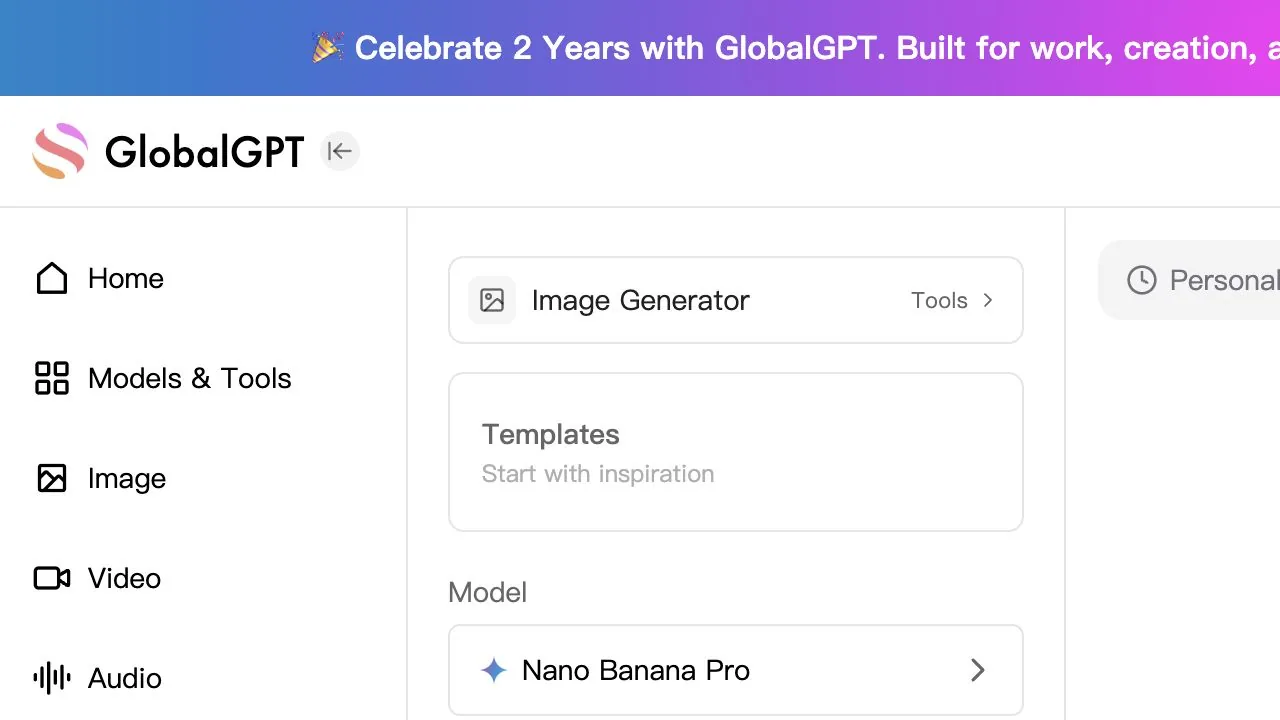
Rute ini menggunakan sistem akun dan paket milik GlobalGPT sendiri. Rute ini tidak membuat akun Google atau memberikan akses ke semua fitur di dalam produk-produk Google seperti Gemini, Workspace, Flow, atau produk-produk pengembang.
Apakah Nano Banana Pro gratis?
Tidak ada jawaban tunggal “ya” atau “tidak” yang berlaku untuk semua jalur akses. Panduan peluncuran Google menyebutkan bahwa pengguna paket gratis Gemini memiliki akses terbatas dan akan kembali ke paket asli Nano Banana setelah mencapai batas, sementara pelanggan Google AI mendapatkan kuota yang lebih tinggi. Tabel paket Google telah mengalami perubahan sejak saat itu, sehingga pemberitahuan langsung di akun Anda adalah sumber terbaik untuk mengetahui kuota pasti Anda.
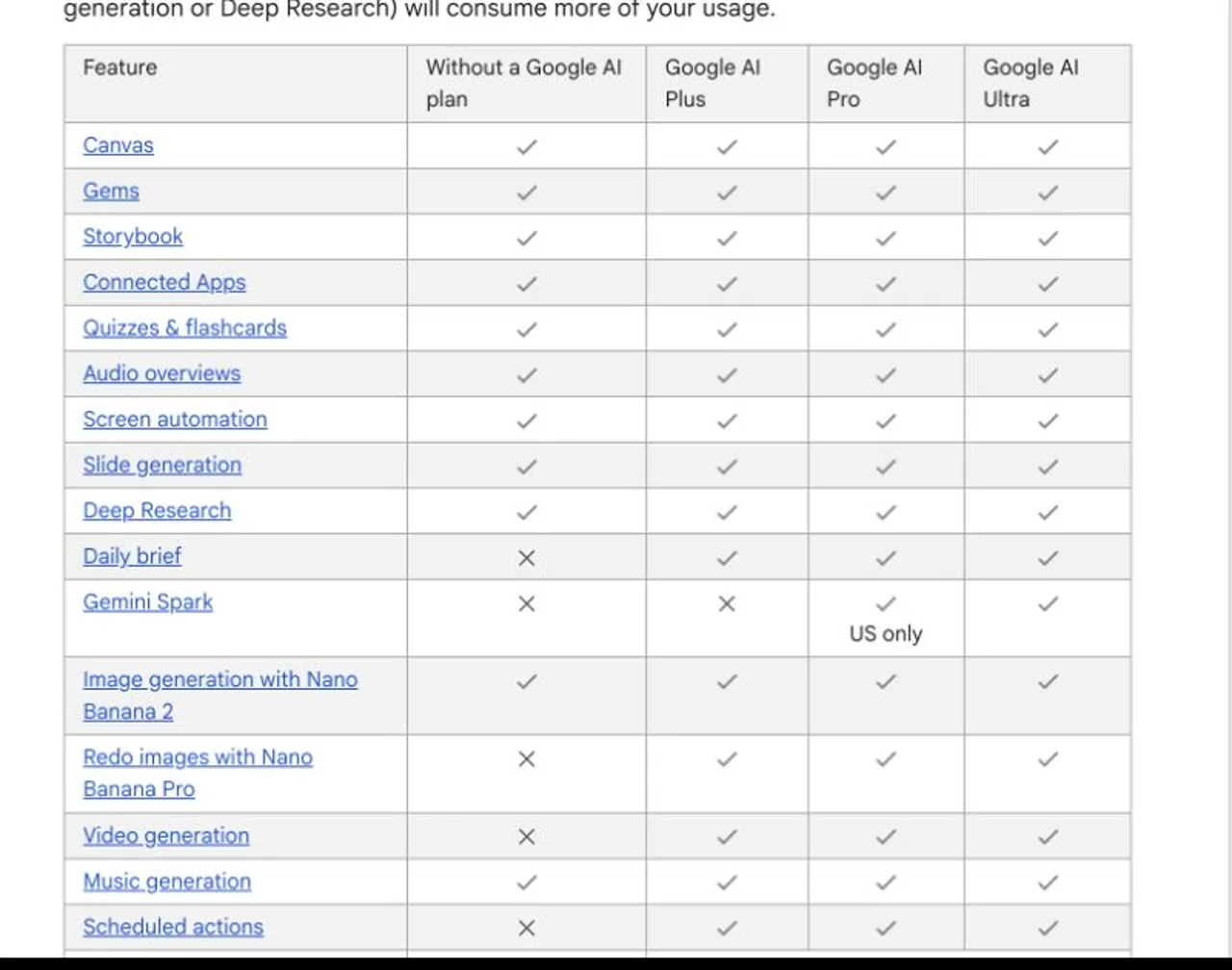
Penggunaan Google AI Studio dan API mengikuti aturan harga dan kuota untuk pengembang, bukan aturan langganan untuk konsumen. GlobalGPT menggunakan sistem paket dan kreditnya sendiri yang transparan. Bandingkan opsi yang benar-benar ingin Anda gunakan, alih-alih menganggap “harga Nano Banana Pro” sebagai satu langganan universal.
Untuk uraian terperinci, baca Perbedaan antara langganan dan akses Nano Banana Pro. Jika prioritas Anda adalah mencobanya terlebih dahulu sebelum membayar, panduan terpisah mengenai Akses gratis ke Nano Banana Pro menjelaskan pilihan-pilihan yang ada saat ini.
Mengapa Anda Tidak Dapat Melihat Nano Banana Pro?
Anda sedang mencari halaman pendaftaran tersendiri
Kembali ke produk Google yang didukung atau generator gambar GlobalGPT. Situs pihak ketiga yang menggunakan “Nano Banana” dalam domainnya tidak secara otomatis merupakan halaman pendaftaran resmi Google.
Opsi model tidak tersedia pada Gemini
Pastikan Anda sudah masuk menggunakan akun Google yang dimaksud, lalu buka antarmuka pembuatan gambar. Jenis akun, usia, wilayah, paket, kuota, dan perubahan antarmuka yang sedang dalam tahap uji coba dapat memengaruhi tampilan yang Anda lihat.
Gemini beralih ke model gambar lain
Anda mungkin telah mencapai batas paket, atau Google mungkin telah mengubah label opsi tersebut. Bacalah pesan yang ditampilkan di Gemini dan bandingkan dengan dokumentasi paket terbaru dari Google.
Akun kerja atau sekolah Anda tidak menampilkan fitur tersebut
Akses ke ruang kerja mungkin bergantung pada paket langganan organisasi dan pengaturan yang ditetapkan oleh administrator. Gunakan akun pribadi hanya jika hal tersebut sesuai dengan materi yang Anda gunakan; jangan pernah memindahkan berkas rahasia perusahaan ke akun pribadi tanpa izin.
Anda memerlukan alur kerja seluler
Logika inti akunnya sama baik di desktop maupun di perangkat seluler, tetapi letak menunya mungkin berbeda. Hal ini Panduan Mobile Nano Banana Pro membahas antarmuka tersebut secara terpisah.
Pertanyaan yang Sering Diajukan
Bagaimana cara membuat akun Nano Banana Pro?
Anda tidak dapat membuat akun Nano Banana Pro yang berdiri sendiri. Silakan masuk menggunakan akun Google untuk menggunakan produk Google yang didukung, atau gunakan akun GlobalGPT untuk generator gambar Nano Banana Pro khusus dari GlobalGPT.
Apa situs web resmi Nano Banana Pro?
Google tidak menampilkan Nano Banana Pro sebagai satu situs web konsumen yang berdiri sendiri. Akses resmi tersebar di berbagai produk seperti Gemini, Mode AI di Pencarian, NotebookLM, Workspace, Flow, AI Studio, dan Vertex AI.
Apakah saya bisa mendaftar menggunakan nomor telepon?
Tidak ada pendaftaran nomor telepon Nano Banana yang terpisah. Google atau GlobalGPT mungkin menawarkan metode verifikasi akun mereka sendiri, tetapi metode tersebut terkait dengan akun platform tersebut, bukan dengan Nano Banana Pro itu sendiri.
Apakah saya bisa menggunakan Nano Banana Pro tanpa akun Google?
Layanan Google untuk konsumen dan pengembang memerlukan akun Google yang sesuai. Platform pihak ketiga seperti GlobalGPT menggunakan sistem akunnya sendiri, namun akses ke platform tersebut tidak membuat atau menggantikan akun Google.
Apakah Nano Banana Pro tersedia di iPhone dan Android?
Google mencantumkan Nano Banana Pro di aplikasi Gemini, baik di desktop maupun perangkat seluler. Ketersediaan model yang sebenarnya masih dapat bergantung pada akun, paket langganan, wilayah, kuota, dan versi aplikasi yang sedang digunakan.
Cara Pendaftaran yang Praktis
Jika Anda ingin merasakan pengalaman pengguna resmi, masuklah ke Gemini menggunakan akun Google Anda, pilih opsi pembuatan gambar, lalu pilih opsi Nano Banana Pro yang ditawarkan ke akun Anda. Jika Anda lebih suka ruang kerja AI yang lebih luas, buka generator gambar khusus GlobalGPT dan gunakan akun GlobalGPT Anda. Dalam kedua kasus tersebut, Anda tidak perlu mencari formulir “akun Nano Banana Pro” yang terpisah.
Sumber yang diperiksa pada tanggal 28 Juli 2026: Panduan akses resmi Google untuk Nano Banana Pro, dokumentasi paket Gemini dari Google, dan antarmuka produk Nano Banana Pro yang tersedia untuk umum dari GlobalGPT.