

Gemini 3.1 Pro Preview costs $2 per million input tokens and $12 per million output tokens on the standard Gemini API tier for prompts of up to 200,000 tokens. Above that threshold, the rates are $4 and $18. Output billing includes thinking tokens. For the Gemini app, Google AI Pro is a separate $19.99 monthly subscription in the United States.
The price you should budget depends on where you use the model. An app subscription, an API project and a multi-model workspace have different billing rules. A long document, repeated conversation history or a large thinking budget can change an API bill even when the number of requests stays the same.
For work that moves from research and writing to coding and media creation, GlobalGPT brings Gemini, Claude, GPT and other models into one subscription and one workspace. It is a practical way to organize a broader AI workflow and manage subscription spending without opening a separate account for every tool. GlobalGPT publishes this guide; the provider prices below come from their official pages.
What is Gemini 3.1 Pro? Model and context window
Google announced Gemini 3.1 Pro on February 19, 2026. The API model covered here is gemini-3.1-pro-preview. Its official model specification lists a 1,048,576-token input limit and a 65,536-token output limit. It accepts text, images, video, audio and PDFs, and produces text. Those input capabilities do not make it an image- or video-generation model.
For users comparing the Gemini Pro token limit, capacity and cost answer different questions: the model may accept a large file, but a prompt above 200k tokens moves into the higher price bracket. The full conversation and repeated source material also contribute to the prompt you send.
In its launch announcement, Google reported a 77.1% ARC-AGI-2 score. That is a vendor-reported reasoning result, not a measure of your cost per useful answer. A more valuable budget check is whether the model finishes your actual document, coding or analysis task with fewer corrections. The Gemini 3.1 Pro coding guide covers that workflow in more detail.
Gemini 3.1 Pro API pricing per million tokens
The Gemini API price list separates standard requests from Batch, Flex and Priority inference. All rates in the following table are in US dollars per one million tokens. Select the bracket using the prompt token count; then apply the corresponding input and output rates.
| Mode | Prompt ≤200k: input / output | Prompt >200k: input / output | When it fits |
|---|---|---|---|
| Standard | $2 / $12 | $4 / $18 | Regular interactive use |
| Batch | $1 / $6 | $2 / $9 | Asynchronous work; target turnaround of 24 hours |
| Flex | $1 / $6 | $2 / $9 | Latency-tolerant synchronous work; variable latency and best-effort availability |
| Priority | $3.60 / $21.60 | $7.20 / $32.40 | A separately priced priority inference tier |
Batch and Flex halve the listed standard input and output rates, with different timing and availability trade-offs. They are useful for jobs such as classifying a document collection or preparing a report you do not need immediately. Their token discount does not automatically halve cache storage or every tool charge.
The 200k boundary: input doubles, output rises by 50%
A prompt of exactly 200,000 tokens remains in the lower bracket. Above 200,000, the standard input rate rises from $2 to $4, while the output rate rises from $12 to $18. The higher rates apply to the request’s applicable token counts; this is not a surcharge on only the tokens beyond 200k.
Source: Google Gemini API pricing. Standard tier; checked September 15, 2026. All bars use the same dollar scale.
A larger input can raise the output rate too, even if the answer is short.
A worked monthly API estimate
Suppose you make 100 standard requests, each with 10,000 input tokens and 2,000 billable output tokens. The estimate is 100 × [(10,000 ÷ 1,000,000 × $2) + (2,000 ÷ 1,000,000 × $12)] = $4.40. This is an illustrative calculation, not a measured bill; it excludes tools, caching, storage, taxes and platform fees.
For one larger request with 250,000 input tokens and 10,000 billable output tokens, the same method gives $1.18: $1.00 for input plus $0.18 for output. Use billable output, including thinking, rather than counting only the words you can see in the answer.
- Count the complete prompt, including conversation history and source files.
- Identify the request mode and the correct prompt-size bracket.
- Add billable output, then any caching, storage and tool charges.
- Check the usage report against the estimate before scaling up.
The official token guide explains token counting. For setup and implementation, use the Gemini 3.1 Pro API developer guide.
How context caching changes the bill
Context caching is useful when the same document, repository or system instructions appear in repeated requests. It discounts the reused input; it does not make the whole request free. On the standard tier, cached input costs $0.20 per million tokens for prompts up to 200k, or $0.40 above 200k. Explicit cache storage adds $4.50 per million cached tokens per hour.
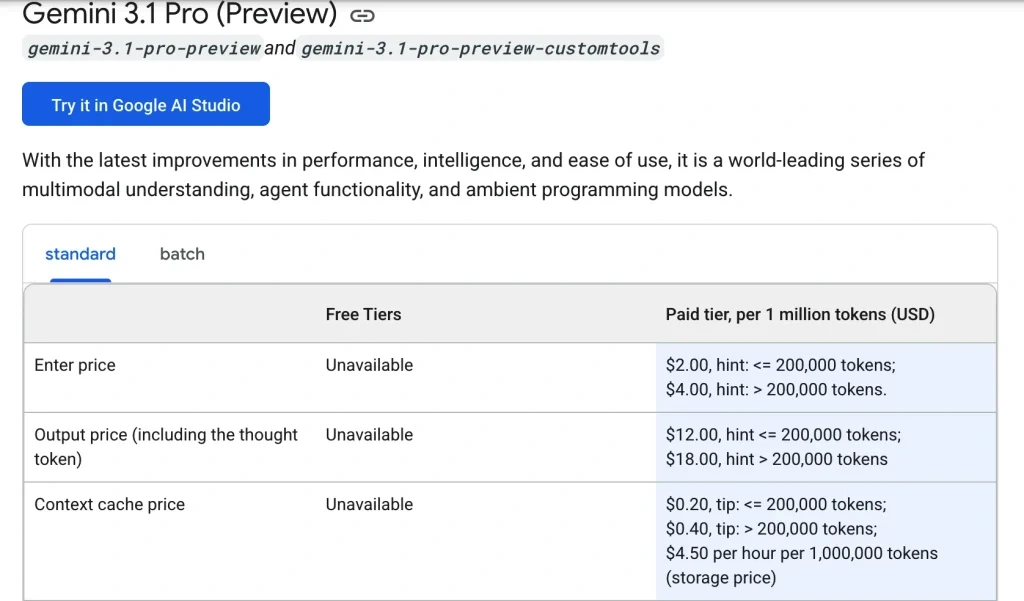
Google describes two approaches in its context caching documentation: implicit caching automatically passes on savings when a request hits a cache; explicit caching lets you retain a specified prefix for a chosen time to live. Explicit caching defaults to one hour if you do not set a duration. Cached tokens still count toward token limits, so caching does not move a long prompt into a smaller price bracket.
| Repeated-input scenario | Five reads of 100k tokens | Storage | Illustrative total |
|---|---|---|---|
| Uncached, standard lower bracket | $1.00 | $0 | $1.00 |
| Explicit cache retained for 1 hour | $0.10 | $0.45 | $0.55 |
| Explicit cache retained for 24 hours | $0.10 | $10.80 | $10.90 |
These estimates compare only the recurring input and storage components. New uncached input and output are additional. A short-lived cache reused several times can be useful; keeping a large cache overnight for only a few reads can cost more than sending those inputs again. Set retention around the actual work session and inspect cache-hit usage instead of assuming every repeated prompt receives a discount.
Tool usage can add another line item. For Google Search grounding, Google’s price table lists 5,000 free “search requests” per month, shared across Gemini 3.x models, then $14 per 1,000 search requests. Its grounding guide clarifies that Gemini 3 billing counts the search queries the model executes, with empty queries excluded when counting unique queries. A single generation request that triggers two distinct searches therefore uses two billable search units. Budget around searches performed, not just answers generated; the free allowance is not a promise of 5,000 grounded answers.
Google AI Pro and Ultra: US monthly subscription prices
If you want to use Gemini in a chat interface, compare Google’s US subscription plans rather than multiplying chat messages by API token rates. The public US page lists the following monthly options. These are advertised subscription prices, not a quote for every country or a tax-inclusive checkout total.
| US plan | Advertised monthly price | Relevant access distinction |
|---|---|---|
| Free | $0 | Access to the Gemini app, including varying access to 3.1 Pro |
| Google AI Plus | $4.99 | Higher usage access than Free |
| Google AI Pro | $19.99 | Higher Gemini access, Google app features and 5 TB storage |
| Google AI Ultra 5x | $99.99 | 5x higher usage limits than AI Pro on the US plan page |
| Google AI Ultra 20x | $199.99 | 20x higher usage limits than AI Pro on the US plan page |
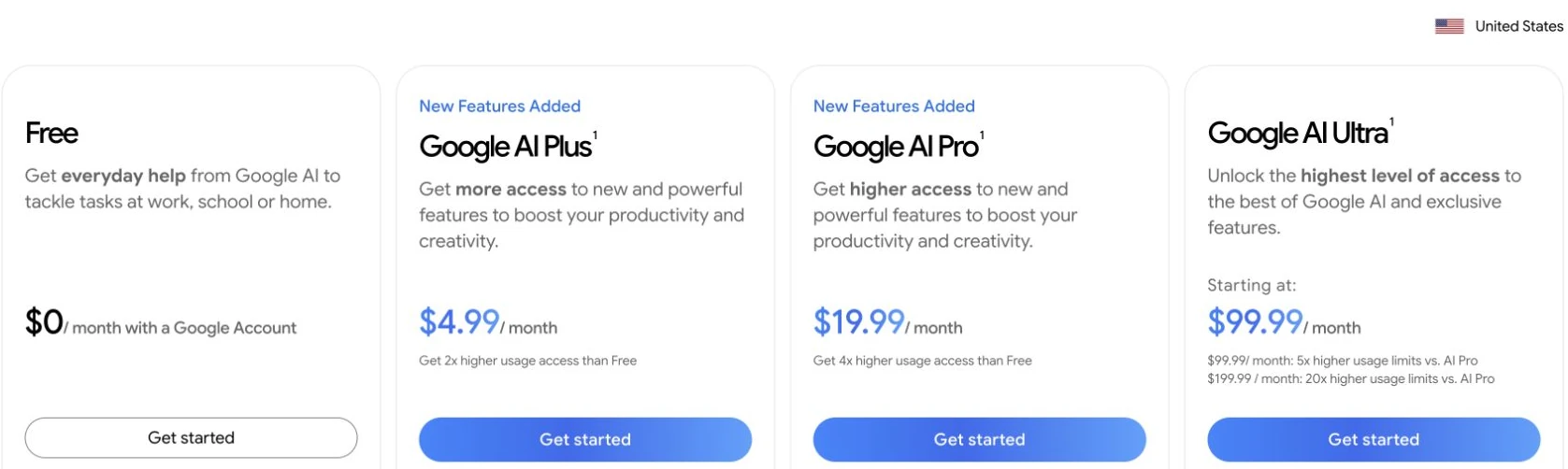
The 5x and 20x labels describe the published plan comparison; they are not a promise of a fixed number of API calls. Google AI Pro is worth considering if Gemini is part of your daily work and you also use the bundled Google features and storage. Free or Plus can be enough for lighter use. Ultra makes sense when its higher app usage or additional features solve a limitation you actually encounter.
Does Google AI Pro include API credit?
Google AI Pro includes a $10 monthly developer credit through the Google Developer Program. Google’s current FAQ describes the linked Pro/Ultra benefit as monthly Google Cloud credit. Its general Cloud credit guidance covers products such as Firebase, Vertex AI and Google Maps, and explains how to apply a benefit to one eligible billing account through My Benefits.
Before using the credit in your budget, check the specific benefit in My Benefits, the service it covers, its expiry date and the available balance on your billing account. Confirm that it applies to the Gemini API service and project you intend to use. Until then, plan around the API costs before credits shown in this guide. Keep your Gemini app subscription and API project billing separate when tracking spending.
The $300 Google Cloud free trial is another, separate offer. Google’s API billing guide excludes Gemini API usage from that free trial starting in March 2026. A Cloud welcome balance should therefore not be treated as the monthly developer benefit attached to a Google AI plan.
Account-specific billing setup and usage are explained in Google’s Gemini API billing guide. App usage limits and API rate limits also differ; the Gemini 3.1 Pro limits guide covers the distinctions. Paying for a subscription does not remove all limits.
API cost comparison: Gemini, GPT and Claude
The most useful comparison starts with the same token budget. The figures below use standard, uncached first-party API rates for a prompt of 100,000 tokens and 10,000 billable output tokens. They exclude tools, storage, taxes, regional processing premiums and third-party platform fees. Equal token counts are not necessarily equal text or equally successful answers across different model tokenizers.
| Selected model | Input / 1M | Output / 1M | 100k input + 10k output |
|---|---|---|---|
| Gemini 3.1 Pro Preview | $2 | $12 | $0.32 |
| GPT-5.5 | $5 | $30 | $0.80 |
| Claude Opus 4.8 | $5 | $25 | $0.75 |
| Claude Sonnet 4.6 | $3 | $15 | $0.45 |
| Claude Sonnet 5 | $2 | $10 | $0.30 |
Sources: Google, OpenAI GPT-5.5, Anthropic. Checked September 15, 2026; calculated examples, not measured bills.
Sonnet 5 costs $0.30 for this token budget, compared with Gemini’s $0.32. This five-model sample is not a market-wide cheapest-model survey or an overall quality or return-on-investment ranking.
Anthropic now lists Sonnet 5’s $2 input / $10 output rates as its standard price; the previously announced September price increase will not occur. Sonnet 4.6 and Opus 4.8 remain useful references for existing workloads, but they are earlier Claude versions rather than the full current lineup.
Longer prompts can change the size of the price gap. Gemini’s higher bracket starts above 200k prompt tokens; GPT-5.5’s documented threshold is above 272k input tokens. Anthropic lists standard pricing across the full 1M context window for Claude 4.6 and later. At 250k input tokens and 10k output tokens, Gemini’s standard token estimate is $1.18, Sonnet 4.6’s is $0.90 and Sonnet 5’s is $0.60. Compare the applicable bracket for the workload you will actually send.
Choose on cost per completed task: include failed attempts, follow-up prompts, thinking and human corrections. Token prices alone cannot establish which model handles your work best. For the earlier model’s pricing background, see the existing comparison of Gemini 3 Pro and Gemini 3 API costs.
When a multi-model subscription fits your budget
A direct API project fits a product that needs programmable calls and usage-based billing. A Google AI plan fits users who want Gemini and its Google ecosystem benefits. GlobalGPT fits work that spans several models and functions: research a subject, draft and revise an article, ask for coding help, then create supporting media in one workspace. Its CLI also connects AI work with terminal and development workflows.

| Purchase | How to budget | Choose it for |
|---|---|---|
| Gemini API | Input, output, service tier, caching and tools | Building software or automating calls |
| Google AI subscription | US advertised monthly plan plus its eligibility and feature limits | Using Gemini and bundled Google products |
| GlobalGPT subscription | The selected platform plan and its own model/function allowances | A broader workflow across leading models and media tools |
The value of a multi-model subscription is breadth and workflow convenience. Compare the tools you would actually use and the separate subscriptions they would otherwise require. Choose a plan whose allowances fit that workload; a platform subscription and an official provider’s API or consumer plan are different products.
- Mostly chat and Google apps? Start with the Google plan whose usage level fits your routine. The guide to what free Gemini access means can help before you upgrade.
- Shipping a product? Use an API budget with logs, usage estimates and the correct project billing setup.
- Research, writing, coding and media in one routine? Explore GlobalGPT’s multi-model workspace. For more options, see Gemini alternatives and match their strengths to your work.
For a practical next step after choosing the access route, follow how to use Gemini 3.1 Pro. Keep the distinction between app subscription and API billing when following setup instructions.
Frequently asked questions
How much does Gemini 3.1 Pro cost per million tokens?
On the standard Gemini API tier, Gemini 3.1 Pro Preview costs $2 per million input tokens and $12 per million output tokens for prompts of up to 200,000 tokens. Above 200,000 prompt tokens, the rates are $4 and $18. Output billing includes thinking tokens.
Is there a free Gemini 3.1 Pro API tier?
Google lists no API free tier for Gemini 3.1 Pro Preview. The Gemini app has a free plan with varying access to 3.1 Pro, and Google AI Studio provides a place to try models. Those access routes do not establish a free production API allowance for this model.
Does the API charge for images and video?
Yes. Gemini 3.1 Pro accepts images, video, audio and PDFs as inputs, and their token usage contributes to the bill. The amount depends on the media and processing settings. It produces text; image or video generation uses separately priced models.
Is exactly 200,000 input tokens in the higher price bracket?
No. A prompt of exactly 200,000 tokens is in the lower standard price bracket. A prompt above 200,000 tokens uses the higher input and output rates. Cached tokens still count toward the applicable token limits.
Is the $19.99 Google AI Pro plan the same as API billing?
No. The US $19.99 monthly plan is a consumer subscription with a $10 monthly developer credit benefit. Google’s general Cloud credit guidance covers products such as Vertex AI and explains applying a benefit to one eligible billing account. Check your specific credit in My Benefits, its eligible service, expiry date and available balance before applying it to your Gemini API budget. Until those details are confirmed, plan for API costs before credits.
What is the cheapest way to use Gemini 3.1 Pro?
For occasional app use, start with the free plan’s available access. For paid API work, estimate tokens and consider Batch or Flex when their timing trade-offs fit. For a broader routine across models and media tools, compare a multi-model subscription against the separate subscriptions you would otherwise use.
Budget around your actual route and workload: Google’s API price list for software, its subscription page for the Gemini app, or GlobalGPT for a connected multi-model workflow.



