
Einleitung
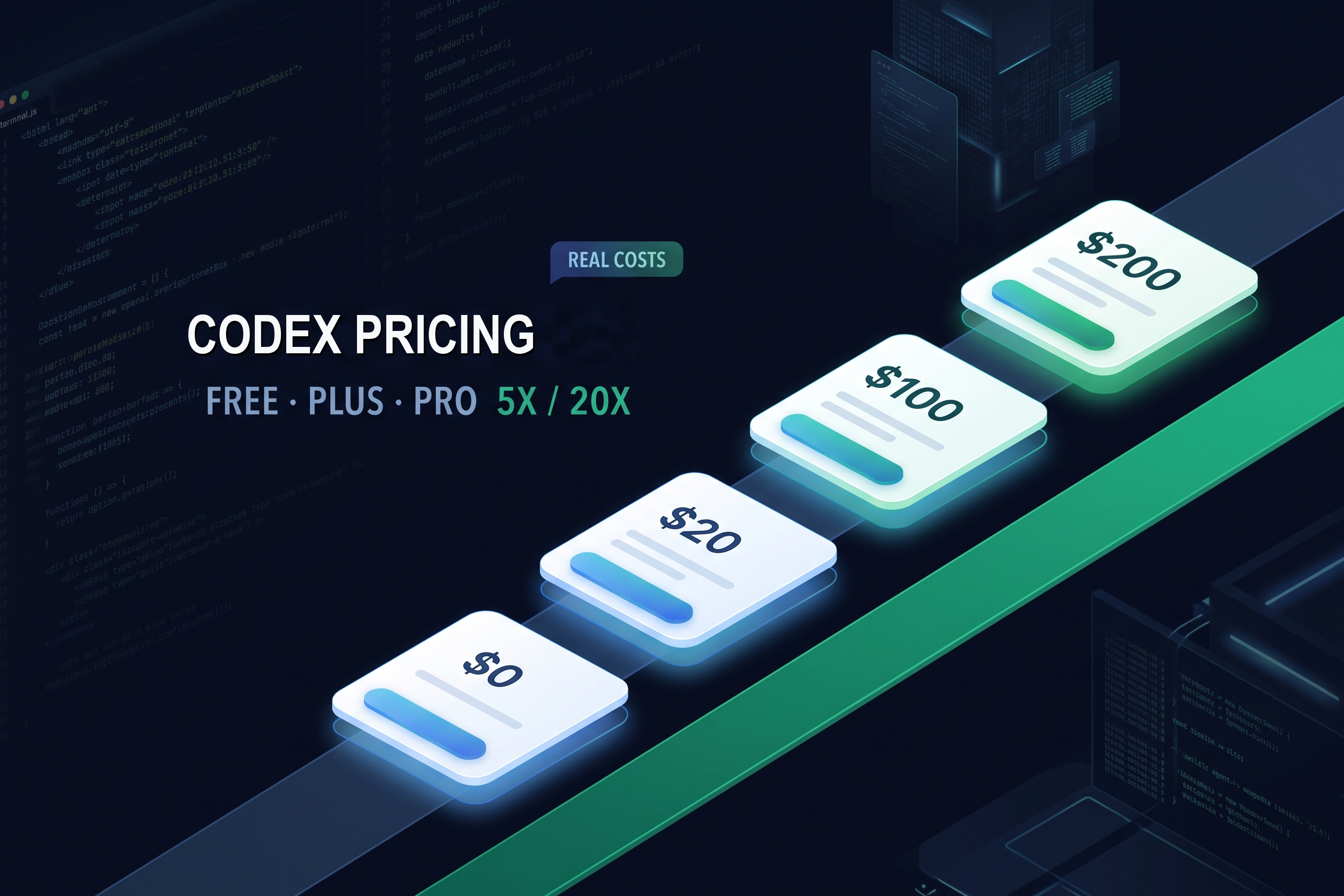
Die Preise für Codex bei OpenAI reichen derzeit von „Free“ mit $0/Monat bis zu „Pro 20x“ mit $200/Monat, wobei die Nutzungsoptionen für „Pro“ als 5x oder 20x im Verhältnis zu „Plus“ beschrieben werden.„Go“ kostet $8 pro Monat und „Plus“ $20 pro Monat. Die Preise sind leicht zu überblicken; die entscheidende Frage ist jedoch, was die einzelnen Stufen beinhalten und wie sich das gemeinsame Nutzungsfenster auf die tatsächliche Programmierarbeit auswirkt.
„Free“ und „Go“ sind mit GPT-6 Luna bei Standardgeschwindigkeit aufgeführt, während „Plus“ GPT-6 Sol und GPT-6 Luna umfasst. „Pro“ bietet mehr Nutzungsvolumen; die Bezeichnungen „5x“ und „20x“ beschreiben die Kapazität, nicht die Qualität des Codes. Der untenstehende Benchmark vom Juli verwendet GPT-5.6 Sol und zeigt, wie sich der Token-Verbrauch bei einer Programmieraufgabe summiert. Es handelt sich um ein historisches Beispiel, nicht um einen Test der aktuellen Modelle.
Ein Teil der Arbeit im Zusammenhang mit einem Programmierprojekt findet außerhalb des Repositorys statt: die Recherche zu einer Idee, der Entwurf eines Dokuments oder die Vorbereitung von Folien. Der browserbasierte Agent von GlobalGPT, Yukie, vereint diese Aufgaben in einem einzigen Arbeitsbereich. Wenn Sie einen Großteil Ihrer Zeit damit verbringen, sollten Sie diese Anforderungen neben den Programmieraufgaben berücksichtigen, wenn Sie entscheiden, wofür Sie Ihr KI-Budget einsetzen möchten.

OpenAI Codex – Preisübersicht auf einen Blick
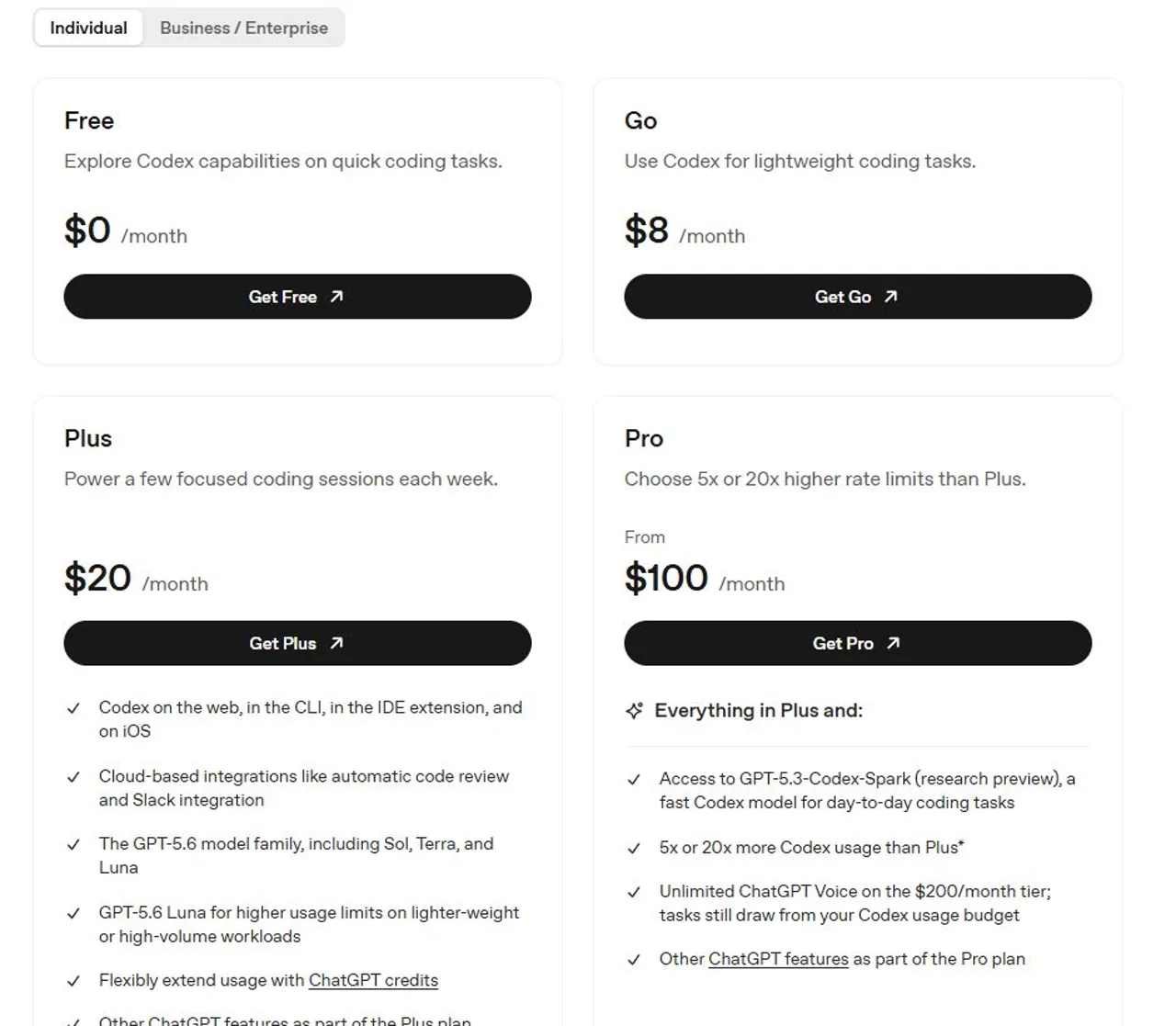
OpenAIs offizielle Codex-Preisdokumentation ist die verlässliche Quelle für aktuelle Preise, Modellzugang und Nutzungsschätzungen. Wenn Sie Ihre Auswahl sowohl nach Modellqualität als auch nach Preis treffen, vergleichen Sie die beste AI-Modelle für die Codierung separat; ein größerer Spielraum löst ein Problem bei der Modellanpassung nicht automatisch.
Was ist in den einzelnen Codex-Tarifen enthalten?
„Free“ dient der Testnutzung, „Go“ ist die kostengünstige Einstiegsstufe und „Plus“ ist die erste Stufe, bei der auf der Preisseite ausdrücklich das vollständige geräteübergreifende Codex-Erlebnis aufgeführt ist. Treffen Sie Ihre Wahl danach, wie oft Sie bei Ihrer Arbeit an eine Grenze stoßen, und nicht allein anhand des Namens des Tarifs.
Codex Free – Ideal zum Ausprobieren
Codex Free kostet $0 pro Monat und ist die einfachste Möglichkeit, um zu prüfen, ob ein KI-Programmieragent zu Ihrer Arbeit passt.
- Preis: $0/Monat.
- Am besten geeignet für: eine kleine Funktion erklären, einen kurzen Patch prüfen oder einen Unit-Test vorschlagen.
- Anmerkung zum Modell: Der kostenlose Zugang bezieht sich auf die Standardgeschwindigkeit von GPT-6 Luna und unterliegt der schrittweisen Einführung sowie der Verfügbarkeit.
- Erwartung: Betrachten Sie „Free“ eher als Testversion denn als garantierte tägliche Entwicklungskapazität.
Codex Go – Die leichte Variante $8
Codex Go kostet $8 pro Monat und schließt die Lücke zwischen der gelegentlichen kostenlosen Nutzung und dem $20 Plus-Tarif.
- Preis: $8/Monat.
- Am besten geeignet für: Lernende, Nebenprojekte und kurze Programmier-Sessions.
- Zugriff auf das Modell: „Go“ ist bei GPT-6 Luna mit Standardgeschwindigkeit aufgeführt. Wenn Sie GPT-6 Sol benötigen, vergleichen Sie die Tarife, in denen es enthalten ist.
- Begrenzung: Der niedrigere Preis garantiert jedoch keine ausreichende Kapazität für große Speicher oder lange autonome Sitzungen.
Einen umfassenderen Vergleich der verschiedenen Preisklassen finden Sie in unserem ChatGPT Go Bewertung. Darin werden die praktischen Vor- und Nachteile des $8-Plans behandelt, ohne eine vorübergehende Beförderung als dauerhaftes Merkmal zu betrachten.
Codex Plus – Der Ausgangspunkt $20
Codex Plus kostet $20 pro Monat und ist die erste Stufe mit einer ausdrücklich dokumentierten geräteübergreifenden Codex-Erfahrung.
- Preis: $20/Monat.
- Enthaltene Flächen: Web, CLI, IDE-Erweiterung und iOS.
- Aktuelle Modellreihe: GPT-6 Sol und GPT-6 Luna sind für Plus aufgeführt; das genaue Modell und der Rollout können je nach Plattform variieren.
- Am besten geeignet für: Einzelne Entwickler, die jede Woche einige themenspezifische Sitzungen abhalten.
- Kapazität: Die Wahl des Modells, der Kontext, die Argumentation, die Werkzeuge und das Caching beeinflussen, wie schnell das Guthaben aufgebraucht wird.
Erhöhen Sie die Kapazität erst nach der Messung der Unterbrechungen. Unser Leitfaden zu den Grenzwerten für ChatGPT Plus liefert nützliche Hintergründe für diese Entscheidung.
Preise für Codex Pro: 5x vs. 20x
Bei der Entscheidung für die Pro-Variante geht es vor allem darum, wie viel ununterbrochene Kapazität Sie benötigen. Beide Tarife umfassen das Plus-Erlebnis, unterscheiden sich jedoch erheblich hinsichtlich der Nutzungsmultiplikatoren und der monatlichen Preise.
Pro 5x kostet $100 pro Monat
Codex Pro 5x kostet 1 TP, 41 T und 100 pro Monat und bietet das Fünffache des im Plus-Tarif verfügbaren Codex-Kontingents.
- Laut der Planbeschreibung von OpenAI steht bei „Plus“ das Fünffache des Codex-Kontingents zur Verfügung.
- Eine sinnvolle Lösung, wenn „Plus“-Limits die Arbeit häufig unterbrechen, ein $200-Tarif sich jedoch nur schwer rechtfertigen lässt.
- Nach wie vor durch Fenster und Grenzen eingeschränkt; dies ist keine Garantie für ungehinderten Zugang.
Pro 20x kostet $200 pro Monat
Codex Pro 20x kostet $200 pro Monat und bietet das Zwanzigfache des im Plus-Tarif verfügbaren Codex-Volumens.
- Zwanzigmal so viele Codex-Funktionen wie bei Plus.
- Am besten geeignet für die kontinuierliche Umsetzung, die Analyse von Repositorien und parallele Aufgaben.
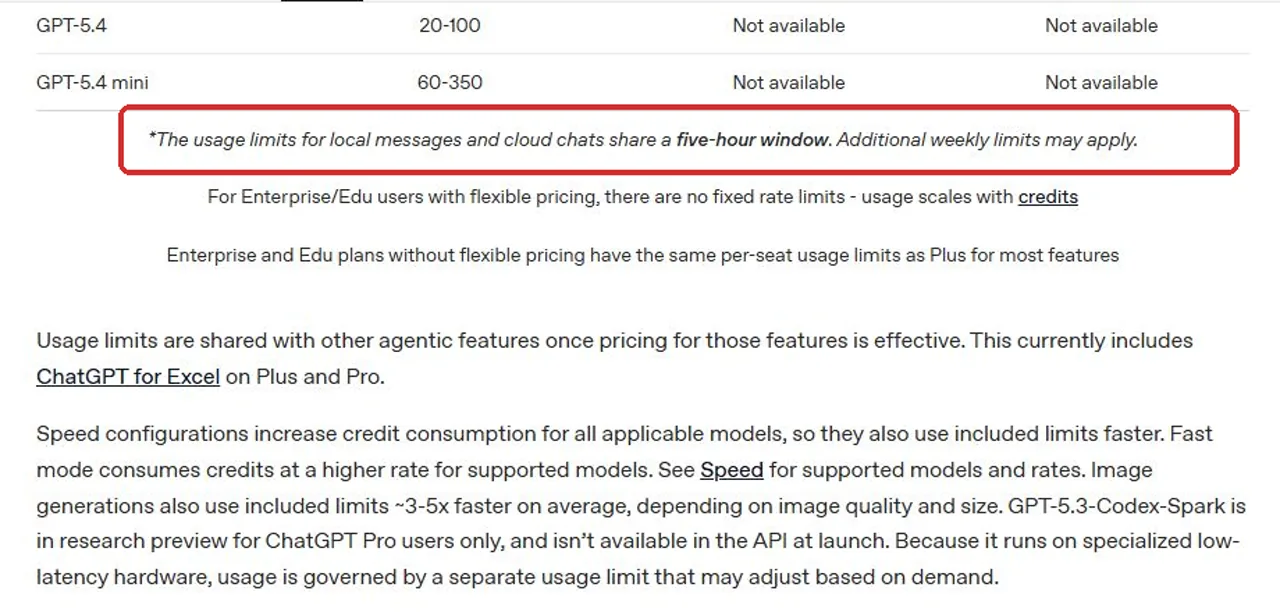
- Nach wie vor nicht unbegrenzt: Lokale Nachrichten und Cloud-Chats teilen sich die Nutzungsfenster, und es können zusätzliche wöchentliche Limits gelten.
Ist Pro 20x den doppelten Preis wert?
Pro 20x verdoppelt die Kosten von Pro 5x, erhöht jedoch die angegebene Nutzungsrate im Vergleich zu Plus von 5x auf 20x. Der Wert hängt davon ab, ob Sie diese zusätzliche Kapazität regelmäßig nutzen.
Nur wenn die zusätzliche Kapazität eine Unterbrechung der bezahlten Arbeit in einem Umfang verhindert, der die zusätzlichen $100 pro Monat abdeckt. Wenn das Warten auf einen Reset Sie nur selten Zeit kostet, ist Plus oder Pro 5x in der Regel leichter zu rechtfertigen.
Codex-Beschränkungen und versteckte Kosten
Die Codex-Tarife unterliegen nicht nur einer monatlichen Preisobergrenze. Gemeinsame Nutzungszeitfenster, mögliche wöchentliche Obergrenzen, die Komplexität der Aufgaben, der „Fast“-Modus, die Bildgenerierung, Wiederholungsversuche und die separate API-Abrechnung können allesamt darüber entscheiden, wie schnell Ihr Kontingent aufgebraucht ist – und wie hoch die Kosten für die weitere Nutzung danach sind.
Gemeinsam genutzte Fenster und wöchentliche Limits
Mit einem Abonnement wird ein Kontingent im Voraus bezahlt, nicht unbegrenzte Arbeitsleistung. Laut OpenAI teilen sich lokale Nachrichten und Cloud-Chats ein Nutzungsfenster von fünf Stunden, und es können zusätzliche wöchentliche Begrenzungen gelten. Große Datensätze, wiederholte Tool-Aufrufe, Wiederholungsversuche, Schlussfolgerungen und die Erzeugung von Bildern können das Kontingent schneller aufbrauchen als eine kurze Textanfrage.
- Dass keine Einzelpostenbelastung vorliegt, bedeutet nicht, dass keine Kosten anfallen: Jede Aufgabe verbraucht im Voraus bezahlte Kapazität.
- Das Zurücksetzen von Wartezeiten kostet Zeit: Unterbrechungen spielen eine Rolle, wenn Codex Teil einer bezahlten Tätigkeit ist.
- Eine fortgesetzte Nutzung kann teurer werden: Möglicherweise sind zusätzliche Credits oder ein höherer Tarif erforderlich.
Bei diesen Zahlen handelt es sich um persönliche Kostenumlagen und nicht um die Preise pro Aufgabe von OpenAI. Außerdem wird dabei davon ausgegangen, dass jede gezählte Aufgabe zu einem akzeptierten Ergebnis geführt hat. Ein fehlgeschlagener Durchlauf, der umfangreiche manuelle Korrekturen erfordert, erhöht die tatsächlichen Kosten, selbst wenn dabei weniger Token verbraucht wurden.
Komplexe Aufgaben verbrauchen die Limits schneller
Codex verbraucht nicht bei jeder Anfrage das gleiche Kontingent. Das Umbenennen einer Variablen erfordert möglicherweise nur wenig Kontext; die Suche nach einem Fehler in der Produktion kann hingegen eine Repository-Suche, das Einlesen von Dateien, logische Schlussfolgerungen, den Aufruf von Tools, Testausgaben und Wiederholungsversuche erfordern. Die Länge der Eingabeaufforderung allein ist daher kein geeigneter Anhaltspunkt, um den Verbrauch zu begrenzen.
- Modellwahl: Die verschiedenen Modelle weisen unterschiedliche Abonnement-Nutzungs- und API-Tarife auf.
- Kontextgröße: Mehr Dateien und längere Gespräche erfordern einen höheren Aufwand bei der Eingabeverarbeitung.
- Begründung: Anspruchsvollere Aufgaben können mehr Rechenleistung oder Credits verbrauchen.
- Werkzeuggebrauch und -rückgabe: Suchvorgänge, Befehle, Testausgaben und das Abrufen externer Daten liefern zusätzliche Informationen.
- Zwischenspeicherung: Wiederverwendbare Inhalte können preislich anders bewertet oder anders gezählt werden als neue Inhalte.
- Wiederholungsversuche: Ein billiger, gescheiterter Versuch kann insgesamt mehr kosten als ein etwas aufwendigerer Erfolg beim ersten Anlauf.
Im Schnellmodus und bei der Nutzung von Bildern wird mehr Datenvolumen verbraucht
Im Schnellmodus und bei der Bildgenerierung wird ein Kompromiss zwischen Geschwindigkeit und einer detailreicheren Ausgabe eingegangen.
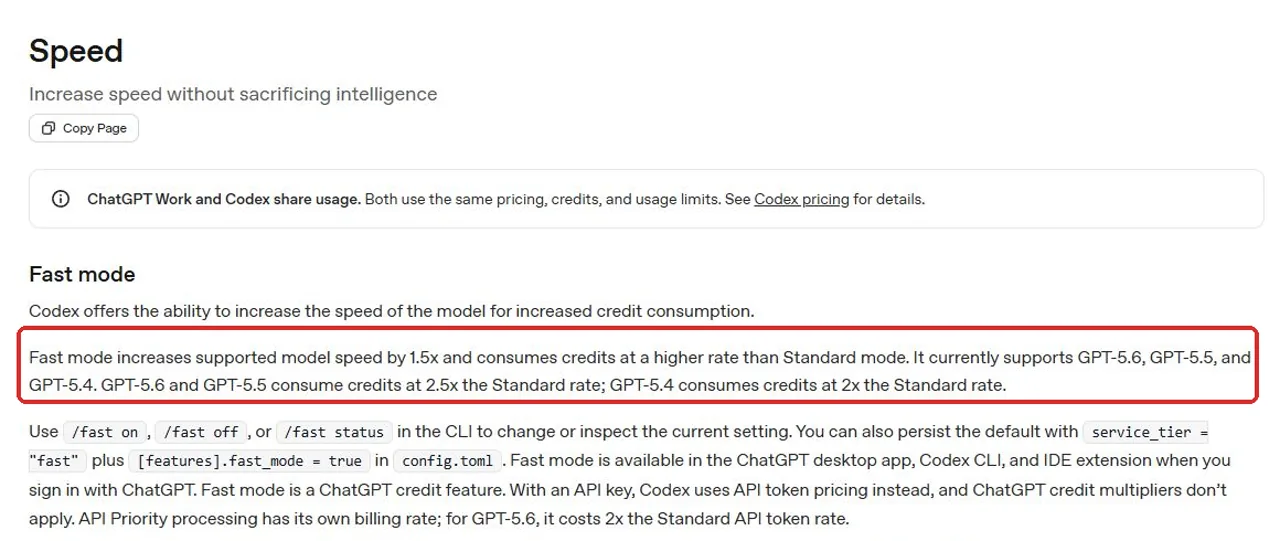
- Der Schnellmodus ist auf unterstützten Modellen etwa 1,5-mal schneller, verbraucht jedoch Credits in höherem Maße.
- Der Kreditmultiplikator hängt vom Modell und vom Modus ab; verwenden Sie den für Ihr ausgewähltes Modell angegebenen Wert.
- Auch die Bildgenerierung verbraucht Ihr Datenvolumen. Berücksichtigen Sie bildintensive Aufgaben, wenn Sie beurteilen, ob ein Tarif genügend Kapazität für die Programmierung bietet.
Extra-Guthaben und API-Abrechnung erfolgen getrennt
Das inbegriffene Nutzungsvolumen, ChatGPT-Credits und die API-Abrechnung sind drei separate Kostenposten.
- Die kostengünstigste Option: Warten Sie, bis das enthaltene Limit zurückgesetzt wird.
- Weiter zu den Abspann: Plus- und Pro-Nutzer können verfügbare ChatGPT-Guthaben nutzen, die zusätzlich zum im Paket enthaltenen Kontingent zur Verfügung stehen.
- Vor größeren Aufgaben überprüfen: verwenden.
/statusin der Befehlszeile oder im Codex-Nutzungsübersicht. - Die Abrechnung der API erfolgt separat: Die Nutzung des API-Schlüssels wird nach dem Token-Modell abgerechnet und umfasst keine Codex-Cloud-Funktionen wie GitHub-Reviews oder Slack-Integrationen.
Wie viel kostet ein echter Codex-Auftrag?
Teststatus: Am 28. Juli 2026 haben wir einen kontrollierten Codex-CLI-Lauf durchgeführt. Codex hat alle sieben öffentlichen und verborgenen Akzeptanzprüfungen bereits bei der ersten Implementierung bestanden. Das untenstehende Ergebnis bezieht sich ausschließlich auf Codex; die aktuelle GlobalGPT-CLI stellt Yukie weder als testbares Modell noch als Agent-Befehl zur Verfügung.
Diese Fallstudie dokumentiert eine abgeschlossene Aufgabe, deren Token-Verbrauch und die Testergebnisse. Die unten angegebene Zahl „$0.32“ ist eine aus den gemessenen Token berechnete Schätzung der Listenrate und stellt weder eine tatsächlich berechnete Gebühr noch die Abonnementkosten pro Aufgabe dar.
Die Testaufgabe
Wie viele Token hat Codex verwendet?
Was hat das Codex-Projekt tatsächlich gekostet?
Hat Codex die Aufgabe erfüllt?
Eine günstigere Alternative zu „Codex“: Warum „Yukie“ die bessere Wahl ist
Codex ist speziell für die Programmierung und Entwicklertools konzipiert. Yukie ist eine „Web-First“-Alternative für alle, die fertige Forschungsergebnisse, Inhalte, Medien, Dokumente oder Präsentationen erstellen möchten, ohne eine lokale Entwicklungsumgebung verwalten zu müssen.
Was ist Yukie?
Yukie ist ein eigenständiger, webbasierter Agent innerhalb von GlobalGPT. Er ermöglicht die Erstellung von Bildern, Videos, Dokumenten, Recherchen, Tabellen, Websites und Folien aus einem einzigen Browser-Arbeitsbereich heraus. Es handelt sich nicht um ein Codex-CLI-Plugin, und für den Betrieb ist Codex nicht erforderlich.
GlobalGPT ist eine modellübergreifende KI-Plattform, die Chat-, Bild-, Video- und Agent-Tools in einem Abonnement vereint. Die öffentlich angegebenen Preise für Jahresabonnements entsprechen derzeit monatlichen Beträgen von $5.80 für die Basic-Version, $10.80 für die Pro-Version und $25 für die Unlimited-Version. Dies sind die Preise für die GlobalGPT-Plattform; die genauen Teilnahmebedingungen und Aufgabenbeschränkungen für Yukies Tarif sind nicht öffentlich bekannt gegeben worden.
- Unabhängiger Vertreter: Yukie läuft direkt im Browser und nicht über die Codex-CLI.
- Niedrigerer Plattformpreis: Die monatlichen Umrechnungswerte des Jahresplans von GlobalGPT liegen deutlich unter denen von Codex Pro, wobei die für Yukie geltenden Obergrenzen noch bestätigt werden müssen.
- Weniger Einrichtungsaufwand: Auch Nicht-Entwickler können arbeiten, ohne ein Repository, ein Terminal oder eine IDE einrichten zu müssen. Siehe unsere Vergleich von KI-Assistenten für weitere „Browser-First“-Optionen.
- Kein vollständiger Codex-Ersatz: Entscheiden Sie sich für Codex, wenn es um die direkte Bearbeitung von Repositorys, Terminalbefehle, automatisierte Tests, IDE-Integration, GitHub-Reviews und andere Entwickler-Workflows geht. Unser Vergleich von All-in-One-KI-Plattformen behandelt eher ergebnisorientierte Alternativen.
Codex vs. Yukie: Was ist der Unterschied?
Entscheiden Sie sich für Codex, wenn Sie die direkte Kontrolle über den Quellcode wünschen; wählen Sie Yukie, wenn ein Browser-Agent das fertige Ergebnis bereitstellen kann. Was das bessere Preis-Leistungs-Verhältnis ausmacht, hängt von der akzeptablen Qualität und den Gesamtkosten ab – und nicht davon, welches Produkt allgemein “besser” ist.”
Fazit – Brauchen Sie Codex Pro wirklich?
- Beginnen Sie mit Plus: Es ist die logische erste kostenpflichtige Stufe für das umfassende Erlebnis mit Web, CLI, IDE und iOS.
- Entscheiden Sie sich für Pro 5x: wenn die Plus-Beschränkungen die regelmäßige Arbeit immer wieder unterbrechen.
- Entscheiden Sie sich für Pro 20x: nur dann, wenn durch die intensive tägliche Nutzung die Wartezeiten beim Zurücksetzen zu messbaren geschäftlichen Kosten führen.
- API-Abrechnung nutzen: für die programmatische oder variable Verwendung, aber separat vom Abonnement nachverfolgen.
- Nehmen wir Yukie als Beispiel: wenn Forschung, Medien, Dokumente, Websites, Folien oder andere browserbasierte Inhalte wichtiger sind als die Kontrolle über das Repository.
- Vergleichen Sie die akzeptierten Ergebnisse: die Korrekturzeit mit einbeziehen und die niedrigeren Planpreise von GlobalGPT nicht als gemessene Kosten für die Yukie-Kodierungsaufgabe darstellen.
Häufig gestellte Fragen
Diese Antworten behandeln die Preisgestaltung, die Limits, die Abrechnungsarten und die Besonderheiten von Yukie, die bei der Auswahl eines Tarifs am wichtigsten sind.
Ist OpenAI Codex kostenlos?
Ja. Der „Codex Free“-Tarif ist derzeit bei OpenAI für $0 pro Monat aufgeführt und eignet sich für erste Schritte im Bereich der Programmierung. Die Kapazität ist geringer als bei den kostenpflichtigen Tarifen, und die aktuelle Preisliste verspricht nicht denselben umfassenden Funktionsumfang wie der „Plus“-Tarif.
Wie viel kostet Codex Plus?
Codex Plus kostet $20 pro Monat. Laut OpenAI umfasst das Angebot Codex im Web, in der CLI, als IDE-Erweiterung und auf iOS.
Wie viel kostet Codex Go?
Codex Go kostet $8 pro Monat und ist für einfache Programmieraufgaben konzipiert. Es reiht sich zwischen dem kostenlosen Tarif $0 und dem Plus-Tarif $20 ein.
Was ist Codex Pro 5x?
Codex Pro 5x ist ein Tarif mit $100 pro Monat, der das Fünffache der im Plus-Tarif verfügbaren Codex-Nutzungsmenge bietet. Die Bezeichnung „5x“ bezieht sich auf die Nutzungskapazität und nicht auf eine fünfmal bessere Modellqualität.
Was ist Codex Pro 20x?
Codex Pro 20x kostet $200 pro Monat und bietet das Zwanzigfache des im Plus-Tarif verfügbaren Codex-Kontingents. Es ist für intensive private Nutzung konzipiert, ist jedoch nicht unbegrenzt.
Ist Pro 20x doppelt so gut wie Pro 5x?
Nein. Pro 20x verdoppelt zwar den monatlichen Preis und bietet ein größeres Nutzungsvolumen, verdoppelt aber nicht die Leistungsfähigkeit des Modells. Die Qualität hängt nach wie vor vom Modell, der Aufgabe, dem Kontext und den Anweisungen ab.
Ist Codex Pro unbegrenzt nutzbar?
Nein. Lokale Nachrichten und Cloud-Chats teilen sich ein Nutzungsfenster von fünf Stunden, und es können zusätzliche wöchentliche Limits gelten. Ressourcenintensive Aufgaben können das Kontingent schneller aufbrauchen.
Ist die Nutzung der API im Codex-Abonnement enthalten?
Nein. Der Zugriff über den API-Schlüssel wird separat pro Token zu den API-Tarifen des ausgewählten Modells abgerechnet. Er funktioniert in der CLI, im SDK und in der IDE-Erweiterung, umfasst jedoch keine Codex-Cloud-Funktionen.
Wie kann ich meine Codex-Nutzung überprüfen?
Ausführen /status in einer aktiven Codex-CLI-Sitzung, um die verbleibenden Limits anzuzeigen, oder öffnen Sie das Codex-Nutzungs-Dashboard außerhalb der Sitzung.
Was passiert, wenn ich ein Codex-Limit erreiche?
Sie können warten, bis das Kontingent zurückgesetzt wird. Plus- und Pro-Nutzer können außerdem ihre verfügbaren ChatGPT-Guthaben weiter nutzen, die unabhängig vom im Abonnement enthaltenen Datenvolumen sind.
Ist der Codex-Fast-Modus teurer?
Ja. Im Schnellmodus werden Credits schneller verbraucht, dafür sind die Reaktionszeiten bei unterstützten Modellen kürzer. Der Multiplikator hängt vom jeweiligen Modell ab. Überprüfen Sie daher vor einer längeren Sitzung die aktuelle Rate.
Ist Yukie günstiger als Codex?
GlobalGPT listet die monatlichen Äquivalente der Jahresverträge $5,80, $10,80 und $25 auf, die alle unter dem „Codex Pro“-Tarif mit $100 bzw. $200 pro Monat liegen. Das bedeutet jedoch nicht, dass jeder GlobalGPT-Tarif günstiger ist als „Go“ mit $8 oder „Plus“ mit $20. Vor einem direkten Kostenvergleich müssen noch Yukies Anspruchsvoraussetzungen und die Leistungsgrenzen des Tarifs geprüft werden.
Läuft Yukie innerhalb der Codex-CLI?
Nein. Yukie ist eine eigenständige, webbasierte Arbeitsumgebung für Agenten innerhalb von GlobalGPT. Es handelt sich um eine Alternative für bestimmte Anwendungsfälle, nicht um ein Codex-CLI-Plugin oder einen Agenten, der mit Codex verbunden sein muss.





