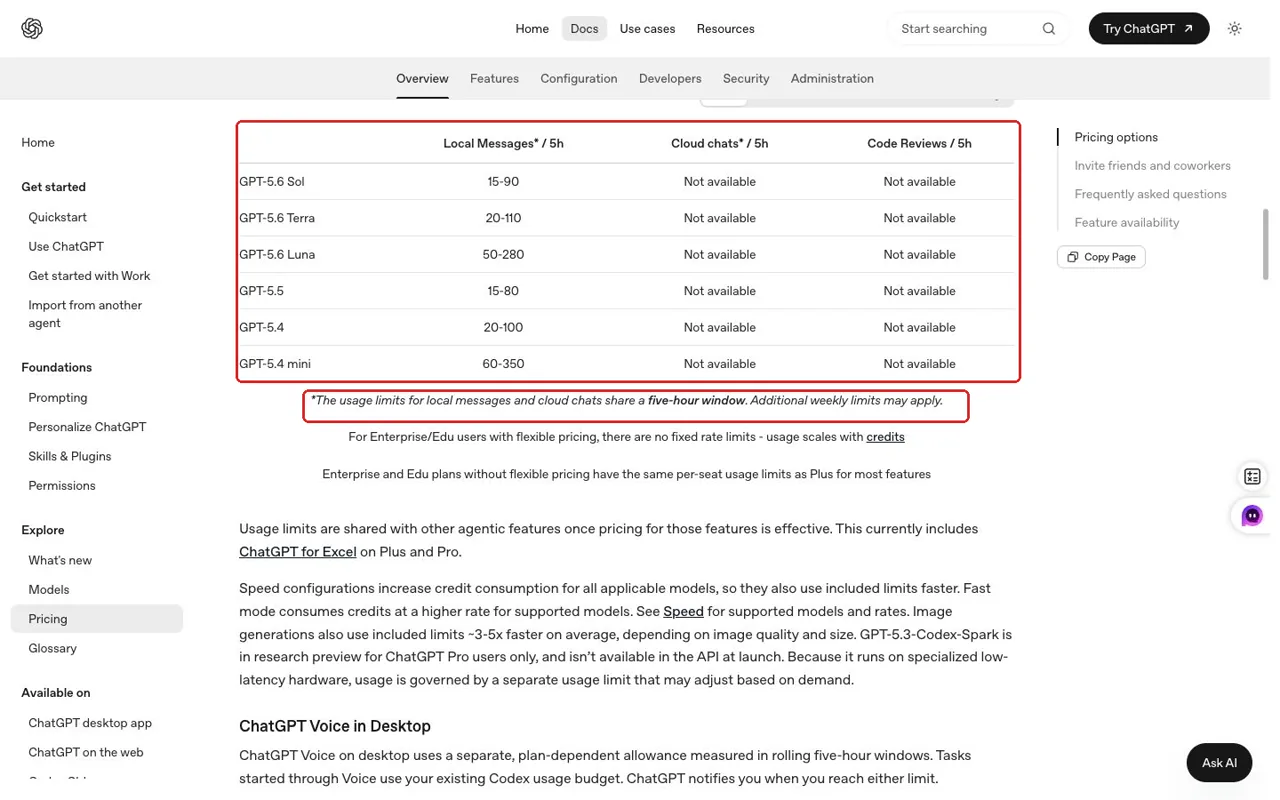
Codex usage is not a fixed number of prompts. Local messages and cloud chats share a five-hour window, and additional weekly limits may apply. How quickly you use that allowance depends on the model, repository context, reasoning, tool use, retrieval, and caching.
The same plan can feel generous during a focused edit and restrictive during a broad review. A message may start repository searches, commands, reasoning, changes, and verification. Ask what work each prompt starts, not only how many prompts remain.
When the coding window is valuable, GlobalGPT provides a practical way to route work that does not need repository access. A developer can keep Codex focused on code while using other available models or Yukie’s guided Slides, Document, and Image workflows for presentations, briefs, and multimodal assets. That preserves the coding context without pretending that a browser Agent replaces repository execution.
This guide separates the official rules from what we observed in four controlled coding tasks. It also shows how to choose a plan, reduce wasted work, and decide which tasks can move safely to another workflow.
Codex usage in one minute
There are four separate ideas to keep straight. The five-hour window is the short-term allowance shared by supported local and cloud Codex work. A weekly cap is a longer constraint that may also apply. Purchased credits are a paid continuation route for eligible accounts after included usage is consumed. API-key calls are a separate pay-as-you-go product and should not be mixed with a ChatGPT subscription.
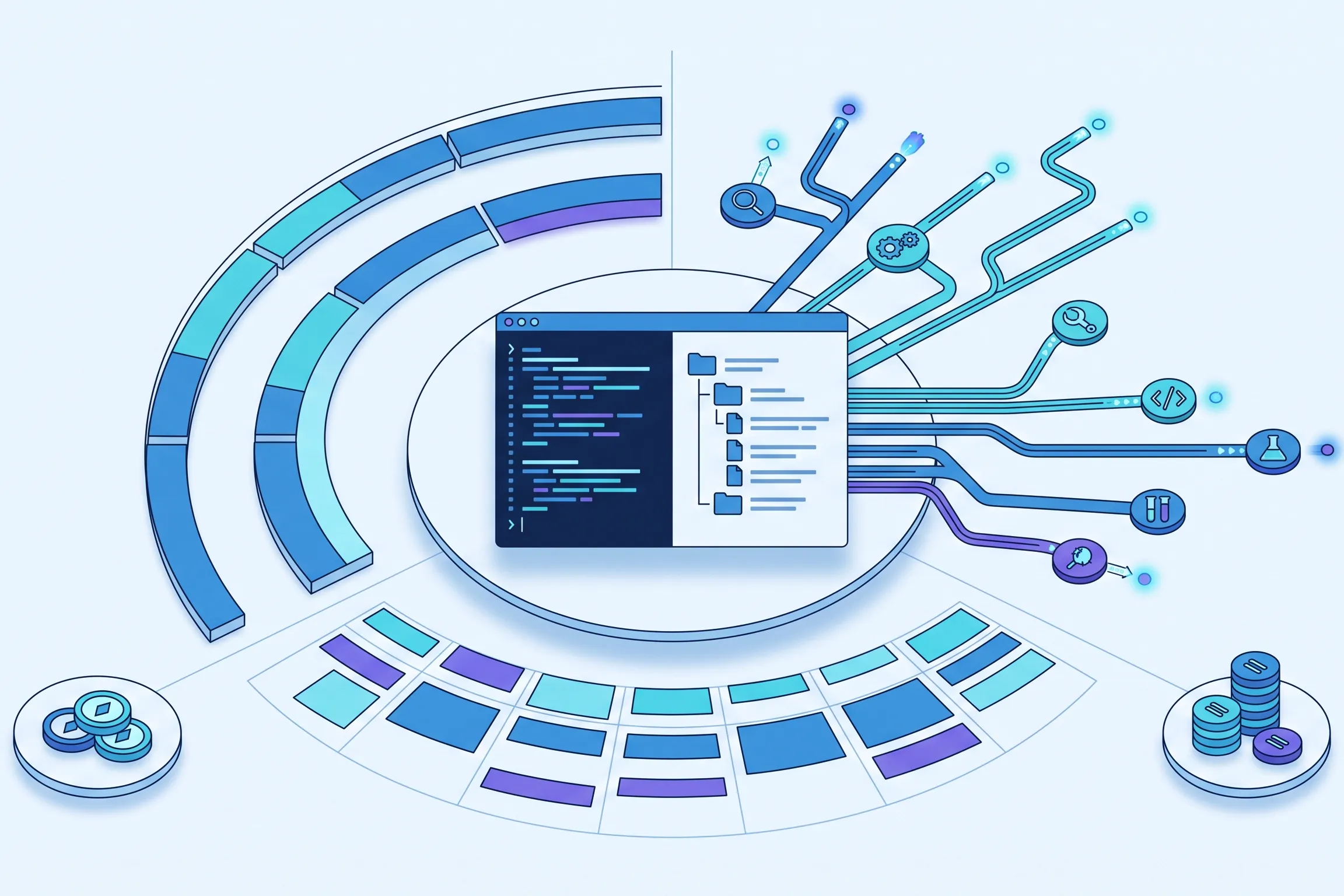
How the limit layers interact
A short-window reset does not necessarily clear the longer constraint.
This diagram shows relationships, not a guaranteed amount of work or a personal reset time.
| Layer | 是什么意思 | 这并不意味着什么 |
|---|---|---|
| Five-hour window | Shared short-term allowance for supported local and cloud work | Five continuous hours of coding or a guaranteed prompt count |
| Weekly cap | A longer account limit that may also apply | A restriction that always disappears after the short window resets |
| Purchased credits | Paid continuation after included usage for eligible users | Free extra subscription capacity |
| API 密钥 | A separately billed developer route | Part of the Plus or higher-use consumer allowance |
What the five-hour Codex window actually means
The five-hour window is best understood as a shared rolling work budget. It is not a stopwatch that runs only while you are typing, and it does not promise that every message costs the same. Local messages and cloud chats draw from the shared window, so switching surfaces does not create an independent pool.
You begin a session, send tasks, and consume the shared allowance according to the work involved. The short window later resets, but a weekly cap may still matter. “Five hours” describes an allowance period, not five hours of uninterrupted execution.

For Plus, OpenAI lists broad estimates of roughly 15–90 local messages for Sol, 20–110 for Terra, and 50–280 for Luna per five-hour window. The width of those ranges is the point. They are planning context, not a personal entitlement and not a prediction of how many prompts your current repository will allow.
Explore the published five-hour range
Choose a model and planned message count. The result is context—not a personal quota prediction.
Actual usage varies with model, context, task complexity, reasoning, tools, retrieval, and caching. This does not estimate a remaining percentage, weekly cap, credits, or API cost.
A lighter model can suit clear, easily verified chores; stronger reasoning earns its place when ambiguity, risk, or cross-file consequences justify it.
Why two Codex prompts can consume very different amounts
Prompt length is a weak predictor. “Review this repository and fix the important problems” can start broad work because its scope is undefined. A longer prompt that names the component, reproduces the failure, and defines success can narrow the search.
Model choice changes the planning range
Different models have different published usage estimates. The practical decision is not simply quality versus price; it is required judgment versus available throughput. Use a daily model for bounded chores with objective checks. Reserve stronger reasoning for architecture, security-sensitive changes, ambiguous bugs, and reviews where missing a subtle issue is more costly than spending more allowance.
Repository and conversation context create work
Codex may read instructions, inspect the tree, trace call sites, understand tests, and revisit context. Long conversations can carry obsolete assumptions forward. A named failing test, specific module, and clear boundary create a smaller search surface.
Ambiguity increases exploration
An agent can move directly when expected behavior is clear and a failure is reproducible. Subjective requirements, intermittent bugs, and several plausible fixes require more exploration. Remove avoidable ambiguity without suppressing necessary reasoning.
Tools and verification are useful consumption
Searches, commands, tests, linters, and diff reviews add activity but make results more trustworthy. Skipping tests can create an expensive second session. Request the narrow verification that proves the outcome and stop unrelated exploration.
Cached input is not a quota percentage
Codex can report cached-input fields when previously processed context is reused. That telemetry helps describe the shape of a run, but it does not reveal the percentage of your five-hour allowance saved. It is also not a credit charge or an API bill. Treat cached input as an implementation detail that can improve efficiency, not as a unit you can convert into remaining subscription capacity.
| Task shape | Likely pressure | 为什么 |
|---|---|---|
| Explain one function in a named file | 较低 | Narrow context and no edit-and-test loop |
| Fix a reproducible bug with a failing test | 中度 | Focused diagnosis, code change, and verification |
| Add a feature across several files | 更高 | Planning, cross-file edits, tests, and compatibility checks |
| Review an unfamiliar repository broadly | Potentially high | Large search surface, judgment, and repeated context |
These labels are directional rather than numerical. Repository size, code quality, task clarity, available tests, and coding-model choice can move any real task up or down.
- Lower-pressure work has narrow context, a named target, and an objective check.
- Higher-pressure work combines broad discovery, ambiguity, cross-file changes, and repeated verification.
- Useful tool calls are not waste: tests and diff inspection may consume allowance but prevent costly rework.
What four controlled repository tasks revealed
We ran four frozen tasks in the same compact Python fixture: unfamiliar repository understanding, a multi-file feature, a daylight-saving-time bug fix, and review plus repair. The first valid result was preserved for each task. Codex reported input, cached-input, output, and reasoning-output fields, giving us a consistent way to compare the four runs without turning the telemetry into a subscription bill.
Observed Codex CLI evidence
Four repository tasks used very different amounts of context
CLI-emitted token fields are shown as test evidence—not subscription-window percentages or API bills.
| 任务 | 持续时间 | 输入 | 缓存输入 | 输出 | Reasoning output |
|---|---|---|---|---|---|
| T1 · Understand | 108 s | 147,420 | 119,296 | 3,752 | 1,073 |
| T2 · Feature | 115 s | 228,681 | 194,560 | 3,634 | 1,219 |
| T3 · Bug fix | 99 s | 146,412 | 119,296 | 2,820 | 933 |
| T4 · Review | 223 s | 496,865 | 419,072 | 7,517 | 3,588 |
View complete controlled-run summary
# Codex T1-T4 Formal Run Summary ## Run status - Protocol: 1.0.1-codex - Venue: Codex CLI on macOS - CLI version: 0.146.0-alpha.3.1 - Model: gpt-5.6-sol - T1-T3 reasoning effort: medium - T4 reasoning effort: high - Valid controlled batch: attempt 3 - Human intervention during valid tasks: none - Network required by tasks: no - Commit, push, deployment, or production access: none ## Valid first-output results | Task | Duration | Objective result | Input tokens | Cached input | Output tokens | Reasoning output | |---|---:|---|---:|---:|---:|---:| | T1 | 108 s | Baseline tests passed; no files changed | 147,420 | 119,296 | 3,752 | 1,073 | | T2 | 115 s | 7 public tests and hidden feature checks passed | 228,681 | 194,560 | 3,634 | 1,219 | | T3 | 99 s | 4 public tests and both DST hidden checks passed | 146,412 | 119,296 | 2,820 | 933 | | T4 | 223 s | 2 defects fixed with regression tests; 4 tests passed | 496,865 | 419,072 | 7,517 | 3,588 | Token fields reproduce the values emitted by Codex CLI. They are not subscription-window percentages, billable API tokens, or credit conversions. ## Preserved excluded attempts - Attempt 1: infrastructure failure before model invocation because the approval option was placed after the `exec` subcommand. All event files were empty. Excluded from model scoring. - Attempt 2: invalid evidence because visible outputs were not English-only and the isolated T2 runner did not receive the user's already-granted file-change authorization. The full batch is preserved but excluded from comparison scoring. - Attempt 3: fresh isolated workspaces and sessions, prior outputs hidden, English-only validation passed. This is the valid controlled batch. ## Evidence retained per task - Complete visible final answer - Raw JSONL event stream - Sanitized CLI warnings - Start and end timestamps - Exit code - Source diff - Public check output and exit code - Applicable hidden check output and exit code - Run record with model, effort, prompt hash, duration, usage, and human intervention The immutable raw final answers are retained as `final.md`. Their prose is English, but Codex-generated clickable links contain the Chinese name of the local parent directory. Each task therefore also includes `final-sanitized.md`, which replaces only that machine-specific absolute prefix with `./` and passes a strict CJK scan. Public-facing evidence must use the sanitized display copy; raw files remain available for audit. T5 GlobalGPT integration is separate from the coding score and is now complete. See `results/T5/SUMMARY.md` for CLI, MCP, Skill, model-lock, readiness, and limitation evidence.
Do not convert these fields into a five-hour percentage, weekly-cap percentage, credit amount, or API cost. Real consumption varies with model, task, context, reasoning, tools, retrieval, and caching.
The review-and-repair task was the heaviest observed run: 496,865 input tokens, including 419,072 cached input, with 7,517 output tokens and 3,588 reasoning-output tokens. That makes sense for this fixture because the task required broad inspection, identification of two defects, code changes, and verification. It does not prove that code review is always the most expensive task category.
The repository-understanding answer was compact and changed no files, yet still processed substantial context. Visible output length is a poor proxy for repository work. The feature and bug fix also passed while producing different telemetry.
The bounded conclusion is that task shape materially changes observed activity, even in one small repository. The sample cannot predict a remaining percentage or universal rate.
- Visible answer length did not reflect how much repository context was processed.
- The broad review-and-repair task produced the heaviest telemetry in this fixture.
- Cached input showed reuse, but not a five-hour discount percentage.
Five-hour resets, weekly caps, and what happens next
A five-hour reset and a weekly reset solve different constraints. The short window can restore short-term access while the longer account-level cap remains in force. If the five-hour period has passed and you are still limited, the weekly layer is the first thing to check rather than assuming the reset failed.
OpenAI documents /status as the allowance check in an active CLI session. The account page can show limits, reset timing, credits, and separate model balances. Those fields are time-sensitive; another user’s percentage is not your expected capacity.
When interrupted, preserve the diff, latest test, remaining objective, and unresolved risk. Check which limit is active. Resume valuable repository work after the relevant reset or evaluate credits; move presentations, memos, and images elsewhere.
- Check the current status and distinguish the short window from the weekly cap.
- Save a clean handoff with the verified state, next step, and remaining checks.
- Move unrelated work that does not need the repository.
- Resume with one objective after the relevant reset.
- Buy credits deliberately only when finishing now justifies the spend.
Plus, $100, or $200—which plan fits your work?
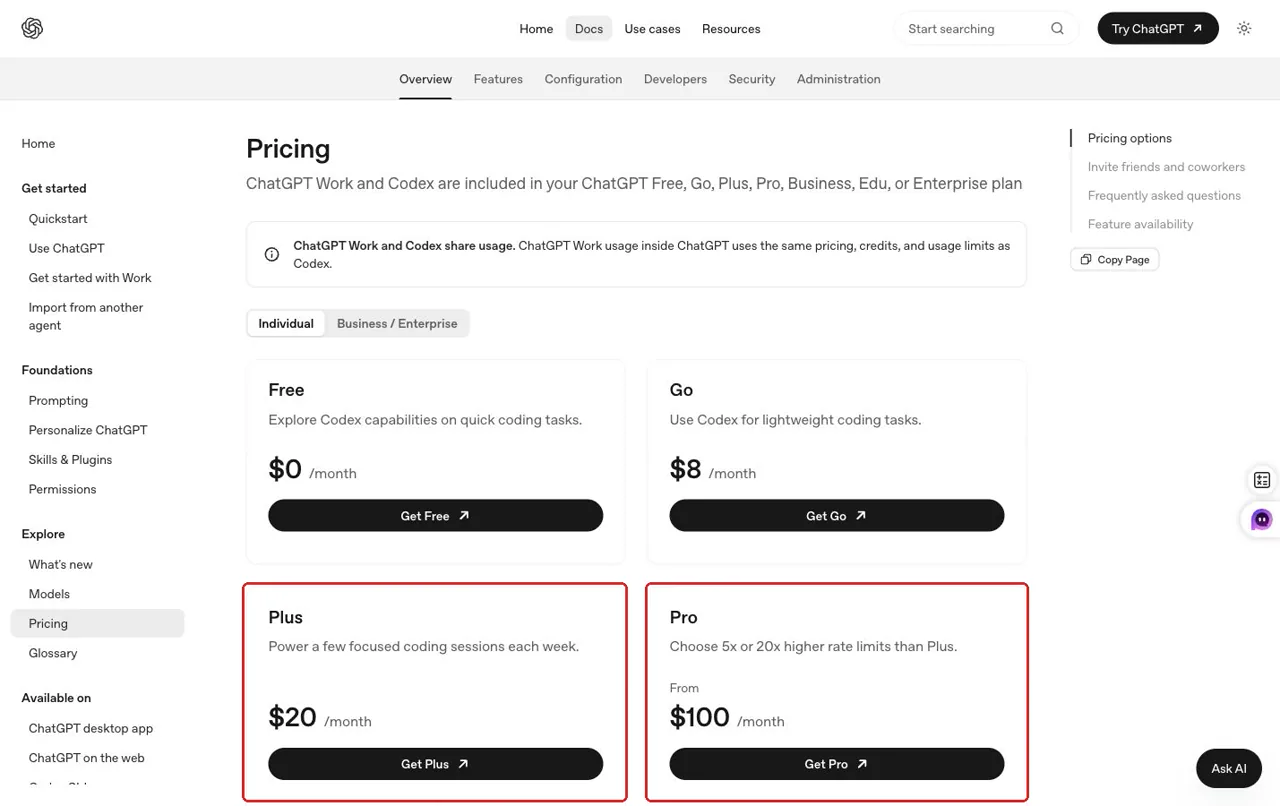
For individual users, the current decision starts with Plus at $20 per month. OpenAI also lists higher-use 5x and 20x consumer tiers at $100 and $200 per month. These prices describe subscription tiers; the labels do not guarantee five or twenty times a specific message count, and they should not be converted into API token rates.

| 计划 | 每月价格 | Best first fit | Signal to reconsider |
|---|---|---|---|
| 加 | $20 | Occasional or bounded coding-agent work | Valuable work is regularly interrupted by included limits |
| Higher-use 5x tier | $100 | Daily agent use with longer sessions | The included allowance still disrupts a normal workday |
| Higher-use 20x tier | $200 | Very heavy individual use | Actual usage history justifies the highest consumer tier |
Which subscription tier should you investigate first?
Choose a work pattern. This is a planning prompt, not a guaranteed-capacity or break-even calculator.
Start with Plus. For occasional work, the lowest consumer tier is the clearest first plan to evaluate. Real capacity remains variable.
Prices and plan names must be rechecked immediately before publication. API usage and purchased credits are separate.
Choose from observed interruptions, not hypothetical prompt counts. Start with the lowest tier that supports your normal repository work. Track how often a limit stops valuable progress, whether those sessions are well scoped, and how much of the window is spent on work that could happen elsewhere. A higher tier is easier to justify when agent runs are part of the working day and interruptions cost more than the price difference.
A larger allowance does not fix a sprawling workflow. Improve task boundaries first; if well-managed engineering work still reaches limits, a higher-use tier becomes easier to justify.
Credits and API billing are not the same thing
Included usage, purchased credits, and API-key billing are three different routes. Eligible Plus and Pro users may purchase credits after the included allowance is consumed, with included usage used first. Purchased credits are a paid balance, not a larger free bucket. OpenAI states that purchased credits remain valid for 12 months and are generally non-refundable and non-transferable, subject to legal exceptions.
| 路线 | When it applies | Billing relationship |
|---|---|---|
| Included subscription allowance | Normal eligible Plus or higher-use Codex work | Included in the monthly consumer plan |
| Purchased credits | An eligible account continues after included usage | Separate prepaid balance; included use is consumed first |
| API 密钥 | A developer calls the API route | Separate pay-as-you-go API billing |
This is also why the token fields from our subscription tests should not be dropped into an API calculator and presented as a real bill. The runs did not establish an API purchase, and the article does not use unverified current token rates. If you use an API key, estimate that route from the current official API pricing and your actual API telemetry, separately from the consumer plan.
A quota-saving workflow that does not reduce code quality
The goal is not to make Codex do less useful work. It is to remove rediscovery, scope drift, and mismatched tasks while preserving the verification that makes an agent result safe to use.
Before the run: define one outcome
Name the feature or defect, the affected area, constraints that must remain true, and the checks that prove completion. Include a failing command or named file when you know it. Remove stale logs and unrelated instructions. Choose the lightest model that can safely handle the ambiguity and risk.
Implement [single outcome] in [scope]. Preserve [constraint]. Success means: [tests/checks]. Inspect only additional files that are necessary, run the relevant verification, and report changed files, results, and remaining risks.
During the run: protect focus, not shortcuts
Let Codex inspect enough context and run useful tests. Intervene when the task expands into unrelated cleanup, repeats a failed approach without new evidence, or lacks a product decision required for correctness.
After the run: keep a reusable state
Review the diff and tests, then save what changed, what passed, what remains, and what needs human review. Start unrelated work in a fresh context. A saved state reduces rediscovery after a reset.
Resume from this verified state: [summary]. The next objective is [one step]. Recheck the current diff and relevant tests before changing anything. Do not expand the task beyond [scope].
Shorter is not automatically cheaper. A cryptic prompt can create more exploration than a detailed but bounded brief. The most efficient prompt gives enough evidence to start correctly and enough acceptance criteria to stop.
Which work belongs in Codex—and which work can move elsewhere?
Use Codex when the task depends on repository state: unfamiliar codebase analysis, multi-file implementation, debugging, tests, code review, and changes that need a diff. Those workflows benefit from file access, terminal execution, and verification in the same environment.
Move work when the repository is not part of the problem. Presentation building, structured documents, summarization, 创建图像, and some research tasks usually need content inputs and a clear output format rather than shell access. Routing them elsewhere preserves the coding window and often gives the user a more direct interface.
When the Codex window matters
Move the right work—not repository engineering—to a guided browser Agent
| 任务 | Best-fit route | 为什么 |
|---|---|---|
| Repository understanding | Codex or Claude Code | Needs direct codebase context and file-grounded reasoning. |
| Multi-file implementation | Codex or Claude Code | Needs coordinated edits, diffs, and executable tests. |
| Bug fixing and code review | Coding agent + human review | Needs reproduction, patches, and verification. |
| Guided presentation | Yukie is a practical option | Dedicated Slides entry, outline review, templates, and export were verified. |
| Structured non-code brief | Yukie is a practical option | Dedicated Document workflow and decision checklist were verified. |
| 创建图像 | Yukie is a practical option with output review | Image workflow worked, but the mixed image-plus-caption request was only partially completed. |
This routing does not claim an exact Codex quota saving, and it does not position Yukie as a repository coding-agent replacement.
GlobalGPT fits here as a multi-model, multimodal workspace. It can route writing, research, images, audio, and video through models or guided workflows chosen for the deliverable. That extends the working setup; it does not reproduce repository editing, terminal controls, or every native Codex feature. Keep the codebase in the coding agent and move only the jobs that can safely leave it. When a second model is useful inside the coding host, the GlobalGPT CLI is the relevant integration route.
What we learned from three guided Yukie tasks
We tested three browser workflows using the first valid result and did not rerun a weak output for appearance. The numbers below count frozen criteria completed; they are not universal product-quality scores.
| 工作流程 | Criteria completed | Practical result |
|---|---|---|
| 幻灯片 | 5/6 | Clear guided deck flow; requested speaker notes could not be verified |
| Document | 6/6 | Complete structured brief with visible export controls |
| Image plus caption | 5/6 | The visual met its constraints, but the required caption was missing |
Slides: strong guidance, one unverified deliverable
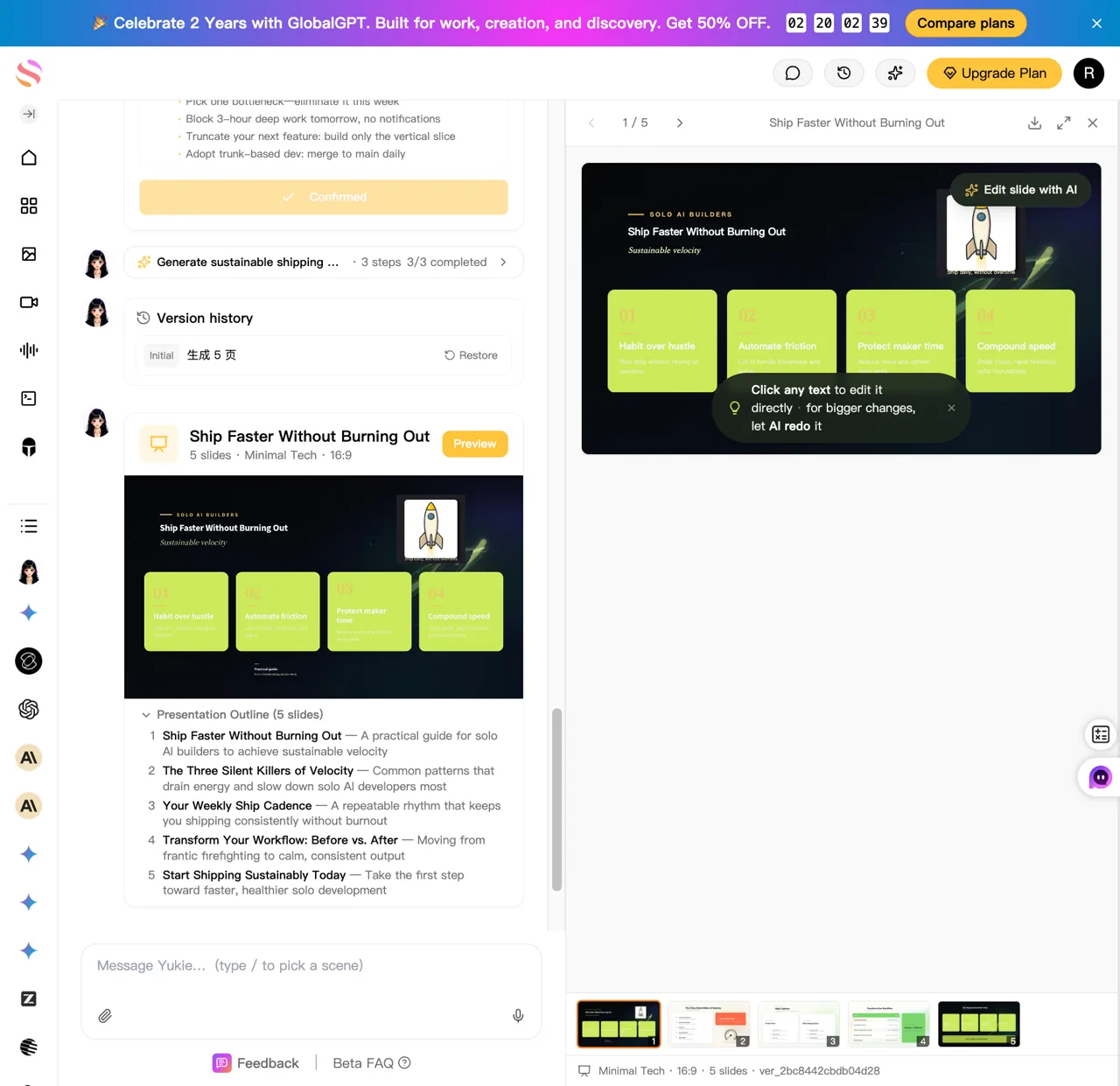
The Slides workflow exposed a dedicated entry, purpose selection, an editable five-slide outline, six named templates, preview, version history, a quality-status label, and an export path. It completed five of the six frozen criteria. Speaker notes were requested but could not be verified in the final deck or interface, so the result remained a partial pass.
Y1 · Yukie browser test
Guided five-slide presentation
- ✓Dedicated Slides entry and purpose selection
- ✓Exactly five slides and editable outline
- ✓Six named templates; Minimal Tech used
- ✓Requested structure substantially covered
- ×Speaker notes verifiably present
- ✓Preview, version history, and export path
Visible usage: 55.31 credits this turn. This is not a currency conversion.

View exact frozen prompt
Create a five-slide presentation for independent developers titled “Ship Faster Without Burning Out.” The audience is solo developers building AI products. Use a clean dark technology style. Include: 1) title and promise, 2) the three biggest workflow bottlenecks, 3) a practical weekly operating system, 4) a simple before-and-after comparison, and 5) a concise call to action. Keep each slide skimmable, use concrete language, and include speaker notes.
View output evidence
— Guided Five-Slide Presentation ### Workflow evidence - Yukie exposed a dedicated `Slides /ppt` entry point. - It parsed the requested title, audience, and five-slide count. - It offered purpose choices: Persuade, Inform, Educate, and Inspire. Educate was selected. - It generated an editable five-slide outline before rendering. - It offered six named templates: Professional, Consulting, Startup Pitch, Data Report, Education, and Minimal Tech. - Minimal Tech was recommended and used. ### First valid output The generated deck contained exactly five slides: 1. Ship Faster Without Burning Out 2. The Three Silent Killers of Velocity 3. Your Weekly Ship Cadence 4. Transform Your Workflow: Before vs. After 5. Start Shipping Sustainably Today The final interface showed `3/3 completed`, `5 slides · Minimal Tech · 16:9`, Preview, Version history, `Quality report Passed`, and an Export control. ### Limitations - The prompt explicitly requested speaker notes. The final DOM and visible preview did not expose verifiable speaker notes or a message saying that notes were unavailable. This criterion therefore remains unverified and prevents a full pass. - The visible internal thinking content mixed Chinese and English even though English was selected. The public slide content inspected was in English. - The interface's own `Quality report Passed` label is a product status signal, not an independent editorial score. ### Evidence - Published evidence image: `https://static.futureshareai.com/glb_features/Y1-slides-status-v2.webp` - Live final page was retained in Chrome as a deliverable.
The advantage was a clearer presentation workflow, not a claim of better coding-agent reasoning. The user still chose a purpose and template, and the deliverables still needed checking.
Document: the cleanest routed task
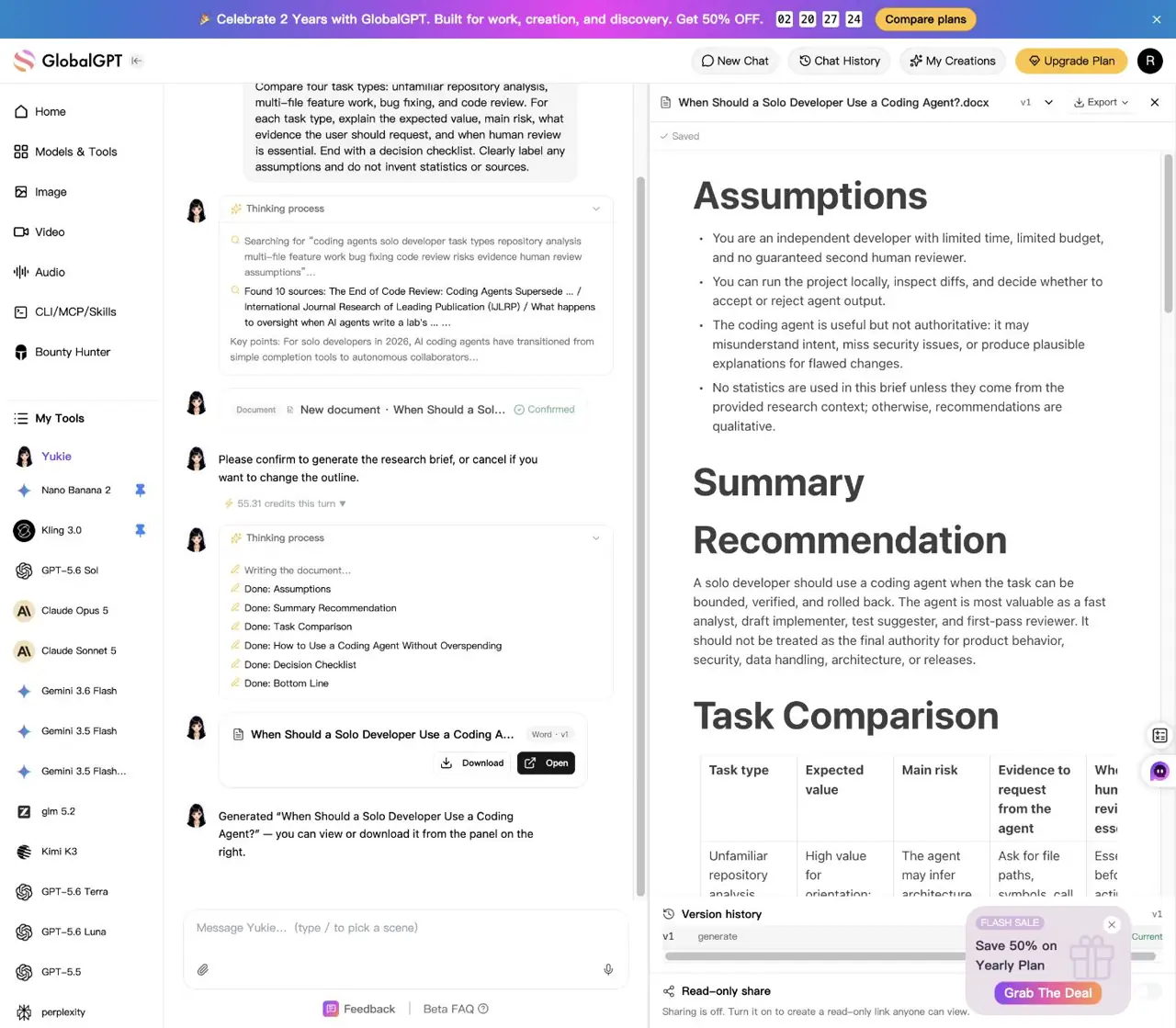
The Document workflow was the strongest fit for moving work outside Codex. It produced the requested four task types, value, risk, evidence, and human-review guidance, labeled assumptions, a decision checklist, and visible download, open, export, and version-history controls.
Y2 · Yukie browser test
Structured coding-agent research brief
- ✓Dedicated Document workflow
- ✓All four requested task types
- ✓Value, risk, evidence, and human-review guidance
- ✓Assumptions marked
- ✓Decision Checklist included
- ✓Download, open, export, and version history
Visible usage: 55.31 credits displayed. This is not a currency conversion.

View exact frozen prompt
Create a concise research brief titled “When Should a Solo Developer Use a Coding Agent?” The reader is an independent developer with limited time and budget. Compare four task types: unfamiliar repository analysis, multi-file feature work, bug fixing, and code review. For each task type, explain the expected value, main risk, what evidence the user should request, and when human review is essential. End with a decision checklist. Clearly label any assumptions and do not invent statistics or sources.
View output evidence
— Structured Research Document ### Workflow evidence - Yukie exposed a dedicated `Document /doc` entry point. - It performed an automatic research/search stage and presented an outline for confirmation. - The workflow required a Generate confirmation before producing the document. ### First valid output The document included: - Assumptions - Summary Recommendation - A task comparison covering unfamiliar repository analysis, multi-file feature work, bug fixing, and code review - Expected value, main risk, evidence to request, and human-review guidance for each task - Guidance on using a coding agent without overspending - A Decision Checklist - A Bottom Line section The final interface showed Download, Open, Export, Version history, and a read-only sharing control. Sharing remained off. ### Limitations - The document required a confirmation click before generation, so the workflow was guided rather than fully one-shot unattended. - No unsupported numerical claims were observed in the reviewed output. ### Evidence - Published evidence image: `https://static.futureshareai.com/glb_features/Y2-document-result.webp` - Live final page was retained in Chrome as a deliverable.
A brief that must quote repository behavior still needs repository evidence. A standalone memo based on supplied requirements can use the guided outline and export flow without consuming the coding window.
Image plus caption: the visual passed, the bundle did not
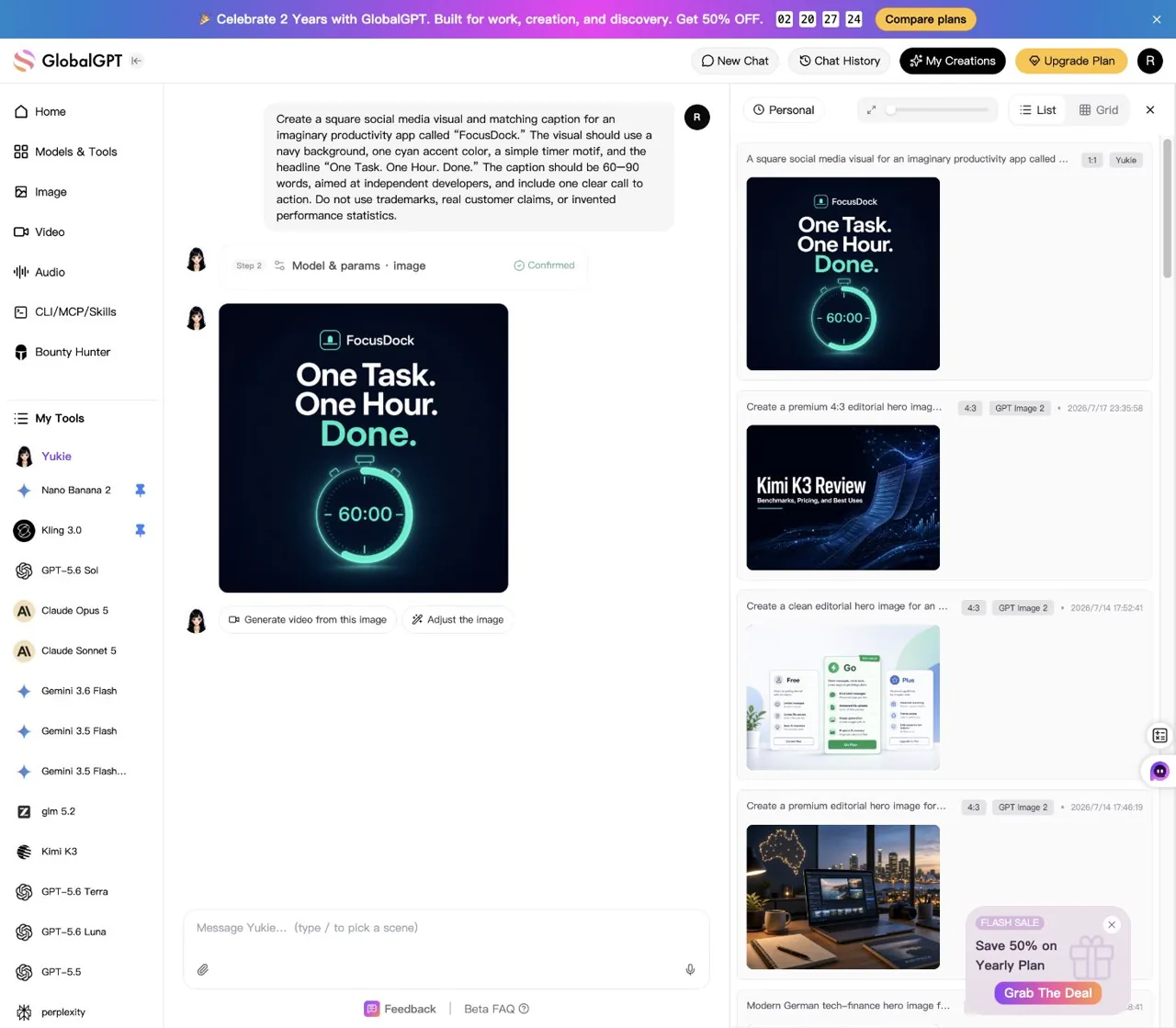
The image workflow recommended an image model and exposed format-specific controls. The first valid square result used the requested navy background, cyan accent, 60:00 timer motif, and exact headline. It did not deliver the required 60–90 word caption and call to action, so the combined task completed five of six criteria.
Y3 · Yukie browser test
FocusDock square visual and matching caption
- ✓Dedicated Image workflow and editable prompt
- ✓Square 1:1 visual
- ✓Navy, cyan, timer, and exact headline
- ×Required 60–90 word caption
- ✓No real-customer claim or invented statistic
- ✓Visible adjustment path
Visible usage: 320 credits displayed before generation. This is not a currency conversion.

View exact frozen prompt
Create a square social media visual and matching caption for an imaginary productivity app called “FocusDock.” The visual should use a navy background, one cyan accent color, a simple timer motif, and the headline “One Task. One Hour. Done.” The caption should be 60–90 words, aimed at independent developers, and include one clear call to action. Do not use trademarks, real customer claims, or invented performance statistics.
View output evidence
— Multimodal Social Asset ### Workflow evidence - Yukie exposed a dedicated `Image /paint` entry point. - It rewrote the request into an editable image-generation prompt. - It recommended GPT Image 2 for typography. - The model and parameter step showed GPT Image 2, 1:1, 2K, and 320 credits before generation. ### First valid output The generated square image visibly included: - A navy background - A cyan accent - A timer motif showing `60:00` - The exact headline `One Task. One Hour. Done.` - No evident real-customer claims or invented performance statistics The final interface exposed `Generate video from this image` and `Adjust the image` controls. ### Failure preserved No matching 60–90 word caption was delivered in the final task output. The only caption-related language in the final DOM was the user's original request. No corrective follow-up was submitted because a follow-up would be manual intervention and would replace neither the first valid result nor its failure. ### Evidence - Published evidence image: `https://static.futureshareai.com/glb_features/Y3-image-result.webp` - Live final page was retained in Chrome as a deliverable.
Together, the three tests support a limited conclusion: guided entries can reduce setup friction for non-code deliverables, but guidance does not remove the need to verify every requested output. They do not support calling Yukie unlimited, converting displayed credits into money, or treating it as a replacement for repository engineering.
A practical Codex usage decision checklist
- Does the task require the repository, shell, diff, or tests? If yes, keep it in Codex or another coding agent.
- Is the objective bounded? Define one result and the checks that prove it before starting a long run.
- Does the task need the strongest reasoning? Use a lighter model when the risk and ambiguity allow it.
- Which limit is active? Separate the five-hour window, weekly cap, credits, and API billing.
- Can the work leave the coding environment safely? Route presentations, standalone documents, media, and other non-repository tasks to a suitable model or guided workflow.
Upgrade when well-scoped repository work is consistently valuable and limit interruptions cost more than the plan difference. Change the workflow first when the window is being spent on broad rediscovery, unrelated deliverables, or repeated clarification that could have been resolved before the run.
Codex usage FAQ
Does Codex reset every five hours?
The shared short-term window resets on a five-hour cycle, but additional weekly limits may still apply. A five-hour reset therefore does not guarantee that every account restriction disappears.
How many Codex prompts do I get?
There is no single reliable prompt count. OpenAI publishes broad estimates by model, while actual consumption changes with context, reasoning, tools, retrieval, caching, and task complexity.
Why can I still be limited after five hours?
An additional weekly cap may be active. Check the current account usage view or the documented allowance information in an active session rather than relying on the short-window reset alone.
How do I check Codex usage in the CLI?
OpenAI documents /status for checking allowance information in an active Codex CLI session. What it displays depends on the current authentication and account state.
Are Codex API charges included in Plus or the higher-use plans?
No. API-key usage is billed separately from the consumer subscription allowance.
Can I buy more Codex usage?
Eligible users may purchase credits after included usage is consumed. Check the current account page for availability and terms before buying.
Do cached input tokens show how much subscription allowance I saved?
No. Cached-input telemetry does not provide a reliable conversion to a five-hour percentage, weekly percentage, credit amount, or API bill.
Is Yukie unlimited?
We did not find reliable evidence supporting that claim. Treat Yukie as a guided option for suitable non-repository tasks, not as a verified unlimited coding replacement.
Official limits, prices, and credit terms were checked on July 29, 2026. They can change, so verify the current OpenAI pages before making a purchase decision.
Keep repository work in Codex. For the next presentation, research brief, or multimodal asset that does not need your codebase, open GlobalGPT and choose the model or guided Yukie workflow built for that job.