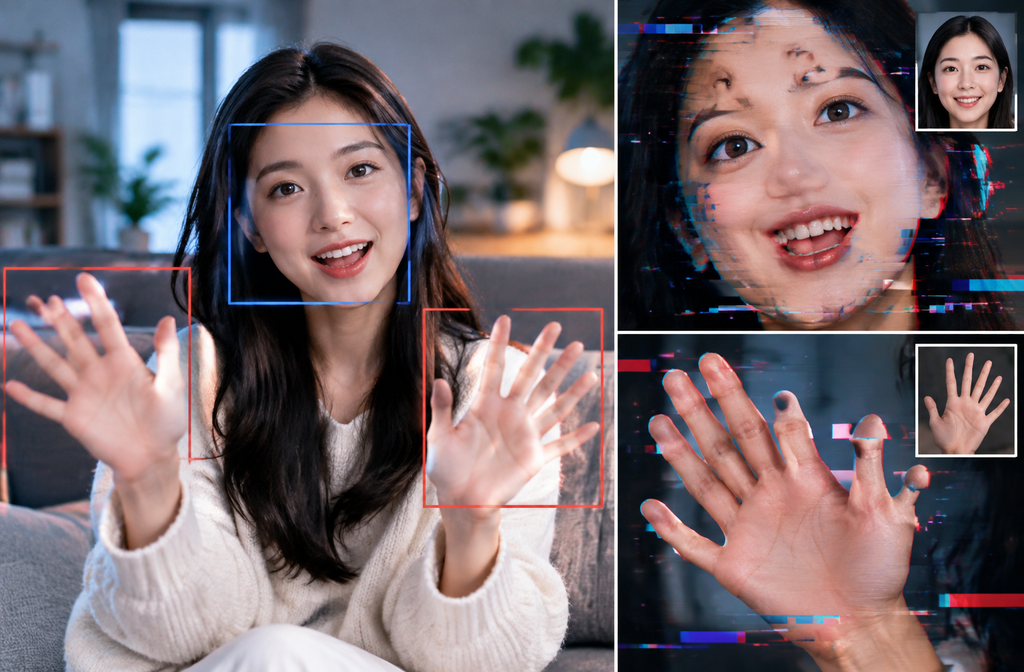
AI video hands and faces go wrong because a model must keep anatomy, identity, lighting, pose and motion coherent across many frames, not just draw one convincing image. A hand that looks acceptable in frame 20 may cross the face in frame 24, change finger spacing in frame 26 and merge with hair in frame 28. The model then has to repair several uncertain regions at once.
We tested a short friendly-wave prompt against a much more constrained open-palm prompt through the GlobalGPT CLI. The constrained version produced calmer motion and a more readable hand pose. It did not preserve the source person’s identity, clothes, microphone or room. That mixed result is more useful than a perfect demo because it shows what prompt constraints can and cannot control.
Why Hands Fail Across Time
Hands are articulated objects with many small parts, frequent self-occlusion and fast changes in silhouette. A waving hand rotates, fingers overlap, motion blur softens edges and the palm moves relative to the face. The generator must infer a consistent 3D structure from every new view while maintaining the previous frame.
Problems become visible as extra fingers, fused digits, changing nail positions, rubbery wrists or a hand that switches sides. The broader AI 기반 영상 고장 진단 helps separate anatomy failures from camera, physics and continuity failures.
Why Faces Drift Even When One Frame Looks Good
A face is sensitive to tiny changes in eye spacing, eyelid shape, mouth corners, nose width and hairline. Speech and expression move those landmarks continuously. If the face becomes small, turns away, crosses a shadow or is partly covered by a hand, the model has less evidence and may redraw identity.
바로 그 때문에 AI video consistency workflow treats character stability as a sequence problem. A strong first frame helps, but the prompt, camera, duration and motion must also protect the identity signal.
Our Baseline and Constrained Test
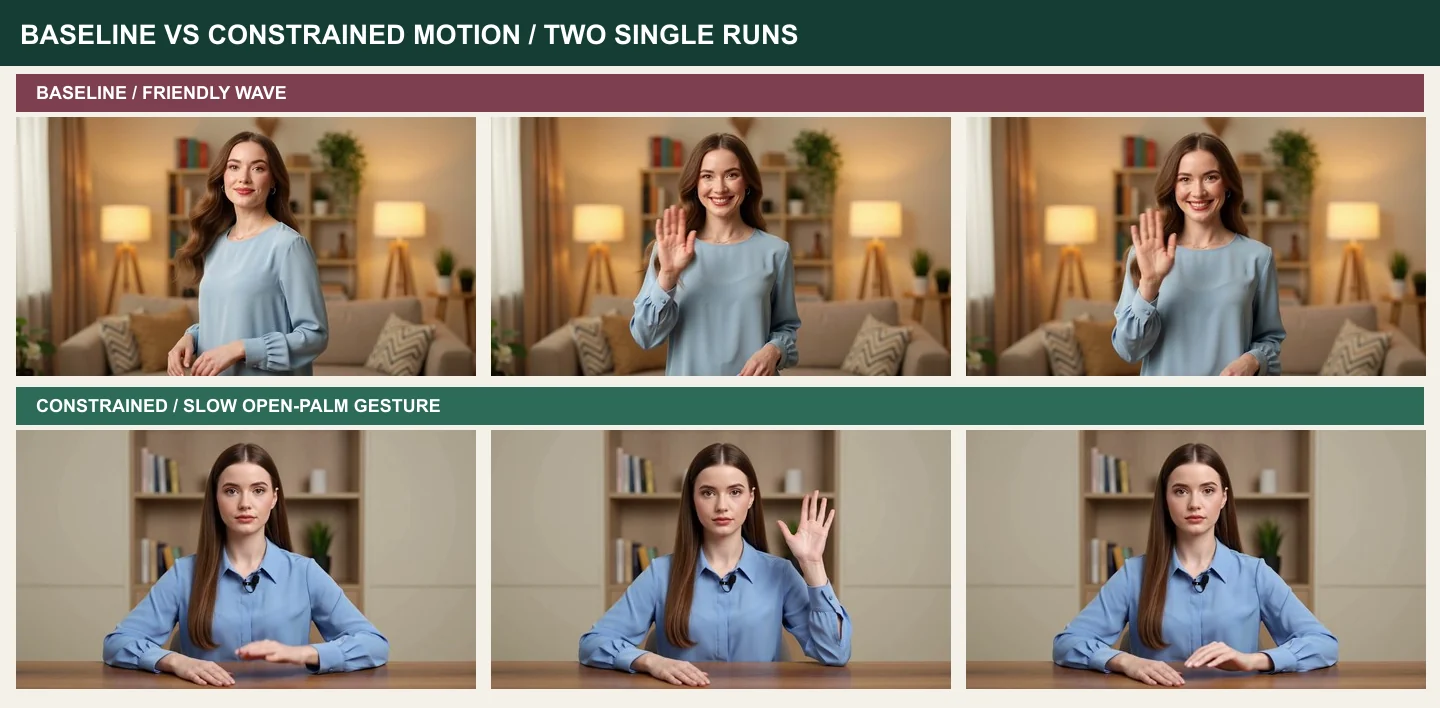
Both runs used the same source image and Grok Imagine route at 1280×720 for about five seconds. The baseline asked the woman to turn toward camera and wave. The constrained prompt named the right hand, required five separated fingers, kept the hand beside the shoulder, prohibited face occlusion, limited head movement and locked the camera.
Each task cost 500 credits. This is an A/B observation with one run per prompt, not a statistically controlled experiment. We sampled fixed-time frames and inspected the videos at normal speed.
Baseline Result: Lively Motion, Major Identity Drift
The baseline generated a friendly, energetic wave. The open hand remained readable in the sampled frames, but the output replaced the source host with a different-looking woman in a different room and outfit. Composition changed before the wave even became the main action.
That outcome shows why a visually attractive hand is not enough. If the job requires a recurring presenter, identity and environment are hard acceptance criteria. The building a consistent character from one photo covers source-image decisions that can improve the starting reference, but our result shows that a source alone does not guarantee continuity.
Constrained Result: Better Pose, Identity Still Lost
The constrained output moved more slowly, kept the hand beside the head and held a cleaner open-palm pose. The hand did not sweep across the face. Those differences made the gesture easier to inspect and would simplify editing.
Yet the person, clothes, microphone and room still changed substantially. The prompt asked for exact preservation and the model did not deliver it. We can say the constrained run improved motion readability in this pair. We cannot say it fixed anatomy universally or preserved identity.
Write Prompts Around Visibility and Motion
A useful hand prompt names one limb, one action, one position and one duration. “Raise the right hand, show an open palm beside the shoulder, hold for one second, lower it” is testable. “Gesture naturally while speaking excitedly” leaves many joints, speeds and occlusions unspecified.
Camera language matters too. Lock the camera, keep the full hand inside frame and avoid aggressive zooms during the gesture. The camera and motion prompt controls offers a broader vocabulary for camera and motion control, while Veo motion-prompt techniques adds Veo-specific prompt techniques.
Protect the Face Before Adding Performance
Keep the face large enough to read. Limit head turns, extreme expressions and hand crossings during identity-critical moments. Ask for subtle blinking and small mouth motion before combining dialogue, a prop and a moving camera. Add complexity only after the simplest shot passes.
For long sequences, divide the performance into shots with stable start and end frames. The long-video character consistency explains why character continuity becomes harder as clips accumulate and how anchors help across edits.
Build a Better Source Frame
Use a sharp, evenly lit image with both eyes visible, a clean hair silhouette and hands either fully visible or completely outside the crop. Avoid fingers cut by the frame edge, heavy beauty filters, strong motion blur and patterned backgrounds that intersect the body.
A source frame should also match the intended video composition. Asking a close portrait to become a waist-up wave forces the model to invent arms, hands, clothes and room detail at once. Generate or photograph the needed framing before animation.
Triage Failures Instead of Rewriting Everything
- If fingers merge, slow the gesture and separate the hand from the face or body.
- If identity drifts, reduce head rotation, expression range and clip duration.
- If the wrist bends strangely, simplify the hand path and remove prop interaction.
- If the background changes, lock the camera and describe fixed scene anchors.
- If several failures appear together, return to a cleaner source frame.
AI 영상 제작 시 흔히 저지르는 실수 lists common planning mistakes that often create these compounded failures.
Copyable Baseline and Constrained Prompts
Run the short baseline first so you can see what the model chooses without help. Then change only the motion constraints. Preserve model, source, duration and aspect ratio. This makes the comparison easier to interpret, even though two single samples cannot prove causality.
Review Frame by Frame, Then at Normal Speed
Normal-speed playback reveals whether motion feels human. Frame stepping reveals when anatomy or identity begins to drift. Check the start, peak gesture, occlusion point and return pose. Look at both hands, not only the waving one, and compare eye shape and mouth corners against the source.
Record the earliest bad frame. That tells you whether to change the source, shorten the shot or constrain a particular transition. A vague “looks weird” note is difficult to turn into a better prompt.
Treat Occlusion as a Production Risk
Occlusion occurs when one object hides another: fingers cross the face, hair covers an eye, a prop hides the wrist or the body turns away from camera. The hidden structure still has to be inferred, and the model may bring it back with a different shape. Fast motion makes that inference harder because adjacent frames provide less stable evidence.
Stage the action so important anatomy stays visible. Place the hand beside the face rather than in front of it. Keep props away from finger joints. If contact is essential, divide the action into approach, contact and release shots, then edit them together. This reduces the number of hard transitions one generation must solve.
Repeat the Test Before Drawing a Model Conclusion
Our two clips are useful observations, but one seed can flatter or punish a prompt. For an actual model choice, repeat each prompt several times with the same source and settings. Score hand readability, identity, background, camera and action completion separately. Keep rejected outputs in the log.
A repeated test can reveal whether the constrained prompt raises the probability of a usable pose or merely produced one fortunate sample. It can also show a trade-off: stronger motion control may reduce expression or create a stiffer performance. Choose the balance that matches the shot rather than chasing a single perfect frame.
Know When to Edit and When to Regenerate
Edit around a brief defect when the identity, action and camera are otherwise strong. A short cutaway can hide a two-frame finger collapse; a tighter trim can remove a bad return pose. Regenerate when the face changes throughout, the wrong hand performs the action, the background transforms or anatomy fails across many frames.
Do not spend an hour repairing a clip that violates the core brief. Conversely, do not discard an excellent performance for a tiny problem that a normal edit can conceal. The acceptance checklist should distinguish fatal failures from finishable imperfections before review begins.
Use a Human-Motion Acceptance Checklist
For every take, score five areas independently: identity, anatomy, action, camera and scene. Identity covers facial proportions, hair and clothing. Anatomy covers fingers, wrists, elbows, teeth and eye motion. Action checks whether the requested movement starts, peaks and ends correctly. Camera covers framing and unwanted motion. Scene covers props, background and lighting continuity.
Mark each area pass, repairable or reject. A repairable result might contain a brief bad frame that can be trimmed without changing meaning. A reject has persistent identity drift, repeated hand collapse or a missing action. This classification prevents a visually pleasing clip from slipping through with a fatal continuity error.
Review sound separately even when the article focuses on faces and hands. Unexpected audio, speech artifacts or a missing track can make a visually acceptable take unusable. The final keeper is the file that passes the whole delivery specification, not the still frame that looks best in a contact sheet.
실제 평가
Our constrained prompt produced a calmer, more readable hand gesture than the baseline, but both outputs changed identity dramatically. Prompt engineering improved one dimension without solving the whole continuity problem.
A production-ready method combines a well-framed source, one controlled action, a stable camera, repeated samples and a written acceptance checklist. When the subject must speak or handle a prop, prove those behaviors in separate short shots before combining them. Complexity should be earned by successful tests.
Do not judge hands from the final frame alone. Watch the entire path into and out of the gesture, then compare the face to the source. A clean palm cannot compensate for a different person, and a stable face cannot compensate for a wrist that collapses during the action.
Compare video routes in GlobalGPT when a shot fails, but change one variable at a time and keep the source, settings and rejection reason. Better hands and faces come from reducing uncertainty across the sequence, not from adding “perfect anatomy” to an overloaded prompt.
For the next test, repeat both prompts several times with the same source and score identity, anatomy, action, camera and scene separately. That small sample will show whether the constrained prompt improves the keeper rate or merely produced one fortunate result. Keep motion short and visible until the core gesture is stable. Then add speech, props or camera movement one at a time, preserving a clean version of every stage that passed review.
자주 묻는 질문
Why do AI video hands have extra fingers?
Fast articulation, self-occlusion, motion blur and changing viewpoints make finger structure uncertain across frames. The model may redraw the hand differently as it moves.
Why does a face change during an AI video?
Small faces, head turns, expressions, shadows and occlusion weaken identity cues. The generator then rebuilds facial landmarks instead of preserving them exactly.
Can a better prompt fix AI hands?
A constrained prompt can reduce motion and occlusion, which improved readability in our single test. It cannot guarantee correct anatomy across every model or run.
Does a reference image guarantee identity consistency?
No. A strong source helps, but the video model may still change the person, clothing, room or camera composition during motion.
What camera movement is safest for faces and hands?
A locked camera with a medium or waist-up composition is the safest starting point. Add pans, zooms or orbiting only after the simple gesture passes.
Can I switch models when a shot keeps failing?
Yes. GlobalGPT lets you compare available video routes. Keep the source and acceptance criteria constant so you can judge whether the model change actually helps.