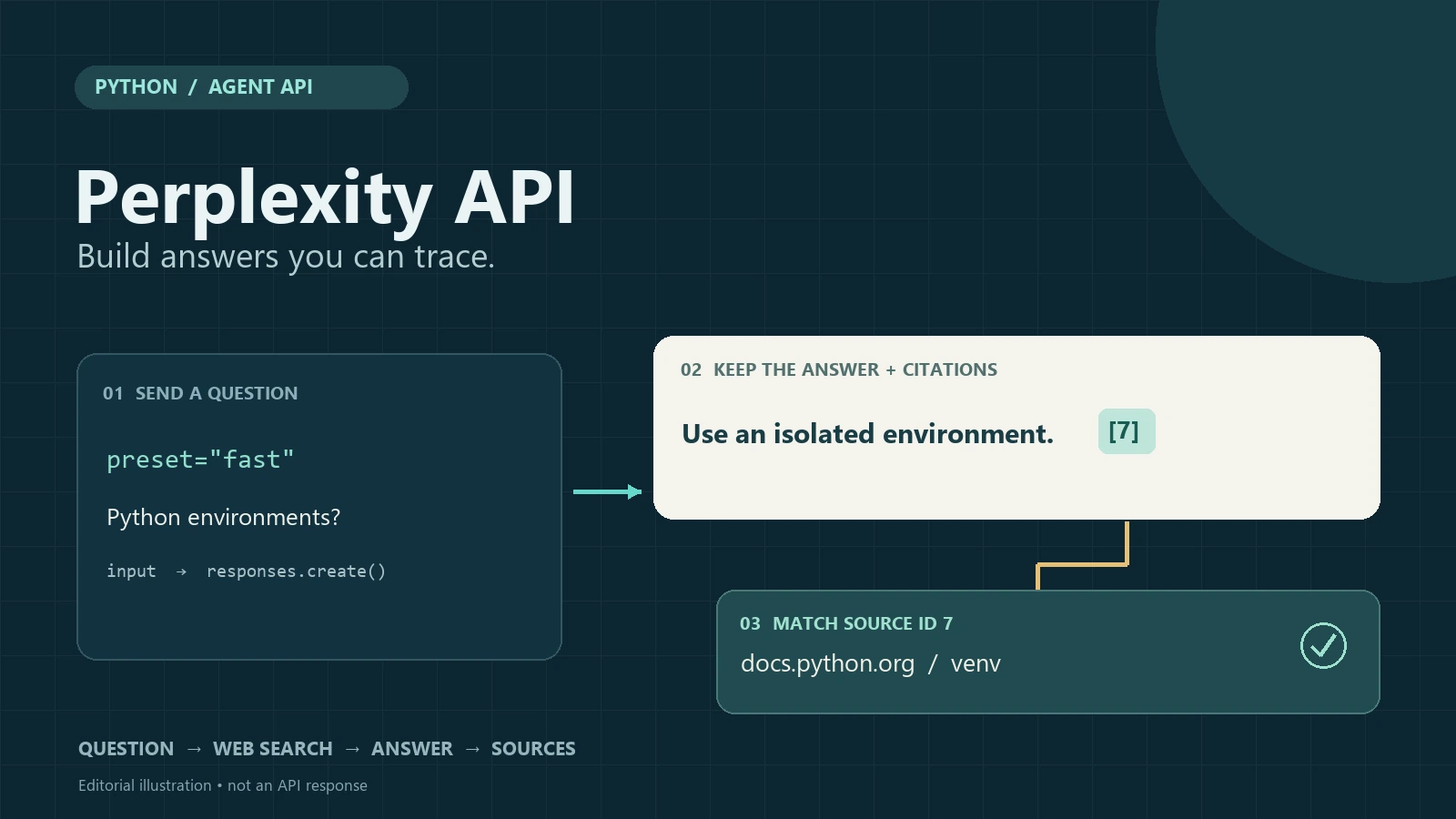
PERPLEXITY API · PYTHON TUTORIAL · 2026
This Perplexity API tutorial shows you how to build a Python script that returns an answer with clickable web sources. Use the Agent API to send a question, read the answer, match its citation markers to source IDs, and export a Markdown file you can review.
We will use one question throughout: How should a small Python project use virtual environments and manage dependencies? Start with a basic request, then add source parsing and domain filters. You need basic Python knowledge and a Perplexity developer account with API billing set up.
If you also use AI for everyday research and writing, Perplexity su GlobalGPT offers access within an all-in-one AI workspace, reducing the need to switch between separate tools. That consumer workflow is separate from the developer key and API billing used here.
Risposta rapida: Utilizza il veloce Agent preset for a first web-grounded answer, read response.output_text for the answer, and read the search_results item in response.output for sources. Match each inline marker to a source by its returned id. A citation means “the answer points to this result”; it does not guarantee that the page proves every claim.
Example status: The request syntax follows official documentation checked September 28, 2026. The citation helper has been checked with offline sample data; no paid API request was run for this tutorial. Source records shown in the illustration are explanatory examples.
- Which Perplexity API should you use?
- Step 1: Get an API key and set up Python
- Step 2: Send your first source-grounded request
- Step 3: Extract the answer and match its sources
- Step 4: Improve the answer with search filters
- Step 5: Save a complete answer with clickable sources
- Streaming and structured output
- Costs and common errors
- Moving from an older Sonar tutorial
- Domande frequenti
Perplexity API tutorial: choose the right API
These are developer interfaces. The chat product may package similar capabilities differently; our overview of Caratteristiche di Perplexity describes the user-facing experience.
Di Perplexity official API quickstart groups its developer products by the job you need to complete. Choose the smallest surface that produces the data your application actually needs.
| API | La migliore vestibilità | What your code receives |
|---|---|---|
| Agente | A finished answer grounded in web search or other tools | Typed output items, answer text and search result records |
| Ricerca | Your application will rank, filter or summarize results itself | Search results without asking Perplexity to write the final answer |
| Router | Route requests to a suitable model | A model response selected through the router |
| Embeddings | Semantic retrieval and a RAG index | Vectors for your own search layer |
This tutorial chooses Agent because the result you want is a finished answer plus its sources. For the broader research workflow, see our guide to using Perplexity for research.
About Sonar: L'attuale migration overview says Sonar Chat Completions remains supported and recommends Agent for all new projects. This tutorial therefore uses Agent. Do not infer that an old integration has stopped working from a deadline quoted in an older tutorial.
Step 1: Get an API key and set up Python
Create the key and prepare billing
Open the Perplexity API console, choose or create the project you will use, configure API billing, and create a key. Keep it server-side. The developer APIs are billed separately from consumer subscriptions; check your project balance before making requests.
Install the official SDK
python -m venv .venv

# macOS/Linux: choose this activation command
source .venv/bin/activate

# Windows PowerShell: use this command instead
.venv\Scripts\Activate.ps1

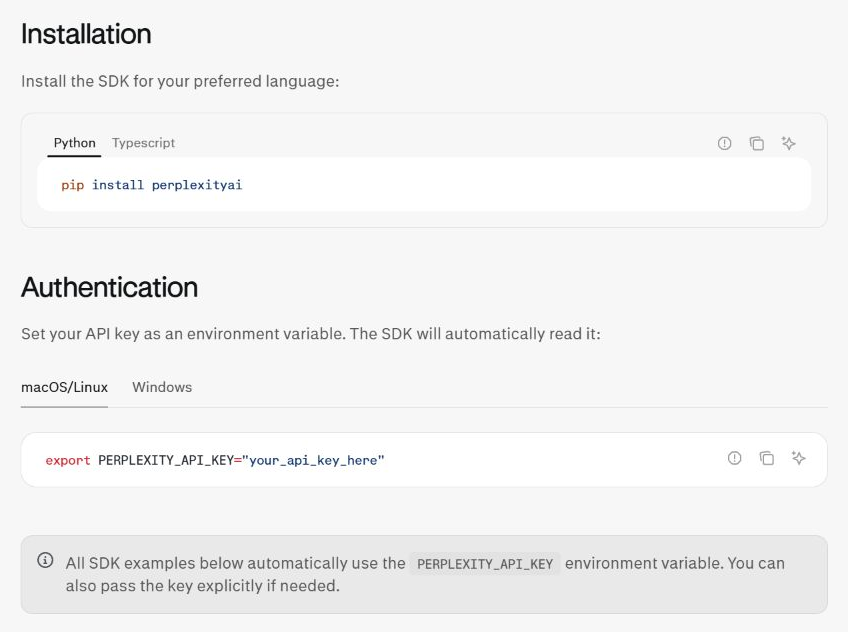
python -m pip install --upgrade perplexityai
Use Python 3.10 or newer for the code below. Activate the environment using the command for your operating system, then install the SDK. If PowerShell blocks activation, use .venv\Scripts\python.exe in place of python for installation and script execution.
The package name is perplexityai, while the Python import is perplessità. Use a virtual environment so this tutorial’s dependencies do not change another project.
The example uses a coding question because its claims can be checked against maintained documentation. Our guide to Perplexity for coding explains where research support fits alongside testing code yourself.
Set the API key as an environment variable
# macOS/Linux
export PERPLEXITY_API_KEY="your-key-here"

# Windows PowerShell
$env:PERPLEXITY_API_KEY = "your-key-here"
The SDK reads PERPLEXITY_API_KEY when you create the client. Do not paste the key into a notebook, commit it to Git, or send it to a browser. If you use a .env file locally, keep that file out of version control and load it with your chosen environment-variable library.
Step 2: Send your first source-grounded request
The Agent API quickstart documents POST https://api.perplexity.ai/v1/agent. Its Python client wraps the request with client.responses.create(). Il veloce preset enables web search by default, which keeps the first example small.
from perplexity import Perplexity

client = Perplexity()

question = (
    "How should a small Python project use virtual environments "
    "and manage dependencies?"
)

response = client.responses.create(
    preset="fast",
    input=question,
)

print(response.output_text)
Save the snippet as first_request.py, quindi eseguire python first_request.py in the same terminal where you set the key. A successful call should print nonempty answer text. If you need evidence for the result, continue to the source extraction step; text alone is not a completed check.
The convenience property output_text gives you the final answer text. Keep the whole response object as well: source records and usage details are in the typed output, not in the printed paragraph alone.
The same request with cURL
curl https://api.perplexity.ai/v1/agent \
  -H "Authorization: Bearer $PERPLEXITY_API_KEY" \
  -H "Content-Type: application/json" \
  -d '{
    "preset": "fast",
    "input": "How should a small Python project use virtual environments and manage dependencies?"
  }'
This cURL example uses Bash syntax for macOS/Linux or a Bash-compatible shell. Each run makes another billable request. Use it only when you need to isolate an endpoint problem from a Python problem; do not run every version just to follow along.
Server-side JavaScript equivalent
Node.js 18+ includes fetch, so a server-side smoke test needs no extra library. Read the raw output items in the JSON response; the Python SDK provides the convenient output_text accessor.
const res = await fetch("https://api.perplexity.ai/v1/agent", {
  method: "POST",
  headers: {
    Authorization: `Bearer ${process.env.PERPLEXITY_API_KEY}`,
    "Content-Type": "application/json"
  },
  body: JSON.stringify({
    preset: "fast",
    input: "How should a small Python project use virtual environments and manage dependencies?"
  })
});
if (!res.ok) throw new Error(`Perplexity HTTP ${res.status}`);
console.log(await res.json());
Step 3: Extract the answer and match its sources
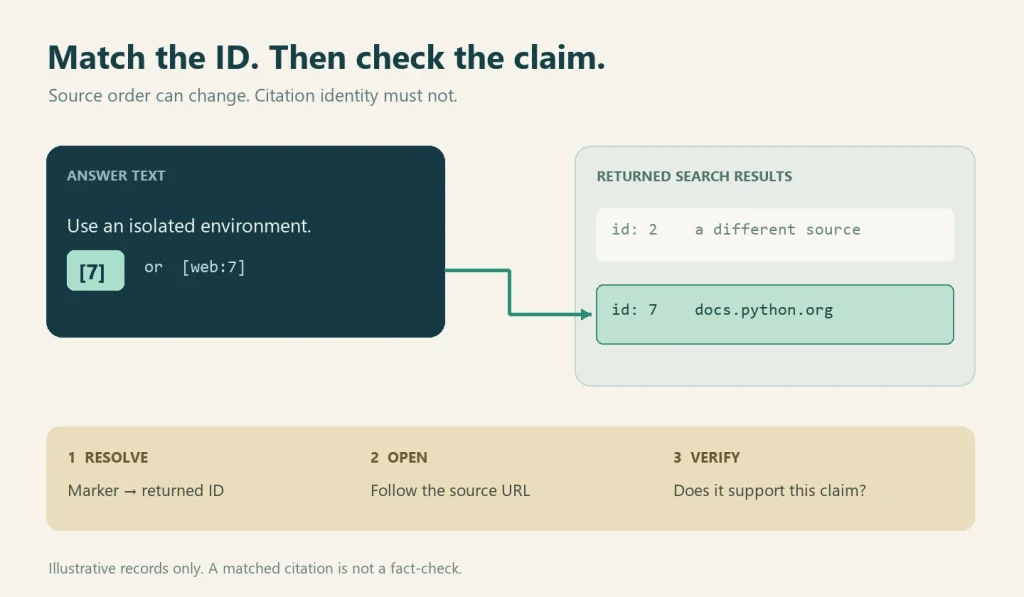
The official citation guidance distinguishes the prose from its evidence records. Sources arrive in an output item with type search_results. Read that item’s risultati and match each citation marker to the result’s id. A result has a title and URL; handle absent values before displaying it.
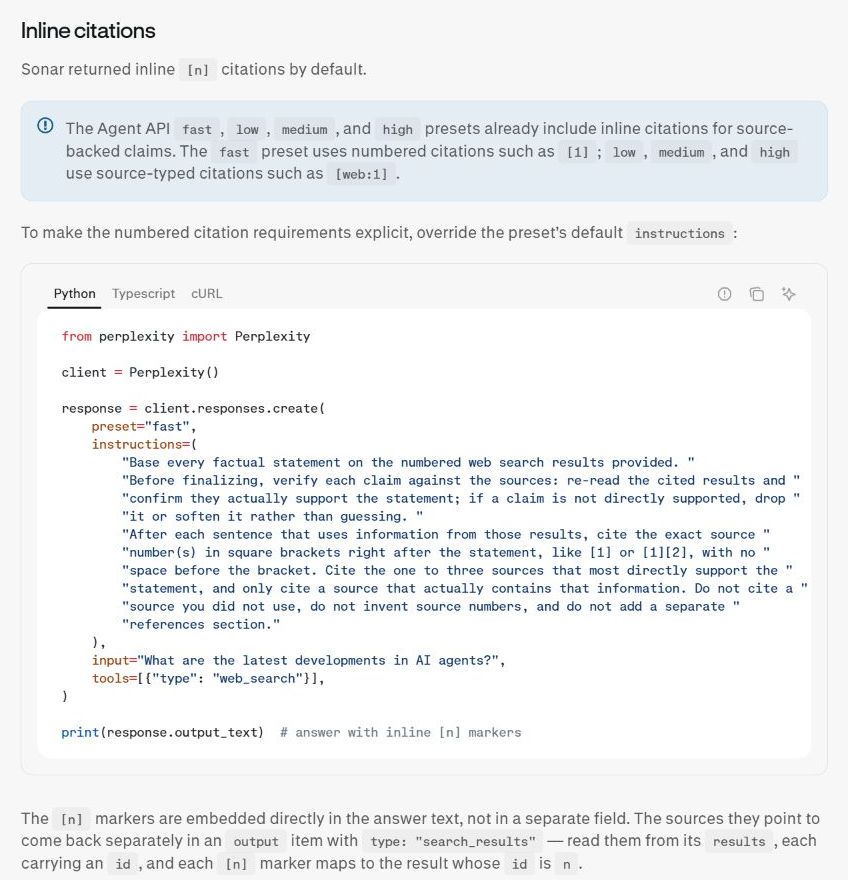
That last detail matters. Do not assume “citation 1” is always the first element in an array after another tool adds an item. Build a lookup by ID, then resolve the markers that actually appear in the answer.
def field(obj, name, default=None):
    return obj.get(name, default) if isinstance(obj, dict) else getattr(obj, name, default)

def source_index(output):
    sources = {}
    for item in output or []:
        if field(item, "type") != "search_results":
            continue
        for result in field(item, "results", []) or []:
            sid, url = field(result, "id"), field(result, "url")
            if sid is None:
                continue
            key = str(sid)
            if key in sources and field(sources[key], "url") != url:
                raise ValueError(f"Conflicting URLs for source ID {key}")
            sources[key] = result
    return sources

sources = source_index(response.output)
print(sources.get("7"))  # A source ID, not array position 7
The complete script below recognizes [1] e [web:1], the documented citation forms for the common presets. The helper above handles both SDK objects and dictionaries, and refuses conflicting URLs assigned to the same ID. It does not renumber results or guess a missing source.
For a broader discussion of citation quality, see our Perplexity citation accuracy guide. A citation is an audit trail; your application still needs a policy for stale pages, duplicate URLs and unsupported claims.
For example, if the returned array contains ID 2 followed by ID 7, the marker [7] must link to ID 7. If the same URL appears under IDs 7 and 9, you can display that URL once while preserving both IDs. If ID 8 never arrives, keep [8] visible and flag it as unmatched.
Step 4: Improve the answer with search filters
Once the basic request works, constrain the search when your question has a clear authority boundary. For Python packaging, the language documentation and packaging guide are better starting points than an arbitrary tutorial.
response = client.responses.create(
    preset="fast",
    input=(
        "How should a small Python project use virtual environments "
        "and manage dependencies? Cite the guidance you use."
    ),
    tools=[
        {
            "type": "web_search",
            "filters": {
                "search_domain_filter": [
                    "docs.python.org",
                    "packaging.python.org",
                ]
            },
        }
    ],
)
The filter belongs inside the web-search tool configuration. The migration documentation also describes search_recency_filter for time-sensitive questions. Use recency when the question depends on recent releases or news; a very narrow domain and date combination can leave you with too little evidence.
For a question about releases in the past month, add "search_recency_filter": "month" beside search_domain_filter. Leave it out of the virtual-environment example: stable documentation may have an older publication date. If you switch from a preset to a directly selected model, explicitly include the web-search tool.
Compare filtered and unfiltered results during development. If the answer changes, record why: a filter may remove useful context, or it may remove low-authority pages that were distracting the model. This is a quality decision, not a guarantee that every remaining page is correct.
If your application needs only ranked links and snippets, call the Search API and perform the synthesis yourself. That separation can make review and caching easier. For a wider comparison with Google, see In che modo Perplexity si differenzia da Google.
Step 5: Save a complete answer with clickable sources
Save the following as perplexity_tutorial.py. It is self-contained: it includes the source helper, applies the Python documentation domain filter, turns matched citation markers into links, groups duplicate URLs without losing IDs, and saves the complete SDK response alongside Markdown.
from pathlib import Path
from collections import defaultdict
from urllib.parse import urlsplit
import json
import re

QUESTION = (
    "How should a small Python project use virtual environments "
    "and manage dependencies?"
)
# Supports the documented [1] and [web:1] forms in prose answers.
CITATION_RE = re.compile(r"(?<!!)\[(?:web:)?(\d+)\](?!\()")

def field(obj, name, default=None):
    return obj.get(name, default) if isinstance(obj, dict) else getattr(obj, name, default)

def source_index(output):
    sources = {}
    for item in output or []:
        if field(item, "type") != "search_results":
            continue
        for result in field(item, "results", []) or []:
            sid, url = field(result, "id"), field(result, "url")
            if sid is None:
                continue
            key = str(sid)
            if key in sources and field(sources[key], "url") != url:
                raise ValueError(f"Conflicting URLs for source ID {key}")
            sources[key] = result
    return sources

def safe_url(value):
    if not isinstance(value, str):
        return None
    parsed = urlsplit(value)
    if parsed.scheme not in ("http", "https") or not parsed.netloc:
        return None
    # Protect a Markdown angle-bracket destination.
    return value.replace("<", "%3C").replace(">", "%3E").replace(" ", "%20")

def md_label(value):
    return re.sub(r"([\\\[\]<>])", r"\\\1", str(value).replace("\n", " "))

def export_markdown(answer, output, question=QUESTION):
    sources = source_index(output)
    cited = list(dict.fromkeys(CITATION_RE.findall(answer)))
    missing = [
        sid for sid in cited
        if sid not in sources or not safe_url(field(sources[sid], "url"))
    ]
    def link(match):
        sid = match.group(1)
        url = safe_url(field(sources.get(sid, {}), "url"))
        return f"[{match.group(0)[1:-1]}](<{url}>)" if url else match.group(0)

    # Keep every ID when the same URL appears under different IDs.
    grouped = defaultdict(list)
    titles = {}
    for sid in cited:
        source = sources.get(sid, {})
        url = safe_url(field(source, "url"))
        if url:
            grouped[url].append(sid)
            titles.setdefault(url, field(source, "title") or url)

    lines = ["# Source-grounded answer", "", question, "",
             CITATION_RE.sub(link, answer), "", "## Cited sources", ""]
    for url, ids in grouped.items():
        lines.append(f"- IDs {', '.join(ids)}: [{md_label(titles[url])}](<{url}>)")
    if missing:
        lines.append("- Unmatched or unusable source IDs: " + ", ".join(missing))
    if not cited:
        lines.append("- No recognized inline citations; evidence not verified.")
    lines.extend(["", "Source links require review; matching IDs does not verify claims."])
    return "\n".join(lines) + "\n"

def main():
    from perplexity import Perplexity
    response = Perplexity().responses.create(
        preset="fast",
        input=QUESTION,
        tools=[{"type": "web_search", "filters": {
            "search_domain_filter": ["docs.python.org", "packaging.python.org"]
        }}],
    )
    answer = response.output_text or ""
    if not answer.strip():
        raise RuntimeError("No answer text returned; inspect response status and errors.")
    Path("perplexity-response.json").write_text(
        response.model_dump_json(indent=2), encoding="utf-8"
    )
    Path("perplexity-answer.md").write_text(
        export_markdown(answer, response.output), encoding="utf-8"
    )
    print("Saved perplexity-answer.md and perplexity-response.json")

if __name__ == "__main__":
    main()
Esegui python perplexity_tutorial.py from your project directory. It writes perplexity-answer.md e perplexity-response.json there, replacing earlier files with those names. The Markdown contains the question, linked answer, cited sources and any unmatched IDs. The JSON keeps the returned output and usage for diagnosis.
The parser targets the documented single-marker forms in prose. It is not a full Markdown parser: if your application asks for arbitrary Markdown, code samples or citations such as [1,2], add a syntax-aware renderer and tests for that format. Do not silently reinterpret unfamiliar markers.
Check whether the linked page supports the answer
For this example, inspect whether the cited documentation actually explains environment isolation and dependency installation. A link to the Python homepage is less useful than the relevant documentation section. If an answer recommends a specific command, check its operating system and Python version before running it. Mark claims that the cited text does not support as unresolved.
Add streaming or structured output when needed
Streaming
Streaming improves perceived latency for a chat interface. The Agent migration guide documents text delta events such as response.output_text.delta. Render those deltas as they arrive, but collect the final response items as well so your UI can show sources after the answer finishes. A stream of text alone is not a source list.
The following is text display only. Keep the non-streaming export for your first complete source record; a production streaming implementation must also collect the tool/output events and handle interrupted or failed runs.
stream = client.responses.create(
    preset="fast", input=question, stream=True
)
for event in stream:
    if event.type == "response.output_text.delta":
        print(event.delta, end="", flush=True)
Output strutturato
Use a structured response when downstream code needs fields such as risposta, confidence_note e follow_up_questions. Keep source IDs as a separate field or preserve the original Agent output so your schema does not hide the evidence. Validate the schema on your own test cases before relying on it in a workflow.
The migration reference retains response_format con type: "json_schema" for structured output. Define required fields and disallow unexpected properties where appropriate. Schema validity checks shape, not truth: source IDs still need to resolve to actual returned records, and a model-written confidence label is not an accuracy measurement.
Perplexity API costs and common errors
Perplexity’s official pricing page, checked September 28, 2026, separates Agent model tokens from tool invocations. The following are USD tool/search charges. The veloce Agent preset and search_type: "fast" are different configuration choices; do not infer the search rate from the preset name.
| Billable action | USD per action | USD per 1,000 |
|---|---|---|
| Agent standard web search | $0.0025 | $2.50 |
| Agent Fast Search invocation | $0.001 | $1.00 |
| Agent URL fetch | $0.0005 | $0.50 |
| Search API successful request | $0.005 | $5.00 |
| Search API with Fast Search | $0.001 | $1.00 |
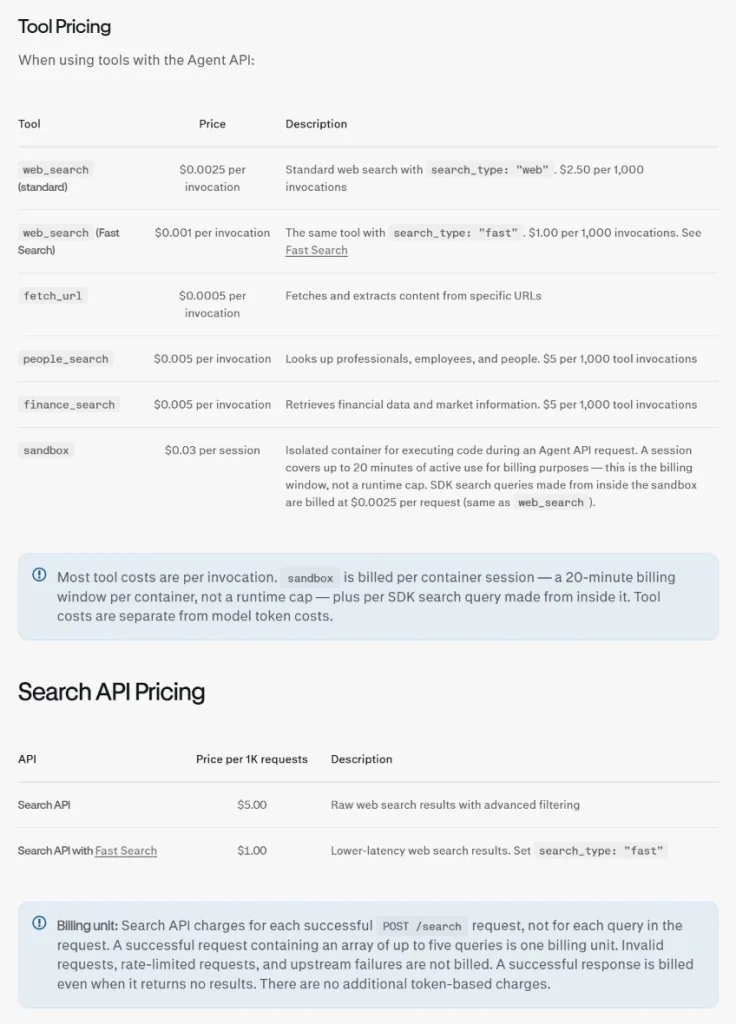
Esempio: 1,000 standard web-search invocations plus 1,000 URL fetches cost $3.00 in tool charges ($2.50 + $0.50), before model tokens or other charges. That is an assumed workload, not a measured cost for the tutorial. A single Agent request may invoke multiple tools. When available, inspect usage.cost.total_cost on the completed response.
| Sintomo | What to check first |
|---|---|
| 401 or 403 | Environment variable name, key validity, account access and whether the request is reaching the current endpoint. |
| Billing or quota error | API credits, payment setup, model/tool charges and account limits. A Perplexity consumer plan does not automatically mean API credits. |
| 429 | Rate limits and retry behavior. Use bounded exponential backoff and avoid replaying a paid request blindly. |
| Timeout | Network path, prompt size, tool count and client timeout settings. Log a request ID if the SDK exposes one, but never log the key. |
| Answer has no matching sources | Inspect the raw response.output, citation syntax and source IDs; mark the answer unverified instead of fabricating links. |
Search API bills successful requests, including those that return no results; its request price has no additional token charge. Agent costs depend on model tokens and tools. Keep these billing units separate when comparing an answer workflow with a search-only workflow.
For an API budget comparison, our Guida ai costi dell'API Perplexity adds background, while the official pricing page remains the authority for current rates.
Moving from an older Sonar tutorial
Many search results still show the older Chat Completions shape. The Agent migration guide uses a direct conceptual mapping. If you are comparing consumer model labels with API presets, our explainer on cosa usa LLM Perplexity provides context, but it is not a substitute for the Agent API documentation.
| Older Sonar pattern | Agent API pattern |
|---|---|
messaggi | input |
modello | preset |
choices[0].message.content | output_text |
| Older citation array assumptions | search_results output item and ID-based matching |
| Search parameters on the request | tools=[{"type":"web_search","filters":{...}}] |
Read the live migration overview e migration details before changing production code. The preset mappings are a starting point, not a promise that old and new models produce identical quality, latency or cost.
Domande frequenti
Is the Perplexity API free?
The APIs are pay-as-you-go according to the current quickstart and pricing documentation. Do not assume that a consumer subscription, a trial or a promotional credit makes every API request free.
Do I need Perplexity Pro to use the API?
API access and a consumer Pro plan are separate products. Create API credentials and check API billing for the developer account you plan to use.
Should I use Agent API or Search API?
Choose Agent when you want a finished grounded answer with sources. Choose Search when your application should own ranking, filtering and synthesis. You can combine Search with your own model if you need strict control over every generation step.
Can I call Perplexity from JavaScript?
Yes. Use the server-side Node.js example above or the official JavaScript SDK. Keep the key on the server. When reading raw JSON, inspect the typed output items and apply the same source-ID mapping rules.
Are Perplexity citations guaranteed to be correct?
No. A citation tells you which returned result the answer points to. Your application or reviewer must still check freshness, authority and whether the page supports the exact claim.
Why did my parser find no sources?
Inspect the raw output item types, confirm that web search ran, and check whether your regular expression matches the preset’s citation form. If no marker appears, save the answer as unverified and investigate the request rather than adding a guessed link.
Can GlobalGPT replace a Perplexity API key?
GlobalGPT is an all-in-one AI workspace for everyday AI use. Its subscription and model access are separate from a Perplexity developer account, API key and API credits; this Python tutorial uses the developer account.
A practical launch checklist
- Create a server-side key and confirm API billing.
- Run the minimal
velocerequest before adding filters or streaming. - Store the complete response, not only the visible answer text.
- Match citation markers to returned source IDs and flag unmatched markers.
- Review the cited pages for claim support, freshness and duplicate URLs.
- Recheck the live Agent, pricing and migration documentation before deploying.
You now have the core pattern for a reliable Perplexity API integration: ask a focused question, let the Agent API search, keep the answer and evidence together, and make every citation auditable. From here, add caching, retries and your own review rules around the same source-ID workflow.