
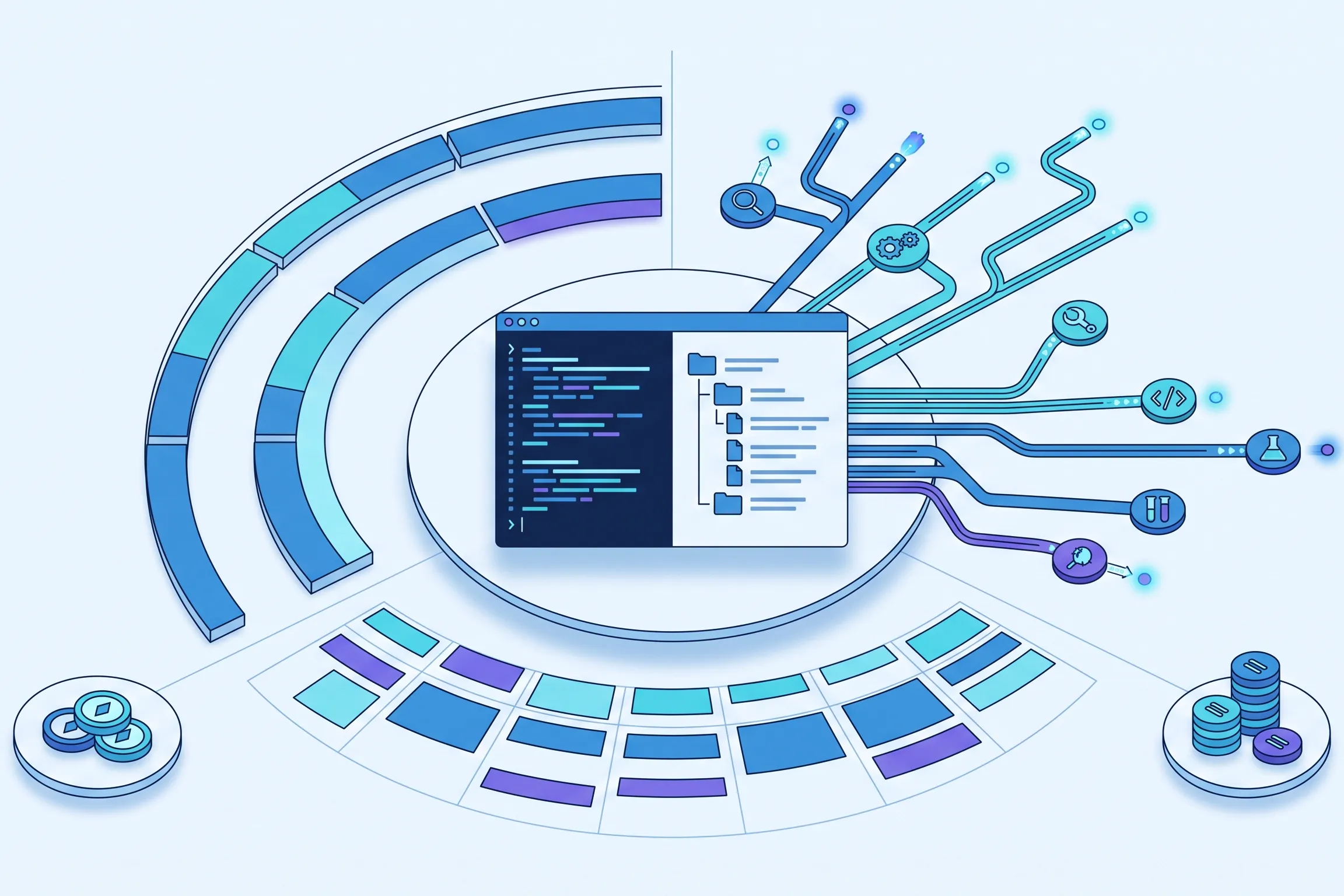
El uso del Codex no se limita a un número fijo de indicaciones. Los mensajes locales y los chats en la nube comparten un margen de cinco horas, y pueden aplicarse límites semanales adicionales. La rapidez con la que se agota ese límite depende del modelo, el contexto del repositorio, el razonamiento, el uso de herramientas, la recuperación de datos y el almacenamiento en caché.
El mismo plan puede parecer generoso durante una revisión específica y restrictivo durante una revisión general. Un mensaje puede dar lugar a búsquedas en el repositorio, comandos, razonamientos, cambios y verificaciones. Pregúntate qué trabajo genera cada indicación, no solo cuántas indicaciones quedan.
Cuando la ventana de programación resulta útil, GlobalGPT ofrece una forma práctica de gestionar el trabajo que no requiere acceso al repositorio. Un desarrollador puede centrar Codex en el código mientras utiliza otros modelos disponibles o los flujos de trabajo guiados de Yukie para diapositivas, documentos e imágenes, destinados a presentaciones, informes y recursos multimodales. De este modo, se mantiene el contexto de programación sin pretender que un agente de navegador sustituya a la ejecución en el repositorio.

Esta guía distingue entre las normas oficiales y lo que hemos observado en cuatro tareas de codificación controladas. Además, explica cómo elegir un plan, reducir el trabajo innecesario y decidir qué tareas pueden trasladarse con seguridad a otro flujo de trabajo.
Cómo usar Codex en un minuto
Hay cuatro conceptos distintos que hay que tener claros. El margen de cinco horas es la asignación a corto plazo que comparten las tareas de Codex locales y en la nube compatibles. El límite semanal es una restricción de mayor duración que también puede aplicarse. Los créditos adquiridos constituyen una vía de continuación de pago para las cuentas que cumplan los requisitos una vez agotado el uso incluido. Las llamadas con clave API son un producto independiente de pago por uso y no deben confundirse con una suscripción ChatGPT.
Cómo interactúan las capas límite
Un restablecimiento de ventana corta no elimina necesariamente la restricción de ventana larga.
Este diagrama muestra las relaciones, no una cantidad de trabajo garantizada ni un tiempo de recuperación personal.
| Capa | Qué significa | Lo que no significa |
|---|---|---|
| Franja horaria de cinco horas | Subsidio compartido a corto plazo para el trabajo presencial y en la nube subvencionado | Cinco horas seguidas de programación o un número garantizado de respuestas |
| Límite semanal | Un límite de cuenta más amplio que también podría aplicarse | Una restricción que siempre desaparece tras el reinicio del breve periodo de tiempo. |
| Créditos adquiridos | Continuación de pago tras agotar el volumen de uso incluido para los usuarios que cumplan los requisitos | Capacidad adicional gratuita de suscripción |
| Clave API | Una tarifa para desarrolladores que se factura por separado | Parte de la asignación para consumidores del plan Plus o de uso superior |
Qué significa realmente el «intervalo de cinco horas» del Codex
La ventana de cinco horas debe entenderse como un presupuesto de trabajo compartido y renovable. No es un cronómetro que solo funciona mientras escribes, ni garantiza que todos los mensajes tengan el mismo coste. Tanto los mensajes locales como los chats en la nube consumen recursos de la ventana compartida, por lo que cambiar de interfaz no crea un fondo independiente.
Inicias una sesión, envías tareas y consumes el límite compartido en función del trabajo que ello conlleva. El breve plazo se restablece posteriormente, pero es posible que el límite semanal siga siendo relevante. “Cinco horas” se refiere al periodo de asignación, no a cinco horas de ejecución ininterrumpida.
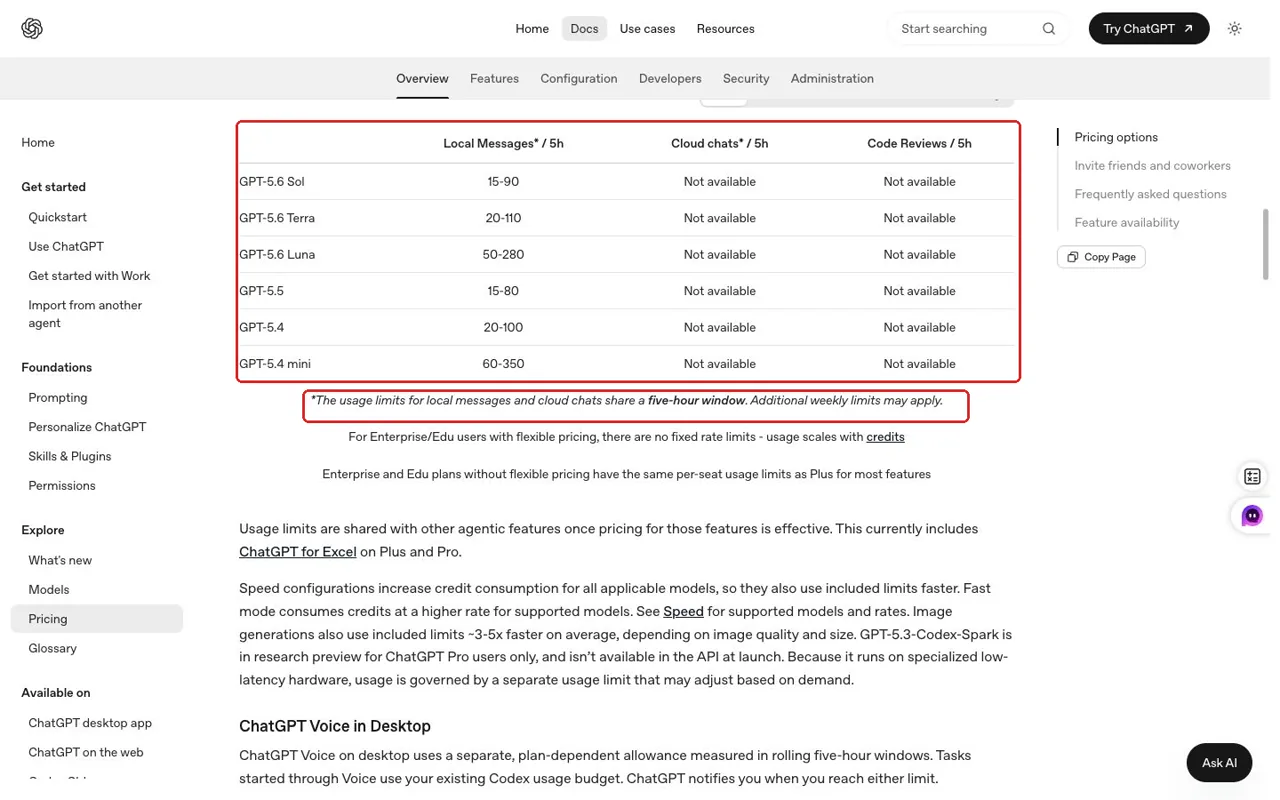
En cuanto a Plus, OpenAI ofrece estimaciones generales de entre 15 y 90 mensajes locales para Sol, entre 20 y 110 para Terra y entre 50 y 280 para Luna por cada intervalo de cinco horas. La amplitud de esos rangos es precisamente la clave. Se trata de un contexto de planificación, no de un derecho personal ni de una predicción del número de solicitudes que permitirá tu repositorio actual.
Descubre la autonomía de cinco horas anunciada
Elige un modelo y el número previsto de mensajes. El resultado es un contexto, no una predicción de tu cuota personal.
El uso real varía en función del modelo, el contexto, la complejidad de la tarea, el razonamiento, las herramientas, la recuperación de datos y el almacenamiento en caché. Esto no supone una estimación del porcentaje restante, el límite semanal, los créditos ni el coste de la API.
Un modelo más sencillo puede ser adecuado para tareas claras y fáciles de verificar; un razonamiento más sólido cobra sentido cuando la ambigüedad, el riesgo o las consecuencias que afectan a varios expedientes lo justifican.
¿Por qué dos comandos de Codex pueden consumir cantidades muy diferentes?
La longitud de la indicación es un indicador poco fiable. “Revisa este repositorio y soluciona los problemas importantes” puede dar lugar a un trabajo muy amplio, ya que su alcance no está definido. Una indicación más larga que especifique el componente, reproduzca el fallo y defina el éxito puede acotar la búsqueda.
La elección del modelo modifica el horizonte de planificación
Los distintos modelos presentan diferentes estimaciones de uso publicadas. La decisión práctica no se reduce simplemente a una cuestión de calidad frente a precio, sino que se trata de sopesar el criterio necesario frente al rendimiento disponible. Utiliza un modelo diario para tareas delimitadas con comprobaciones objetivas. Reserva un razonamiento más riguroso para la arquitectura, los cambios que afectan a la seguridad, los errores ambiguos y las revisiones en las que pasar por alto un problema sutil resulte más costoso que destinar un mayor presupuesto.
El repositorio y el contexto de la conversación generan trabajo
Codex puede leer instrucciones, examinar el árbol, rastrear los puntos de llamada, comprender las pruebas y volver a analizar el contexto. Las conversaciones prolongadas pueden perpetuar suposiciones obsoletas. Una prueba fallida identificada, un módulo específico y unos límites claros reducen el ámbito de búsqueda.
La ambigüedad fomenta la exploración
Un agente puede actuar directamente cuando el comportamiento esperado está claro y el fallo es reproducible. Los requisitos subjetivos, los errores intermitentes y las diversas soluciones plausibles requieren una mayor exploración. Elimina la ambigüedad evitable sin suprimir el razonamiento necesario.
Las herramientas y la verificación son un consumo útil
Las búsquedas, las órdenes, las pruebas, los linters y las revisiones de diferencias añaden actividad, pero hacen que los resultados sean más fiables. Saltarse las pruebas puede dar lugar a una segunda sesión costosa. Solicita la verificación específica que demuestre el resultado y evita la exploración que no esté relacionada con el mismo.
La entrada almacenada en caché no es un porcentaje de cuota
Codex puede informar de los campos de entrada almacenados en caché cuando se reutiliza un contexto procesado anteriormente. Esa telemetría ayuda a describir el perfil de una ejecución, pero no revela el porcentaje de tu asignación de cinco horas que se ha ahorrado. Tampoco se trata de un cargo en tu cuenta ni de una factura de la API. Considera la entrada almacenada en caché como un detalle de implementación que puede mejorar la eficiencia, no como una unidad que puedas convertir en capacidad restante de la suscripción.
| Forma de la tarea | Presión probable | Por qué |
|---|---|---|
| Explica una función en un archivo con nombre | Más bajo | Contexto limitado y ausencia de un ciclo de edición y prueba |
| Corregir un error reproducible que provoca el fallo de una prueba | Moderado | Diagnóstico específico, modificación de códigos y verificación |
| Añadir una función en varios archivos | Más alto | Planificación, modificaciones entre archivos, pruebas y comprobaciones de compatibilidad |
| Revisar a grandes rasgos un repositorio que no se conoce | Potencialmente alto | Amplia superficie de búsqueda, capacidad de juicio y contexto repetido |
Estas etiquetas son de carácter orientativo, más que numérico. El tamaño del repositorio, la calidad del código, la claridad de las tareas, las pruebas disponibles y Elección del modelo de codificación puede desplazar cualquier tarea real hacia arriba o hacia abajo.
- Trabajos a baja presión tiene un contexto limitado, un objetivo concreto y una comprobación de objetivos.
- Trabajos a alta presión combina un amplio proceso de descubrimiento, ambigüedad, modificaciones entre archivos y verificaciones repetidas.
- Las llamadas a herramientas útiles no son un desperdicio: Las pruebas y la inspección de diferencias pueden consumir parte del presupuesto, pero evitan costosas repeticiones del trabajo.
Lo que revelaron cuatro tareas de control del repositorio
Ejecutamos cuatro tareas congeladas en el mismo entorno compacto de Python: comprensión de un repositorio desconocido, una característica de múltiples archivos, una corrección de un error relacionado con el horario de verano y revisión más reparación. Se conservó el primer resultado válido de cada tarea. Codex generó los campos de entrada, entrada almacenada en caché, salida y salida del razonamiento, lo que nos proporcionó una forma coherente de comparar las cuatro ejecuciones sin que la telemetría se convirtiera en una factura de suscripción.
Pruebas observadas de Codex CLI
Cuatro tareas del repositorio utilizaron cantidades muy diferentes de contexto
Los campos de tokens emitidos por la CLI se muestran como pruebas de prueba, no como porcentajes de la ventana de suscripción ni como facturas de la API.
| Tarea | Duración | Entrada | Entrada almacenada en caché | Salida | Resultado del razonamiento |
|---|---|---|---|---|---|
| T1 · Comprender | 108 s | 147,420 | 119,296 | 3,752 | 1,073 |
| T2 · Reportaje | 115 s | 228,681 | 194,560 | 3,634 | 1,219 |
| T3 · Corrección de errores | 99 s | 146,412 | 119,296 | 2,820 | 933 |
| T4 · Reseña | 223 s | 496,865 | 419,072 | 7,517 | 3,588 |
Ver el resumen completo de la ejecución controlada
Resumen formal de la ejecución de Codex T1-T4 para #

Estado de la ejecución de ##

- Protocolo: 1.0.1-codex
- Entorno: CLI de Codex en macOS
- Versión de la CLI: 0.146.0-alpha.3.1
- Modelo: gpt-5.6-sol
- Esfuerzo de razonamiento en T1-T3: medio
- Esfuerzo de razonamiento en T4: alto
- Lote controlado válido: intento 3
- Intervención humana durante las tareas válidas: ninguna
- Red requerida por las tareas: no
- Acceso a commit, push, implementación o producción: ninguno

## Resultados válidos de la primera salida

| Tarea | Duración | Resultado objetivo | Tokens de entrada | Entrada almacenada en caché | Tokens de salida | Salida del razonamiento |
|---|---:|---|---:|---:|---:|---:|
| T1 | 108 s | Pruebas de referencia superadas; ningún archivo modificado | 147 420 | 119 296 | 3 752 | 1 073 |
| T2 | 115 s | Se han superado 7 pruebas públicas y las comprobaciones de características ocultas | 228 681 | 194 560 | 3 634 | 1 219 |
| T3 | 99 s | Se han superado 4 pruebas públicas y ambas comprobaciones ocultas de DST | 146 412 | 119 296 | 2 820 | 933 |
| T4 | 223 s | 2 defectos corregidos con pruebas de regresión; 4 pruebas superadas | 496 865 | 419 072 | 7 517 | 3 588 |

Los campos de tokens reproducen los valores emitidos por la CLI de Codex. No se trata de porcentajes de la ventana de suscripción, tokens de API facturables ni conversiones de crédito.

## Intentos excluidos conservados

- Intento 1: fallo de infraestructura antes de la invocación del modelo porque la opción de aprobación se colocó después del subcomando `exec`. Todos los archivos de eventos estaban vacíos. Excluidos de la puntuación del modelo.
- Intento 2: evidencia no válida porque las salidas visibles no estaban solo en inglés y el ejecutor T2 aislado no recibió la autorización de modificación de archivos ya concedida al usuario. El lote completo se conserva, pero se excluye de la puntuación comparativa.
- Intento 3: espacios de trabajo y sesiones aislados nuevos, resultados anteriores ocultos, validación «solo en inglés» superada. Este es el lote controlado válido.

## Evidencia conservada por tarea

- Respuesta final visible completa
- Flujo de eventos JSONL sin procesar
- Advertencias de la CLI depuradas
- Marcas de tiempo de inicio y fin
- Código de salida
- Diferencias del código fuente
- Salida de la comprobación pública y código de salida
- Salida de la comprobación oculta aplicable y código de salida
- Registro de ejecución con modelo, esfuerzo, hash de la indicación, duración, uso e intervención humana

Las respuestas finales sin procesar e inmutables se conservan como `final.md`. Su texto está en inglés, pero los enlaces clicables generados por Codex contienen el nombre en chino del directorio padre local. Por lo tanto, cada tarea incluye también `final-sanitized.md`, que sustituye únicamente ese prefijo absoluto específico de la máquina por `./` y supera un escaneo estricto de caracteres CJK. Las pruebas destinadas al público deben utilizar la copia de visualización depurada; los archivos sin procesar siguen estando disponibles para su auditoría.

La integración de T5 GlobalGPT es independiente de la puntuación de codificación y ya se ha completado. Consulte `results/T5/SUMMARY.md` para ver las pruebas relativas a la CLI, el MCP, las habilidades, el bloqueo del modelo, la preparación y las limitaciones.
No conviertas estos campos en un porcentaje de cinco horas, un porcentaje del límite semanal, un importe en créditos ni un coste de API. El consumo real varía en función del modelo, la tarea, el contexto, el razonamiento, las herramientas, la recuperación y el almacenamiento en caché.
La tarea de revisión y reparación fue la ejecución más pesada observada: 496 865 tokens de entrada, incluidos 419 072 de entrada almacenados en caché, con 7 517 tokens de salida y 3 588 tokens de salida de razonamiento. Esto tiene sentido en este caso concreto, ya que la tarea requería una inspección exhaustiva, la identificación de dos defectos, cambios en el código y la verificación. No demuestra que la revisión de código sea siempre la categoría de tareas más costosa.
La respuesta basada en el análisis del repositorio fue concisa y no modificó ningún archivo, pero aun así procesó una cantidad considerable de contexto. La longitud visible de la salida no es un buen indicador del trabajo realizado en el repositorio. La función y la corrección de errores también se superaron, aunque generaron datos de telemetría diferentes.
La conclusión que cabe extraer es que la naturaleza de la tarea modifica sustancialmente la actividad observada, incluso en un repositorio de pequeño tamaño. La muestra no permite predecir un porcentaje restante ni una tasa universal.
- La longitud visible de la respuesta no reflejaba la cantidad de contexto del repositorio que se había procesado.
- La amplia tarea de revisión y reparación generó el mayor volumen de datos de telemetría de esta sesión.
- Los datos almacenados en caché mostraban la reutilización, pero no un porcentaje de descuento de cinco horas.
Restablecimientos cada cinco horas, límites semanales y qué pasará a continuación
Un restablecimiento de cinco horas y uno semanal resuelven diferentes limitaciones. El plazo corto permite restablecer el acceso a corto plazo, mientras que el límite más prolongado a nivel de cuenta sigue vigente. Si ha transcurrido el periodo de cinco horas y sigues teniendo restricciones, lo primero que debes comprobar es el límite semanal, en lugar de dar por hecho que el restablecimiento ha fallado.
Documentos OpenAI /estado como el cheque de asignación en una sesión CLI activa. La página de la cuenta puede mostrar límites, plazos de restablecimiento, créditos y saldos de modelos independientes. Esos campos varían en el tiempo; el porcentaje de otro usuario no corresponde a tu capacidad prevista.
Si se produce una interrupción, conserva el historial de cambios, la última prueba, los objetivos pendientes y los riesgos sin resolver. Comprueba qué límite está activo. Reanuda el trabajo relevante en el repositorio tras el reinicio correspondiente o evalúa los créditos; traslada las presentaciones, los memorandos y las imágenes a otra ubicación.
- Comprueba el estado actual y distinguir el intervalo corto del límite semanal.
- Guardar un traspaso limpio con el estado verificado, el siguiente paso y las comprobaciones pendientes.
- Trasladar el trabajo no relacionado que no necesita el repositorio.
- Currículum con un único objetivo tras el reinicio correspondiente.
- Compra créditos con cuidado solo cuando terminar el proyecto ahora justifique el gasto.
Además, ¿$100 o $200? ¿Qué plan se adapta mejor a tu trabajo?
Para los usuarios particulares, la oferta actual comienza con el plan «Plus», a $20 al mes. OpenAI también ofrece planes para consumidores con mayor uso, «5x» y «20x», a $100 y $200 al mes, respectivamente. Estos precios corresponden a los niveles de suscripción; las denominaciones no garantizan cinco o veinte veces un recuento específico de mensajes, y no deben convertirse en tarifas de tokens de API.
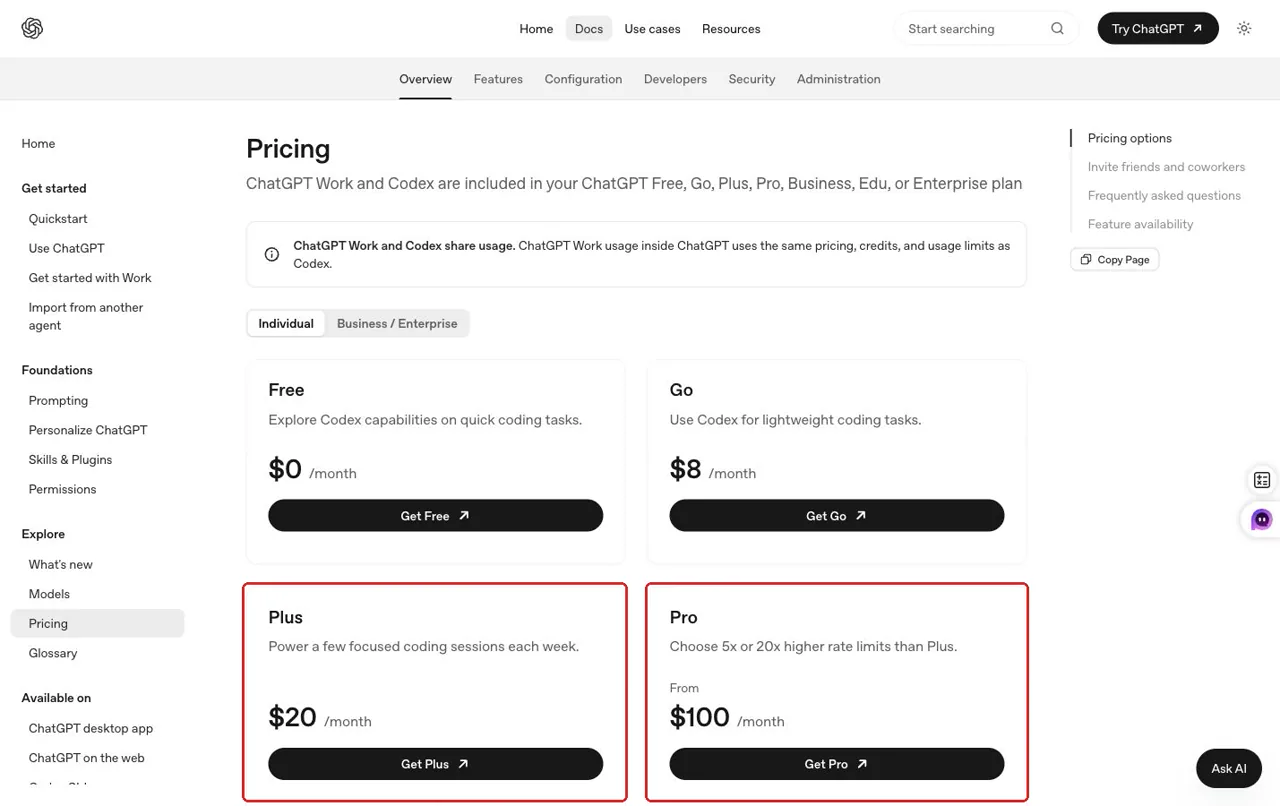
| Plan | Precio mensual | El mejor ajuste inicial | Señal para reconsiderarlo |
|---|---|---|---|
| Más | $20 | Trabajo ocasional o de duración determinada como programador | El trabajo valioso se ve interrumpido con frecuencia por las limitaciones impuestas. |
| Nivel 5x de mayor uso | $100 | Uso diario del agente con sesiones más prolongadas | La asignación incluida sigue alterando la jornada laboral habitual |
| Nivel 20x de mayor uso | $200 | Uso individual muy intensivo | El historial de consumo real justifica la tarificación más alta para los consumidores |
¿Qué nivel de suscripción deberías analizar primero?
Elige un modelo de trabajo. Se trata de una guía de planificación, no de una calculadora que garantice la capacidad ni el umbral de rentabilidad.
Empieza con Plus. Para un uso ocasional, el nivel de consumo más bajo es, sin duda, la primera opción que hay que valorar. La capacidad real sigue siendo variable.
Los precios y los nombres de los planes deben volver a comprobarse justo antes de su publicación. El uso de la API y los créditos adquiridos son conceptos independientes.
Elige en función de las interrupciones observadas, no de recuentos hipotéticos de solicitudes. Empieza por el nivel más bajo que permita tu trabajo habitual con el repositorio. Haz un seguimiento de la frecuencia con la que un límite frena el progreso valioso, de si esas sesiones están bien delimitadas y de cuánto tiempo de la ventana se dedica a tareas que podrían realizarse en otro lugar. Es más fácil justificar un nivel superior cuando las ejecuciones de los agentes forman parte de la jornada laboral y las interrupciones suponen un coste superior a la diferencia de precio.
Una asignación mayor no soluciona un flujo de trabajo desorganizado. Lo primero es mejorar la delimitación de las tareas; si, aun gestionándose adecuadamente, el trabajo de ingeniería sigue llegando a sus límites, resulta más fácil justificar un nivel de uso superior.
Los créditos y la facturación de la API no son lo mismo
El uso incluido, los créditos adquiridos y la facturación mediante clave API son tres modalidades diferentes. Los usuarios de las planes Plus y Pro que cumplan los requisitos pueden adquirir créditos una vez agotada la asignación incluida, aplicándose primero el uso incluido. Los créditos adquiridos constituyen un saldo de pago, no un paquete gratuito más amplio. OpenAI establece que los créditos adquiridos tienen una validez de 12 meses y, por lo general, no son reembolsables ni transferibles, salvo en los casos previstos por la ley.
| Ruta | Cuándo se aplica | Relación de facturación |
|---|---|---|
| Cuota de suscripción incluida | Trabajo normal de Codex de categoría «Plus» o superior que cumpla los requisitos | Incluido en la tarifa mensual para particulares |
| Créditos adquiridos | Una cuenta que cumple los requisitos sigue vigente tras el consumo incluido | Saldo de prepago independiente; el consumo incluido se agota primero |
| Clave API | Un desarrollador llama a la ruta de la API | Facturación independiente mediante API de pago por uso |
Por eso mismo, los campos de tokens de nuestras pruebas de suscripción no deben introducirse en una calculadora de API y presentarse como una factura real. Las pruebas no supusieron una compra de API, y el artículo no utiliza tarifas de tokens actuales no verificadas. Si utilizas una clave de API, calcula el coste de esa ruta a partir de los precios oficiales actuales de la API y de tu telemetría real de la API, independientemente del plan de consumidor.
Un flujo de trabajo que permite ahorrar cuota sin mermar la calidad del código
El objetivo no es que Codex realice menos tareas útiles, sino eliminar el redescubrimiento, la desviación del alcance y las tareas incompatibles, al tiempo que se mantiene la verificación que garantiza que el resultado de un agente sea seguro de utilizar.
Antes de la carrera: establece un objetivo
Indica la característica o el defecto, el área afectada, las restricciones que deben cumplirse y las comprobaciones que demuestran que se ha completado. Incluye un comando que falle o el nombre del archivo cuando lo sepas. Elimina los registros obsoletos y las instrucciones que no tengan relación. Elige el modelo más sencillo que pueda gestionar de forma segura la ambigüedad y el riesgo.
Implementar [resultado único] en [ámbito]. Respetar [restricción]. Se considerará un éxito si se cumplen: [pruebas/comprobaciones]. Inspeccionar únicamente los archivos adicionales que sean necesarios, ejecutar la verificación pertinente e informar de los archivos modificados, los resultados y los riesgos restantes.Durante la carrera: mantén la concentración, no busques atajos
Deja que Codex analice el contexto suficiente y ejecute pruebas útiles. Interviene cuando la tarea se desvíe hacia una limpieza que no tenga relación con el tema, repita un enfoque fallido sin nuevas pruebas o carezca de una decisión sobre el producto necesaria para garantizar la corrección.
Después de la carrera: mantén un estado reutilizable
Revisa el diff y las pruebas; a continuación, guarda los cambios, lo que ha pasado, lo que queda pendiente y lo que requiere revisión manual. Empieza el trabajo no relacionado en un contexto nuevo. Guardar el estado evita tener que volver a empezar desde cero tras un reinicio.
Retoma el trabajo desde este estado verificado: [resumen]. El siguiente objetivo es [un paso]. Vuelve a comprobar las diferencias actuales y las pruebas pertinentes antes de modificar nada. No amplíes la tarea más allá de [alcance].Más breve no significa automáticamente más barato. Una indicación enigmática puede dar lugar a una mayor exploración que unas instrucciones detalladas pero limitadas. La indicación más eficaz proporciona suficiente información para empezar con buen pie y suficientes criterios de aceptación para saber cuándo parar.
¿Qué obras deben incluirse en Codex y cuáles pueden trasladarse a otro lugar?
Utiliza Codex cuando la tarea dependa del estado del repositorio: análisis de código desconocido, implementaciones con varios archivos, depuración, pruebas, revisión de código y cambios que requieran una comparación (diff). Estos flujos de trabajo se benefician del acceso a los archivos, la ejecución en la terminal y la verificación en un mismo entorno.
Traslada el trabajo cuando el repositorio no sea parte del problema. Creación de presentaciones, documentos estructurados, resúmenes, creación de imágenes, y algunos tareas de investigación Por lo general, necesitan datos de entrada y un formato de salida claro, más que acceso al shell. Desviarlos a otra parte permite conservar la ventana de programación y, a menudo, ofrece al usuario una interfaz más directa.
Cuando la ventana del Codex es importante
Traslada las tareas adecuadas —no la ingeniería de repositorios— a un agente de navegador guiado
| Tarea | Ruta óptima | Por qué |
|---|---|---|
| Conocimiento del repositorio | Código «Codex» o «Claude» | Requiere un contexto directo del código fuente y un razonamiento basado en los archivos. |
| Implementación con varios archivos | Código «Codex» o «Claude» | Requiere modificaciones coordinadas, comparaciones de cambios y pruebas ejecutables. |
| Corrección de errores y revisión del código | Agente de codificación + revisión humana | Es necesario reproducir el problema, aplicar parches y verificarlo. |
| Presentación guiada | Yukie es una opción práctica | Se han comprobado la entrada de diapositivas específicas, la revisión del esquema, las plantillas y la exportación. |
| Resumen estructurado sin código | Yukie es una opción práctica | Se han comprobado el flujo de trabajo específico para los documentos y la lista de verificación para la toma de decisiones. |
| Creación de imágenes | Yukie es una opción práctica que permite revisar los resultados | El proceso de gestión de imágenes funcionó, pero la solicitud de imágenes con pie de foto solo se completó parcialmente. |
Esta ruta no pretende ofrecer un ahorro exacto en la cuota de Codex, ni posiciona a Yukie como sustituto del agente de codificación del repositorio.
GlobalGPT encaja aquí como un espacio de trabajo multimodelo y multimodal. Puede canalizar la redacción, la investigación, las imágenes, el audio y el vídeo a través de modelos o flujos de trabajo guiados seleccionados para el producto final. Esto amplía la configuración de trabajo; no reproduce la edición del repositorio, los controles de la terminal ni todas las funciones nativas de Codex. Mantén el código fuente en el agente de programación y traslada únicamente los trabajos que puedan salir de él de forma segura. Cuando resulte útil un segundo modelo dentro del host de programación, el GlobalGPT CLI es la vía de integración pertinente.
Lo que hemos aprendido de tres actividades guiadas de Yukie
Hemos probado tres flujos de trabajo en el navegador utilizando el primer resultado válido y no hemos vuelto a ejecutar ningún resultado deficiente por motivos de apariencia. Las cifras que figuran a continuación corresponden al número de criterios fijos completados; no son puntuaciones universales de calidad del producto.
| Flujo de trabajo | Criterios cumplidos | Resultado práctico |
|---|---|---|
| Diapositivas | 5/6 | El flujo de la presentación está claro; no se han podido verificar las notas del ponente solicitadas. |
| Documento | 6/6 | Informe completo y estructurado con controles de exportación visibles |
| Imagen y pie de foto | 5/6 | La imagen cumplía con los requisitos, pero faltaba el pie de foto requerido. |
Diapositivas: orientaciones sólidas, un resultado sin verificar
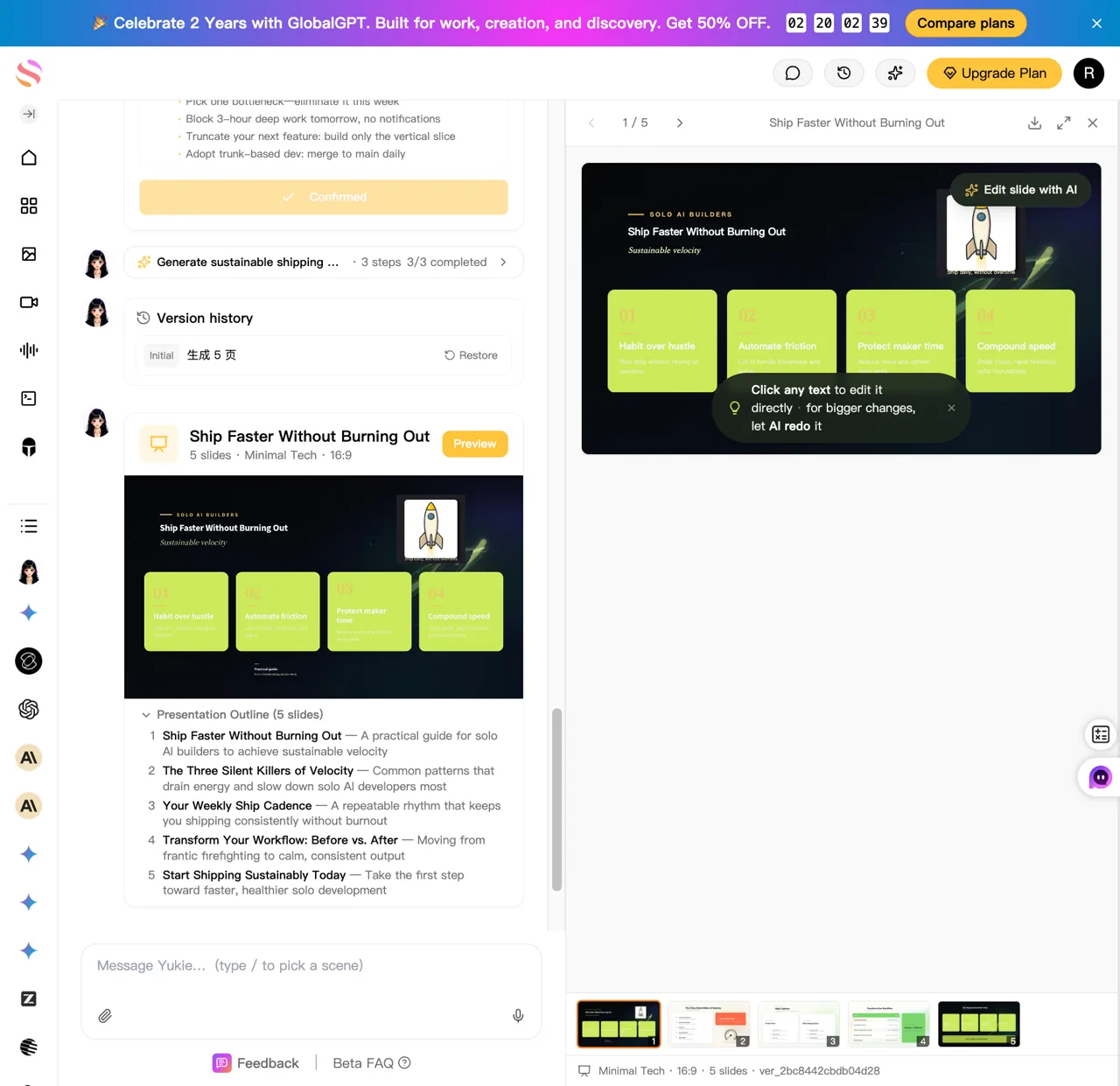
El flujo de trabajo de Slides presentaba una entrada específica, la selección del objetivo, un esquema editable de cinco diapositivas, seis plantillas con nombre, una vista previa, un historial de versiones, una etiqueta de estado de calidad y una ruta de exportación. Cumplía cinco de los seis criterios fijos. Se solicitaban notas del ponente, pero no se pudieron verificar ni en la presentación final ni en la interfaz, por lo que el resultado fue una aprobación parcial.
Y1 · Prueba del navegador Yukie
Presentación guiada de cinco diapositivas
- ✓Selección de la entrada y la finalidad de las diapositivas específicas
- ✓Exactamente cinco diapositivas y un esquema editable
- ✓Seis plantillas con nombre; se ha utilizado «Minimal Tech»
- ✓Estructura solicitada cubierta en su mayor parte
- ×Se ha comprobado que las notas del ponente están presentes
- ✓Vista previa, historial de versiones y ruta de exportación
Consumo visible: 55,31 créditos en este turno. No se trata de una conversión de moneda.
Ver el mensaje exacto de «congelado»
Crea una presentación de cinco diapositivas dirigida a desarrolladores independientes titulada “Lanza tus productos más rápido sin agotarte”. El público objetivo son desarrolladores autónomos que crean productos de IA. Utiliza un estilo tecnológico sencillo y oscuro. Incluye: 1) el título y la promesa, 2) los tres principales cuellos de botella en el flujo de trabajo, 3) un sistema operativo semanal práctico, 4) una comparación sencilla del «antes y después», y 5) una llamada a la acción concisa. Haz que cada diapositiva se pueda leer rápidamente, utiliza un lenguaje concreto e incluye notas del ponente.
Ver pruebas de resultados
 — Presentación guiada de cinco diapositivas

### Evidencia del flujo de trabajo

- Yukie expuso un punto de entrada específico `Slides /ppt`.
- Analizó el título solicitado, el público destinatario y el número de diapositivas (cinco).
- Ofreció opciones de finalidad: Persuadir, Informar, Educar e Inspirar. Se seleccionó «Educar».
- Generó un esquema editable de cinco diapositivas antes de la visualización.
- Ofreció seis plantillas con nombre: Profesional, Consultoría, Presentación de startup, Informe de datos, Educación y Tecnología minimalista.
- Se recomendó y utilizó «Tecnología minimalista».

### Primer resultado válido

La presentación generada contenía exactamente cinco diapositivas:

1. Entrega más rápido sin agotarte
2. Los tres asesinos silenciosos de la velocidad
3. Tu cadencia semanal de entregas
4. Transforma tu flujo de trabajo: antes y después
5. Empieza a lanzar de forma sostenible hoy mismo

La interfaz final mostraba «3/3 completadas», «5 diapositivas · Minimal Tech · 16:9», Vista previa, Historial de versiones, «Informe de calidad: Aprobado» y un control de Exportación.

### Limitaciones

- La indicación solicitaba explícitamente notas del ponente. El DOM final y la vista previa visible no mostraban notas del ponente verificables ni un mensaje que indicara que las notas no estaban disponibles. Por lo tanto, este criterio queda sin verificar e impide la aprobación total.
- El contenido visible de «pensamiento interno» mezclaba chino e inglés, a pesar de que se había seleccionado el inglés. El contenido público de las diapositivas inspeccionado estaba en inglés.
- La propia etiqueta de la interfaz «Informe de calidad: Superado» es una señal del estado del producto, no una puntuación editorial independiente.

### Pruebas

- Imagen de la prueba publicada: «https://static.futureshareai.com/glb_features/Y1-slides-status-v2.webp»
- La página final en vivo se conservó en Chrome como resultado final.
La ventaja radicaba en un flujo de trabajo de presentación más claro, no en una afirmación de que el agente de codificación razonara mejor. El usuario seguía eligiendo un objetivo y una plantilla, y los resultados seguían teniendo que revisarse.
Documento: la tarea con el recorrido más óptimo
El flujo de trabajo «Document» era la opción más adecuada para trasladar el trabajo fuera de Codex. Ofrecía los cuatro tipos de tareas solicitados —valor, riesgo, evidencia y directrices para la revisión humana—, supuestos etiquetados, una lista de comprobación para la toma de decisiones y controles visibles para la descarga, la apertura, la exportación y el historial de versiones.
Y2 · Prueba del navegador Yukie
Resumen de investigación sobre agentes de codificación estructurada
- ✓Flujo de trabajo específico para documentos
- ✓Los cuatro tipos de tareas solicitadas
- ✓Orientaciones sobre el valor, el riesgo, la evidencia y la revisión humana
- ✓Supuestos marcados
- ✓Se incluye una lista de verificación para la toma de decisiones
- ✓Descargar, abrir, exportar e historial de versiones
Consumo visible: se muestran 55,31 créditos. No se trata de una conversión de moneda.
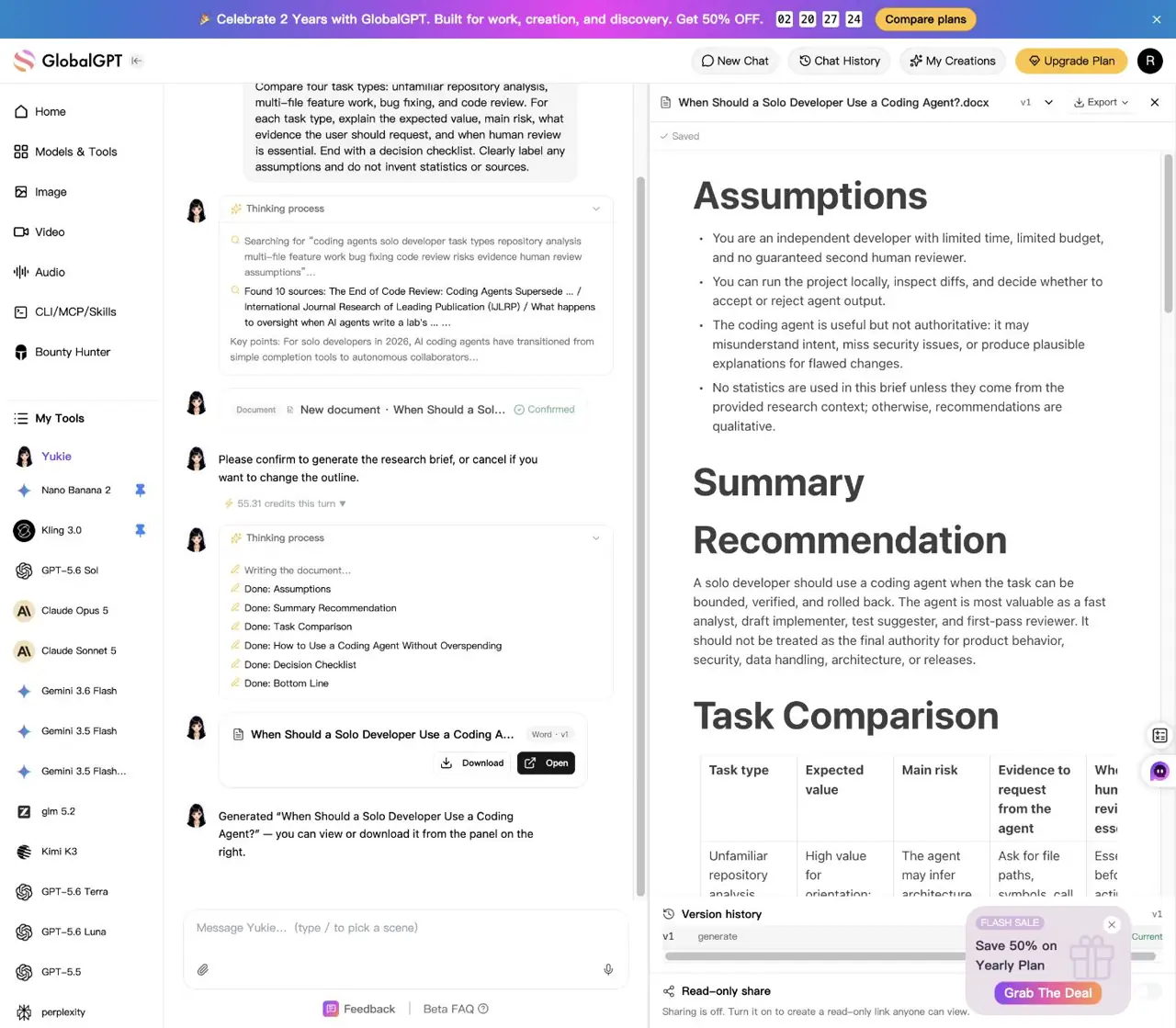
Ver el mensaje exacto de «congelado»
Elabora un resumen de investigación conciso titulado “¿Cuándo debería un desarrollador independiente recurrir a un agente de programación?”. El lector es un desarrollador independiente con tiempo y presupuesto limitados. Compara cuatro tipos de tareas: análisis de repositorios desconocidos, desarrollo de funcionalidades en varios archivos, corrección de errores y revisión de código. Para cada tipo de tarea, explica el valor esperado, el riesgo principal, qué pruebas debe solicitar el usuario y cuándo es imprescindible la revisión humana. Concluye con una lista de verificación para la toma de decisiones. Indica claramente cualquier suposición y no inventes estadísticas ni fuentes.
Ver pruebas de resultados
 — Documento de investigación estructurado

### Evidencia del flujo de trabajo

- Yukie expuso un punto de entrada específico `Document /doc`.
- Llevó a cabo una fase automática de investigación/búsqueda y presentó un esquema para su confirmación.
- El flujo de trabajo requería una confirmación de «Generar» antes de producir el documento.

### Primer resultado válido

El documento incluía:

- Supuestos
- Resumen de recomendaciones
- Una comparación de tareas que abarcaba el análisis de repositorios desconocidos, el trabajo con características de múltiples archivos, la corrección de errores y la revisión de código
- Valor esperado, riesgo principal, pruebas que solicitar y orientación para la revisión humana de cada tarea
- Orientación sobre el uso de un agente de codificación sin sobrepasar el presupuesto
- Una lista de comprobación para la toma de decisiones
- Una sección de «Conclusión»

La interfaz final mostraba las opciones «Descargar», «Abrir», «Exportar», «Historial de versiones» y un control de uso compartido de solo lectura. El uso compartido permaneció desactivado.

### Limitaciones

- El documento requería un clic de confirmación antes de su generación, por lo que el flujo de trabajo estaba guiado en lugar de ser totalmente automático y sin intervención.
- No se observaron afirmaciones numéricas sin fundamento en el resultado revisado.

### Evidencia

- Imagen de la evidencia publicada: `https://static.futureshareai.com/glb_features/Y2-document-result.webp`
- La página final en vivo se guardó en Chrome como producto final.
Un resumen que deba citar el comportamiento del repositorio sigue necesitando pruebas del mismo. Un memorándum independiente basado en los requisitos facilitados puede utilizar el esquema guiado y el flujo de exportación sin ocupar la ventana de programación.
Imagen y pie de foto: la imagen se aprobó, pero el paquete no
El flujo de trabajo de imágenes recomendaba un modelo de imagen y ofrecía controles específicos para cada formato. El primer resultado válido, de formato cuadrado, utilizaba el fondo azul marino solicitado, el detalle en cian, el motivo del temporizador de 60:00 y el titular exacto. No incluía el pie de foto de entre 60 y 90 palabras ni la llamada a la acción requeridos, por lo que la tarea combinada cumplió cinco de los seis criterios.
Y3 · Prueba del navegador Yukie
Imagen cuadrada de FocusDock y pie de foto a juego
- ✓Flujo de trabajo específico para imágenes y indicación editable
- ✓Imagen de Square a escala 1:1
- ✓Azul marino, cian, temporizador y titular exacto
- ×Se requiere un pie de foto de entre 60 y 90 palabras
- ✓Ni afirmaciones de clientes reales ni estadísticas inventadas
- ✓Trayectoria de ajuste visible
Uso visible: se muestran 320 créditos antes de la generación. No se trata de una conversión de moneda.
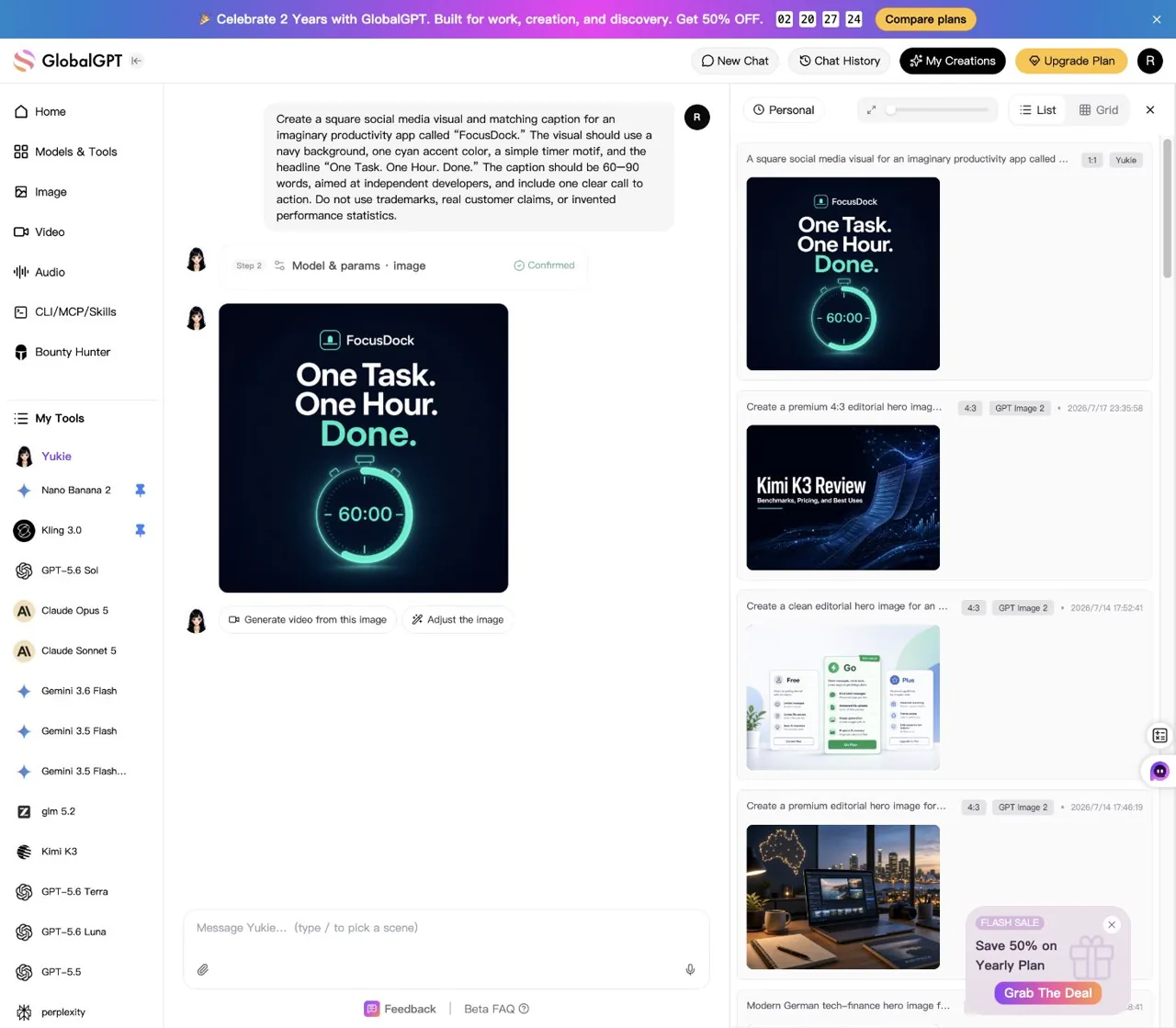
Ver el mensaje exacto de «congelado»
Crea una imagen cuadrada para redes sociales y un pie de foto a juego para una aplicación de productividad imaginaria llamada “FocusDock”. La imagen debe tener un fondo azul marino, un color de contraste cian, un motivo sencillo de temporizador y el titular “Una tarea. Una hora. Listo”. El texto debe tener entre 60 y 90 palabras, estar dirigido a desarrolladores independientes e incluir una llamada a la acción clara. No utilices marcas registradas, testimonios reales de clientes ni estadísticas de rendimiento inventadas.
Ver pruebas de resultados
 — Activo social multimodal

### Evidencia del flujo de trabajo

- Yukie expuso un punto de entrada específico `Image /paint`.
- Reescribió la solicitud para convertirla en una indicación editable para la generación de imágenes.
- Recomendó GPT Image 2 para la tipografía.
- El paso de modelo y parámetros mostró GPT Image 2, 1:1, 2K y 320 créditos antes de la generación.

### Primera salida válida

La imagen cuadrada generada incluía de forma visible:

- Un fondo azul marino
- Un detalle en cian
- Un motivo de reloj que mostraba «60:00»
- El titular exacto «Una tarea. Una hora. Listo.»
- Ninguna afirmación evidente de clientes reales ni estadísticas de rendimiento inventadas

La interfaz final mostraba los controles «Generar vídeo a partir de esta imagen» y «Ajustar la imagen».

### Fallo conservado

En el resultado final de la tarea no se proporcionó ningún pie de foto de entre 60 y 90 palabras que coincidiera. El único texto relacionado con el pie de foto en el DOM final fue la solicitud original del usuario. No se envió ningún seguimiento correctivo, ya que un seguimiento supondría una intervención manual y no sustituiría ni al primer resultado válido ni a su fallo.

### Evidencia

- Imagen de evidencia publicada: «https://static.futureshareai.com/glb_features/Y3-image-result.webp»
- La página final en vivo se conservó en Chrome como resultado final.
En conjunto, las tres pruebas respaldan una conclusión limitada: las entradas guiadas pueden reducir las dificultades de configuración en el caso de los entregables que no son código, pero la orientación no elimina la necesidad de verificar cada resultado solicitado. No respaldan la posibilidad de llamar a Yukie de forma ilimitada, convertir los créditos mostrados en dinero ni considerarla un sustituto de la ingeniería de repositorios.
Una lista de comprobación práctica para la toma de decisiones sobre la aplicación del Codex
- ¿La tarea requiere el repositorio, el shell, el diff o las pruebas? Si es así, guárdalo en Codex o en otro agente de codificación.
- ¿El objetivo está acotado? Antes de empezar una carrera larga, define un objetivo y las comprobaciones que lo confirmen.
- ¿Es necesario aplicar el razonamiento más sólido para realizar esta tarea? Utiliza un modelo más sencillo cuando el riesgo y la ambigüedad lo permitan.
- ¿Qué límite está activo? Distinguir entre el intervalo de cinco horas, el límite semanal, los créditos y la facturación de la API.
- ¿Se puede sacar el trabajo del entorno de programación de forma segura? Dirige las presentaciones de rutas, los documentos independientes, los archivos multimedia y otras tareas ajenas al repositorio hacia un modelo adecuado o un flujo de trabajo guiado.
Realiza una actualización cuando el trabajo en el repositorio, bien definido, resulte valioso de forma sistemática, y limita las interrupciones cuando su coste supere la diferencia con respecto al plan. Modifica primero el flujo de trabajo cuando el tiempo se dedique a un rediseño general, a entregables no relacionados o a aclaraciones repetidas que podrían haberse resuelto antes de la ejecución.
Preguntas frecuentes sobre el uso de Codex
¿Se reinicia Codex cada cinco horas?
El plazo compartido a corto plazo se restablece cada cinco horas, pero es posible que sigan aplicándose límites semanales adicionales. Por lo tanto, el restablecimiento cada cinco horas no garantiza que desaparezcan todas las restricciones de la cuenta.
¿Cuántas indicaciones de Codex recibo?
No existe una cifra única y fiable del número de prompts. OpenAI publica estimaciones generales por modelo, mientras que el consumo real varía en función del contexto, el razonamiento, las herramientas, la recuperación de información, el almacenamiento en caché y la complejidad de la tarea.
¿Por qué sigo teniendo limitaciones después de cinco horas?
Es posible que haya un límite semanal adicional activo. Consulta la vista de uso actual de la cuenta o la información documentada sobre los límites en una sesión activa, en lugar de basarte únicamente en el restablecimiento de la ventana corta.
¿Cómo puedo comprobar el uso de Codex en la CLI?
Documentos OpenAI /estado para consultar la información sobre las asignaciones en una sesión activa de la CLI de Codex. Lo que se muestra depende de la autenticación actual y del estado de la cuenta.
¿Se incluyen las tarifas de la API de Codex en el plan Plus o en los planes de mayor consumo?
No. El uso de la clave API se factura por separado del límite de la suscripción del usuario.
¿Puedo comprar más créditos de Codex?
Los usuarios que cumplan los requisitos pueden adquirir créditos una vez agotado el volumen de uso incluido. Consulta la página de tu cuenta para conocer la disponibilidad y las condiciones antes de realizar la compra.
¿Los tokens de entrada almacenados en caché muestran cuánto he ahorrado de mi asignación de suscripción?
No. La telemetría de entrada almacenada en caché no ofrece una conversión fiable a un porcentaje de cinco horas, un porcentaje semanal, un importe de crédito o una factura de la API.
¿Yukie es ilimitada?
No hemos encontrado pruebas fiables que respalden esa afirmación. Considera a Yukie como una opción orientativa para tareas adecuadas que no requieran el uso de repositorios, y no como un sustituto verificado e ilimitado de la programación.
Los límites oficiales, los precios y las condiciones de crédito se comprobaron el 29 de julio de 2026. Pueden sufrir cambios, por lo que te recomendamos que consultes las páginas actuales de OpenAI antes de tomar una decisión de compra.
Guarda el trabajo del repositorio en Codex. Para la próxima presentación, informe de investigación o recurso multimodal que no requiera tu código fuente, abierto GlobalGPT y elige el modelo o el flujo de trabajo guiado de Yukie diseñado para ese trabajo.





