Best Sora Alternative Kling AI: Ultimate 2026 Review & Guide

Kling AI is officially the best Sora alternative in 2026 because it allows you to generate up to 3 minutes of highly realistic video with advanced physics, whereas OpenAI's Sora is largely limited to 15-25 seconds. Developed by Kuaishou, Kling 3.0 offers pixel-perfect motion control and consistent characters, making it the top choice for actual filmmaking. However, using Kling AI effectively still creates a major headache: users are forced to juggle and pay for multiple separate AI tools to get the text prompts, base images, and synced audio needed for a complete video.
Constantly buying different subscriptions for text, image, and video generators quickly drains your budget and ruins your creative workflow. You should not have to manage five different accounts and pay massive monthly fees just to produce a single professional AI short film.
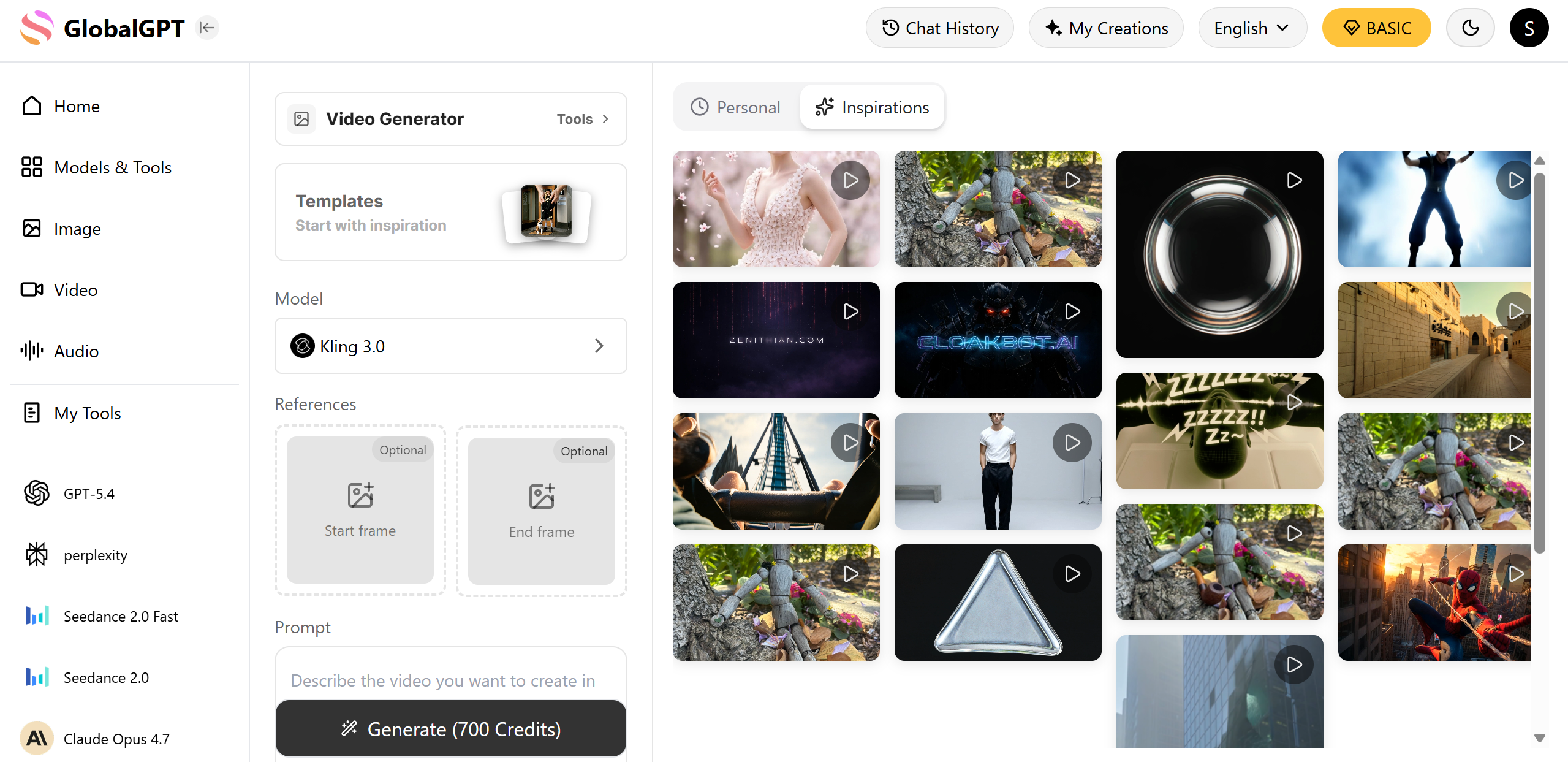
GlobalGPT solves this exact problem by providing an all-in-one AI platform with over 100 top-tier models. With the $10.8 Pro Plan, you can write your script with GPT-5.4, generate stunning base images with Midjourney, and animate them using video models like Kling AI, Sora 2 Pro, or Veo 3.1. It allows seamless switching between text, image, and video creation in one dashboard with no rigid region restrictions.
Best Sora Alternative Kling AI: How Does It Actually Compare to OpenAI's Model?
Kling AI beats OpenAI's Sora in video length and physical consistency, offering continuous 3-minute clips compared to Sora's shorter 15-second limits. While Sora produces incredible cinematic lighting, Kling focuses on making sure objects and people move naturally without melting or morphing over time.
Maximum Video Length: Kling 3.0 can generate long-form storytelling clips up to 3 minutes. Sora typically caps out much earlier, making Kling better for actual short films.
Advanced Physics Simulation: Kling uses advanced 3D spatial mapping (NeRF technology). This means if a character turns their head or drops an object, the gravity and lighting remain perfectly real.
Less Hallucinations: Sora sometimes introduces random objects into a scene by mistake. Kling is much stricter, keeping your scenes stable and predictable.
;"> <h4 style="text-align: center; font-family: Arial, sans-serif; color: #1e293b; margin-bottom: 20px;">Sora 2 vs Kling 3.0: Core Capabilities</h4> <canvas id="radarChartKlingSora"></canvas> </div> <script src="https://cdn.jsdelivr.net/npm/chart.js"></script> <script> document.addEventListener("DOMContentLoaded", function() { var ctx = document.getElementById('radarChartKlingSora').getContext('2d'); new Chart(ctx, { type: 'radar', data: { labels: ['Video Length', 'Physics/Consistency', 'Motion Control', 'Audio Integration', 'Lighting/Visuals'], datasets: [{ label: 'Kling 3.0', data: [95, 90, 95, 40, 85], backgroundColor: 'rgba(59, 130, 246, 0.2)', borderColor: 'rgba(59, 130, 246, 1)', pointBackgroundColor: 'rgba(59, 130, 246, 1)', borderWidth: 2 }, { label: 'Sora 2', data: [40, 80, 70, 95, 98], backgroundColor: 'rgba(16, 185, 129, 0.2)', borderColor: 'rgba(16, 185, 129, 1)', pointBackgroundColor: 'rgba(16, 185, 129, 1)', borderWidth: 2 }] }, options: { responsive: true, scales: { r: { angleLines: { display: true }, suggestedMin: 0, suggestedMax: 100 } }, plugins: { legend: { position: 'top' } } } }); }); </script>)
Feature | Kling AI (Kling 3.0) | OpenAI Sora (Sora 2) | Winner for Filmmakers |
Max Video Length | Up to 3 Minutes | 15 - 25 Seconds | Kling AI |
Physics Consistency | Excellent (NeRF Tech) | Good | Kling AI |
Cinematic Lighting | Very Good | Industry Best | Sora |
Input Flexibility | Text, Image, Video | Mostly Text-to-Video | Kling AI |
Why Are Filmmakers Choosing Kling 3.0 for Professional Video Generation?
Filmmakers are choosing Kling 3.0 for professional video generation because it provides the exact tools needed to direct a scene, rather than just hoping the AI guesses correctly. The platform acts more like a traditional editing suite.
Mastering the Motion Brush: Kling allows you to use a "Motion Brush." You simply paint over a specific part of your image (like a car or a person's arm) and draw an arrow to tell the AI exactly which direction and how fast it should move.
Zero Character Hallucinations: When generating a 2-minute short film, the main character must look identical in every shot. Kling's advanced memory ensures the character's face and clothes do not suddenly change mid-video.
Camera Tracking: You can command the AI camera to pan, tilt, or zoom smoothly, giving you a real director's experience.
Filmmaking Tool | How It Works in Kling 3.0 | Real-World Application |
Motion Brush | Paint area + draw direction vector | Making a specific character wave their hand |
Camera Control | Set zoom, pan, and tilt parameters | Creating a cinematic drone flyover shot |
Image-to-Video | Upload custom base images | Animating a pre-designed brand logo |

How Do Other Video Models Like Veo 3.1 and Runway Gen-4 Compare?
While Kling AI is the best alternative for long videos and motion control, models like Veo 3.1 and Runway Gen-4 offer different strengths for specific user needs.
Veo 3.1 (Audio Focus): Google's Veo 3.1 is incredible if you need native sound. It generates high-fidelity audio perfectly synced to the video action right out of the box, something Kling cannot do alone.
Runway Gen-4 (Cinematic Editing): Runway focuses heavily on style and post-production. It is great for highly artistic, stylized clips, though it struggles to maintain the long-term physical realism that Kling offers.
The Multi-Model Approach: Because no single model is perfect at everything, professional editors often use a mix of these platforms to get the best final cut.
Video AI Model | Core Strength | Ideal User |
Kling AI 3.0 | Long videos, precise motion control | Storytellers, Directors |
Veo 3.1 | Native audio-video synchronization | Social media content creators |
Runway Gen-4 | Artistic style, visual effects | Commercial editors, VFX artists |

What Is the Biggest Weakness of Kling AI (And How Do You Fix It)?
The biggest weakness of Kling AI is that it cannot generate its own native sound effects or voiceovers. When you generate a beautiful, realistic video in Kling, it exports completely silent.
The Native Audio Gap: Unlike Sora or Veo, Kling 3.0 focuses purely on visual pixels. You will not hear footsteps, dialogue, or background wind.
Fixing it with External Tools: To fix this, creators must export their Kling video and upload it to third-party audio AI platforms. You can use WaveSpeedAI to generate matching background sound effects or ElevenLabs to add hyper-realistic human voiceovers.
Syncing in Post-Production: You will then need to use an editing program to merge the Kling video with the generated audio to make sure the lips and sounds match perfectly.
Kling Limitation | External Fix Required | Recommended Tool |
No Sound Effects | AI Foley Generation | WaveSpeedAI |
No Dialogue | AI Voice Cloning | ElevenLabs |
No Music | AI Music Generation | Suno / Udio |
How Can You Access the Best Video Models Without Subscription Fatigue?
You can access the best video models without subscription fatigue by using a centralized AI platform that bundles multiple top-tier models into a single account. Buying everything separately is destroying creator budgets.
The Hidden Costs: To make a great video, you might pay $20 for ChatGPT Plus (for prompts), $30 for Midjourney (for images), and $8 for Kling AI (for video). This totals nearly $60 a month.
The Workflow Nightmare: Downloading heavy 4K videos from one website, opening another website to get audio, and a third to edit is slow and frustrating.
The All-in-One Solution: Platforms like GlobalGPT allow you to draft your prompt, generate the image, and animate the video using various models like Kling or Sora 2 Pro all within a single browser tab, saving you time and money.

Tool Strategy | Monthly Cost Estimate | Workflow Speed | Model Switching |
Buying Separately | $60 - $80+ | Very Slow (File transfers) | Requires multiple logins |
All-in-One Hub | $5.8 - $10.8 | Fast (Built-in pipeline) | Seamless switching |
Is Kling AI the Most Cost-Effective AI Video Generator in 2026?
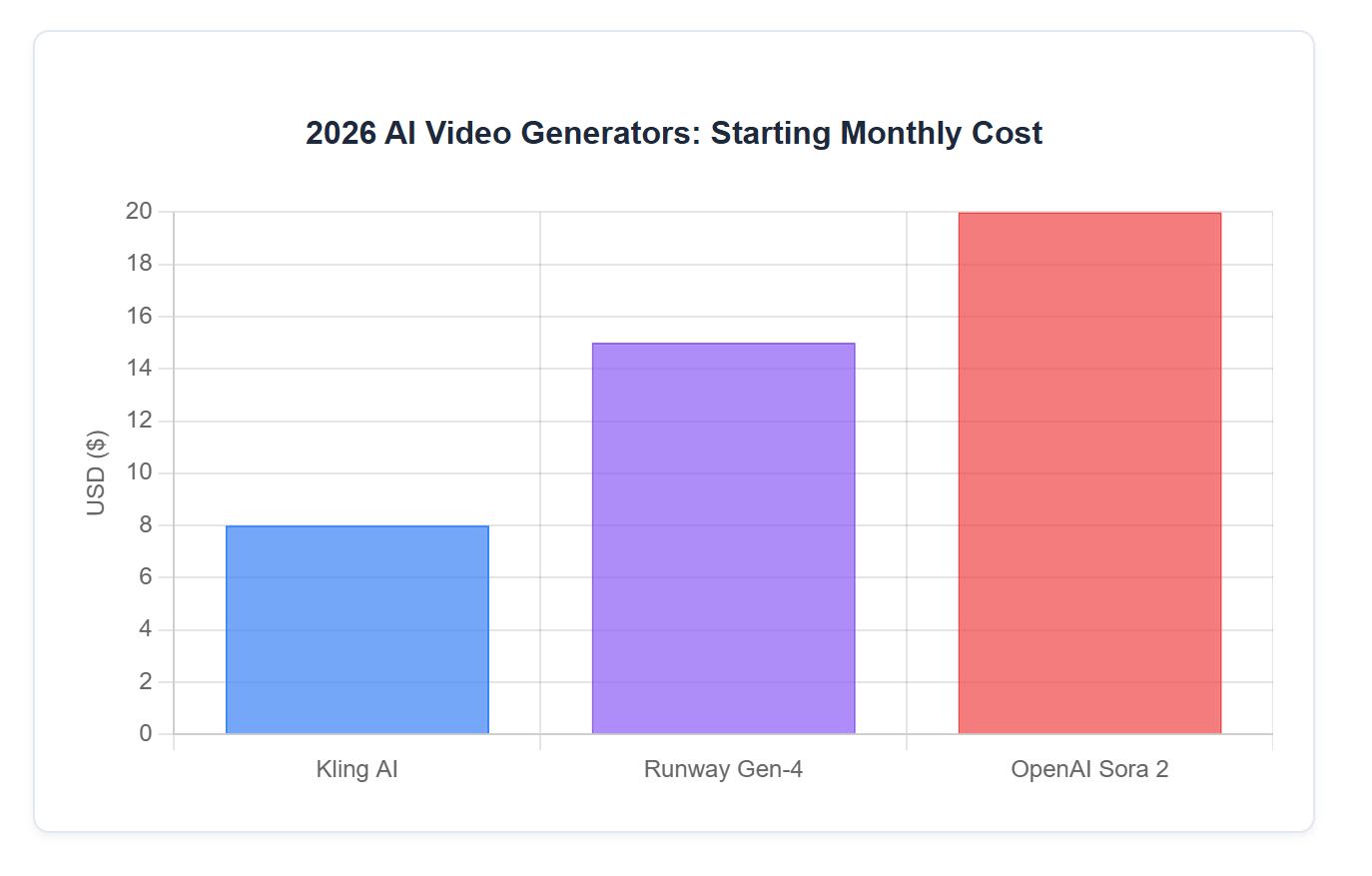
Yes, Kling AI is highly cost-effective, with standard paid plans starting between $6.99 and $8 per month, making it significantly cheaper than OpenAI Sora's massive $20 starting fee.
Budget-Friendly for Pros: For less than $10, you get access to enterprise-grade NeRF technology and 3-minute video capabilities.
Free Tier Limitations: Kling does offer a free trial, but videos will have watermarks, generation speeds will be very slow, and some videos cannot be downloaded.
Clear ROI: If your goal is strictly high-quality, long-form video, Kling provides the best return on investment on the market today.
FAQs
Is Kling AI better than Sora?
Kling AI is better than Sora for generating long videos up to 3 minutes and providing exact motion control, while Sora is slightly better for cinematic lighting and native audio sync.
Is Kling AI free to use?
Kling AI offers a limited free tier with slower processing times and watermarks, but professional features require a paid subscription starting around $6.99 per month.
How long can Kling AI videos be?
As of 2026, Kling 3.0 can generate continuous, highly realistic videos that last up to 3 minutes, which is currently the longest capability in the industry.
Does Kling AI have sound?
No, Kling AI does not generate native sound effects or voices. You must use external AI audio tools to add sound to your Kling videos during editing.
Conclusion
Kling AI stands out as the premier video generation model for creators who demand long-form storytelling, advanced physical realism, and pixel-perfect motion control. While it lacks native audio generation, its incredibly low price point and superior handling of character consistency make it the most practical choice for filmmakers. By pairing Kling's visual power with the right supplementary tools, you can produce stunning, professional-grade videos that easily rival more expensive alternatives on the market.
