
更新於 2026 年 8 月 21 日。. GPT-5.6 的定價並非單一數字。實際成本取決於您是否使用 ChatGPT 方案、OpenAI API 代幣費率、Codex 積分、提示詞快取,或是會產生大量輸出代幣的長期編碼任務。.
如果您真正要考慮的是是否要再支付一筆獨立的人工智慧訂閱費用,, GlobalGPT 的全功能 AI 平台 這是實用的比較基準。它將 Perplexity 的使用權限,以及 GPT、Claude 和 Gemini 等頂尖模型整合至單一工作區中,讓您無需分別管理每項訂閱,即可比較日常寫作、研究與規劃的工作流程。 關於 GPT-5.6,請在購買前先查看您所使用產品的模型選擇器;其可用性可能因產品和方案而異。.
本指南中
快速解答:GPT-5.6 的定價機制
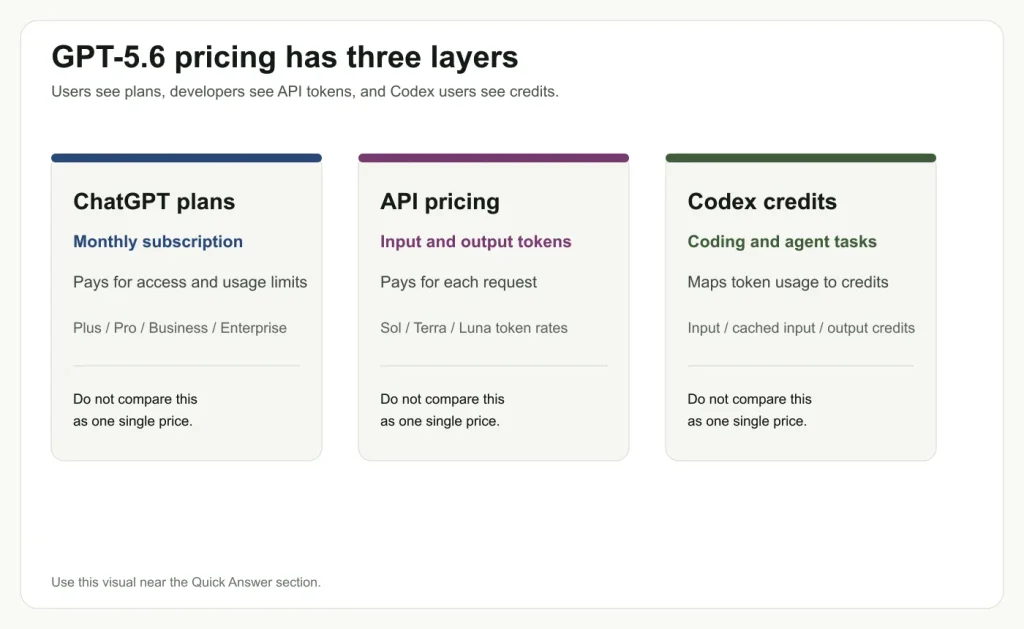
GPT-5.6 的定價分為三個層級: ChatGPT 訂閱方案、API 代幣費率以及 Codex 積分。這些概念雖有關聯,但並非同一事物。ChatGPT 方案是按月訂閱的服務,可解除模型存取限制並提升使用上限;API 計費則是以輸入和輸出代幣為單位進行收費;Codex 積分則是針對程式設計與代理工作流程所設計的產品級積分系統。.
最重要的實務要點在於: GPT-5.6 每代幣的最低價格,未必就是每項完成任務的最低價格。. 在我們的 GPT-5.6 標記使用量測試中,Terra 的輸出標記成本低於 Sol,但其消耗的輸出標記數量更多,且在長期編碼任務中的通過率較低。針對該工作負載,Sol 雖然每標記的成本較高,但以每項通過的任務計算則更為經濟。.
| 定價類型 | 您所支付的費用包含哪些項目 | 最適合 |
|---|---|---|
| ChatGPT 計畫 | 月費方案的存取權限與使用限制 | 希望在 ChatGPT 中使用 GPT-5.6 的常規使用者 |
| OpenAI API | 輸入與輸出標記 | 需要直接呼叫模型的開發人員 |
| 《Codex》演職員名單 | 映射至輸入、快取輸入及輸出標記的權值 | 編碼人員與專案層級的工作 |
GPT-5.6 ChatGPT 方案存取權限
關於 GPT-5.6 定價的第一个混淆點在於:有些人詢問的是 ChatGPT 的月費方案,而另一些人則詢問的是 API 代幣的費率。 訂閱 ChatGPT 並不代表您是直接購買 API 代幣。這意味著您的方案包含特定的模型存取權限、使用限制以及產品功能。若您要比較更廣泛的訂閱方案,這 ChatGPT 訂閱價格指南 在您將 GPT-5.6 與較早的方案選項進行比較之前,這是一篇值得閱讀的延伸文章。.
OpenAI 目前的 ChatGPT 定價頁面列出了「免費」、「Go」、「Plus」和「Pro」四種方案。 可見的方案卡片顯示,「Plus」方案每月費用為 $20,「Pro」方案則從每月 $100 起,其中「Plus」方案包含搭載 GPT-5.6 的進階推理模型,而「Pro」方案則包含 GPT-5.6 Sol Pro 推理功能。 關於 GPT-5.6 的定價,此為方案使用權限,並非按代幣計費。.
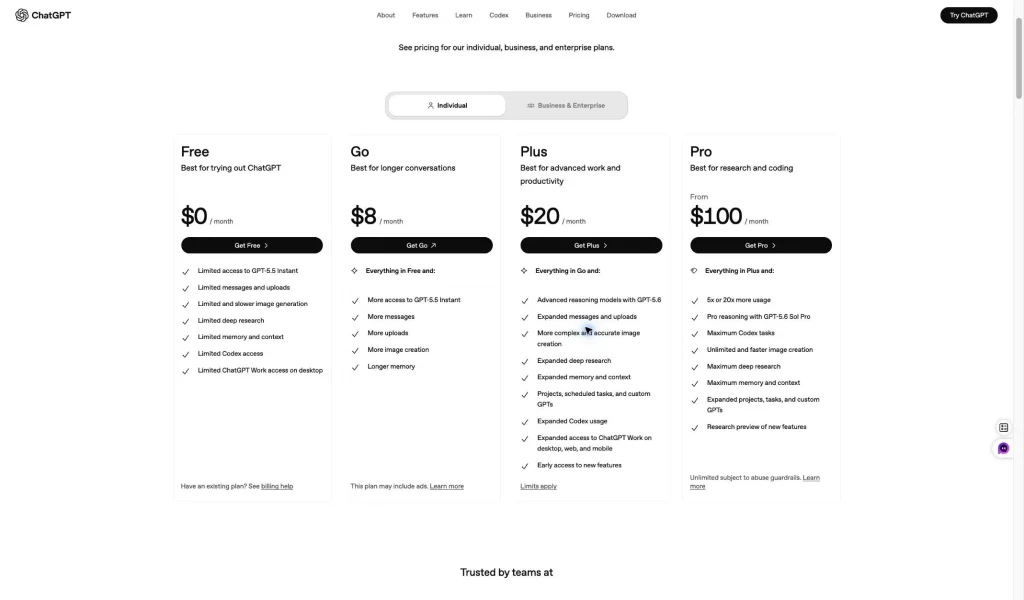
OpenAI 的說明頁面也指出,GPT-5.6 正逐步推送到符合資格的 ChatGPT 方案中。若使用者在模型選擇器中未看到 GPT-5.6 Sol,則表示該帳戶可能尚未開放使用此模型。這意味著,關於 GPT-5.6 定價的文章不應假設每個帳戶都能立即使用所有模型。.
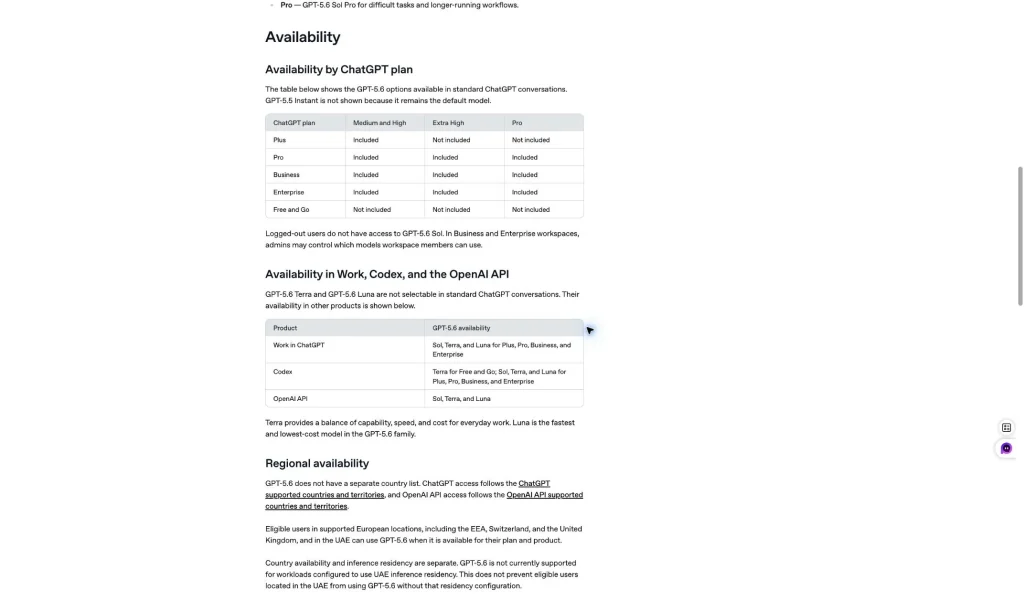
明確的區分: ChatGPT 方案定價解答「我可以在產品中使用 GPT-5.6 嗎?」API 定價解答「每個代幣的費用是多少?」Codex 積分解答「這項編碼任務在 Codex 內會消耗多少積分?」“
GPT-5.6 API 定價:Sol 對比 Terra 對比 Luna
對開發者而言,最直接的 GPT-5.6 定價表是 OpenAI 官方 API 報價單. OpenAI 列出了三個 GPT-5.6 等級:Sol、Terra 和 Luna。每個模型皆有每 100 萬枚代幣的輸入價格與輸出價格。.
若您正在針對各實驗室的模型支出進行基準比較,請將本節內容與《GlobalGPT》指南進行對照,以 Claude AI 定價.
若要採用 Google 的開發者途徑,請使用 Gemini 3.1 Pro API 定價指南.
| 模型 | 投入價格 | 輸出價格 | 最佳用途 |
|---|---|---|---|
| GPT-5.6 Sol | $5 / 1M 代幣 | $30 / 100萬枚代幣 | 複雜的編碼、冗長的推理、困難的代理任務 |
| GPT-5.6 Terra | $2 / 1M 代幣 | $12 / 1M 代幣 | 在日常工作、研究、草稿撰寫與程式碼支援之間取得平衡 |
| GPT-5.6 Luna | $0.20 / 1M 代幣 | $1.20 / 1M 代幣 | 簡單、快速、低成本且大量處理的任務 |
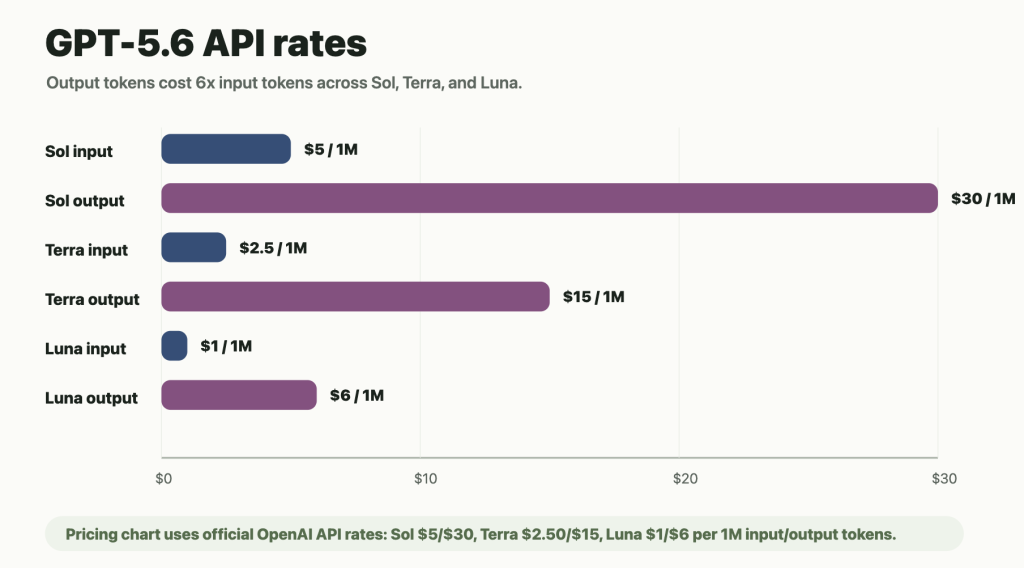
價目表備註: 以下為 2026 年 8 月 21 日經核實的標準短語境價格。OpenAI 列出的長語境費率較高,因此在估算非常龐大的請求之前,請先查閱官方定價頁面上的「長語境」分頁。.
關鍵模式一貫如此:輸出標記的成本遠高於輸入標記。這一點至關重要,因為 GPT-5.6 在程式設計、代理工作流程及長篇推理方面的定價,往往主要取決於輸出長度,而不僅僅是提示字串的大小。.
GPT-5.6 Codex 點數:Codex 的定價有何不同
Codex 的定價方式與 API 的定價方式不同。 OpenAI 的 Codex 價格表指出,Codex 的使用費用雖以 API 代幣用量為基礎計算,但實際是以每百萬個輸入代幣、快取輸入代幣及輸出代幣為單位來計算信用點數。這意味著 GPT-5.6 Codex 的信用點數機制仍會考量代幣用量,但使用者是透過 Codex 信用點數系統來查看相關資訊,而非直接收到 API 帳單。.
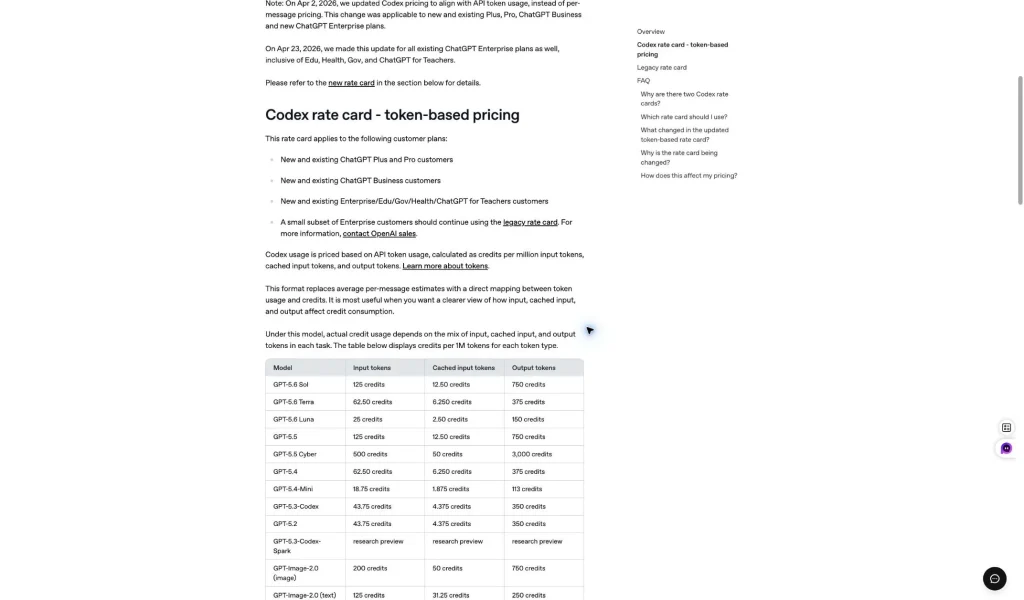
| 模型 | 輸入積分/100萬枚代幣 | 快取輸入積分/100萬代幣 | 產出獎勵 / 100萬枚代幣 |
|---|---|---|---|
| GPT-5.6 Sol | 125 學分 | 12.50 學分 | 750 學分 |
| GPT-5.6 Terra | 50 學分 | 5 學分 | 300 學分 |
| GPT-5.6 Luna | 5 學分 | 0.50 學分 | 30學分 |
如欲了解更詳盡的「訂閱制與信用制」比較分析,請參閱 《Codex》定價指南.
實際上的教訓很簡單:在 Codex 中討論 GPT-5.6 的定價時,切勿直接將其與 ChatGPT 的月費方案相比較。GPT-5.6 Codex 的信用點數更接近於「任務級」的消耗模式。 一個專案層級的任務可能會讀取檔案、重複使用快取的上下文、進行編輯、重試,並產生長篇輸出。.
如果您正在規劃每週的工作量,而非單一任務,那麼 《法典》使用限制指南 說明「計畫視窗」與「額外學分」如何影響實際總數。.
GPT-5.6 的成本計算公式
就 API 使用而言,GPT-5.6 的費用可透過一個簡單的公式估算:將輸入代幣數乘以輸入費率,再將輸出代幣數乘以輸出費率,最後將兩者相加即可。.
預估 API 費用 = (輸入代幣數 / 1,000,000 × 輸入價格) + (輸出代幣數 / 1,000,000 × 輸出價格)
就 Codex 而言,概念上同樣適用此原則,但計費單位是「積分」而非「美元」。在這兩種系統中,產出量大的任務往往會導致 GPT-5.6 的費用迅速攀升。這是進行任何模型比較時,最簡明的 GPT-5.6 計費公式。.
輸入代幣 傳送至模型的文字、程式碼、檔案及上下文。.
輸出標記 答案、程式碼變更、說明以及生成的內容。.
快取輸入 可重複使用的上下文,能降低重複輸入的成本。.
我們的 GPT-5.6 標記使用量測試
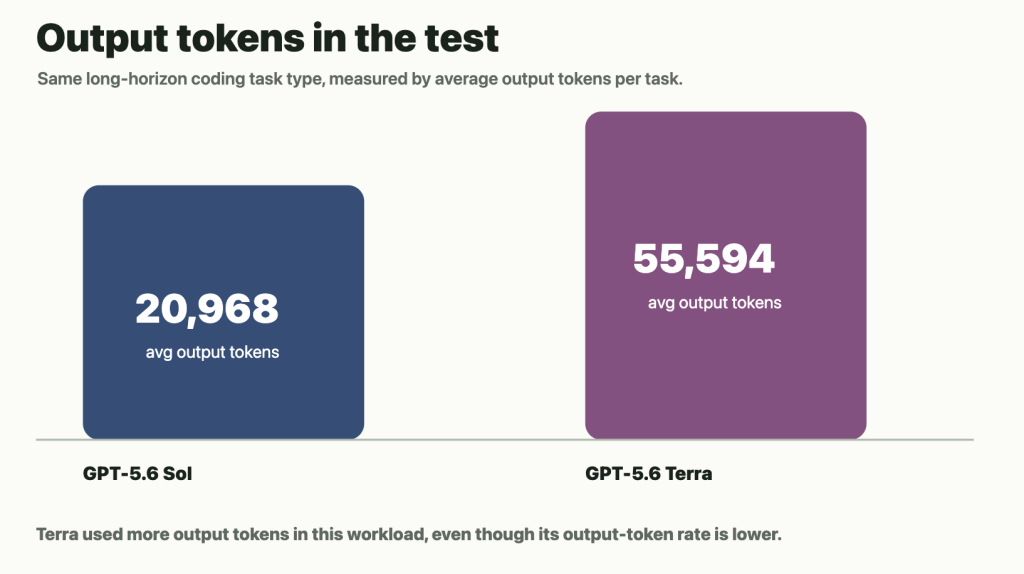
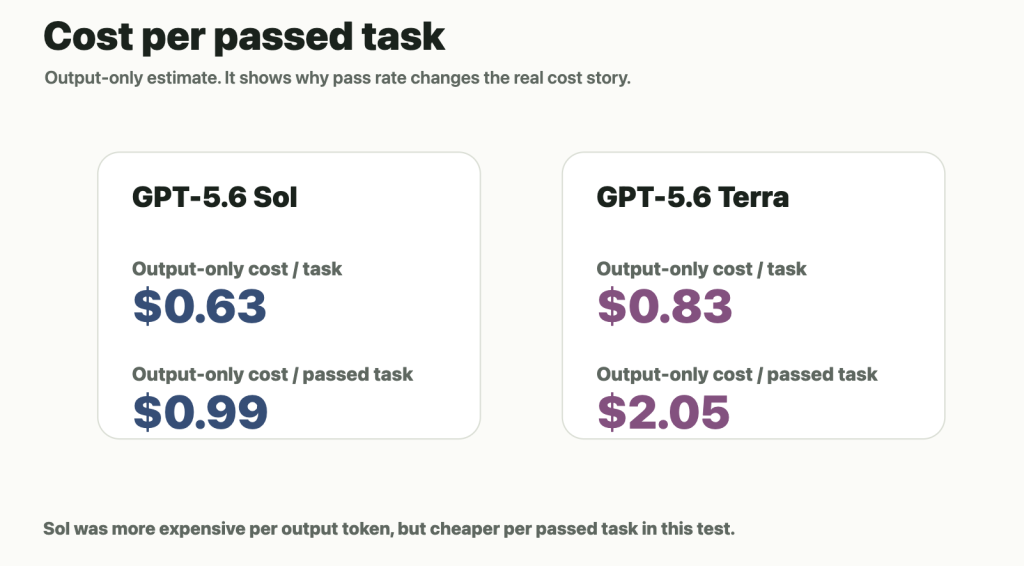
為了讓 GPT-5.6 的定價概念更具體,我們針對一項長期編碼任務測量了其標記行為。在 GPT-5.6 標記使用測試中,我們採用相同的任務類型與評估方法,對 GPT-5.6 Sol 與 GPT-5.6 Terra 進行了比較。 我們追蹤了通過率、每項任務的平均輸出代幣數、每項任務的純輸出成本,以及每項通過任務的純輸出成本。.
這並非完整的發票模擬。下表是 僅輸出估計值, ,因為完整的計費明細還會包含輸入代幣、快取輸入行為、工具呼叫以及工作流程特定的上下文。我們在此僅採用「僅輸出」的成本計算方式,因為輸出代幣是 GPT-5.6 計費中成本較高的一部分,且能清楚顯示 GPT-5.6 的代幣使用模式。.
| 模型 | 通過率 | 每個任務的平均輸出標記數 | 每項任務的純輸出成本 | 純輸出成本/已通過的任務 |
|---|---|---|---|---|
| GPT-5.6 Sol | 63.7% | 20,968 | ~$0.63 | ~$0.99 |
| GPT-5.6 Terra | 40.7% | 55,594 | ~$0.67 | ~$1.64 |
這項檢測的意義
Terra 的輸出代幣成本比 Sol 更低。但在這項工作負載中,Terra 產出的輸出代幣數量遠多於 Sol,且任務通過率較低。這改變了 GPT-5.6 的實際定價狀況。在本次測試中,Sol 雖然每單位輸出代幣的成本較高,但每項通過任務的成本卻更低。.
更廣泛的教訓是,使用者不應僅憑代幣單價來評估 GPT-5.6 的定價。對於複雜的工作而言,完成率、輸出長度以及重試次數,可能比標示價格更為重要。.
提示詞快取與 GPT-5.6 定價
OpenAI 表示,GPT-5.6 導入了更可預測的提示字串快取機制,包括明確的快取中斷點,以及 30 分鐘的最低快取存活時間。 對於 GPT-5.6 及後續版本的模型,快取寫入的計費標準為未快取輸入費率的 1.25 倍,而快取讀取則仍可享有 90% 的快取輸入折扣。 在 GPT-5.6 的實際定價中,當同一上下文被多次重複使用時,GPT-5.6 的提示詞快取功能便顯得至關重要。.
當同一個長上下文被反覆重用時,這一點至關重要。無論是運作於單一專案中的編碼代理、重用相同文件的研究工作流程,或是具有穩定上下文的長篇對話,都能從輸入快取中受益。但快取並不會降低輸出標記的成本,因此輸出量大的任務仍需謹慎選擇模型。.
實用閱讀: 快取可以降低重複執行同一上下文的成本。但這並不能免除監控輸出長度、重試以及任務完成狀況的必要性。.
GPT-5.6 與 GPT-5.5 的價格比較:升級值得嗎?
關於 GPT-5.6 定價的正確問題,並非單純地問「GPT-5.6 是否比 GPT-5.5 更便宜?」更好的問題應該是:「GPT-5.6 能否以更少的重試次數、更少的手動修正,並產出更優質的結果來完成任務?」對於簡單的聊天、輕量級寫作或例行的腦力激盪,, 一個 GPT-5.5 工作區 或者,Luna 可能就足夠了。至於艱深編碼、資安研究、複雜推理以及代理工作流程等應用,Sol 或 Terra 或許能證明其較高的模型成本是合理的。較舊的 GPT-5.4 定價指南 當您需要上一代的成本基準時,這也相當有用。.
如果決策是針對 API 支出,那麼 GPT-5.5 價格明細 能為您提供更清晰的上一代基準線。.
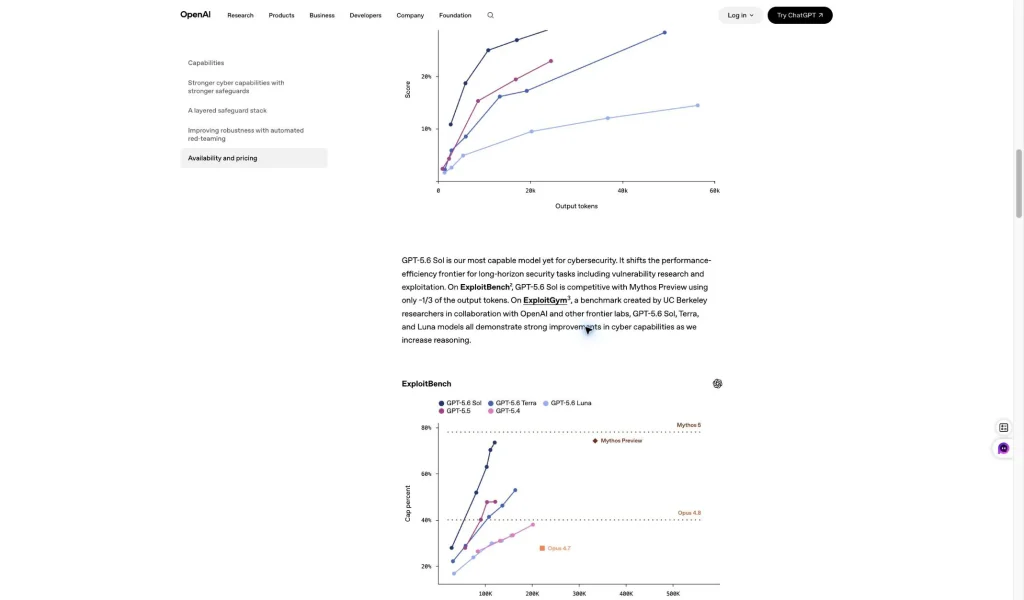
OpenAI 的 GPT-5.6 頁面也從效能效率的角度來闡述該模型的價值。 該官方頁面指出,GPT-5.6 Sol 在 ExploitBench 上的表現可與 Mythos Preview 相媲美,但產出的代幣數量僅為其三分之一左右。這正是讀者應關注的關鍵證據:兼具效能與代幣效率。.
若要進行更廣泛的品質權衡,則 GPT-5.6 與 Fable 5 與 GPT-5.5 比較 著眼於代幣價格之外。.
您應該選擇哪一款 GPT-5.6 模型?
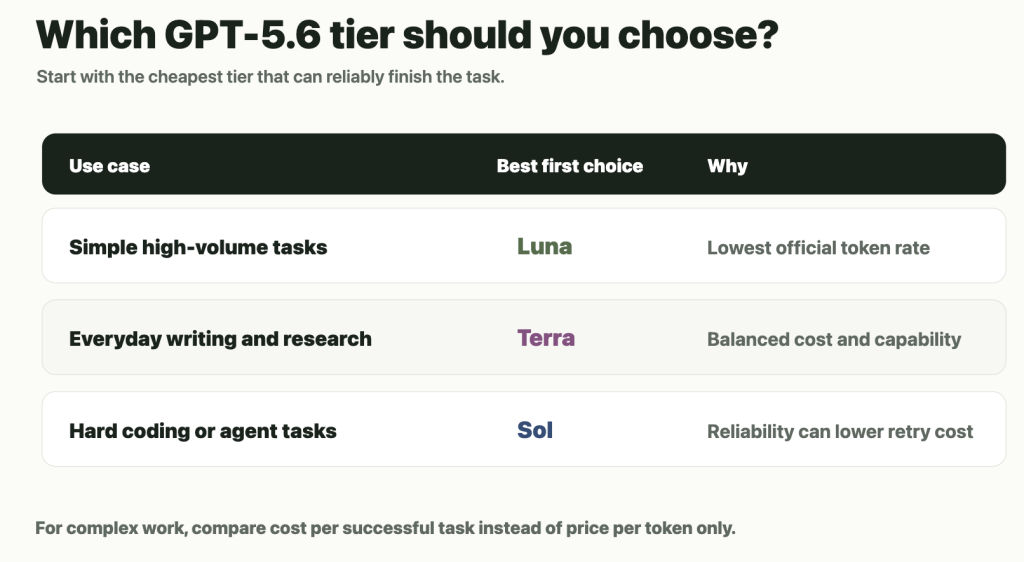
最佳的性價比取決於具體任務。對於大多數日常工作而言,Terra 是最穩妥的起點,因為它在功能、速度和成本之間取得了平衡。對於簡單且大量處理的任務,Luna 是最經濟實惠的 GPT-5.6 模型。當失敗、重試或輸出品質較低所造成的成本高於模型價格差額時,Sol 便是首選方案。 做出明智的 GPT-5.6 定價決策,應從能可靠完成任務且價格最低的方案開始著手。.
| 使用者類型 | 推薦選擇 | 理由 |
|---|---|---|
| ChatGPT 的偶爾使用者 | 此外,還可使用 GPT-5.6 Sol 服務 | 固定方案定價比代幣預算制更為簡便。. |
| SEO 專員或內容撰稿人 | 優先使用 Terra,Luna 則用於簡單的草稿 | 大多數寫作任務都不需要最高等級。. |
| 使用 API 的開發者 | 優先選擇 Terra,棘手的情況則使用 Sol | 一開始採用平衡配置,當重試成本過高時再進行升級。. |
| Codex 進階使用者 | 索爾或泰拉 | 任務完成的情況可能比代幣率更為重要。. |
| 高處理量且簡單的作業流程 | 露娜 | 最低的進價與出價。. |
關於訂閱工作流程的說明: 若您的目標是控制每月在 AI 工具上的支出,而非直接透過 API 進行開發,請將 OpenAI 的官方方案/API 途徑與 GlobalGPT 的全功能 AI 平台 和 GlobalGPT 定價頁面. 當您希望在同一個工作區中同時使用 Perplexity 以及 GPT、Claude 和 Gemini 等頂尖模型時,GlobalGPT 便能發揮最大效益;不過對於開發者建置而言,API 和 Codex 的定價仍是一項重要考量。.
常見問題:GPT-5.6 定價
GPT-5.6 的價格是多少?
官方 GPT-5.6 標準短語境 API 的定價單位為每 100 萬個代幣。 Sol 的輸入為 $5,輸出為 $30;Terra 的輸入為 $2,輸出為 $12;Luna 的輸入為 $0.20,輸出為 $1.20。 ChatGPT 方案存取權限、Codex 積分以及長語境 API 費率採用不同的定價系統。.
ChatGPT Plus 是否包含 GPT-5.6?
OpenAI 的「說明中心」指出,Plus 方案包含 GPT-5.6 Sol 中階與高階版本,適用於標準的 ChatGPT 對話。Extra High 與 Pro 版本則不包含在 Plus 方案中。.
免費用戶可以使用 GPT-5.6 嗎?
「Free」和「Go」方案的用戶在標準的 ChatGPT 對話中無法使用 GPT-5.6 Sol。OpenAI 表示,「Free」和「Go」方案用戶可在 Codex 中使用 Terra,而「Plus」、「Pro」、「Business」及「Enterprise」方案用戶則可在 Codex 中更廣泛地使用 Sol、Terra 和 Luna。.
Codex 的定價與 API 的定價是否相同?
不。API 的計費方式是以每個輸入和輸出代幣的美元金額為單位。Codex 則採用「信用點」制度,並針對輸入代幣、快取輸入代幣及輸出代幣分別設有不同的信用點費率。.
為什麼在實際應用中,Terra 的成本會比 Sol 更高?
Terra 的輸出單價低於 Sol,但 GPT-5.6 的實際成本也取決於輸出長度和通過率。在我們的長期編碼測試中,Terra 消耗了更多輸出代幣,且通過率較低,導致其每項通過任務的純輸出成本高於 Sol。.
哪款 GPT-5.6 模型最便宜?
根據官方標準短語境 API 費率,Luna 是 GPT-5.6 型號中最便宜的,每 100 萬個代幣的輸入為 $0.20,輸出為 $1.20。它最適合用於簡單、快速且處理量大的任務。.
哪款 GPT-5.6 模型性價比最高?
對於許多日常工作流程而言,Terra 是最佳的預設值。在進行複雜的程式設計或代理程式作業時,若更高的可靠性能減少重試次數,Sol 可能是更佳的選擇。當任務足夠簡單且品質風險較低時,Luna 則是最理想的選擇。.
官方消息來源
- OpenAI API 定價 – 目前 GPT-5.6 Sol、Terra 及 Luna 的標準短期與長期費率。.
- ChatGPT 學習:定價 – 目前 Codex 方案的存取權限、使用範圍,以及每 100 萬代幣可獲得的點數。.
- OpenAI:GPT-5.6 – 提示字元快取與基準測試環境。.
- OpenAI 協助中心:ChatGPT 中的 GPT-5.6 – 方案與產品的供應狀況。.
- ChatGPT 定價 – 消費者方案的定價及所包含的產品使用權限。.



