

Perplexity Login is simple when it works — visit perplexity.ai/login, choose Email, Google, or Apple, and you’re in. But because Perplexity uses a passwordless system, your entire login flow depends on receiving a one-time passcode or Magic Link, small issues like spam filtering, VPNs, or Apple Relay delays can turn a fast login into a slow one. And if you’re using multiple AI tools every day, that friction adds up fast.
That’s where GlobalGPT helps — an all in one platform that gives you GPT-5.1, Claude 4.5, Gemini 3 Pro, Sora 2 Pro, and Perplexity-style search without juggling OTP emails or switching accounts.
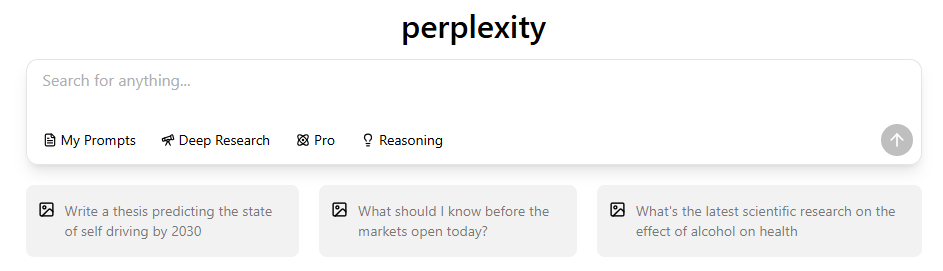
What Is Perplexity and Why Does It Use a Passwordless Login System?
Perplexity’s login experience is built around simplicity and security. Instead of storing passwords—which can be reused or leaked—the platform relies entirely on one-time passcodes (OTP) and Magic Links.
Passwordless login reduces account recovery issues and ensures that only users with access to their email can authenticate.
Read more
How Does Perplexity AI Differ from Traditional Search Engines?
What is the Difference Between Perplexity and Perplexity Pro?
How to Use Perplexity AI: A Complete Beginner’s Guide
How to Log In to Perplexity on the Web (Step-by-Step)
The only official website link for Perplexity is: https://www.perplexity.ai/
Follow the steps below to sign in on the web safely and correctly.
Step 1 — Visit the Official Perplexity Website
Go to the official website your or enter “perplexity ”and click the official website entry that appears on the search page.

Perplexity does not use third-party login pages, so make sure the URL always ends with perplexity.ai to avoid phishing or unofficial mirrors.
Step 2 — Choose Your Login Method
After clicking the login button, Perplexity will show three official sign-in options:
- Continue with Google
- Continue with Apple
- Continue with Email (OTP / Magic Link)

These are the only supported options. Perplexity does not use partner login systems or external authentication platforms.
Step 4 — Complete the Login Flow
Depending on your chosen method:
Google Login
- Fastest
- Most reliable
- Works across all browsers
- Rarely encounters OTP issues
Apple Login
- Ideal for iOS/macOS users
- Fully supports Hide My Email
- OTP forwarding may be delayed if Apple Relay is enabled

How to Log In on Mobile (iOS & Android)
- Open the Perplexity app
- On the home screen, look above the search bar — you’ll see a Sign In button

- Tap Sign In
- Choose Google, Apple, or Email

- If you choose Email, open the OTP link on the same device
- The app will authenticate automatically
Failing to open the login link on the same device is one of the most common mobile login mistakes.
Why Perplexity Login Emails Sometimes Don’t Arrive
Perplexity relies on automated email delivery, and anything that interrupts it can block your OTP.
Common causes include:
- Spam/Junk filtering
- VPN/proxy interference
- Apple Relay forwarding delays
- Corporate/university email blocks
- Wrong email spelling
- Email providers with aggressive filtering
How to Fix Perplexity Login Problems?
- Check all inbox folders
Spam, Junk, Promotions, Updates.
- Whitelist Perplexity’s sender
Email team@mail.perplexity.ai
- Disable VPN or proxy
They often break OTP redirects.
- Resend the login email
Wait 20–30 seconds.
- Try Gmail
Best delivery speed.
- Use Google/Apple login
Bypasses email.
Why Magic Links and OTP Codes Stop Working
OTP failures usually happen because:
- Link expired
- Link opened on another device
- Antivirus/email scanner broke the link
- Browser extensions blocked redirect
- App was outdated
Requesting a fresh OTP usually solves it.
Can You Change Login Methods or Emails?
Perplexity allows switching login methods only if the email matches exactly.
- ❌ You cannot change your primary email
- ❌ You cannot merge accounts
- ❌You cannot transfer Perplexity Pro
Apple Relay / Hide My Email Login Issues
Apple users often face:
- Forwarding delays
- OTP blocked by Relay
- Incorrect Relay address used
- Disabled forwarding
Fix:
- Or log in directly with Apple ID
Common Mobile Login Problems
- OTP opened in wrong browser
- Link opened in desktop browser instead of app
- App outdated
- VPN interference
- Private Relay issues
Who to Contact If Login Still Fails
📧 support@perplexity.ai
If none of the troubleshooting steps work, contact Perplexity Support. They can help with:
- OTP emails not arriving
- Apple Relay forwarding issues
- Duplicate accounts
- Browser or device login errors
To speed up the process, include:
- Device + OS
- Browser
- Email provider
- VPN on/off
- Screenshots of the issue
- Which login method you tried (Google / Apple / Email)
Perplexity Pro users usually receive faster responses.
Perplexity Login FAQ
Can I log in without access to my email?
No. Your email is your identity on Perplexity, and it cannot be changed or replaced. You must regain access to the original email.
Can I switch login methods?
Yes, but only if all login methods use the exact same email address. Otherwise, Perplexity will treat them as separate accounts.
Why am I not receiving the OTP?
Most commonly due to:
- Spam/Junk filtering
- VPN interference
- Corporate/university email blocking
- Apple Hide My Email delays
- Email typos
Gmail usually delivers OTPs fastest.
Can accounts be merged?
No. Each login method creates a separate account, and Perplexity cannot combine them or transfer subscriptions.
GlobalGPT: A Smoother Way to Work Across All AI Tools
If you regularly switch between Perplexity, GPT-5.1, Claude 4.5, Gemini 3, Sora 2 Pro, and other AI platforms, the constant OTP emails and login prompts can slow your workflow to a crawl. GlobalGPT removes that friction by giving you all these frontier models in a single, unified workspace—no repeated logins, no switching accounts, no waiting for verification codes.
One login.
Every model you need.
A faster, cleaner way to work.

