What Is HappyHorse 1.0? A Tested and Verified Guide


HappyHorse 1.0 is Alibaba’s AI video model family for creating and editing short videos from text, images, references, and existing footage. It is designed for workflows such as text-to-video, image-to-video, reference-to-video, and video editing, which means it is better understood as a group of video generation tools rather than a single standalone model.
The model has gained attention quickly, but reliable information about it is still scattered. Some details are confirmed in official Alibaba Cloud documentation, including model modes, API access, resolution, duration, and pricing. Other claims come from partner platforms, rankings, media reports, or third-party articles, so they need to be treated more carefully.
This guide gives you a tested and verified overview of HappyHorse 1.0: what it is, who made it, what each model mode does, where you can use it, how its official specs work, how it compares with other AI video models, and which technical details are still not publicly available.
To learn more about the ways to access Happy Horse 1.0, you can read How to Access the Real Happy Horse 1.0 (And Avoid Fake Websites).
What Is HappyHorse 1.0?
TL;DR
HappyHorse 1.0 is Alibaba’s AI video generation and editing model family. It can create or edit short videos from different types of input, including text prompts, still images, reference images, and existing footage.
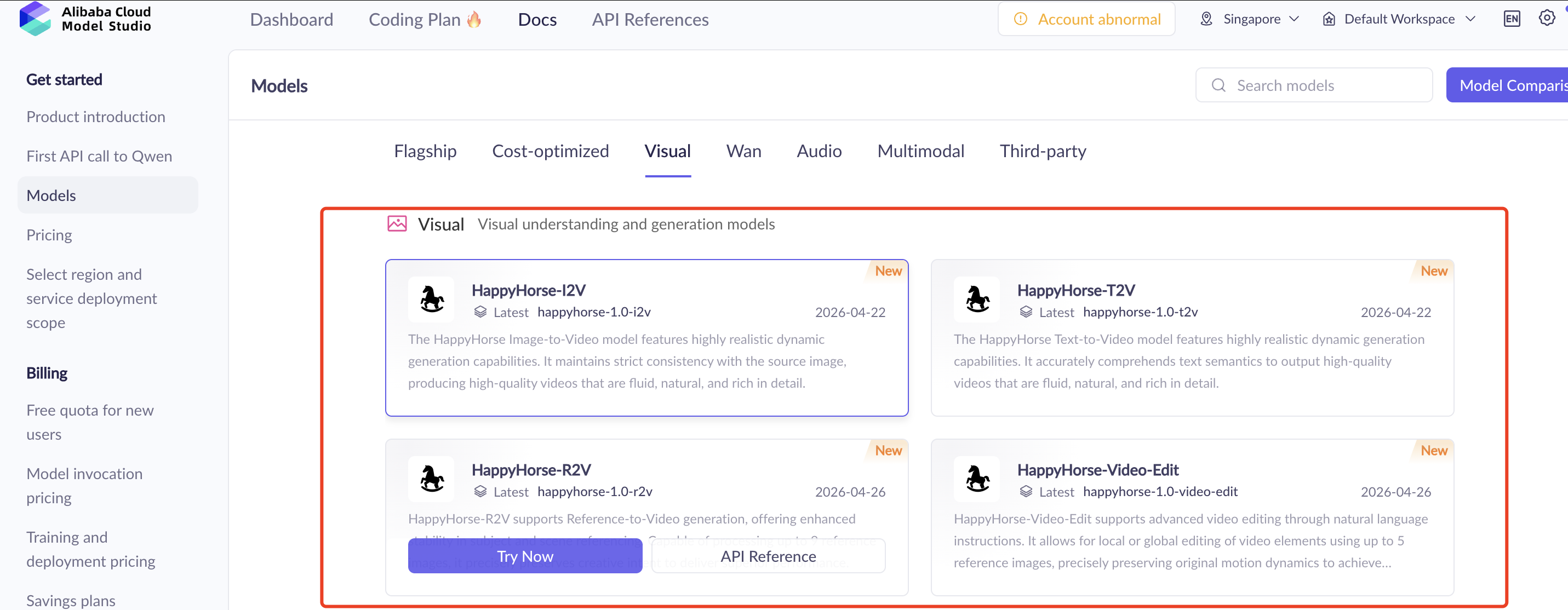
In official Alibaba Cloud documentation, HappyHorse 1.0 is not presented as just one standalone model. It appears as a family of related video workflows, including text-to-video, image-to-video, reference-to-video, and video editing.
What it means in practice
The easiest way to understand HappyHorse 1.0 is this:
HappyHorse 1.0 turns creative inputs into video outputs.
If you start with a written idea, you use text-to-video. If you already have a still image, you use image-to-video. If you want the model to follow a visual reference, you use reference-to-video. If you already have footage, you use video editing.
Alibaba Cloud’s model list places HappyHorse under video generation and editing, while Alibaba Cloud Model Studio lists HappyHorse 1.0 as a model available in its broader model ecosystem. The consumer-facing site, HappyHorse.com, describes HappyHorse as an AI video creation platform for generating and editing videos. Alibaba Cloud Model Studio also presents HappyHorse 1.0 with per-second output pricing for 720P–1080P generation.
Is HappyHorse 1.0 a single model or a model family?
HappyHorse 1.0 is best understood as a model family because official Alibaba Cloud documentation does not present only one isolated model name. Instead, it lists multiple HappyHorse 1.0 model variants and workflows.
This distinction matters because “HappyHorse 1.0” is the name users usually search for, but the product itself is organized around several creation modes. If you start from a written idea, you use text-to-video. If you start from a still image, you use image-to-video. If you need reference-guided generation, you look at reference-to-video. If you already have footage, you use video editing.
In other words, HappyHorse 1.0 is not just one button that generates a video. It is a set of video creation and editing workflows under the same 1.0 generation.
Official model name | What it does |
|---|---|
| Text-to-video |
| Image-to-video from a first frame |
| Reference-to-video |
| Video editing |
Alibaba Cloud’s rate-limit documentation lists HappyHorse series models, and Alibaba Cloud’s model documentation places HappyHorse in video generation and editing categories. This supports the model-family interpretation from an official product and operations perspective.
Why HappyHorse 1.0 is getting attention
HappyHorse 1.0 is getting attention for three main reasons.
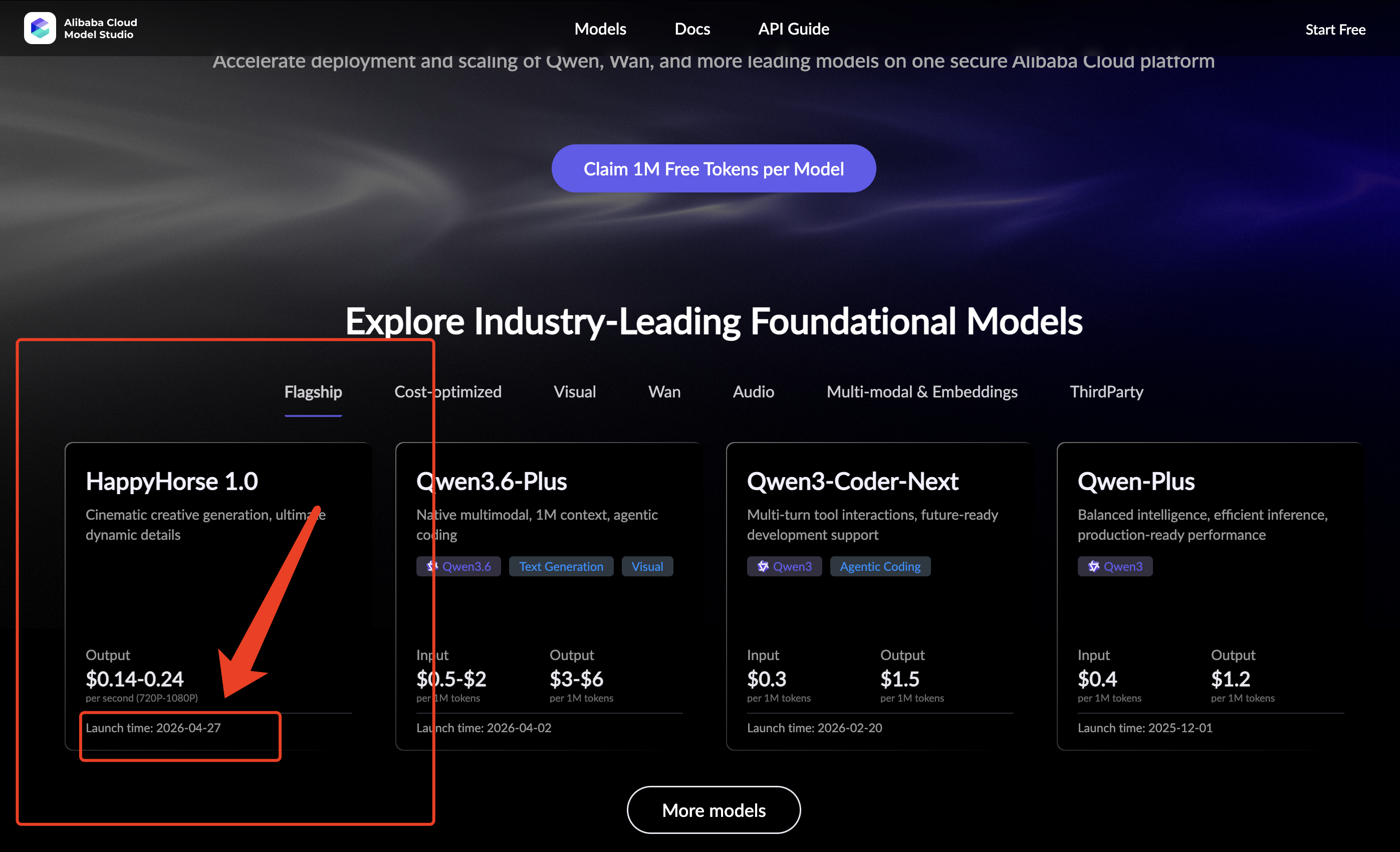
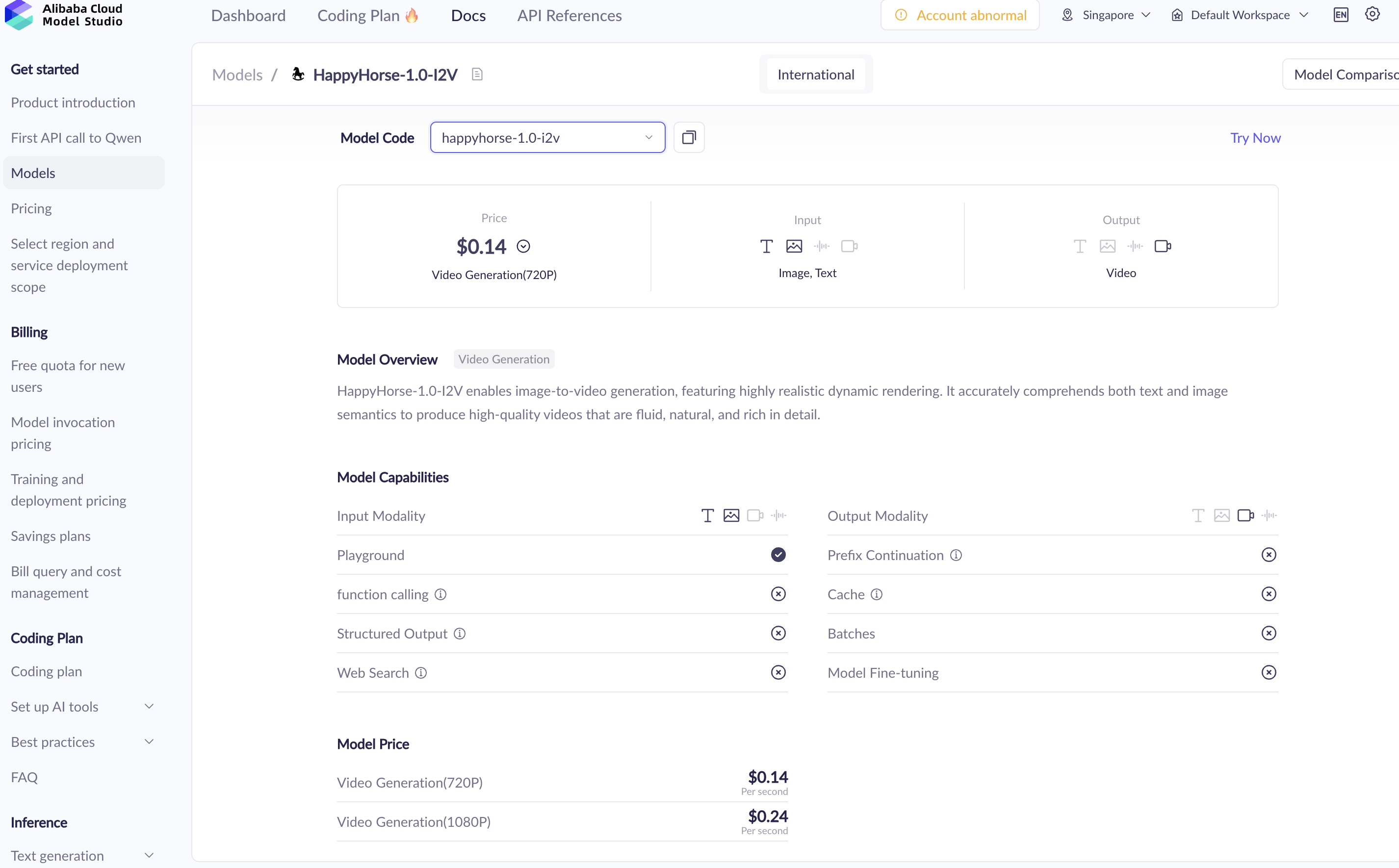
First, it now has official visibility. Alibaba Cloud Model Studio lists HappyHorse 1.0 with a launch time shown as 2026-04-27 and output pricing shown as $0.14–$0.24 per second for 720P–1080P generation.
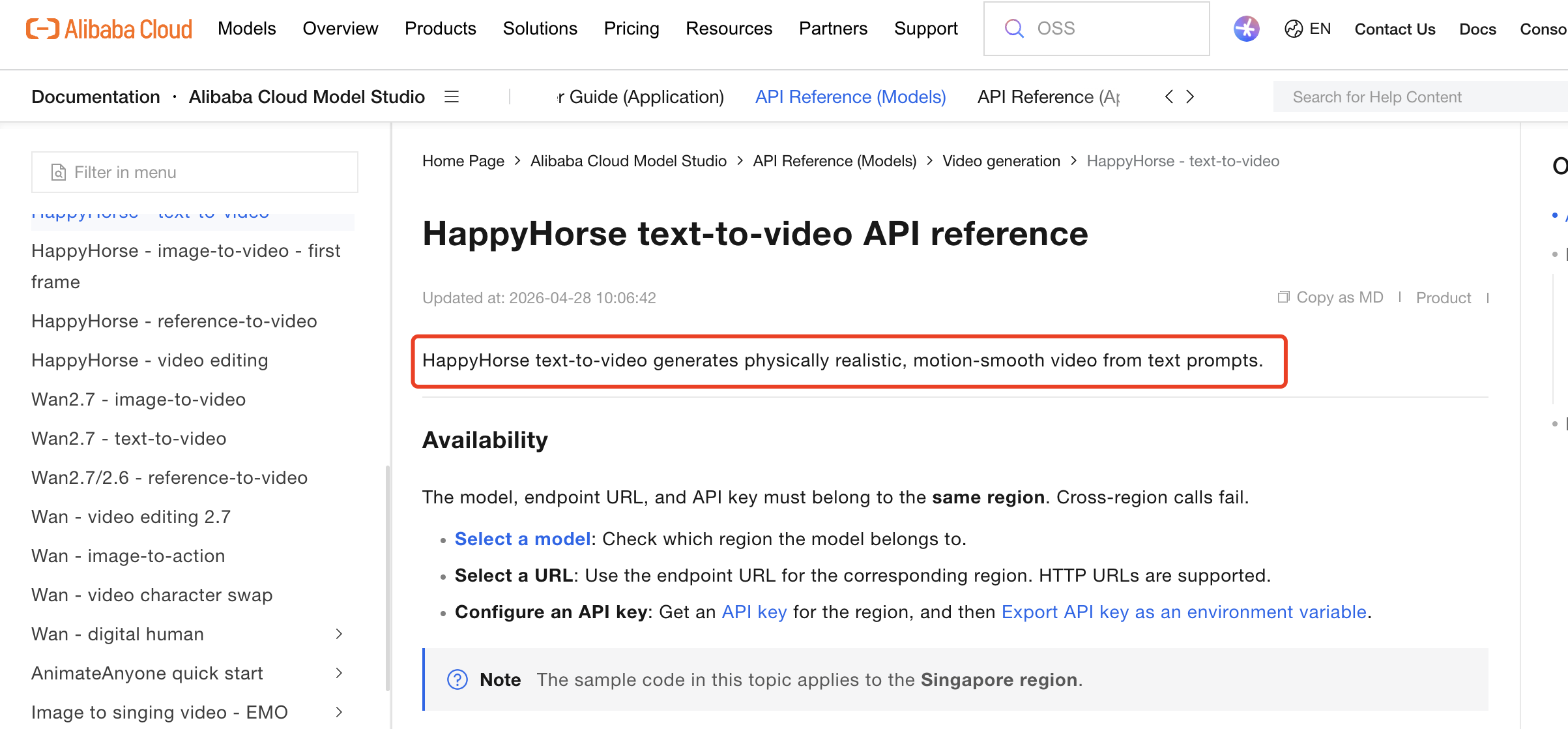
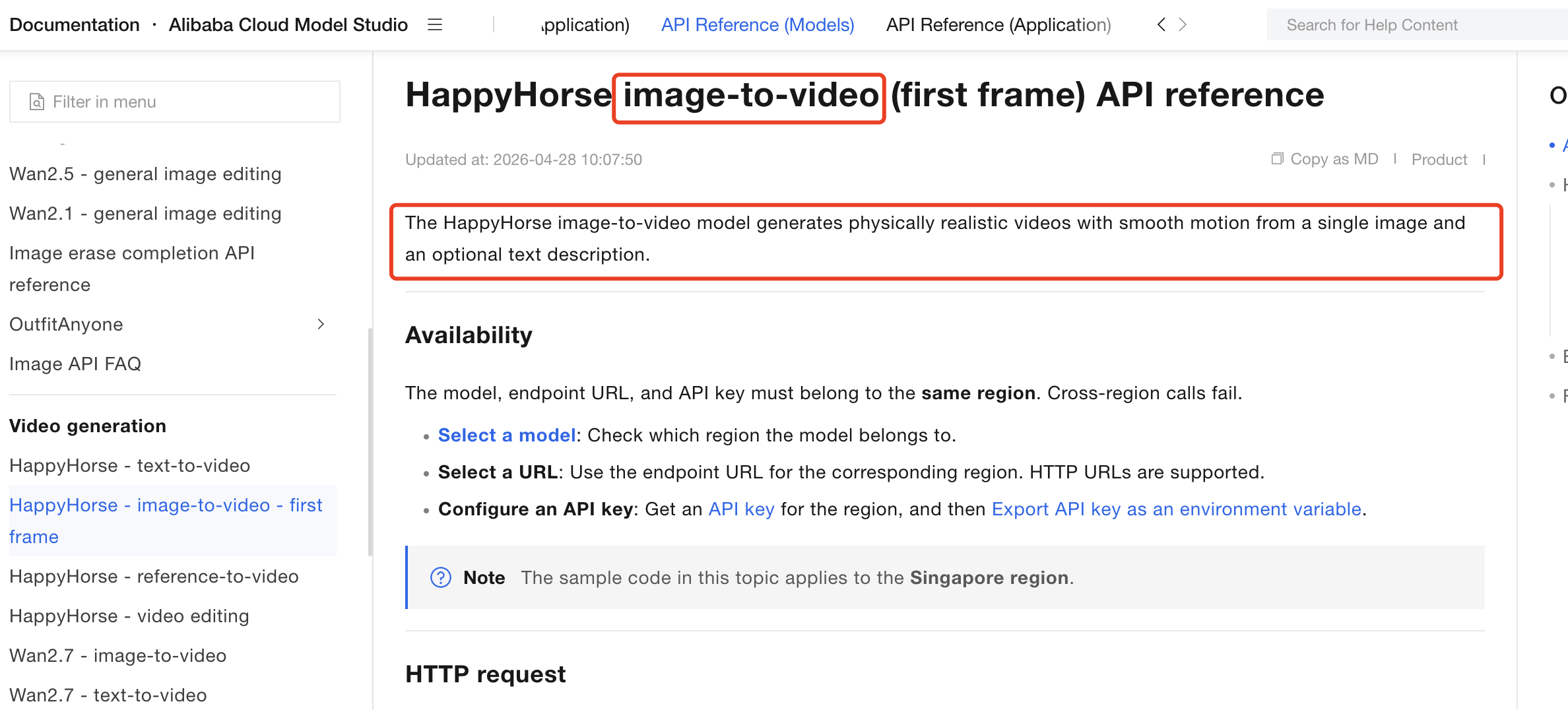
Second, the model appears in Alibaba Cloud’s formal product documentation. The official T2V API reference says the HappyHorse text-to-video model takes text prompts and generates physically realistic, smooth-motion video content. The official I2V API reference says the image-to-video model uses a first-frame image and can be guided by text to generate physically realistic, smooth-motion video.
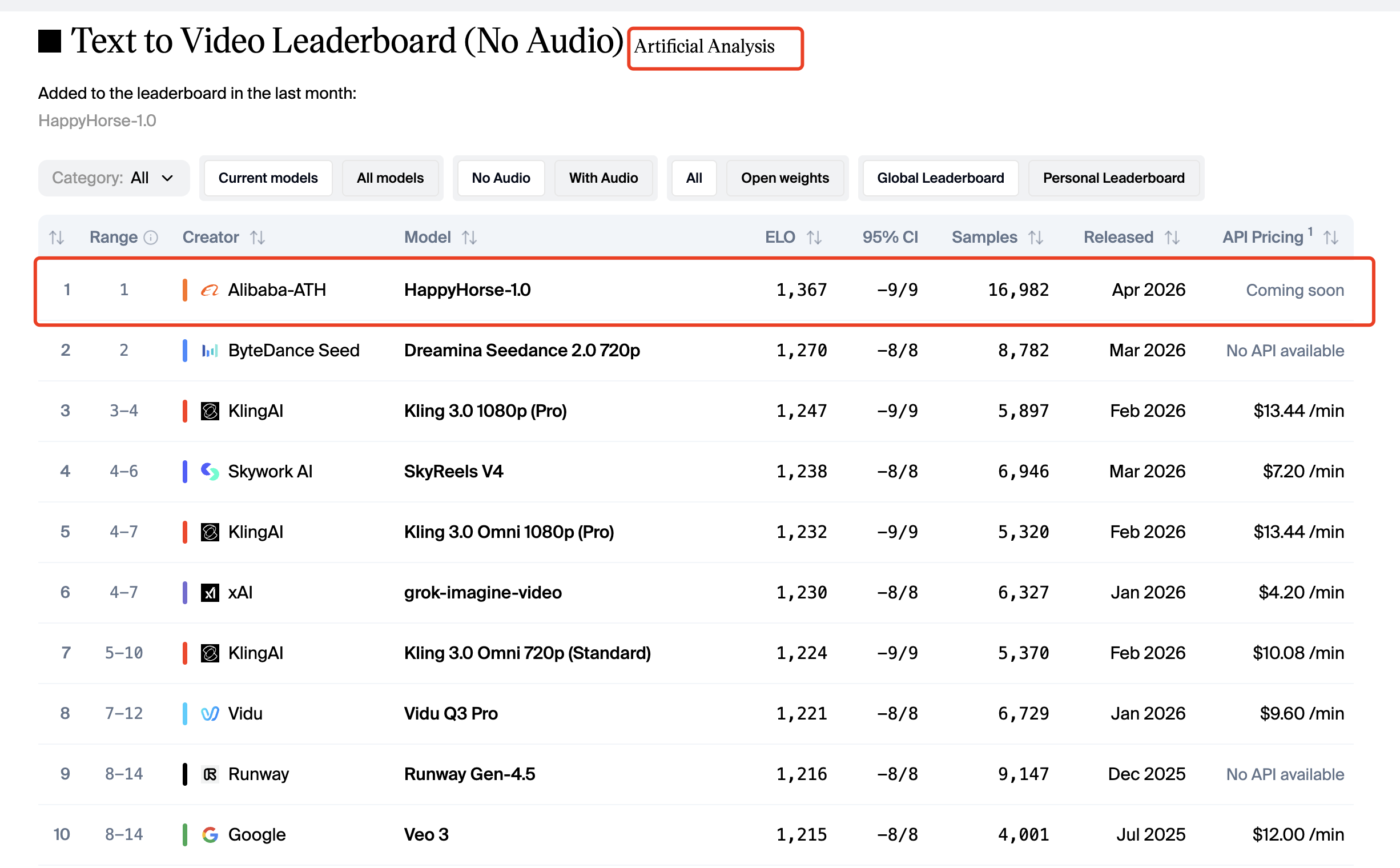
Third, it ranks strongly in third-party AI video comparisons. Artificial Analysis lists HappyHorse-1.0 at the top of its Text to Video Leaderboard without audio with an Elo score of 1,367, and at the top of its Image to Video Leaderboard without audio with an Elo score of 1,401.
What makes HappyHorse 1.0 different from older “mystery model” coverage
Early coverage of HappyHorse focused heavily on the mystery around who made it and why it suddenly ranked well. That angle made sense when public documentation was limited.
Now the better angle is different: what is officially documented, what is externally ranked, and what is still unknown?
That is why it helps to look at HappyHorse 1.0 in layers: what Alibaba Cloud documents directly, what HappyHorse.com shows for everyday users, what Artificial Analysis reports in third-party rankings, and what remains unavailable in public technical documentation.
Official Alibaba Cloud documentation
HappyHorse.com product positioning
Artificial Analysis ranking data
Partner-platform or third-party claims
Data not publicly available
Who Made HappyHorse 1.0?
Alibaba attribution and current public positioning
Based on public documentation, HappyHorse 1.0 should be understood as an Alibaba Cloud-documented video AI model family. You can find it in Alibaba Cloud Model Studio and in Alibaba Cloud’s documentation for video generation and editing.
That matters because Alibaba Cloud is currently the strongest official source for confirming what HappyHorse 1.0 is, which model modes exist, how the API works, and what usage limits or pricing details are publicly available.
Its deeper technical details, such as architecture, training data, and parameter count, have not been publicly disclosed.
Where can you use HappyHorse 1.0?
There are two main places to start with HappyHorse 1.0, depending on what you want to do.
If you just want to create or edit videos without dealing with API setup, start with HappyHorse.com. It is the consumer-facing site for HappyHorse and presents the product as an AI video creation platform for generating and editing videos.
If you are a developer, business user, or technical team, Alibaba Cloud is the better place to look. Alibaba Cloud Model Studio and Alibaba Cloud documentation provide the model names, API references, pricing details, deployment information, and usage limits for HappyHorse 1.0.
If you want to figure out more detail of how to access HappyHorse 1.0, please read this article.
Where to go | Best for |
|---|---|
HappyHorse.com | Creating and editing videos through the product interface |
Alibaba Cloud Model Studio | Exploring HappyHorse 1.0 inside Alibaba Cloud’s model ecosystem |
Alibaba Cloud documentation | Checking API parameters, pricing, rate limits, and technical usage details |

Which source should you trust for details?
For everyday use, HappyHorse.com is the simplest starting point. It tells you what the product is for and helps you understand HappyHorse from a creator’s perspective.
For technical details, use Alibaba Cloud documentation as the main reference. That is where you should verify things like model names, supported workflows, resolution, duration, pricing, API behavior, and rate limits.
This matters because a lot of HappyHorse 1.0 information online comes from partner platforms, rankings, media reports, or third-party articles. Those sources can be useful, but they should not replace official documentation when you are checking what the model actually supports. For example, Alibaba Cloud documentation confirms the public model modes such as T2V, I2V, R2V, and video edit, but it does not publicly disclose details such as the model’s parameter count, training data, or full architecture.
What has and has not been officially disclosed
Here is the current public evidence status:
Question | Status |
|---|---|
Is HappyHorse 1.0 publicly listed by Alibaba Cloud? | Yes |
Are T2V and I2V API references public? | Yes |
Are R2V and video-edit model names public? | Yes |
Are official pricing and rate limits public? | Yes |
Is there a public official parameter count? | Data not publicly available |
Is there a public system card or whitepaper? | Data not publicly available |
Is there a public training-data disclosure? | Data not publicly available |
Alibaba Cloud’s API pages provide practical product documentation, but they do not disclose a full research paper, training dataset, architecture description, or official parameter count.
What Can HappyHorse 1.0 Do?
Text-to-video generation
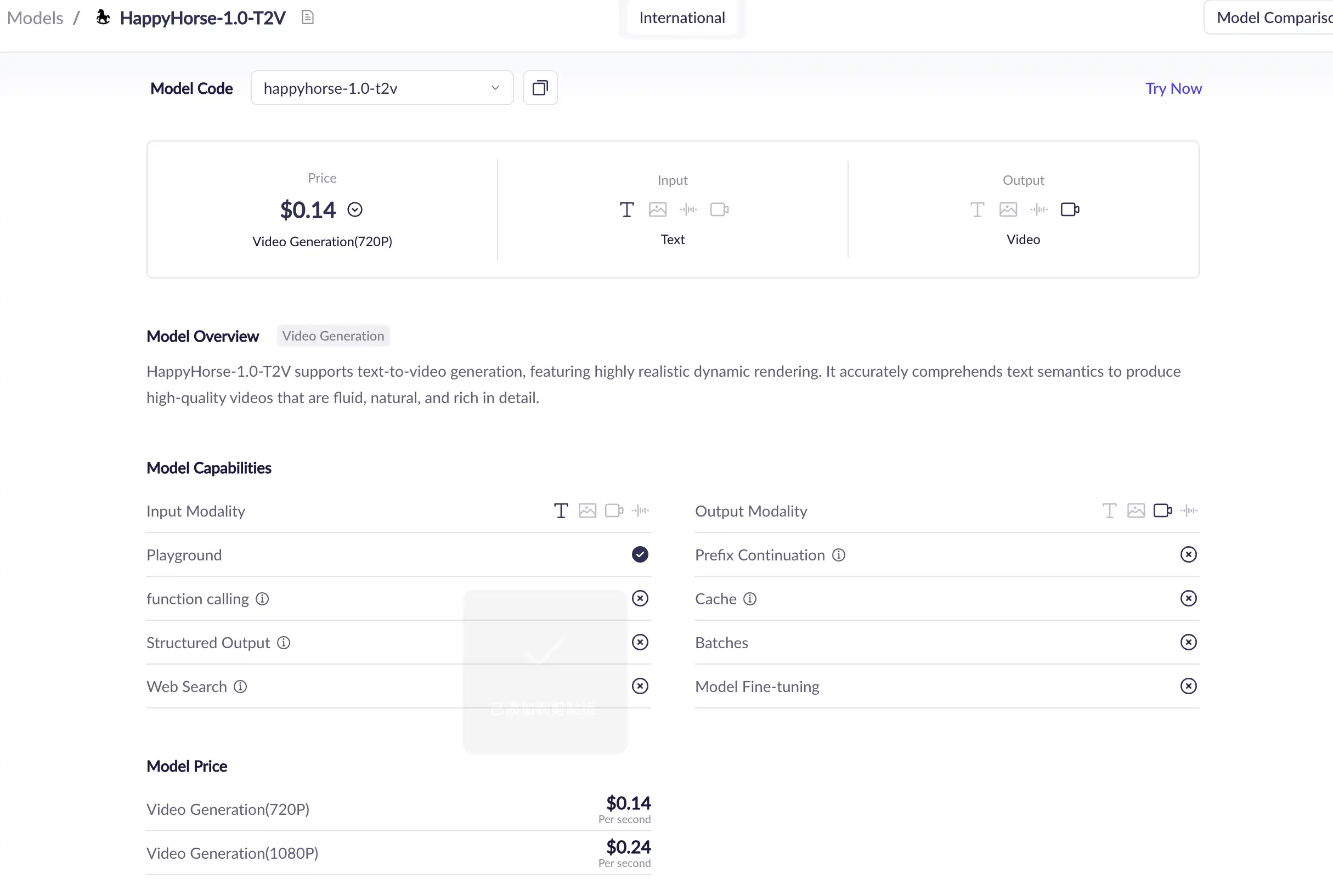
The official HappyHorse T2V API reference describes the text-to-video model as taking a text prompt and generating video content with physical realism and smooth motion. The model name shown in the official API context is happyhorse-1.0-t2v.
This mode is best for users who start with an idea rather than an image. For example, a marketer, filmmaker, or creator might begin with a written scene description such as:
“A futuristic city street at night, neon signs reflecting on wet pavement, slow cinematic camera movement.”
T2V is the most open-ended HappyHorse 1.0 workflow because the prompt defines the scene, subject, action, motion, and visual style.
Image-to-video generation
The official HappyHorse I2V API reference describes image-to-video as using a first-frame image as the base and allowing text guidance to generate a physically realistic, smooth-motion video. The model name shown in the official API context is happyhorse-1.0-i2v.
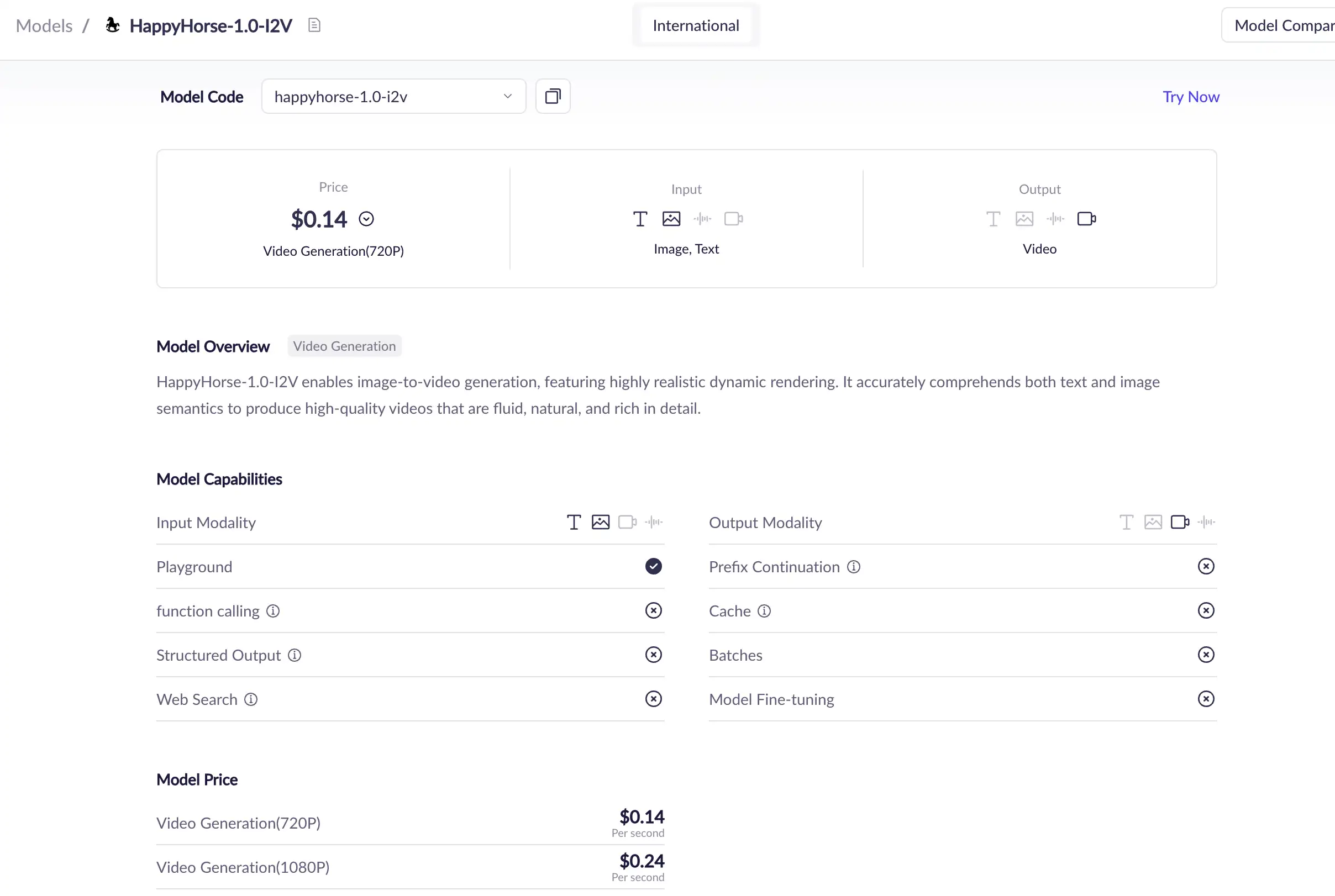
This mode is useful when you already have a visual anchor. Instead of relying only on text, you can provide an image that establishes the subject, framing, character appearance, product look, or scene composition.
I2V is often better than T2V when you care about:
keeping a specific character or product visible,
animating an existing visual asset,
turning concept art into motion,
preserving a first-frame composition,
creating a short moving version of a still image.
Official I2V documentation says the input image must be a first frame, and it lists image constraints such as file format, minimum dimensions, aspect-ratio range, and file size.
Reference-to-video generation
Alibaba Cloud’s model list includes HappyHorse reference-to-video, and its HappyHorse series documentation includes happyhorse-1.0-r2v as one of the model names in the family.
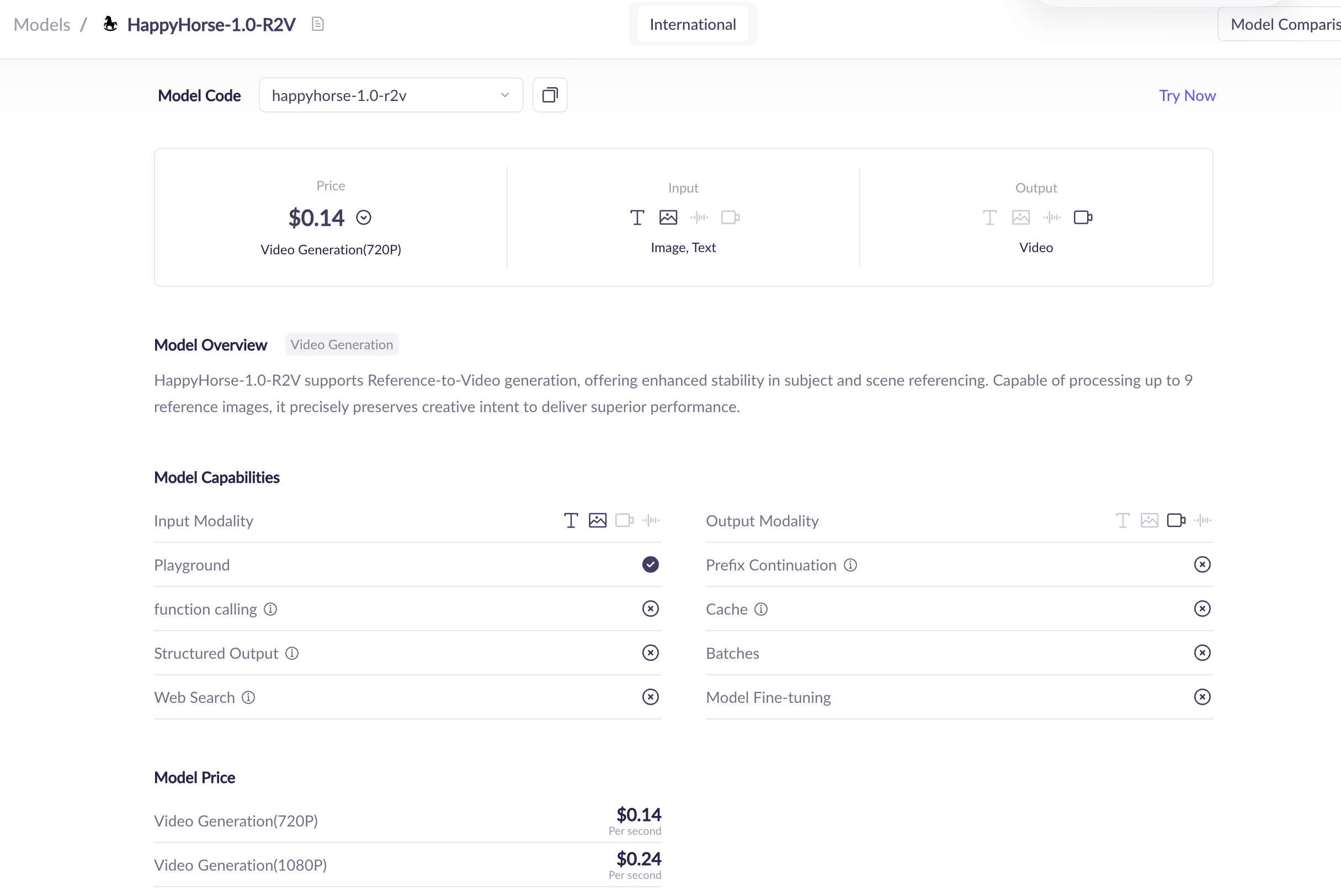
Reference-to-video matters because many creators want more control than a plain text prompt can provide. A reference can help guide the visual identity, subject appearance, or creative direction.
Because the public R2V details are less fully exposed than the T2V and I2V API references in the sources reviewed here, this article treats R2V as an officially listed model mode but avoids inventing unsupported schema details.
Video editing
Alibaba Cloud’s model list includes HappyHorse video editing, and its HappyHorse series documentation includes happyhorse-1.0-video-edit as one of the model names in the family. However, in current user-facing access, the video-editing workflow is better understood as a HappyHorse.com product feature rather than a direct option users can easily find inside Alibaba Cloud Model Studio.
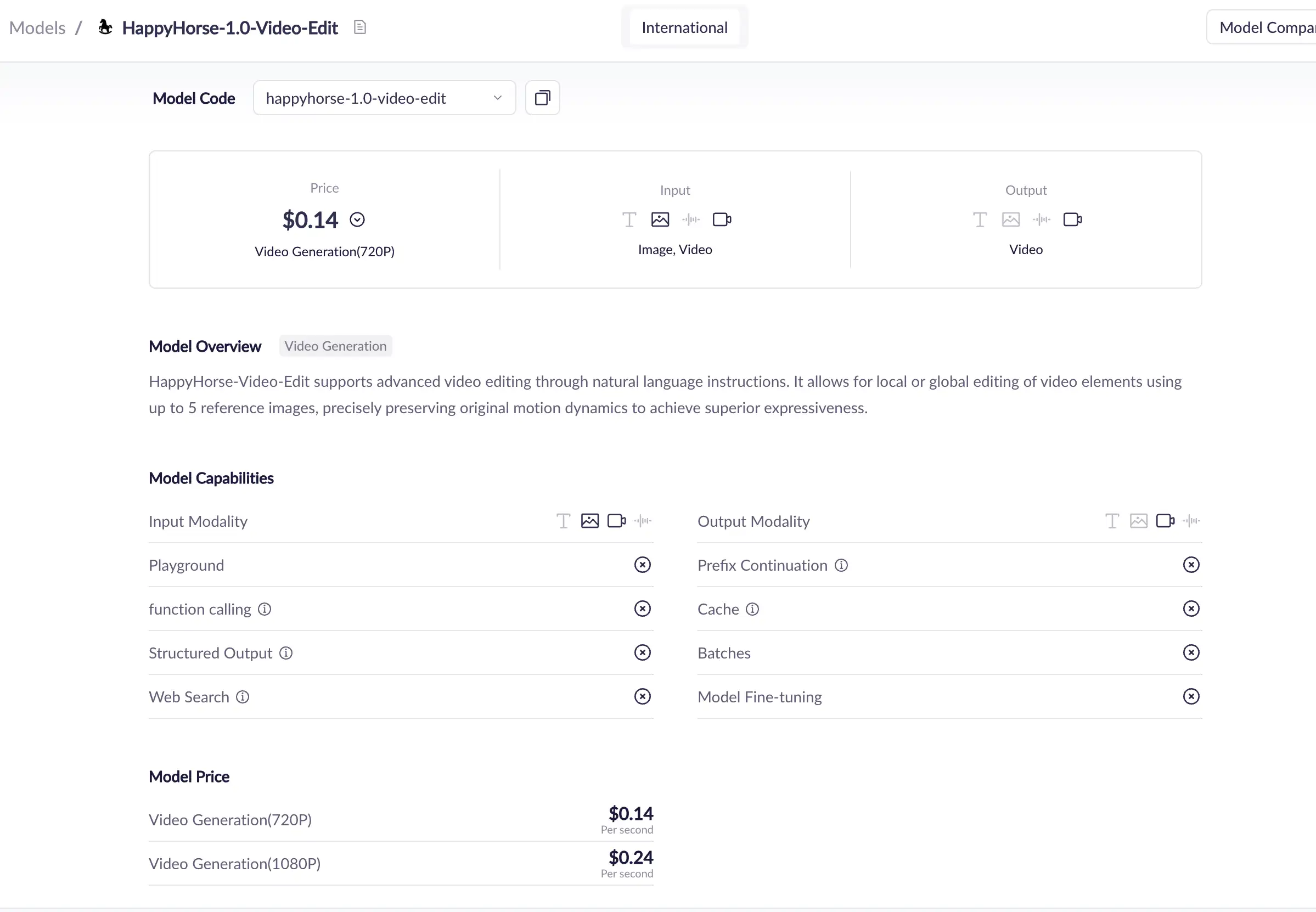
Video editing is important because it expands HappyHorse 1.0 beyond “generate a clip from scratch.” It suggests a broader workflow: create, modify, refine, and transform video assets.
For creators and teams, this matters because many production workflows do not start from a blank prompt. They start from existing footage, an existing image, or a partially finished visual direction.
What HappyHorse 1.0 is designed for
Based on the official documentation, HappyHorse 1.0 is designed around short-form AI video generation and editing. The clearest official patterns are:
generating video from text,
generating video from a first-frame image,
generating video from reference material,
editing existing video,
producing short videos with configurable resolution and duration.
Alibaba Cloud Model Studio describes HappyHorse 1.0 with cinematic creative generation and dynamic details, while the API references focus on practical parameters and asynchronous generation.
Common use cases for HappyHorse 1.0
HappyHorse 1.0 can fit several user groups:
User type | Possible use case |
|---|---|
Creators | Short cinematic clips, image animation, social videos |
Marketers | Product visuals, ad concepts, campaign previews |
Designers | Mood videos, motion concepts, visual storyboards |
Developers | API-based video generation workflows |
Brands | Localized visual content and fast creative testing |
Agencies | Rapid concept exploration and iteration |
For GlobalGPT users, HappyHorse 1.0 can fit into a broader full-cycle workflow: ideation with LLMs, visual planning with image models, and video generation with models such as Sora 2, Veo 3.1, Kling, Wan2.7, and HappyHorse-style video systems. GlobalGPT’s Pro plan is positioned for video and advanced image workflows at $10.8, while Basic is more suitable for LLM use at $5.8.
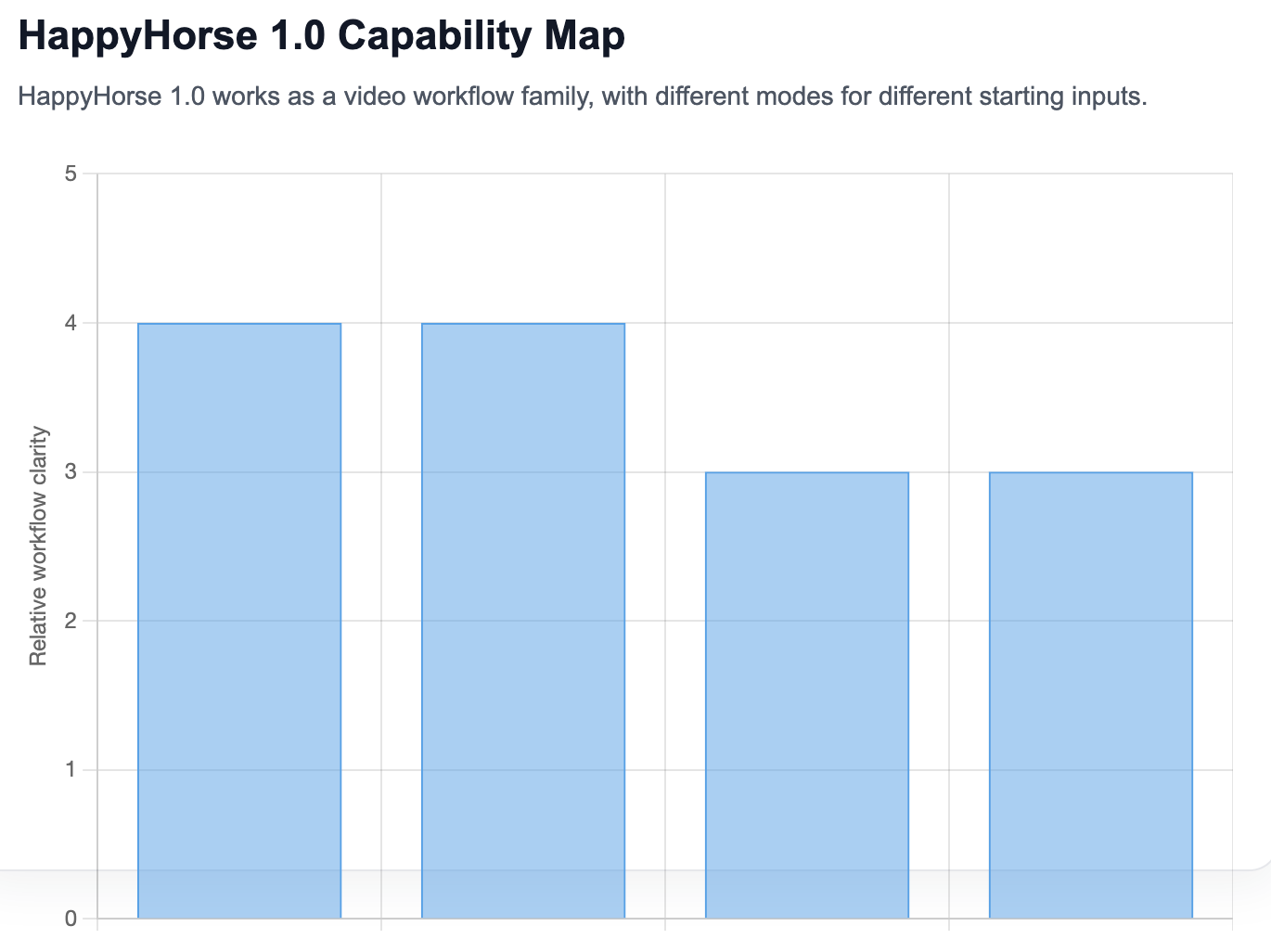
Capability | Input | Best use |
|---|---|---|
Text-to-video | Text prompt | Start from an idea |
Image-to-video | First-frame image + optional prompt | Animate a still image |
Reference-to-video | Reference image + prompt | Guide subject or style |
Video editing | Existing video + instruction/reference | Transform existing footage |
HappyHorse 1.0 Model Family Explained
happyhorse-1.0-t2v
happyhorse-1.0-t2v is the official text-to-video model name shown in Alibaba Cloud’s T2V API reference. It requires a prompt and supports video parameters such as resolution, aspect ratio, duration, watermark, and seed.
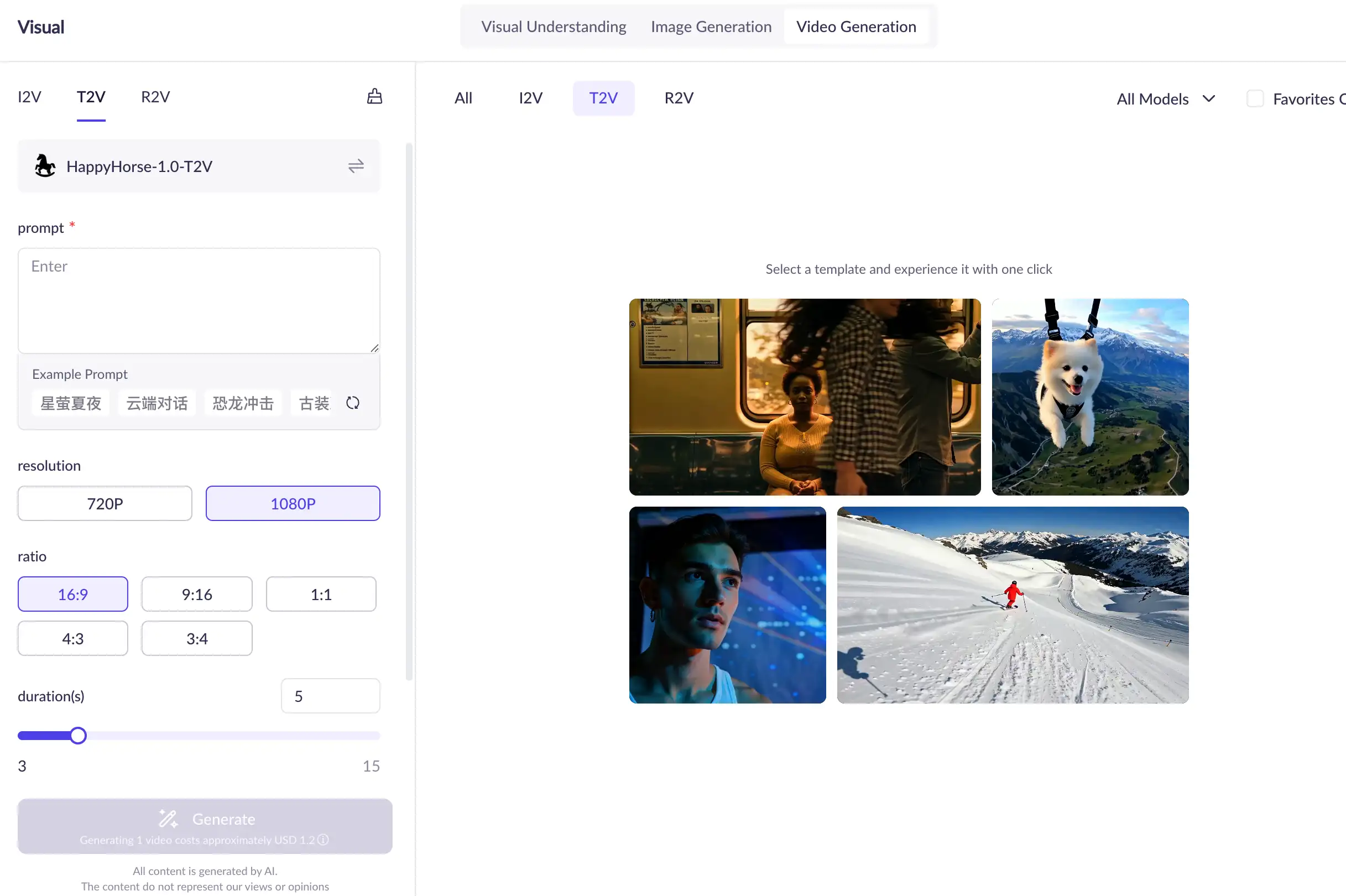
Use T2V when you want to start from pure text.
Best-fit examples:
concept trailers,
cinematic scene tests,
short social video ideas,
fictional product scenes,
creative mood clips.
T2V gives the widest creative freedom, but because it starts only from text, prompt clarity matters more.
happyhorse-1.0-i2v
happyhorse-1.0-i2v is the official image-to-video model name shown in Alibaba Cloud’s I2V API reference. It uses a first-frame image, with optional text guidance, to generate video.
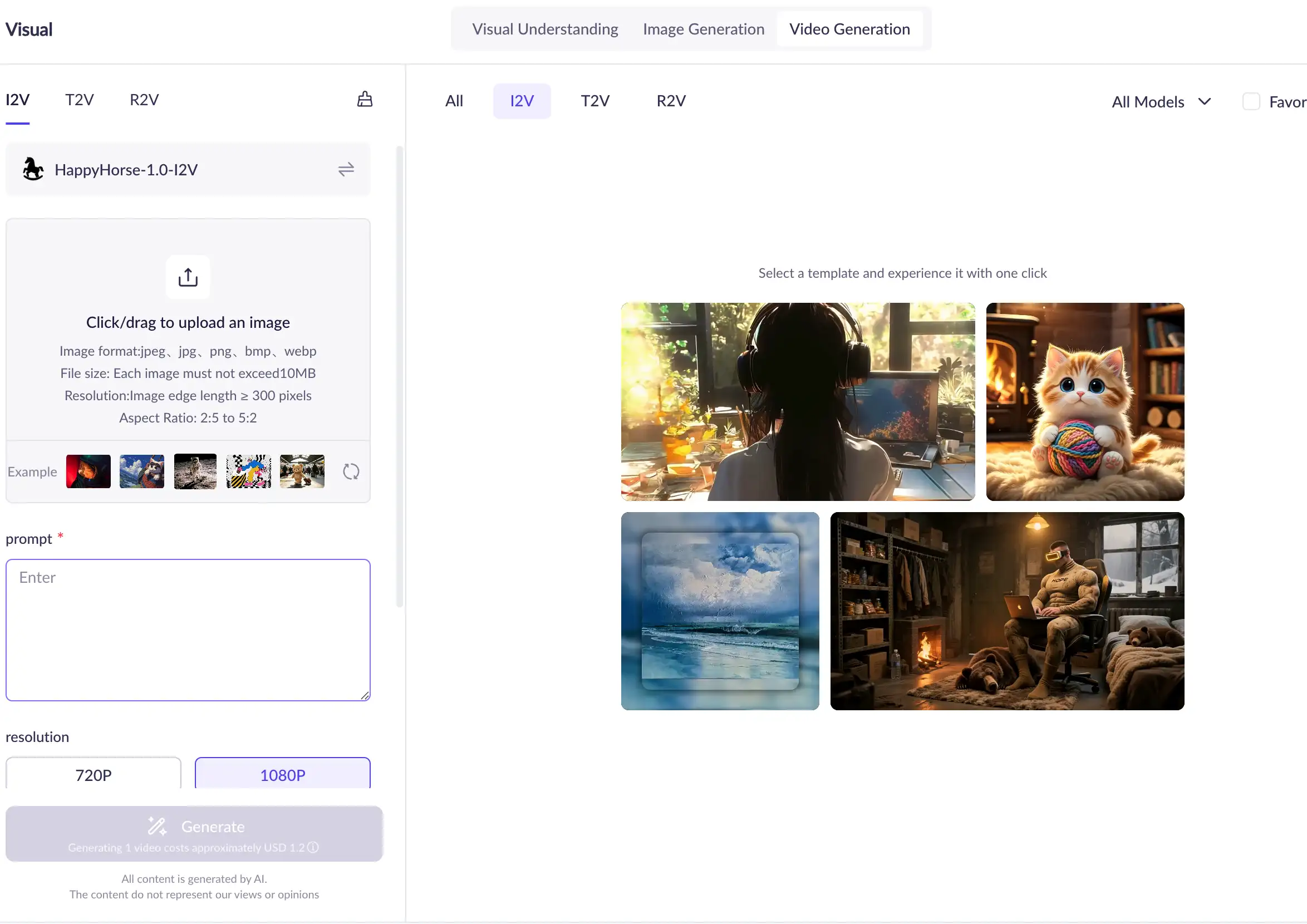
Use I2V when you already have a visual asset.
Best-fit examples:
animating a product photo,
turning character art into motion,
creating movement from a poster,
adding life to a scene concept,
preserving a specific starting frame.
I2V is especially useful when the image itself carries important visual details that a text prompt might not reproduce reliably.
happyhorse-1.0-r2v
happyhorse-1.0-r2v appears in Alibaba Cloud’s HappyHorse series documentation, and Alibaba Cloud’s model list includes HappyHorse reference-to-video as a model category.
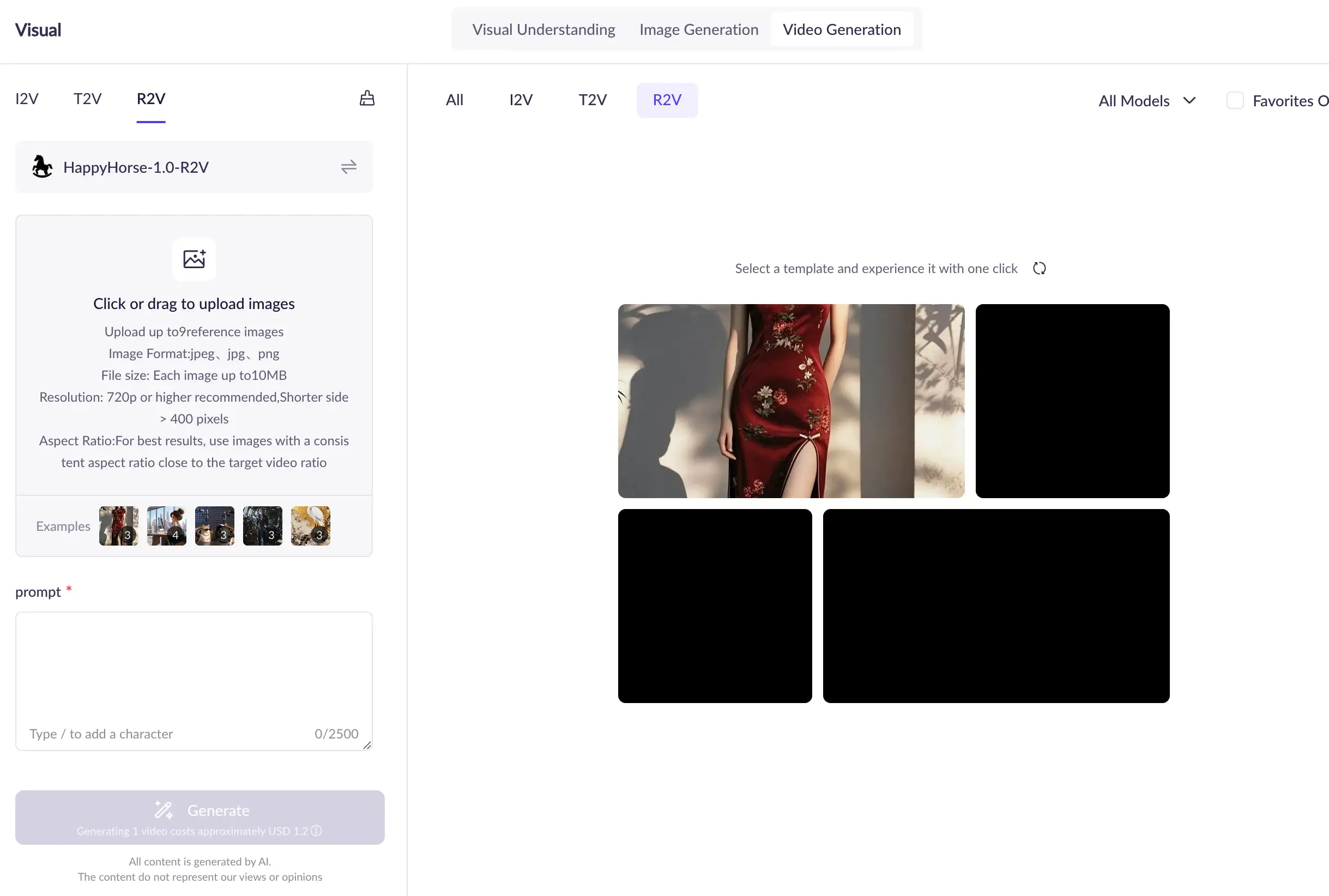
Use R2V when the reference matters.
Best-fit examples:
maintaining a subject style,
guiding character appearance,
using a visual reference for a shot,
producing a video that follows a reference direction.
Public documentation gives less detail for R2V than for T2V and I2V, so the best way to understand it today is at the workflow level: it is the HappyHorse 1.0 mode for generating video with reference guidance.
happyhorse-1.0-video-edit
happyhorse-1.0-video-edit appears in Alibaba Cloud’s HappyHorse series documentation. Alibaba Cloud’s model list also includes HappyHorse under video editing categories.
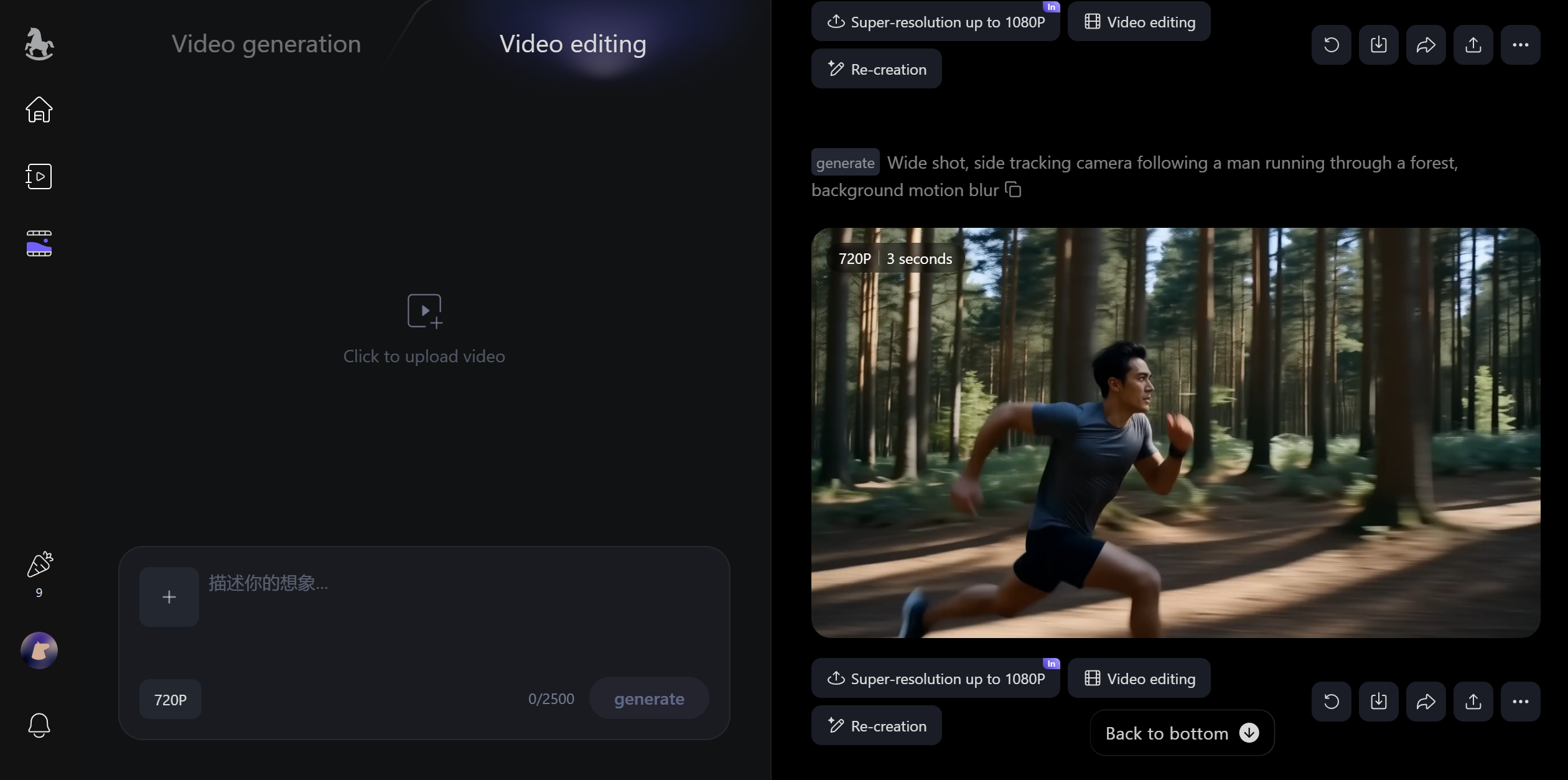
Use video edit when you already have footage.
Best-fit examples:
changing the style of a clip,
modifying part of a video,
adding or removing elements,
refining a generated video,
transforming existing footage into a new look.
This mode is one reason “model family” is the right phrase. HappyHorse 1.0 is not only a generation model; it also includes editing-oriented workflows.
Which HappyHorse 1.0 model should you use?
Use this decision path:
Starting point | Best model mode | Why |
|---|---|---|
You have only an idea | T2V | Text is enough to start |
You have a still image | I2V | First-frame control improves visual anchoring |
You have a reference image | R2V | Reference material can guide the output |
You have existing footage | Video Edit | Editing starts from an existing video |
A simple rule:
If you are creating from nothing, start with T2V. If you already have a visual, start with I2V or R2V. If you already have a video, use video edit.
Quick decision table
Goal | Best HappyHorse 1.0 mode | Typical input | Output control level | Best for |
|---|---|---|---|---|
Generate a new scene | T2V | Prompt | Medium | Creative ideation |
Animate a still | I2V | Image + prompt | Higher visual anchoring | Product/character motion |
Follow a reference | R2V | Reference image + prompt | Reference-guided | Subject/style control |
Modify footage | Video Edit | Video + instruction/reference | Edit-focused | Post-generation refinement |
HappyHorse 1.0 Specs: Resolution, Duration, Ratios, and Workflow
Supported resolutions
Alibaba Cloud’s T2V API reference lists two resolution options for happyhorse-1.0-t2v: 720P and 1080P. The I2V API reference also lists 720P and 1080P.
This is one of the clearest official product specifications because it appears directly in API parameter documentation.
Supported duration
For T2V, Alibaba Cloud documents duration as an integer in seconds, with a supported range of 3 to 15 seconds. I2V uses the same documented generation-window concept in the official image-to-video API reference.
This should be understood as an official generation setting, not a quality benchmark. It tells users how long the generated video can be, not how good the result will be.
Supported aspect ratios
For T2V, Alibaba Cloud documents aspect-ratio controls as part of the request configuration. The supported ratio options are used to format outputs for common landscape, vertical, square, and traditional frame shapes.
For I2V, the output video’s aspect ratio follows the input first-frame image more closely, and the official API reference defines input-image constraints such as format, dimensions, aspect-ratio range, and file size.
Aspect ratio matters because users may be creating for:
YouTube-style landscape video,
TikTok/Reels/Shorts-style vertical video,
square social media posts,
product demo frames,
cinematic widescreen concepts.
Generation workflow
HappyHorse video generation uses an asynchronous API flow in Alibaba Cloud’s documentation. The T2V and I2V API references both describe the process as:
create a task,
poll to retrieve the result.
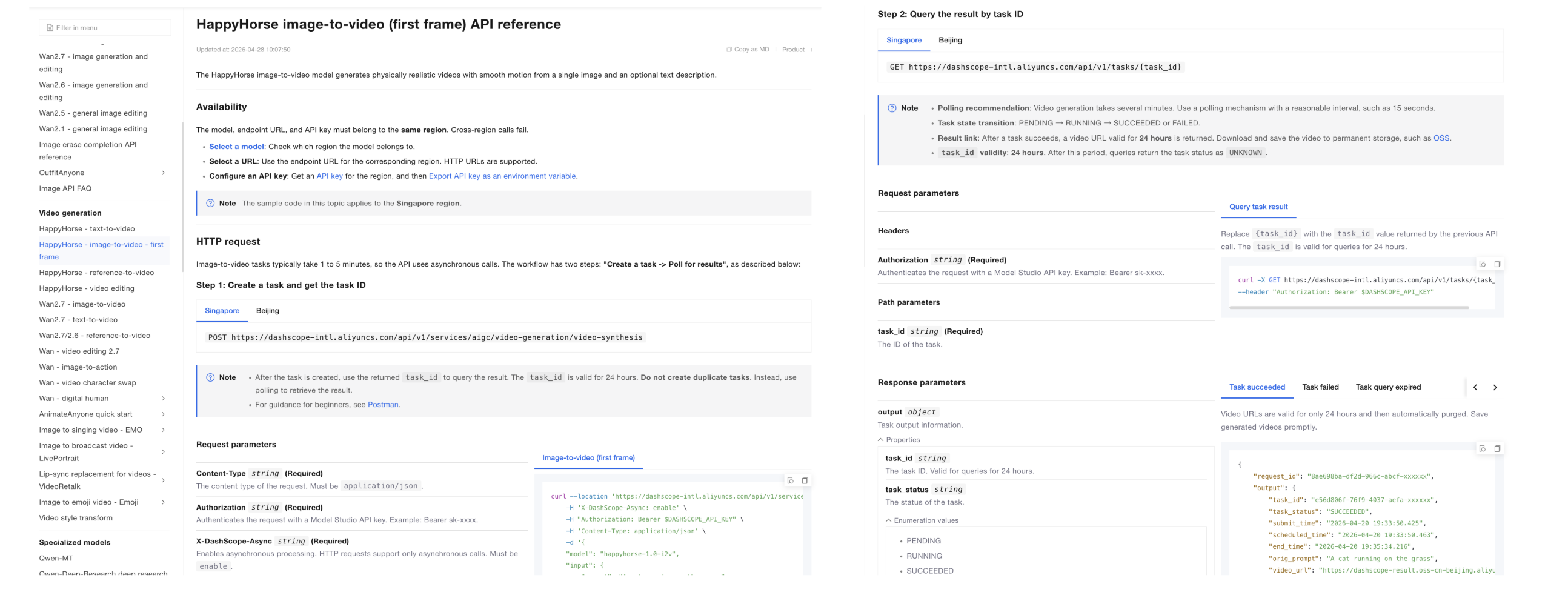
The official docs state that video generation tasks take longer and usually require 1–5 minutes, so asynchronous calling is used.
This means users should not expect a simple synchronous request-response flow. A developer needs to submit the job, save the task ID, and check the task status later.
Input requirements for image-based generation
For I2V, Alibaba Cloud documents first-frame image requirements, including supported formats, minimum dimensions, aspect-ratio range, and file-size limits.
This is important because I2V is not simply “upload anything.” The starting image must satisfy official constraints.
Officially documented parameters
For T2V, the official API reference documents key fields such as:
Parameter | Meaning |
|---|---|
| Model name, such as |
| Text description of the desired video |
| Output resolution |
| Output aspect ratio for T2V |
| Video duration |
| Whether to add a watermark |
| Random seed for reproducibility |
Alibaba Cloud notes that fixed seeds can improve reproducibility, but because generation is probabilistic, the same seed does not guarantee identical output every time.
For I2V, the official API reference includes a first-frame image input, optional prompt guidance, resolution, duration, watermark, and seed.
What is not part of the public official spec
Official product parameters are public. Official architecture-level details are not.
As of the latest public documentation reviewed here, Alibaba Cloud has not publicly disclosed:
official parameter count,
full architecture,
training data,
training compute,
training duration,
alignment method,
distillation pipeline,
system card,
technical report,
research paper.
So the article should not state “HappyHorse 1.0 is a 15B model” or “HappyHorse uses a 40-layer transformer” as official facts unless Alibaba publishes official confirmation.
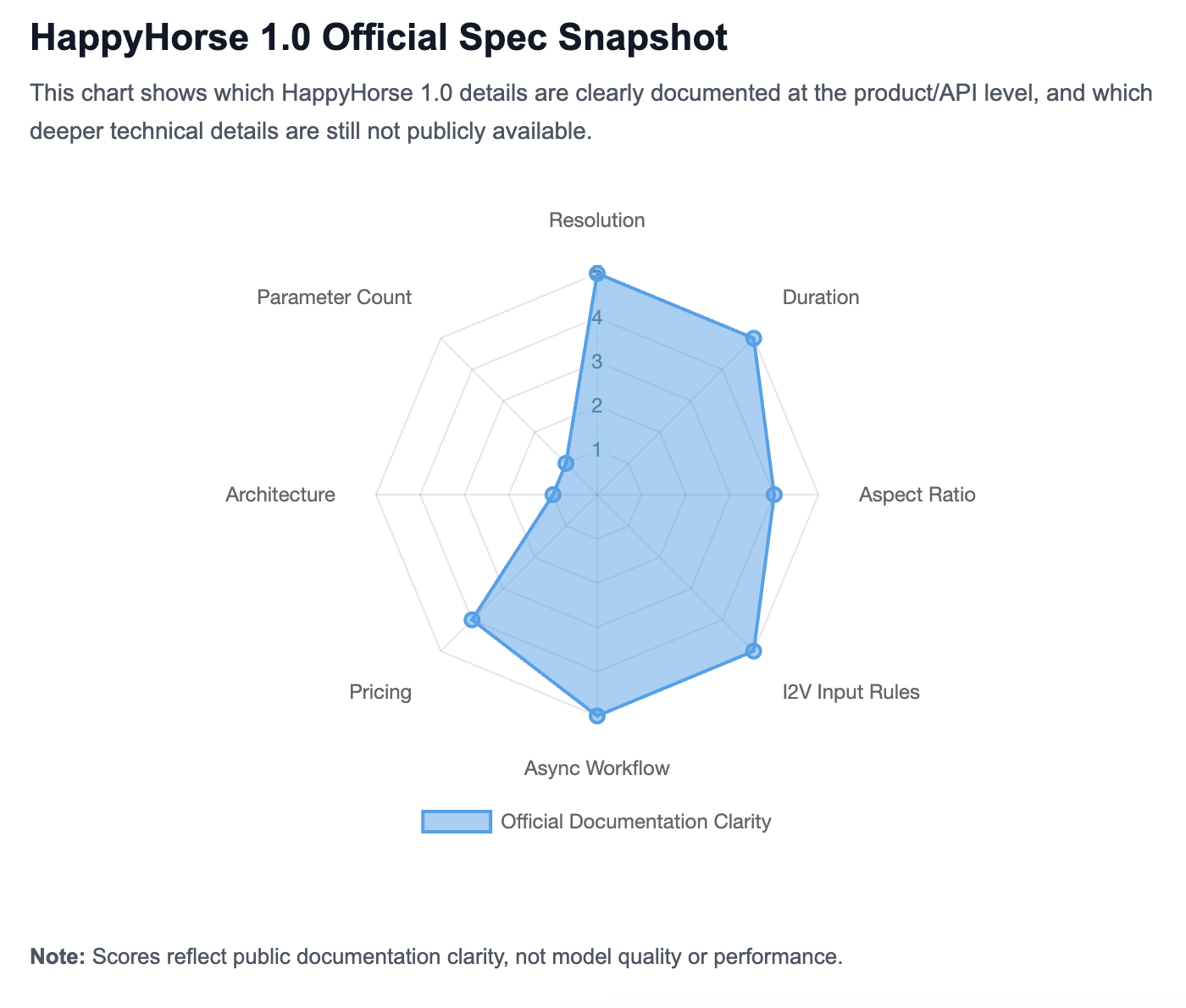
Spec | Official status |
|---|---|
Resolution | 720P / 1080P documented |
T2V duration | 3–15 seconds documented |
T2V ratios | Officially configurable |
I2V image input | Officially constrained |
API workflow | Async task + polling documented |
Architecture | Data not publicly available |
Parameter count | Data not publicly available |
HappyHorse 1.0 Pricing and Availability
Official pricing
HappyHorse 1.0 is priced by video output rather than by token. In Alibaba Cloud’s official pricing information, the cost is tied to factors such as video resolution, generated duration, and deployment region.
Alibaba Cloud Model Studio’s English page lists HappyHorse 1.0 output pricing at $0.14–$0.24 per second for 720P–1080P generation. In simple terms, a longer video costs more than a shorter one, and a 1080P output costs more than a 720P output.
If you are checking cost before using HappyHorse 1.0, the most important things to look at are:
Resolution: 720P is cheaper than 1080P.
Duration: pricing is based on video seconds, so longer clips cost more.
Region: Alibaba Cloud pricing may differ between China mainland and international deployment.
Access path: the price on Alibaba Cloud may not be the same as the price shown by third-party platforms or wrapper services.
For most users, the easiest way to estimate cost is to start with this question:
How many seconds of video do I want to generate, and at what resolution?
A 5-second 720P test clip will cost much less than a 15-second 1080P production clip. That makes HappyHorse 1.0 pricing easier to understand once you think in terms of seconds × resolution rather than a flat subscription price.
Where HappyHorse 1.0 is available
You can use or explore HappyHorse 1.0 through different official surfaces, depending on your goal.
If you want a creator-friendly experience, start with HappyHorse.com. This is the consumer-facing site for generating and editing videos through the product interface.
If you want to check the model inside Alibaba’s model ecosystem, use Alibaba Cloud Model Studio. This is where HappyHorse 1.0 appears as part of Alibaba Cloud’s broader model catalog.
If you are a developer or technical team, use Alibaba Cloud documentation. This is where you can find API references, request parameters, region requirements, rate limits, and billing details.
Where to go | Best for |
|---|---|
HappyHorse.com | Creating and editing videos through the product interface |
Alibaba Cloud Model Studio | Exploring HappyHorse 1.0 in Alibaba Cloud’s model ecosystem |
Alibaba Cloud documentation | Checking API parameters, pricing, rate limits, and deployment details |
Availability does not mean open source
HappyHorse 1.0 is available through official product and cloud surfaces, but that does not mean the model is open source.
There is a big difference between:
using a model through a website,
calling a model through an API,
downloading model weights,
self-hosting the model on your own infrastructure.
For HappyHorse 1.0, the public evidence supports website and cloud/API access. It does not show an official open-weight release, self-hosting package, or open-source license.
So the simplest way to put it is:
You can use HappyHorse 1.0 through official access points, but it is not publicly documented as an open-source or self-hosted model.
Who HappyHorse 1.0 is best suited for
HappyHorse 1.0 is useful for different types of users depending on how they want to work.
For creators and marketers, it is useful for turning ideas, images, or existing assets into short videos. This makes it a good fit for social content, product visuals, concept videos, and campaign testing.
For developers and businesses, it is useful when video generation needs to be integrated into a product, workflow, or internal creative system. Alibaba Cloud’s API documentation is the better starting point for that use case.
For users who want a broader AI workflow, HappyHorse 1.0 can sit alongside other AI tools: use an LLM to plan the idea, an image model to create a first frame, and a video model like HappyHorse 1.0 to turn it into motion.
How Good Is HappyHorse 1.0?
Third-party rankings and current visibility
HappyHorse 1.0 performs strongly in Artificial Analysis’ public AI video leaderboards.
In the Text to Video Leaderboard without audio, Artificial Analysis lists HappyHorse-1.0 at rank 1 with an Elo score of 1,367. It also lists HappyHorse-1.0 as the top model in the Text to Video with audio category with an Elo score of 1,230.
In the Image to Video Leaderboard without audio, Artificial Analysis lists HappyHorse-1.0 at rank 1 with an Elo score of 1,401.
These are strong signals, but they should be described correctly: they are third-party arena rankings, not Alibaba’s own official benchmark report.
What these rankings do and do not prove
Artificial Analysis says its rankings are based on blind user votes in its Video Arena. Users compare videos and vote on preference, producing Elo-style scores for models.
That means the rankings are useful for understanding market-visible video quality preferences.
They do not prove:
the model’s parameter count,
the model’s training data,
the model’s architecture,
the model’s safety profile,
enterprise reliability,
every use-case-specific outcome.
A leaderboard can show comparative preference. It cannot replace an official technical report.
Why Artificial Analysis still matters
Artificial Analysis matters because it provides one of the most structured public ways to compare AI video models across categories. Its HappyHorse model-family page describes analysis across quality, generation time, and price, and refers to Video Arena Elo as a relative metric of video generation quality.
For users evaluating HappyHorse 1.0 against Seedance, Kling, Veo, Sora, Wan, and other video models, Artificial Analysis is currently one of the most useful public references.
What official performance documentation is still missing
Alibaba Cloud’s official public documentation is strong on product specs and API usage, but it does not currently provide a full official performance package.
The following remain Data not publicly available in official public documentation reviewed here:
official benchmark report,
official system card,
official model card,
official whitepaper,
official research paper,
official architecture disclosure,
official parameter count,
official training-data disclosure.
Performance summary in one sentence
HappyHorse 1.0 appears highly competitive in current third-party AI video rankings, especially on Artificial Analysis, but its official public documentation is stronger on product specs and API usage than on deep technical benchmarking.
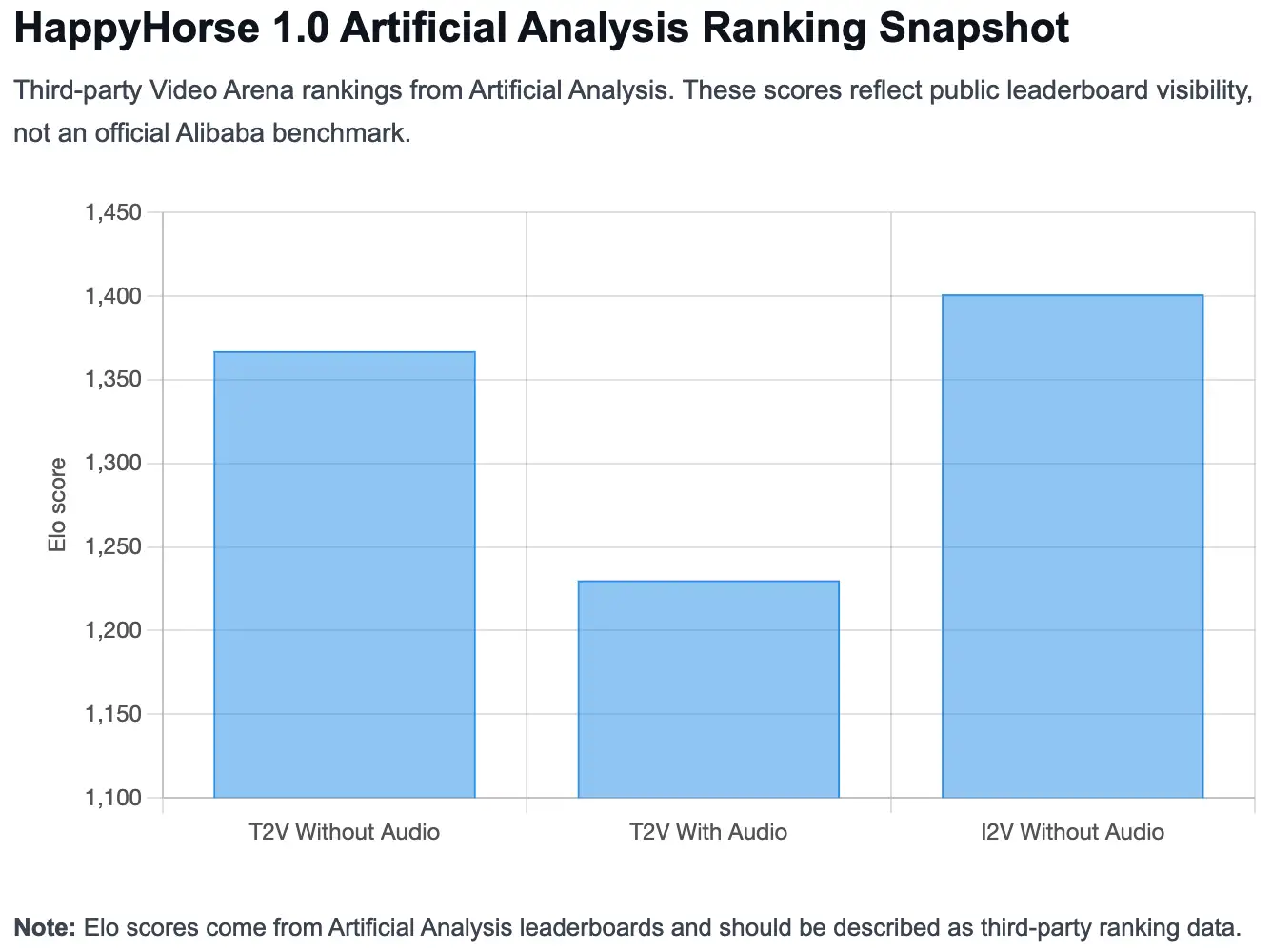
Category | Rank | Elo |
|---|---|---|
Text-to-video without audio | 1 | 1,367 |
Text-to-video with audio | 1 | 1,230 |
Image-to-video without audio | 1 | 1,401 |
Is HappyHorse 1.0 Open Source?
What is publicly available
HappyHorse 1.0 is publicly available in several ways:
HappyHorse has a consumer-facing website.
Alibaba Cloud Model Studio lists HappyHorse 1.0.
Alibaba Cloud provides API references for T2V and I2V.
Alibaba Cloud documentation lists model names for T2V, I2V, R2V, and video edit.
Alibaba Cloud publishes pricing and rate-limit data for HappyHorse modes.
This is meaningful availability. It means users and developers can find official public surfaces.
What is not publicly documented as open source
Open-source availability is a different question.
In the sources reviewed here, there is no official public evidence of:
downloadable model weights,
a public official GitHub repo for HappyHorse weights,
an official Hugging Face weight release,
an official ModelScope weight release,
an Apache, MIT, or similar open-source model license,
official self-hosting instructions.
Therefore, the safest answer is:
HappyHorse 1.0 is publicly accessible through official product and cloud/API surfaces, but it is not publicly documented as an open-source or open-weight model.
Why people confuse “publicly available” with “open source”
Many AI tools are easy to use but not open source.
For example, a model can be available through:
a web app,
a cloud console,
a hosted API,
a partner integration,
a managed inference platform.
None of those automatically mean the weights are open, downloadable, modifiable, or self-hostable.
Open source vs API access vs platform access
Access type | What it means | Does public evidence support it for HappyHorse 1.0? |
|---|---|---|
Platform access | Use through website/product | Yes |
Cloud/API access | Use through official cloud APIs | Yes |
Partner/proxy access | Use through third-party platform | May exist, but should be labeled separately |
Open weights | Download model weights | Data not publicly available |
Self-hosting | Deploy privately with your own infrastructure | Data not publicly available |
Open-source license | Legal permission to modify/distribute | Data not publicly available |
HappyHorse 1.0 vs Other AI Video Models
HappyHorse 1.0 vs Seedance 2.0
Artificial Analysis shows HappyHorse-1.0 ahead of Dreamina Seedance 2.0 720p in the cited no-audio T2V and I2V leaderboards. In T2V without audio, HappyHorse-1.0 is listed with Elo 1,367, while Dreamina Seedance 2.0 720p is listed with Elo 1,270. In I2V without audio, HappyHorse-1.0 is listed with Elo 1,401, while Dreamina Seedance 2.0 720p is listed with Elo 1,346.
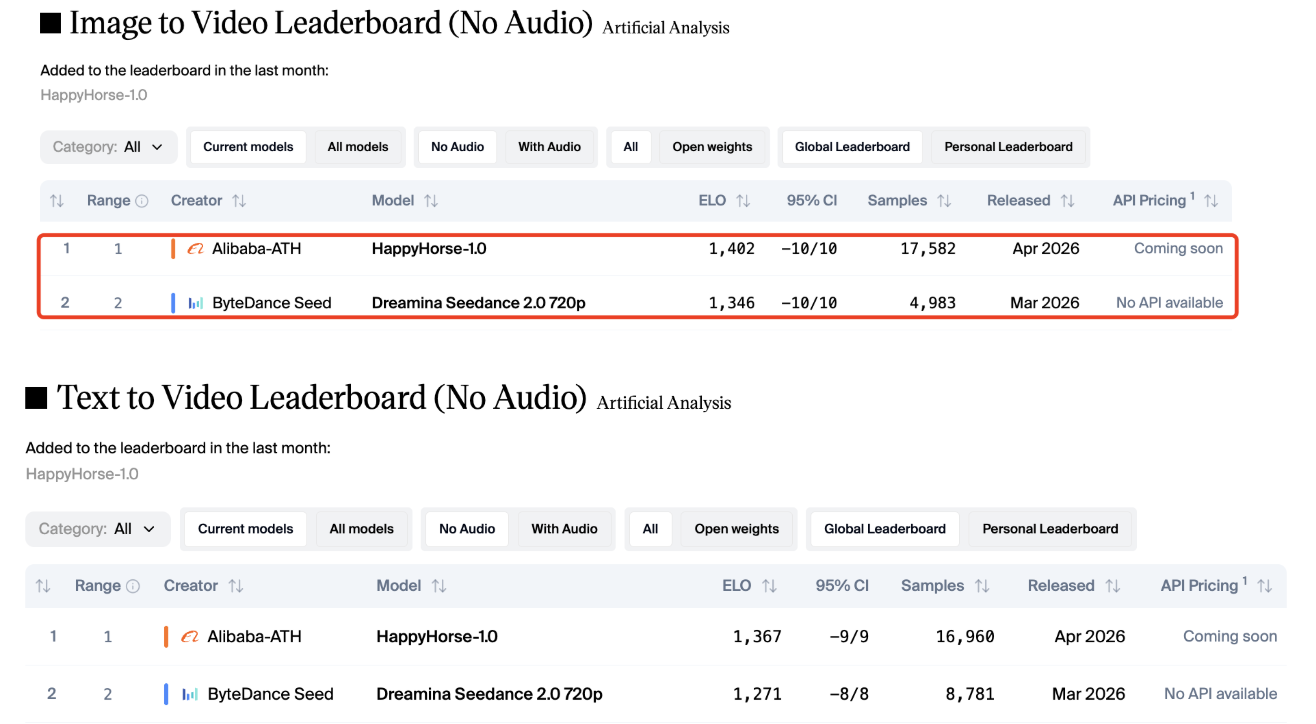
That does not mean HappyHorse wins every use case. It means that in those Artificial Analysis arena categories, HappyHorse currently has stronger public ranking visibility.
HappyHorse 1.0 vs Kling 3.0
Kling remains one of the most visible AI video model families, and Artificial Analysis lists multiple Kling versions near the top of video leaderboards. In the no-audio T2V leaderboard, Kling 3.0 1080p Pro appears near the top behind HappyHorse and Seedance.
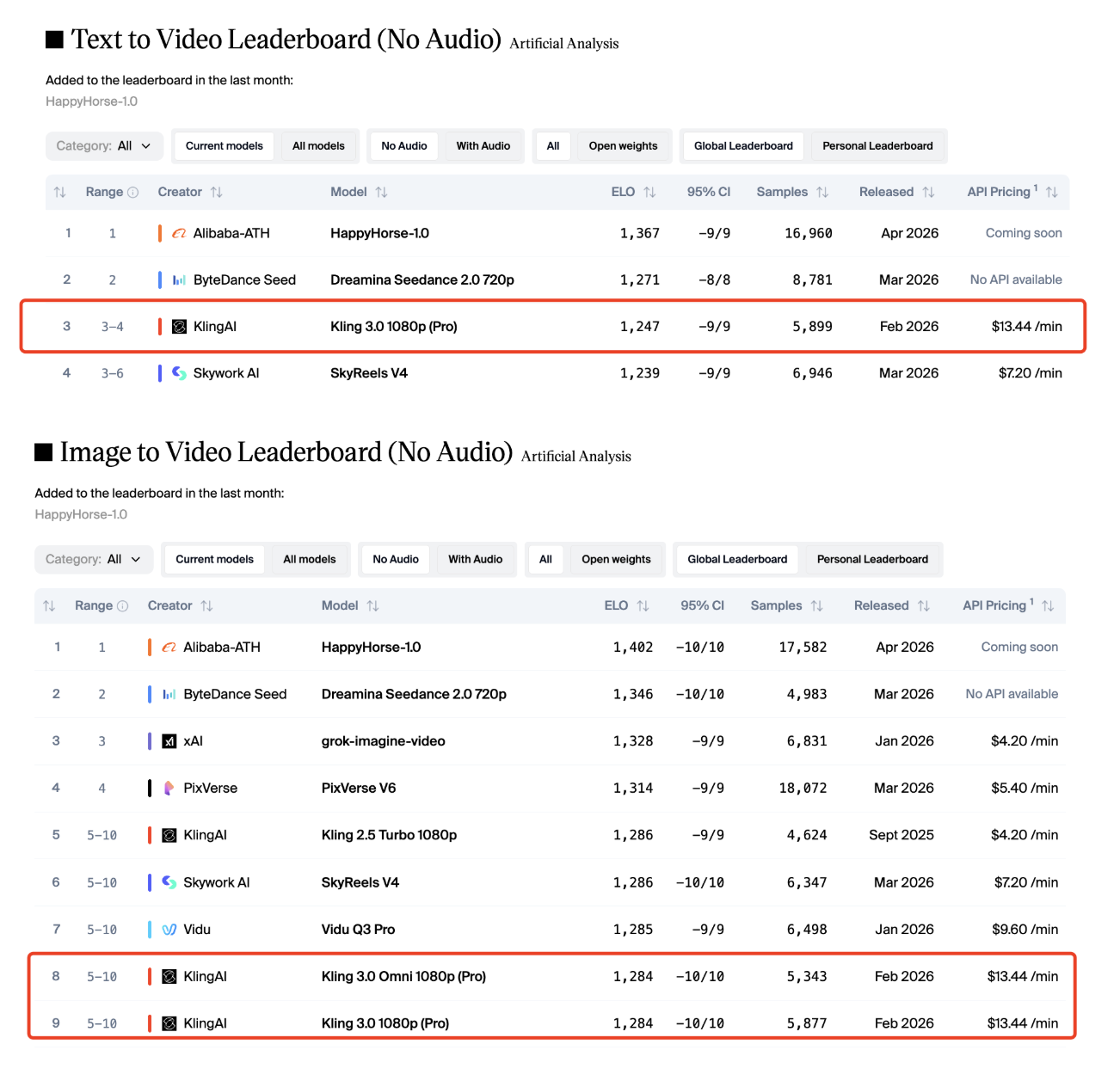
A fair comparison should focus on workflow needs:
Use HappyHorse when you want Alibaba Cloud-documented T2V/I2V/R2V/video-edit workflows.
Compare Kling when you need a broader history of public AI video model versions and established third-party API/platform coverage.
If you are choosing between HappyHorse 1.0 and Kling, compare them by output style, cost, speed, control, access options, and the kind of footage you want to produce.
HappyHorse 1.0 vs Veo 3.1
Veo is Google’s video model family, and Artificial Analysis lists Veo models in its video rankings. In the no-audio T2V leaderboard cited here, Veo 3 appears below HappyHorse-1.0.
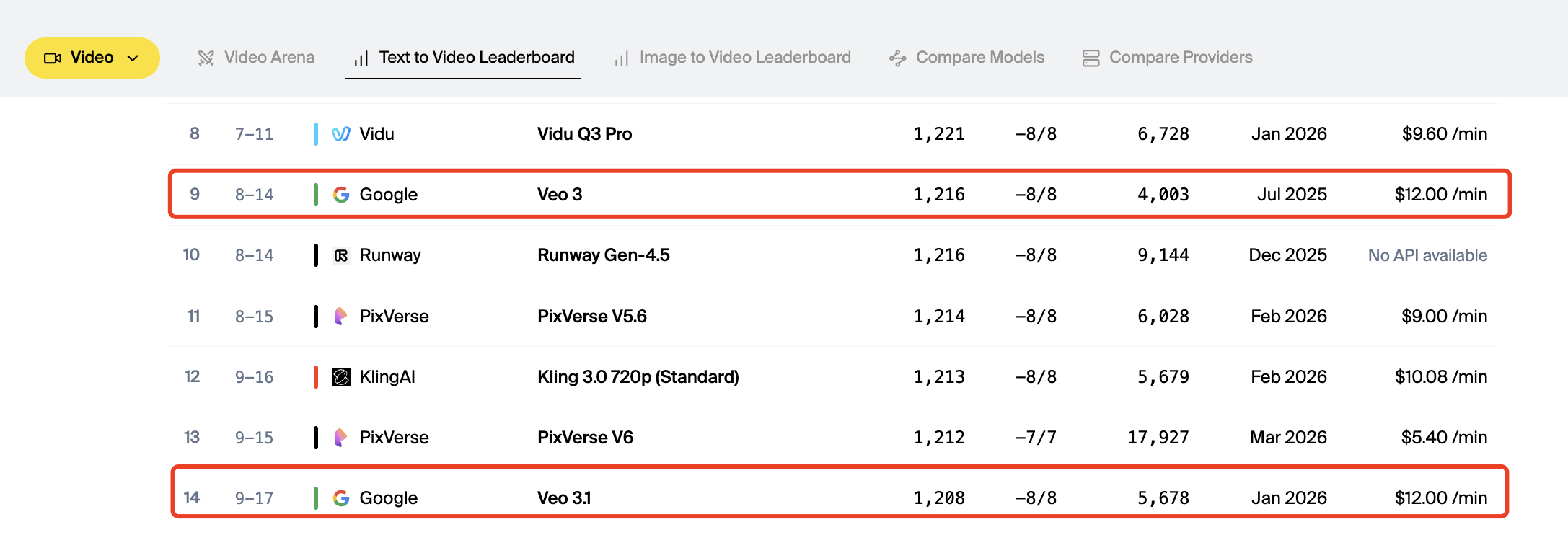
However, the comparison should not be reduced to one leaderboard number. Veo may be evaluated differently depending on ecosystem, availability, enterprise requirements, prompt behavior, safety rules, and integration paths.
HappyHorse 1.0 vs Sora 2.0
Sora is OpenAI’s video model family, and Sora 2 / Sora 2 Pro appear in Artificial Analysis’ video leaderboard data. In the cited T2V no-audio leaderboard, Sora 2 Pro appears below HappyHorse-1.0.
For a full HappyHorse 1.0 vs Sora comparison, users should look beyond one leaderboard number and compare access, pricing, output duration, realism, camera control, audio support, prompt reliability, safety constraints, and production workflow.
How to Use HappyHorse 1.0
Using HappyHorse 1.0 on the official website
For non-technical users, the simplest path is the official HappyHorse consumer-facing site. It describes HappyHorse as an AI video creation platform for generating and editing videos.
This route is best for:
creators,
marketers,
non-developers,
social video users,
people who want a product interface instead of an API.
Using HappyHorse 1.0 through Alibaba Cloud
For developers and businesses, Alibaba Cloud is the more technical route.
The T2V and I2V API references show HTTP calls using an asynchronous process. Both docs emphasize that the model, endpoint URL, and API key must belong to the same region, and that cross-region calls will fail.
The API process is:
choose the model,
choose the region endpoint,
configure the API key,
create a task,
poll for the result.
Choosing the right HappyHorse 1.0 mode
Choose the mode based on your starting asset:
Starting asset | Recommended mode |
|---|---|
Text idea | T2V |
Still image | I2V |
Reference image | R2V |
Existing footage | Video Edit |
This choice matters because each mode gives the model a different type of input. Better input usually means better control.
Basic first workflow
A beginner-friendly workflow looks like this:
Decide your goal
Are you creating from scratch, animating an image, following a reference, or editing footage?Choose the right mode
Use T2V, I2V, R2V, or Video Edit.Prepare the input
Write a prompt, upload a first frame, provide a reference, or prepare existing footage.Set output options
Choose resolution, duration, aspect ratio where supported, watermark behavior, and seed if needed.Generate and review
Because the workflow is asynchronous, submit the task and retrieve the output once complete.
What first-time users should know before starting
First-time you should know four things.
Mode choice matters.
Do not use T2V if your real goal is to preserve a specific image. Use I2V instead.
Image quality matters.
I2V uses the image as the first frame, so poor source images can limit the result.
Duration and resolution affect cost.
Alibaba Cloud prices video generation by usage, and video-mode pricing is connected to generated video duration and resolution.
Seeds help, but do not guarantee identical outputs.
Alibaba Cloud documents seed as a reproducibility control, but generative video output can still vary.
HappyHorse 1.0 Prompting Basics
What official documentation confirms
Official Alibaba Cloud documentation confirms prompt-based generation for T2V. The T2V API reference says the model receives a text prompt and generates video content.
For I2V, the official documentation confirms that the model uses a first-frame image as the base and can be guided through text description.
For more examples, prompt structures, and use-case templates, see our dedicated guide: HappyHorse 1.0 Prompt Guide.
What a strong first prompt should include
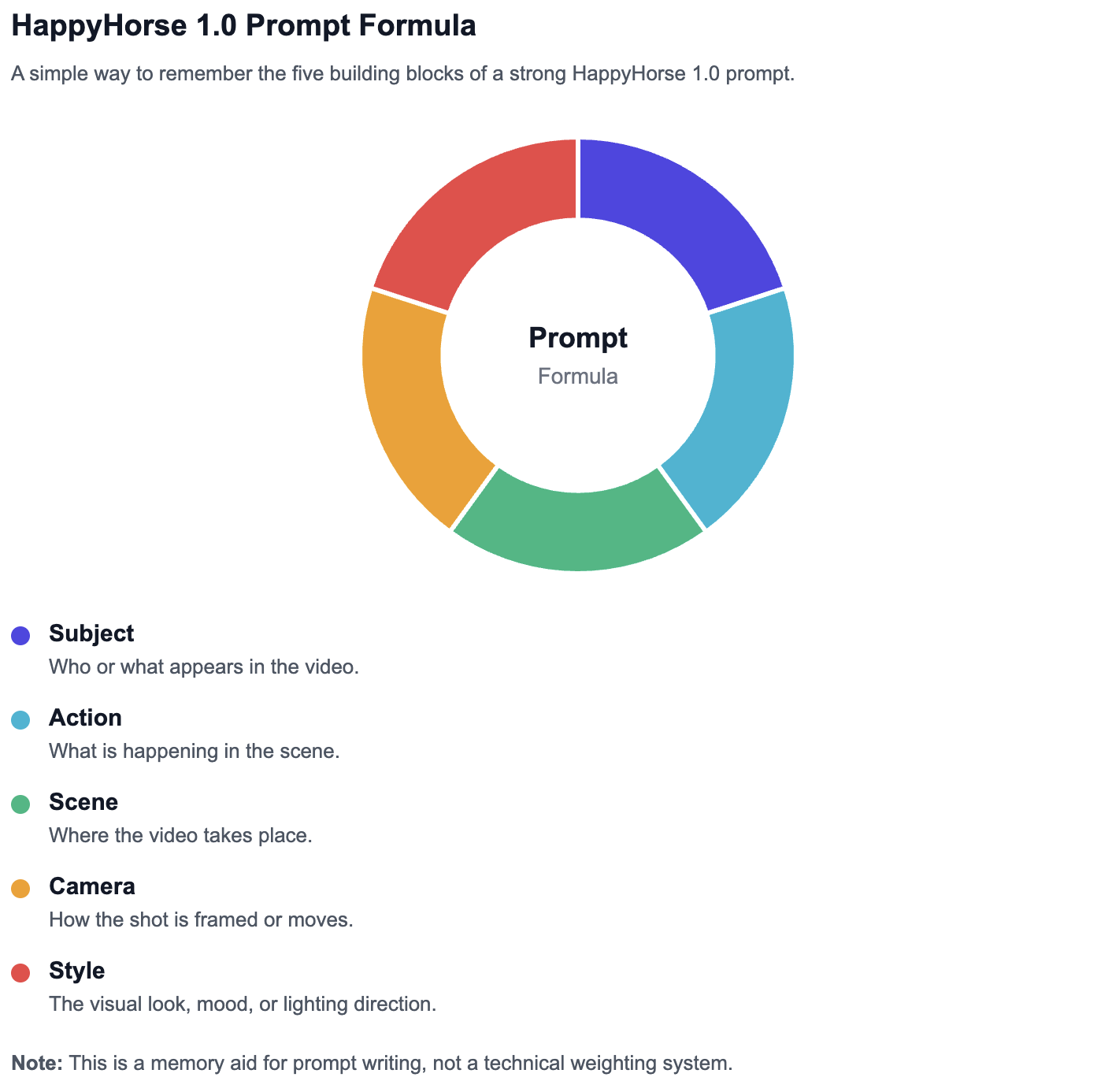
A strong HappyHorse 1.0 prompt should usually include:
Subject — who or what appears in the video
Action — what is happening
Scene — where it happens
Motion — how the subject or camera moves
Visual style — cinematic, realistic, animated, product-shot, etc.
Lighting or mood — warm, neon, dramatic, soft, natural
Camera framing — close-up, wide shot, tracking shot, aerial view
A weak prompt might say:
“A car in a city.”
A better prompt would say:
“A sleek electric car drives through a rainy neon-lit city street at night, slow tracking shot, cinematic reflections on wet pavement, realistic motion.”
Beginner prompt formula for HappyHorse 1.0
Use this simple formula:
Subject + action + scene + motion/style detail
Examples:
A golden retriever runs through a sunny park, slow-motion shot, warm cinematic lighting.
A glass perfume bottle rotates on a reflective black surface, luxury product video style, soft studio lighting.
A robot chef prepares noodles in a futuristic kitchen, smooth camera push-in, playful sci-fi atmosphere.
For I2V, the image already supplies part of the subject and composition, so the prompt should focus more on motion and transformation.
Example:
“The character slowly turns toward the camera as the background lights flicker softly, cinematic close-up, natural motion.”
When you need more advanced prompting
Once you understand the basic formula, the next step is learning how to control shots, motion, style, and consistency more precisely.
More advanced HappyHorse 1.0 prompting can include:
- prompt templates,
- shot-list prompting,
- camera movement terms,
- product video prompts,
- character consistency prompts,
- image-to-video prompt strategies,
- prompt troubleshooting,
- before/after examples.
HappyHorse 1.0 Limitations and Unknowns
No public architecture disclosure
Alibaba Cloud’s public documentation explains product usage, model names, parameters, pricing, and limits. It does not disclose the full model architecture.
That means readers should be cautious with claims such as:
“unified transformer architecture,”
“single-pass audio-video generation,”
“40 layers,”
“specific attention design,”
“exact inference pipeline.”
Unless Alibaba publishes official confirmation, these should not be written as facts.
No public official parameter count
No official Alibaba Cloud documentation reviewed here discloses a parameter count for HappyHorse 1.0.
So the safe phrasing is:
Alibaba has not publicly disclosed HappyHorse 1.0’s official parameter count in the documentation reviewed for this guide.
If a third-party page says “15B parameters,” that may be worth mentioning only with clear attribution and caution, not as an official fact.
No public training-data disclosure
There is no official public documentation in the reviewed sources describing:
training dataset size,
dataset sources,
video corpus details,
filtering methods,
licensing details,
synthetic data usage,
training duration.
For a professional article, the correct phrase is:
Data not publicly available.
No public official system card or whitepaper
A system card or whitepaper would usually describe safety behavior, evaluation methods, known limitations, model architecture, or deployment assumptions.
For HappyHorse 1.0, the reviewed official sources provide product and API documentation, but not a public official system card or whitepaper.
Why that matters for accurate coverage
This matters because many AI model articles blur together three different things:
Official product specifications
Third-party performance rankings
Unverified technical claims
A trustworthy article must keep those separate.
What we can say confidently today
We can confidently say:
HappyHorse 1.0 is publicly listed by Alibaba Cloud.
It includes documented T2V and I2V APIs.
Alibaba Cloud lists HappyHorse text-to-video, first-frame image-to-video, reference-to-video, and video-edit categories.
Official docs show 720P and 1080P generation settings.
Official docs describe asynchronous task creation and polling.
Official docs show pricing and rate-limit data.
Artificial Analysis ranks HappyHorse-1.0 strongly in public video leaderboards.
We should be cautious about:
parameter count,
training data,
architecture,
safety system,
exact internal model design,
self-hosting,
open-source status.
Data not publicly available
The following should be marked as Data not publicly available unless Alibaba publishes more documentation:
Topic | Status |
|---|---|
Official parameter count | Data not publicly available |
Training data | Data not publicly available |
Training compute | Data not publicly available |
Architecture | Data not publicly available |
Alignment method | Data not publicly available |
System card | Data not publicly available |
Whitepaper | Data not publicly available |
Open weights | Data not publicly available |
FAQ About HappyHorse 1.0
What is HappyHorse 1.0?
HappyHorse 1.0 is Alibaba’s AI video generation and editing model family. It includes workflows such as text-to-video, image-to-video, reference-to-video, and video editing, according to Alibaba Cloud model documentation.
Who made HappyHorse 1.0?
HappyHorse 1.0 is publicly documented by Alibaba Cloud. Alibaba Cloud Model Studio lists HappyHorse 1.0 inside its model ecosystem.
Is HappyHorse 1.0 an Alibaba model?
Yes. It is publicly listed in Alibaba Cloud documentation and Alibaba Cloud Model Studio. The safest phrasing is: HappyHorse 1.0 is publicly documented by Alibaba Cloud as part of its video model offerings.
Is HappyHorse 1.0 open source?
There is no official public evidence in the reviewed sources that HappyHorse 1.0 is open source or open weight. It is publicly accessible through official product/cloud surfaces, but public access is not the same as open-source release.
Can HappyHorse 1.0 generate 1080P video?
Yes. Alibaba Cloud’s T2V and I2V API references list 1080P as a supported resolution.
How long can HappyHorse 1.0 videos be?
For T2V and I2V, Alibaba Cloud documents short video generation through an asynchronous task workflow, with official duration controls described in the API documentation.
What is the difference between T2V, I2V, R2V, and video edit?
T2V starts from text. I2V starts from a first-frame image. R2V uses reference material plus text guidance. Video edit modifies existing video through instructions and reference editing. Alibaba Cloud’s model list and rate-limit page support this model-family breakdown.
Where can I try HappyHorse 1.0?
The main official surfaces are HappyHorse.com and Alibaba Cloud Model Studio. Developers can also use Alibaba Cloud API documentation for T2V and I2V.
Is HappyHorse 1.0 better than Seedance or Kling?
In Artificial Analysis’ cited no-audio T2V and I2V leaderboards, HappyHorse-1.0 currently ranks above Seedance and Kling models. However, “better” depends on workflow, availability, cost, prompt behavior, output style, and production needs.
Does HappyHorse 1.0 have official API documentation?
Yes. Alibaba Cloud provides public API references for HappyHorse text-to-video and HappyHorse image-to-video based on a first frame.
Is HappyHorse 1.0 a single model or a model family?
It is best understood as a model family. Alibaba Cloud documentation lists multiple HappyHorse modes, including T2V, I2V, R2V, and video edit.
What is the official website for HappyHorse 1.0?
The consumer-facing site is HappyHorse.com, while Alibaba Cloud Model Studio and Alibaba Cloud documentation are the technical official surfaces used for model and API details.
Does HappyHorse 1.0 have official pricing?
Yes. Alibaba Cloud publishes HappyHorse-related pricing, and Alibaba Cloud Model Studio shows HappyHorse 1.0 output pricing as $0.14–$0.24 per second for 720P–1080P.
What official technical details about HappyHorse 1.0 are still unavailable?
The reviewed official sources do not publicly disclose parameter count, training data, training compute, full architecture, system card, or whitepaper.
