What Is Grok 4.3? Features, Pricing and Use Cases

Grok 4.3 is one of xAI’s most important model updates in 2026. It is not just another model name added to the Grok lineup. The more important signal is that xAI appears to be pushing Grok 4.3 as its new default flagship model for complex AI work.
The model brings together several features that users care about:
A 1M-token context window
Text and image input
Configurable reasoning effort
Stronger coding support
Agentic workflow capabilities
Competitive API pricing
That combination makes Grok 4.3 interesting for more than casual chat. It is built for tasks that need more context, more reasoning, and more structure. In other words, Grok 4.3 is less about quick chatbot replies and more about serious AI workflows.
For users, this also shows a bigger shift in AI: the best workflow is no longer about relying on one model for everything. Different models are becoming better at different jobs, from long-context reasoning and coding to image generation, video creation, and everyday writing.
That is where an all-in-one AI platform like GlobalGPT becomes useful. GlobalGPT helps users access leading AI models in one workspace, compare their strengths, and choose the right model for each task without switching between many separate tools.
This guide explains what Grok 4.3 is, what makes it different, how much it costs, what it is best for, and where its limits still are.
What Is Grok 4.3?
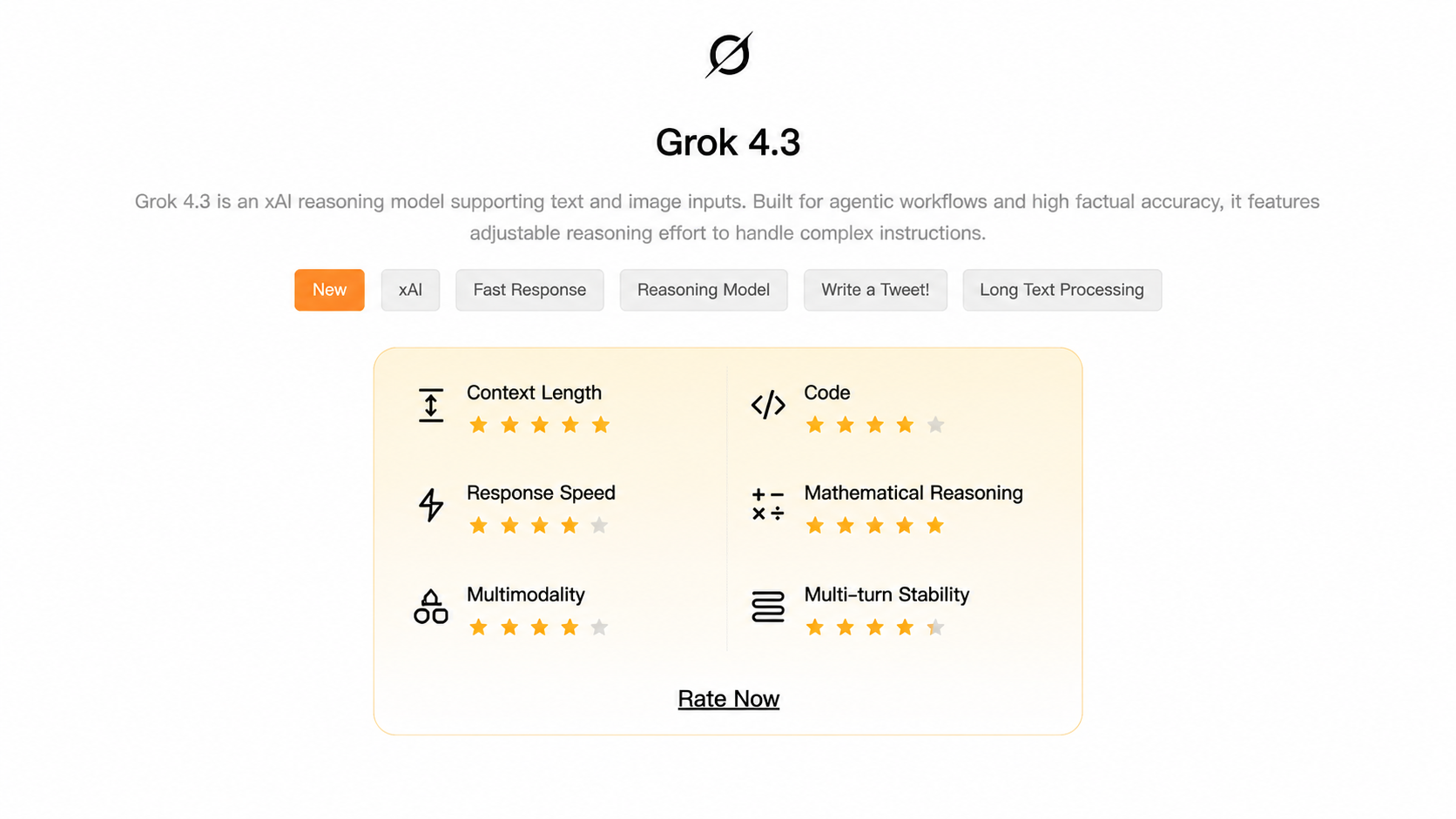
Grok 4.3 is xAI’s latest flagship model for text-based AI workflows. It supports text and image input, produces text output, and comes with a 1M-token context window.
That means Grok 4.3 can take in much more information than a normal short-context chatbot. It can work with long documents, larger codebases, detailed research files, and multi-step instructions.
At a high level, Grok 4.3 is designed for:
Chat
Coding
Long-document analysis
Research tasks
Structured outputs
Agentic workflows
Multi-step reasoning
The simplest way to understand it is this: Grok 4.3 is a general-purpose AI model for complex text work.
It is important to be clear about what this means. Grok 4.3 can understand image input, but it does not generate images. It is also not a video generation model. If you need image or video generation, you should use a specialized creative model instead.
Grok 4.3 Features: What’s New and Why It Matters
What’s New in Grok 4.3?
The biggest change in Grok 4.3 is not one single feature. The bigger story is that xAI seems to be using Grok 4.3 to simplify and consolidate the Grok model lineup.
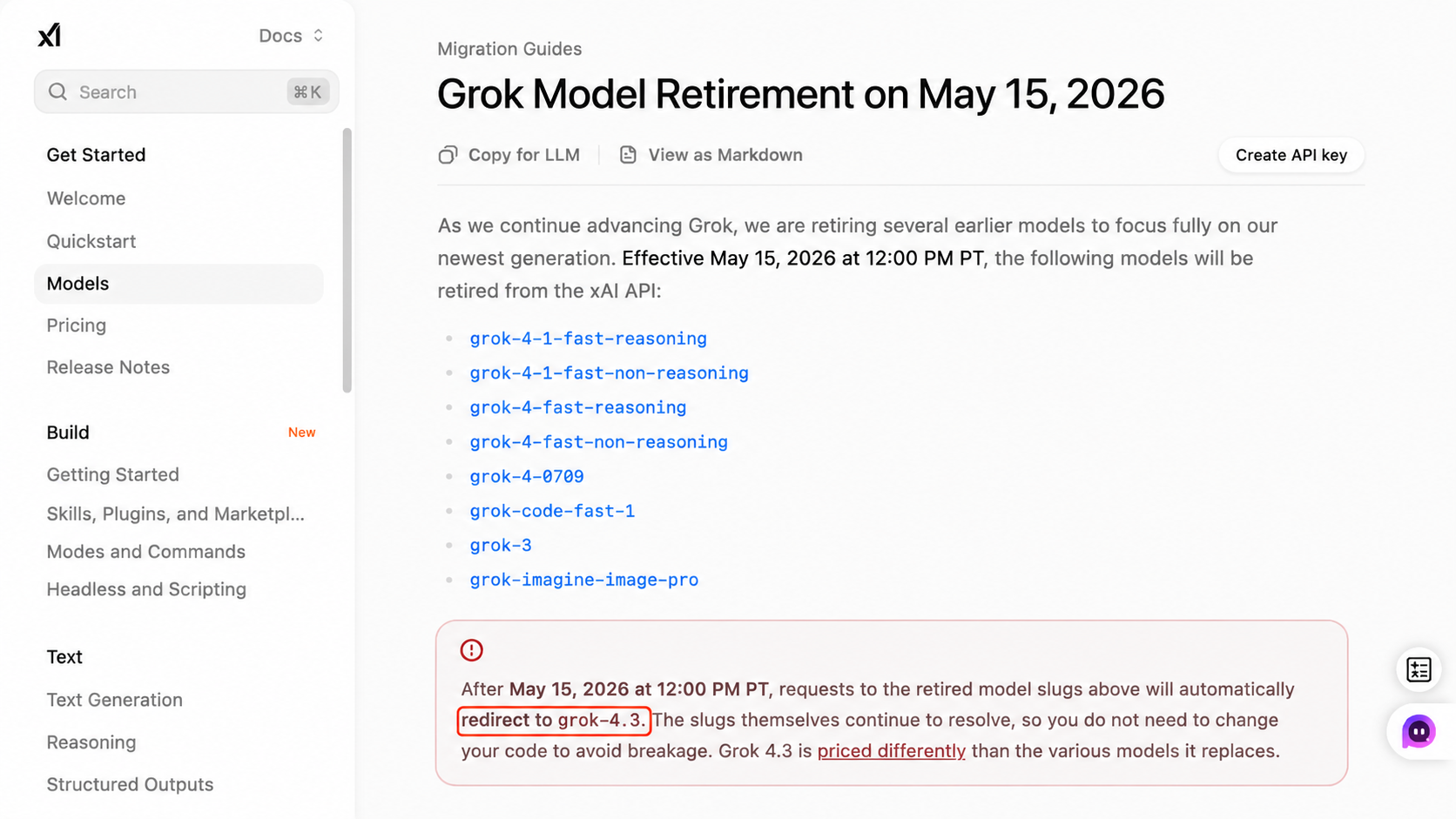
Instead of keeping many older Grok routes separate, xAI is moving several older model slugs toward Grok 4.3. That makes this model more important than a normal update. It suggests Grok 4.3 is becoming the new center of xAI’s text model strategy.
The update is especially interesting because these upgrades work together. The larger context window helps Grok 4.3 handle more information at once. The reasoning controls make it easier to match the model’s depth to the task. Its coding and tool-use features also make it more useful for workflows that go beyond simple question answering.
This is why Grok 4.3 is getting attention. It is not only trying to be smarter. It is trying to be more usable for real work.
Grok 4.3 Key Specs
Feature | Grok 4.3 |
|---|---|
Provider | xAI |
Input | Text, Image |
Output | Text |
Context window | 1M tokens |
Reasoning effort | none / low / medium / high |
Input price | $1.25 / 1M tokens |
Cached input | $0.20 / 1M tokens |
Output price | $2.50 / 1M tokens |
Best for | Chat, coding, research, long-context work, agentic workflows |
On paper, these specs make Grok 4.3 look like a strong option for users who work with large amounts of information. The 1M-token context window is the most visible upgrade, but the full value comes from how it combines long context with reasoning control, coding support, and structured workflow features.
That is why Grok 4.3 is more than a bigger chatbot. It is better understood as a model for longer and more complex tasks.
1M Token Context Window
The 1M-token context window is one of Grok 4.3’s most practical features.
For regular users, this means the model can take in more background information before answering. Instead of breaking a long document into many smaller prompts, users can give Grok 4.3 a larger body of material and ask it to work across the full context.
This is useful for:
Long PDFs
Research papers
Legal documents
Business reports
SEO research files
Product documents
Large codebases
Internal knowledge bases
The real value is not simply that Grok 4.3 can “read more.” The value is that it can connect ideas across a larger set of information. For example, it can compare sections in a report, find contradictions in a policy document, summarize a long research file, or explain how different parts of a codebase relate to each other.
That said, long context is not magic. Users still need to provide clean and relevant input. If you give the model too much messy or unrelated information, the answer can become less focused. The 1M-token window gives Grok 4.3 more room to work, but good prompting still matters.
Configurable Reasoning Effort
Another important Grok 4.3 feature is configurable reasoning effort.
This means users or developers can choose how much reasoning the model should use. Instead of treating every task the same way, Grok 4.3 can adjust its reasoning depth based on the task.
The main reasoning levels are:
Reasoning effort | Best for |
|---|---|
none | Fast answers, simple rewrites, short summaries |
low | Normal chat, basic tasks, simple tool use |
medium | Research, coding, analysis, multi-step tasks |
high | Math, logic, complex reasoning, hard problems |
This is a useful design choice because not every task needs deep reasoning.
A quick rewrite does not need the same reasoning depth as a difficult coding bug. A short summary does not need the same reasoning depth as a legal review or a research synthesis task. By letting users adjust reasoning effort, Grok 4.3 gives more control over speed, cost, and quality.
This is one of the features that makes Grok 4.3 feel more practical. The model is not just saying, “I can reason.” It gives users a way to decide when deeper reasoning is actually worth using.
Aggressive API Pricing
Grok 4.3 is also getting attention because of its API pricing.
xAI lists Grok 4.3 API pricing as:
$1.25 per 1M input tokens
$0.20 per 1M cached input tokens
$2.50 per 1M output tokens
This pricing gives Grok 4.3 a strong cost-performance angle. For developers and AI product teams, that matters a lot. A model can be powerful, but if it is too expensive to use at scale, it may not be practical for real products.
Grok 4.3’s pricing makes it more attractive for use cases such as:
Document processing
Coding assistants
Research workflows
Customer support systems
AI agents
Business automation tools
The cached input price is especially important. Many real workflows reuse the same instructions, documents, or context. When cached input can be used, the cost may be much lower.
Still, users should be careful with long-context tasks. A 1M-token context window is powerful, but large inputs can still increase cost and latency. Grok 4.3 is priced aggressively, but long-context usage still needs planning.
Migration from Older Grok Models
One of the clearest signs that Grok 4.3 matters is the way xAI is moving older model routes toward it.
Several older Grok model slugs are being retired or redirected. This includes older Grok 3, Grok 4, Grok Fast, and Grok Code routes.
This matters because it shows that Grok 4.3 is not just another optional model. It is becoming the replacement path for many Grok workloads.
For users, this makes the Grok lineup easier to understand. Instead of tracking too many old model names, Grok 4.3 can be treated as the current flagship model for text-based Grok work.
For developers, it also means migration planning matters. If an app or workflow uses older Grok model slugs, it may need to update its model selection, reasoning settings, and cost assumptions.
Grok 4.3 for Coding
Grok 4.3 is especially interesting for coding because it combines two things developers often need:
Long context
Stronger reasoning control
The 1M-token context window can help the model understand larger projects. This is useful when a coding task depends on more than one file or one small code snippet.
Grok 4.3 can help with:
Code explanation
Code review
Debugging
Test planning
Architecture review
Cross-file reasoning
Project structure analysis
This makes it more useful for codebase understanding than a simple code completion model. Many AI models can write a small function. Fewer models are useful when the task requires understanding a larger project, checking how files connect, or reasoning through a bug across several parts of the codebase.
That is where Grok 4.3 becomes more compelling.
Grok 4.3 for Agentic Workflows
Grok 4.3 is also designed for agentic workflows.
An agentic workflow means the model is not just answering one question. It may need to follow instructions, call tools, read data, return structured output, and complete several steps.
This matters for real AI products. Many modern AI tools are not simple chatbots anymore. They are workflows. The model may need to search, classify, extract, summarize, call a function, and return a formatted result.
Grok 4.3 supports features that are useful for this kind of work:
Function calling
Structured outputs
Tool use
Multi-step reasoning
Configurable reasoning effort
These features make Grok 4.3 useful for:
AI assistants
Coding agents
Research agents
Customer support workflows
Productivity automation
Business document workflows
In this sense, Grok 4.3 is not only a model for conversation. It is also a model for execution.
Grok 4.3 Benchmarks
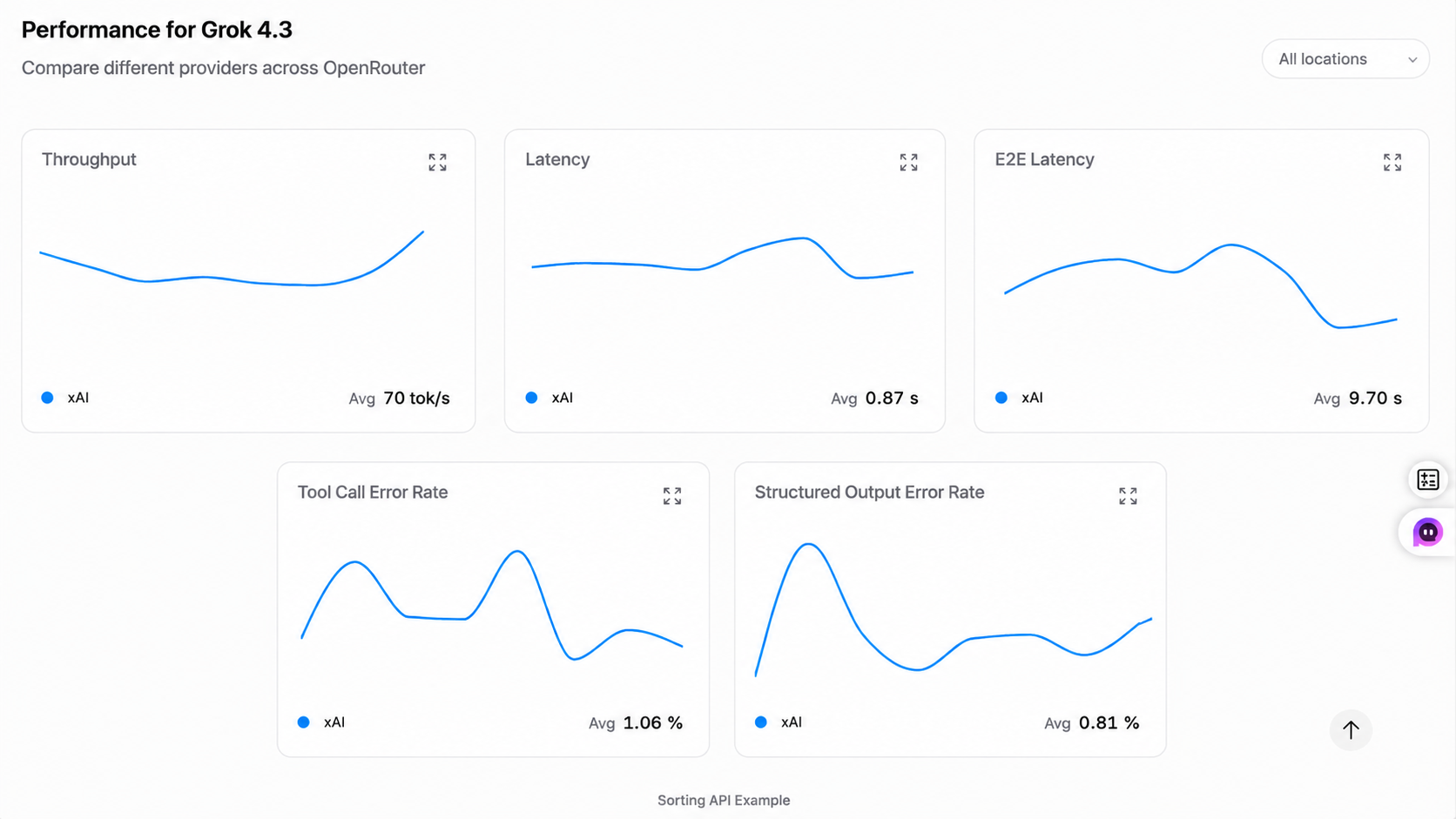
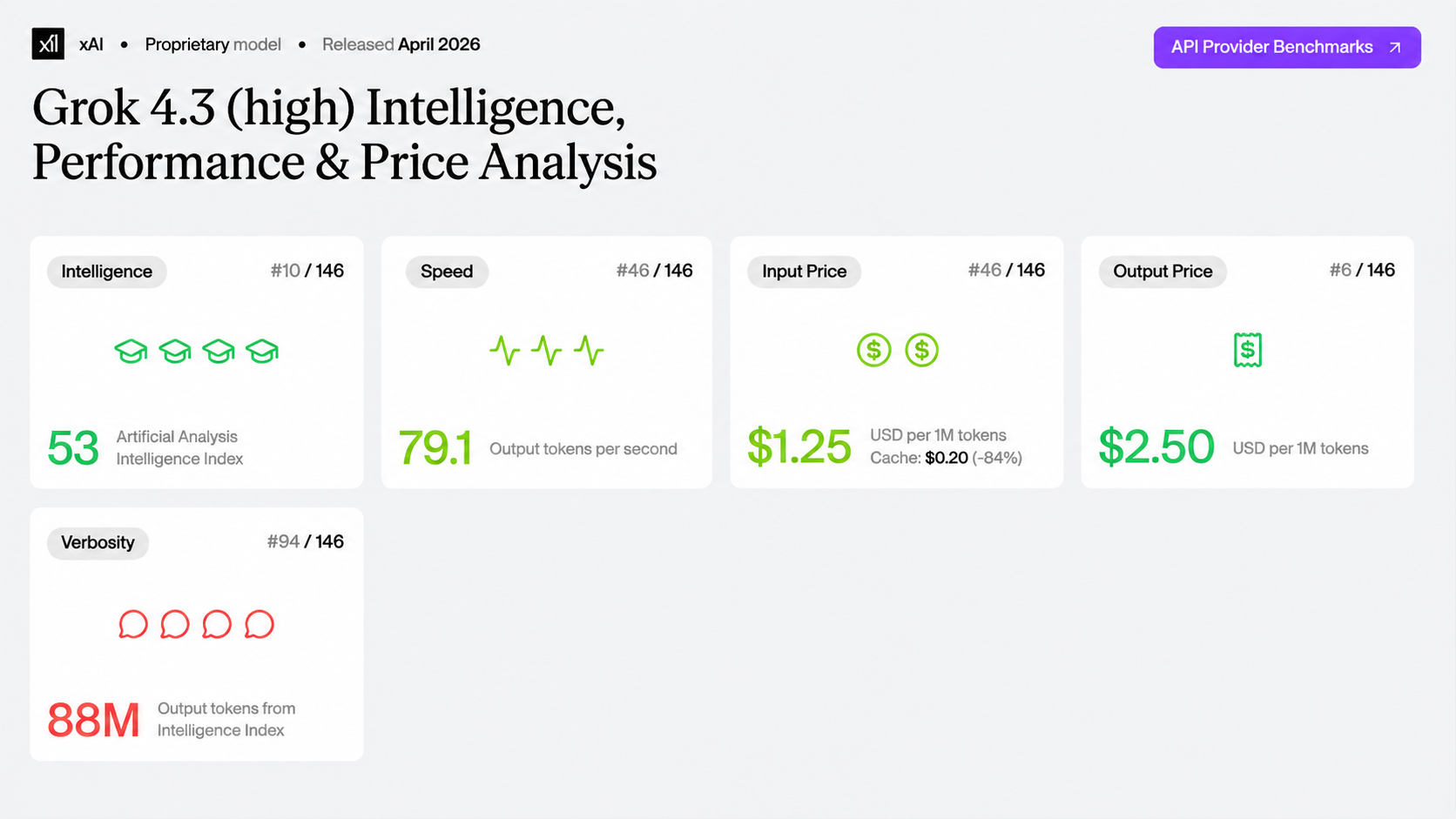
Early third-party benchmark data suggests Grok 4.3 is competitive in intelligence, agentic performance, and cost-performance.
This is important, but benchmarks should be read carefully. A benchmark score can show that a model is strong in certain test conditions. It does not prove the model is best for every real-world task.
Real performance still depends on:
The prompt
The task type
The input quality
The context length
The reasoning setting
The tool setup
For example, a model may perform well on reasoning benchmarks but still need careful prompting for SEO writing. It may perform well on coding tasks but still make mistakes in a large codebase if the context is messy.
So the best way to understand Grok 4.3 is to look at both benchmark performance and real workflow use. Based on its specs and positioning, Grok 4.3 looks strongest when the task needs long context, reasoning, and structured execution.
Why These Features Matter for AI Users
Taken together, Grok 4.3’s features show where xAI is moving.
This model is not only trying to be more intelligent in a general sense. It is trying to become more useful for serious work. The combination of long context, reasoning control, coding support, and agentic workflow features gives Grok 4.3 a clear role.
In daily use, Grok 4.3 feels most valuable when the task is too large or too layered for a basic chatbot. A short rewrite will not show much of its strength. But if you give it a long report, a messy research brief, or a codebase with several connected files, its larger context window and reasoning controls become much more meaningful.
For simple tasks, Grok 4.3 may be more than you need. For complex tasks, it becomes much more interesting.
Grok 4.3 Pricing: Subscription Plans and API Cost
Grok 4.3 pricing can be confusing because there are two different types of access.
The first is subscription access. This is for regular users who use Grok through Grok or X.
The second is API access. This is for developers and teams who build apps, agents, or workflows with Grok 4.3.
These two systems are different. A subscription is not the same as API usage.
Grok 4.3 Subscription Pricing
For regular users, Grok access usually depends on Grok or X subscription plans.
Common access paths may include:
Free Grok access
X Premium
X Premium+
Grok-specific plans
SuperGrok plans
X pricing can vary by region, platform, taxes, and plan changes. The official X Premium page lists web pricing such as:
X Basic starting at $3/month
X Premium starting at $8/month
X Premium+ starting at $40/month
Grok-specific pricing should be checked on the official Grok plans page.
This matters because Grok access may vary based on:
Country
Platform
Plan type
Usage limits
Feature rollout
Account eligibility
A paid plan does not always mean every user gets the same Grok access. Some features may roll out gradually. Some limits may depend on the plan.
Plan type | Price signal | Best for |
|---|---|---|
Free Grok access | Limited access may vary | Casual testing |
X Premium | Check X pricing page | X users |
X Premium+ | Check X pricing page | Heavy X users |
Grok / SuperGrok | Check Grok plans page | Grok-focused users |
API access | Token-based pricing | Developers |
The key point is simple: subscription pricing is product-level pricing. It may include usage caps, feature limits, or plan-based access rules.
Grok 4.3 API Pricing
API pricing is different. It is used when developers call Grok 4.3 through the xAI API.
The official Grok 4.3 API pricing is:
API item | Grok 4.3 price |
|---|---|
Context window | 1M tokens |
Input tokens | $1.25 / 1M tokens |
Cached input tokens | $0.20 / 1M tokens |
Output tokens | $2.50 / 1M tokens |
This pricing matters most for:
App developers
AI product teams
Coding tools
Research tools
Business automation
Customer support systems
The API price is especially attractive because Grok 4.3 offers a large context window at a relatively low token cost. That makes it appealing for workflows that process lots of text.
However, long-context tasks still need cost control. A large document, a big codebase, or a multi-step agent can use many tokens. Developers should estimate cost based on real usage, not just the price per 1M tokens.
Subscription Pricing vs API Pricing
The easiest way to separate the two is this:
Subscriptions are for people using Grok as a product.
API pricing is for builders using Grok as infrastructure.
If you are an everyday user, subscription pricing matters more. You want to know which Grok or X plan gives you access and what limits apply.
If you are building an app or workflow, API pricing matters more. You need to know how many tokens your product uses and how much each request may cost.
These two pricing systems should not be compared directly. They serve different users and different use cases.
Grok 4.3 vs Earlier Grok Models
Grok 4.3 is best understood as xAI’s new consolidation model.
Earlier Grok models had different roles. Some were known for general chat. Some focused more on fast reasoning. Some were used for coding-related tasks.
Grok 4.3 appears to bring many of those routes into one newer flagship model.
Model | How to understand it |
|---|---|
Grok 3 | Earlier widely known Grok model |
Grok Code Fast | Older coding-focused route |
Grok 4 / Grok 4 Fast | Previous Grok 4 models |
Grok 4.3 | New flagship model replacing older routes |
The important point is not just that Grok 4.3 is newer. The important point is that it is becoming the default path for many Grok workloads.
For users, that makes model choice easier. If you are trying to understand the current Grok lineup, Grok 4.3 is now the model to watch.
For developers, it also means old assumptions may need to be updated. A workflow built around an older Grok route may behave differently once it is redirected to Grok 4.3.
Best Use Cases for Grok 4.3
Long-Document Analysis
Grok 4.3 is a strong choice for long-document work.
It can help with:
PDFs
Research papers
Legal documents
Business reports
Policy materials
Market research files
This is one of the clearest use cases for the model. The 1M-token context window gives it more room to understand long materials and work across different sections.
For example, users can ask Grok 4.3 to summarize a report, extract key points, compare sections, identify contradictions, or turn a long document into a structured brief.
This makes Grok 4.3 useful for students, researchers, legal teams, marketers, analysts, and business users who work with large amounts of text.
Code Review and Codebase Understanding
Grok 4.3 is also useful for coding tasks.
It can help with:
Code review
Debugging
Code explanation
Project structure analysis
Cross-file understanding
Test planning
The key advantage is not only that it can write code. The more important point is that it can understand more context around the code.
That is useful when a bug is not located in one small snippet, or when a developer needs help understanding how several files work together.
For small coding tasks, many models can help. For larger projects, Grok 4.3’s long context and reasoning control make it more useful.
Research and SEO Planning
Grok 4.3 can also support research and SEO workflows.
It can help with:
Topic research
Source comparison
Article outlines
SEO briefs
Competitor analysis
Content planning
This is a strong use case for marketers and writers. SEO work often requires combining many types of information, such as keyword notes, competitor pages, product details, source materials, and internal positioning.
A long-context model can help organize that information into a clear content plan. It can also help compare angles, find missing sections, and turn scattered notes into a structured article brief.
For a blog or content team, Grok 4.3 is most useful when the task is not just writing a paragraph, but building a full content strategy from multiple inputs.
Business and Productivity Workflows
Grok 4.3 can also support business tasks.
Useful examples include:
Email drafting
Meeting summaries
Knowledge base analysis
Customer support prep
Internal documentation
Report generation
These tasks often involve messy information. A team may have meeting notes, customer feedback, product documents, and internal rules. Grok 4.3 can help turn that information into a cleaner output.
Its strength is not just writing. Its strength is organizing and reasoning through business context.
That makes it useful for teams that need faster document handling, better summaries, and more structured internal workflows.
Agentic and Tool-Based Tasks
Grok 4.3 is also a good fit for tool-based workflows.
It can help when a workflow needs:
Tool calls
Structured data
Multi-step logic
External system actions
Organized output formats
This is where function calling and structured outputs become important. A model in an agent workflow may need to call a tool, process the result, decide the next step, and return a structured answer.
That kind of workflow is useful for:
AI assistants
Coding agents
Research agents
Support bots
Productivity tools
For users who work across writing, research, coding, image generation, and video creation, the real challenge is not memorizing every model name. The real challenge is knowing which model to use for each task.
If Grok 4.3 becomes available in your model workspace, it is best treated as a strong option for:
Long-context reasoning
Coding tasks
Complex research
Agentic workflows
Grok 4.3 Limitations
Grok 4.3 is powerful, but it has clear limits.
The first limit is output format. Grok 4.3 supports image input, but its output is text. That means it can understand an image, but it does not generate images.
This matters because many users hear “image input” and assume “image generation.” Those are different things.
Grok 4.3 is not built for:
Image generation
Video generation
Open-source model deployment
Every lightweight writing task
Another limit is that high reasoning is not always needed. If you only need a simple rewrite, a short summary, or a casual answer, Grok 4.3 may be more model than the task requires.
Benchmarks also have limits. They can show that a model is strong in certain tests, but they do not guarantee the best result in every real workflow.
Long context has limits too. More context can help, but too much irrelevant context can make the answer less focused. It can also increase cost and latency.
So the right way to use Grok 4.3 is not to use it for everything. The right way is to use it when the task actually benefits from long context, reasoning, or structured workflow support.
Should You Use Grok 4.3?
Grok 4.3 is a strong choice if your task needs depth.
Use Grok 4.3 if you need:
Long-document analysis
Codebase understanding
Complex research
Multi-step reasoning
Agentic workflows
Structured outputs
Tool-based tasks
These are the areas where Grok 4.3’s strengths make the most sense.
You may not need Grok 4.3 if you only need:
Simple rewriting
Short summaries
Basic chatbot answers
Image generation
Video generation
Lightweight creative tasks
For simple work, a faster or cheaper model may be enough. For creative media, a specialized image or video model is a better fit.
The best AI workflow is not always about choosing the most advanced model. It is about choosing the right model for the task.
That is also where an all-in-one AI platform like GlobalGPT becomes useful. In real work, users often need different models for different jobs: one model for long-context reasoning, another for image generation, another for video creation, and another for fast writing or brainstorming. GlobalGPT brings leading AI models into one workspace, so users can compare different capabilities and switch between models without jumping across many separate tools.
Conclusion
Grok 4.3 is one of xAI’s most important model updates because it brings together long context, configurable reasoning, competitive API pricing, coding support, and agentic workflow features.
It is not just a chatbot upgrade. It looks like xAI’s attempt to make Grok 4.3 a practical default model for complex AI work.
Its strongest use cases are the ones where a normal chatbot starts to feel limited: long documents, coding projects, research-heavy tasks, and workflows that need structured multi-step output. At the same time, Grok 4.3 is not the best model for every use case. It is not an image generator. It is not a video generator. It may also be unnecessary for simple writing or short summaries.
The future of AI work is not about using one model for everything. It is about matching the right model to the right task. That is where GlobalGPT can help. As an all-in-one AI platform, GlobalGPT brings leading AI models into one workspace, so users can explore different strengths, switch between models more easily, and build a more flexible workflow for writing, research, coding, image generation, and video creation.
FAQ
Is Grok 4.3 free?
Grok access may vary by plan, region, and platform. Some users may have limited free access, while heavier use may require a paid Grok or X subscription.
Is Grok 4.3 open source?
Based on currently available official information, Grok 4.3 is not open source.
