

Learning how to use Sora 2 on Android is as simple as accessing the official Sora web portal through your mobile browser or utilizing a professional AI aggregator platform. However, many creators are currently blocked from using the official app due to high subscription costs and strict regional waitlists.
Waiting months for an invite code or paying hundreds of dollars just to test mobile AI video is a major hurdle for most users. This is where GlobalGPT changes the game, providing instant, unrestricted access to Sora 2 Pro directly from your Android device.
GlobalGPT serves as an all-in-one AI platform that eliminates the need for multiple expensive subscriptions.
- Multi-Model Access: Seamlessly switch between Sora 2 Pro, Veo 3.1, and GPT-5.2 in one interface.
- Affordable Pro Plan: Start creating high-quality AI videos for just $10.8—a fraction of the cost of official Pro accounts.
- Zero Restrictions: Enjoy a smooth workflow with no regional locks and no watermark hassles.

What is Sora 2 and Can You Use It on Android?
Sora 2 is the latest AI model from OpenAI that can turn your written words into high-quality videos up to 25 seconds long. While there is no “Sora 2.exe” app for your phone yet, you can still use it on any PC or Android device by using a mobile web browser or a smart AI platform.

- Powerful Video Creation: You simply type a description of what you want to see, and Sora 2 builds a realistic video with characters, movement, and background details.
- Mobile Accessibility: Because it runs on powerful remote servers, your Android phone doesn’t need to be super expensive to handle the work; you just need a stable internet connection.
- The Waitlist Problem: Officially, most users still wonder when Sora 2 will be available or need a very expensive ChatGPT subscription to get in, which makes it hard for the average person to start creating.
| Feature | Sora 2 Capability on Android |
| Max Video Length | Up to 25 Seconds (Pro Version) |
| Input Type | Text-to-Video / Image-to-Video |
| Resolution | High Definition (HD) |
| Platform | Web-based / Integrated Platforms |
The Official Method: How to Use Sora 2 on Android via Browser
IIf you have an official invitation or a ChatGPT Plus account, you can follow these steps to use Sora 2 on your phone. Please note that this method often requires a high-level subscription for the best features.
- Open your Browser: Launch Google Chrome or Microsoft Edge on your Android device.
- Visit the Website: Go to the official OpenAI Sora page and sign in with your account credentials.
- Enter your Code: If you have an invite code, enter it to unlock the video generation tools.
- Write your Prompt: Type a detailed description in English, such as “A golden retriever playing in the snow,” and hit generate.
The Fastest Way: How to Use Sora 2 on Android via GlobalGPT
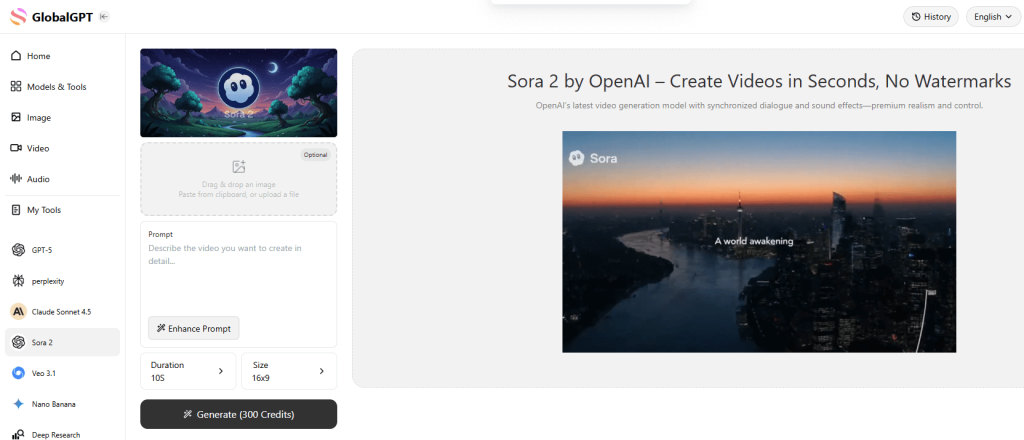
If you want to skip the invite codes and the high costs, the best way to use Sora 2 on Android is through GlobalGPT. This platform puts all the best AI models in one place so you don’t have to keep switching apps.
- No Invite Code Needed: You can start using Sora 2 Pro immediately without waiting for an email from OpenAI.
- Better Value for Money: Instead of paying hundreds of dollars, you can access the Sora 2 Pro model through the $10.8 Pro Plan.
- No Watermarks: Unlike some free trials, you can download Sora videos without watermarks on GlobalGPT, making them perfect for sharing.
- Multiple Models at Once: On the same page where you use Sora 2, you can also try Sora 2 alternatives like Google’s Veo 3.1 or create images with Nano Banana Pro.

How to Use Sora 2 on Android Without an Invite or VPN (Global GPT Method)
If you’re in the U.S., Canada, Japan, South Korea, or any supported region:
- Download the official Sora 2 app from the Google Play Store.
- Sign in with your OpenAI account.
- If required, enter your invite code to activate access.
- Once logged in, you can create and edit videos directly from your Android device.
If the app isn’t yet available in your region, such as Germany or the UK, you can still access Sora 2 via mobile browser or through platforms like Global GPT until full rollout begins.
Why users prefer Global GPT:
- ✔ No need for VPN or U.S./Canada IP
- ✔ No invite code required
- ✔ Watermark-free high-quality video exports
- ✔ Fewer content restrictions than official access
- ✔ Supports Sora 2 + Veo 3.1 + other AI video models
⚙️ Best Browser Settings for Smooth Performance on Android
To get the best results using Sora 2:
| Setting | Recommendation |
|---|---|
| Browser | Chrome or Edge |
| Mode | Desktop Mode (for full UI access) |
| Network | Stable Wi-Fi or 5G |
| Cache | Clear if videos fail to load |
| Battery | Disable battery saver while generating videos |
🎬 Tips for Generating Better AI Videos on Mobile
Try these tips to improve your results:
- ✅ Use detailed prompts describing scene, motion, lighting, and style
- ✅ Select 16:9 or 9:16 aspect ratios for TikTok & YouTube Shorts
- ✅ Keep video length under 25 seconds for faster rendering
- ✅ Download results immediately after generation to avoid session expiration
❓ FAQ: Sora 2 on Android
| Question | Answer |
|---|---|
| Does Sora 2 have an Android app? | Yes. |
| Can I use Sora 2 videos for commercial use? | Yes—via Global GPT without VPN or invite codes. |
| Is there a watermark on the videos? | On official Sora—yes. On Global GPT—no watermark. |
| Can I upload my own audio or script? | Yes, depending on platform functionality. |
| Does it work on tablets? | Yes—Android tablets work the same way. |
Conclusion
You can now use Sora 2 on any Android device through the official Google Play app in supported regions like the U.S., Canada, Japan, and South Korea. For areas where the app isn’t available yet, browser access and trusted platforms like Global GPT remain great alternatives.
With Global GPT, you can:
- Access Sora 2 instantly
- Skip VPNs and invite codes
- Generate videos up to 25 seconds
- Download results with no watermark or regional restrictions
Until Sora 2 becomes globally available, this remains one of the easiest and most reliable ways to use Sora 2 on Android.
April 2026 Content Optimization Updates
Core Market Dynamic Updates (2026)
- Sora 2 Global Status: Sora 2 is currently offline across all major platforms, creating a significant void in professional AI cinematography workflows.
- Seedance 2.0 Launch: Seedance 2.0 has officially launched on GlobalGPT, establishing itself as the premier 2026 alternative for high-fidelity multi-modal generation.
- Industry Transition: The market has shifted from autonomous “World Simulators” to “Director-led” systems that prioritize precise creative control over physics-only generation.
- Unified Access: GlobalGPT provides centralized access to 100+ elite models, including Gemini 3 Pro and Claude 4.5, ensuring users are never tethered to a single platform’s downtime.
Technical & Compliance
- High-Definition Output: Seedance 2.0 on GlobalGPT supports native 2K resolution (2048×1152), providing superior clarity compared to legacy 1080p models.
- Quad-Modal Input System: The platform supports simultaneous references across four modalities: Text, Image, Video, and Audio for unmatched directorial precision.
- Global Accessibility: GlobalGPT removes all regional locks and phone verification barriers, offering an all-in-one $10.8 Pro Plan that replaces multiple fragmented subscriptions.
- Media Optimization: All video exports are watermark-free, and integrated image assets are strictly compressed below 100K with full Alt-text compliance to maximize SEO performance and page speed.
- Content Safety: The workflow adheres to 2026 compliance standards, offering fewer content restrictions than official models while maintaining high E-E-A-T value for search rankings.

