GPT-5.5 is OpenAI’s frontier model for complex professional work, especially software engineering, long-context analysis, tool-heavy agents, research synthesis, and customer-facing workflows. According to OpenAI’s GPT-5.5 model documentation, the model ID is gpt-5.5, with text and image input, text output, a 1,050,000-token context window, and up to 128,000 output tokens.
For searchers asking “what is GPT-5.5?”, here are Key takeaways:
- Wat het is: GPT-5.5 is OpenAI’s frontier model for complex professional work.
- Toegang: OpenAI-lijsten
gpt-5.5in its official API documentation. - Prijzen: GPT-5.5 costs more than GPT-5.4 and GPT-5.4 mini.
- Beperkingen: It is not ideal for every task; costs, latency, fine-tuning limits, and native modality limits matter.
- Compared with GPT-5.4: GPT-5.5 is stronger for harder coding, tool-use, long-context, and reasoning tasks.
For most users, the real question is where GPT-5.5 fits in a real workflow. If you are comparing GPT-5.5 with Claude, Gemini, Perplexity, or other AI models, here is a multi-model workspace — GlobalGPT. You can test across different models to see which one performs best for your actual task with a basic plan starting around $5.8.

What is GPT-5.5
GPT-5.5 is a stronger fit for production workflows than for casual experimentation alone. It is most useful when a task includes:
- Multiple constraints that must be followed at the same time
- Long source material, such as reports, contracts, documentation, or codebases
- Tool-oproepen, such as search, file retrieval, code execution, or structured outputs
- High-quality final deliverables, such as plans, summaries, comparisons, reviews, or customer-facing responses
Strong GPT-5.5 tasks often start messy. The user may have incomplete context, conflicting requirements, or a need to cite evidence. GPT-5.5 creates value by turning that complexity into a clear next step.
Official Model Basics
OpenAI‘s official model page lists GPT-5.5 with the following core specifications:
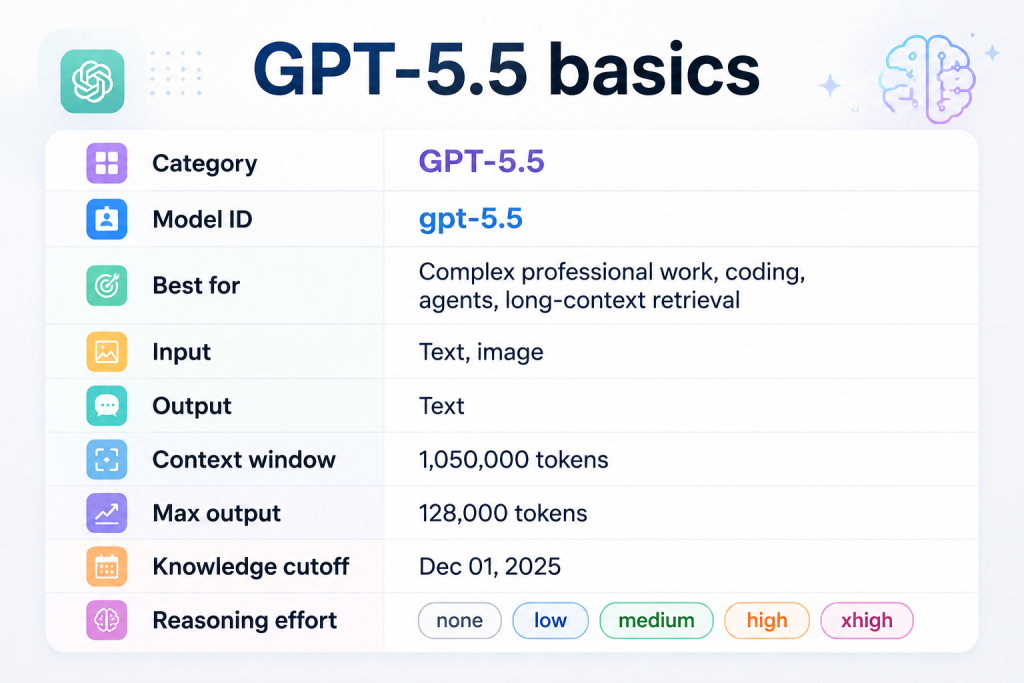
These details are important because they shape what GPT-5.5 can and cannot do:
- Configurable reasoning effort helps teams balance quality, latency, and cost.
- Text and image input means GPT-5.5 can process visual input in supported workflows.
- Text output means it should not be described as a native video or audio generator.
- Large context makes it useful for long documents and broad project context.
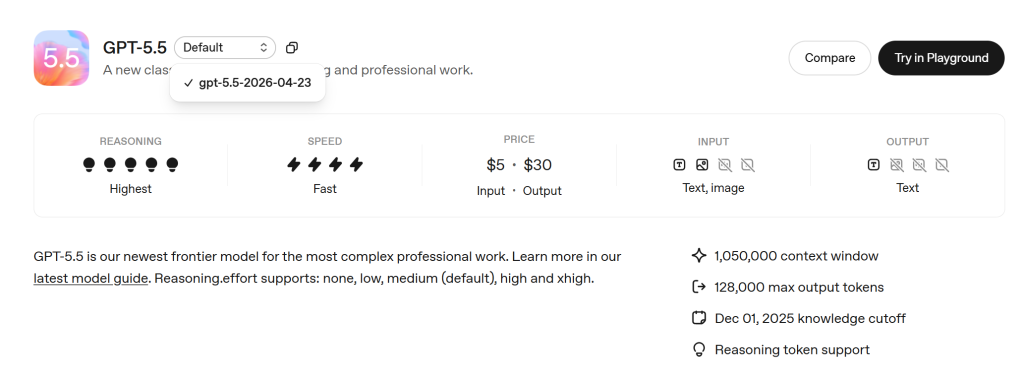
GPT-5.5 is new because it combines more efficient reasoning, stronger tool-oriented behavior, en more direct production-friendly output.
| Verbetering | Betekenis |
|---|---|
| More efficient reasoning | Can reduce wasted reasoning tokens in complex workflows |
| Outcome-first execution | Helps turn user intent into concrete work |
| Stronger tool use | Improves agent and automation reliability |
| Direct default style | Useful for productivity, but may need tone tuning |
| Coding orchestration | Better suited for planning, editing, testing, and verification |
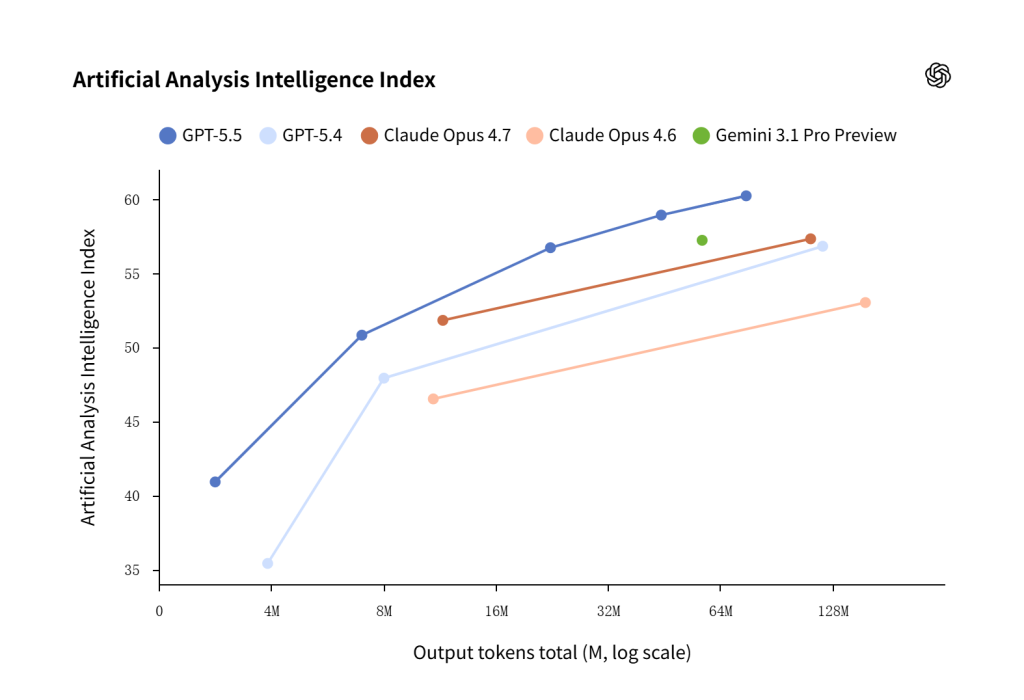
GPT‑5.5 is not just more intelligent; it is more efficient in how it works through problems, often reaching higher-quality outputs with fewer tokens and fewer retries. On Artificial Analysis’s Coding Index, GPT‑5.5 delivers state-of-the-art intelligence at half the cost of competitive frontier coding models.
GPT-5.5 Access, and Model Availability
As of June 17, 2026, OpenAI’s GPT-5.5 model documentation lists GPT-5.5 as an official API model with the model ID gpt-5.5. OpenAI’s GPT-5.5 launch page also describes the model’s broader availability and real-world examples.
For developers, the model can be evaluated through OpenAI’s API surfaces. OpenAI’s GPT-5.5 guidance emphasizes careful migration, prompt updates, reasoning-effort tuning, and tool-description clarity rather than simply swapping the model name in an old integration.
API Access vs ChatGPT Access
API-toegang en ChatGPT-toegang are not the same thing.
| Access type | What it means | Best source to verify |
|---|---|---|
| API-toegang | Developers can call gpt-5.5 in applications or workflows | OpenAI API model docs |
| ChatGPT-toegang | Users can select the model inside a ChatGPT product surface | ChatGPT model picker, plan settings, or OpenAI release notes |
| Multi-model workspace access | Users compare model behavior inside one productivity environment | The workspace’s live model list and supported tools |
Why Model Snapshots Matter
OpenAI’s model page lists the snapshot gpt-5.5-2026-04-23. A model snapshot is a dated version of a model that helps teams reduce behavior drift.
Snapshots are useful when stability matters, such as:
- Customer support assistants
- Code review tools
- Compliance workflows
- Document analysis systems
- Internal productivity agents
The general gpt-5.5 model ID is useful when teams want the current default version. A dated snapshot is useful when teams want repeatability during testing, rollout, or production monitoring.
GPT-5.5 Technical Specs
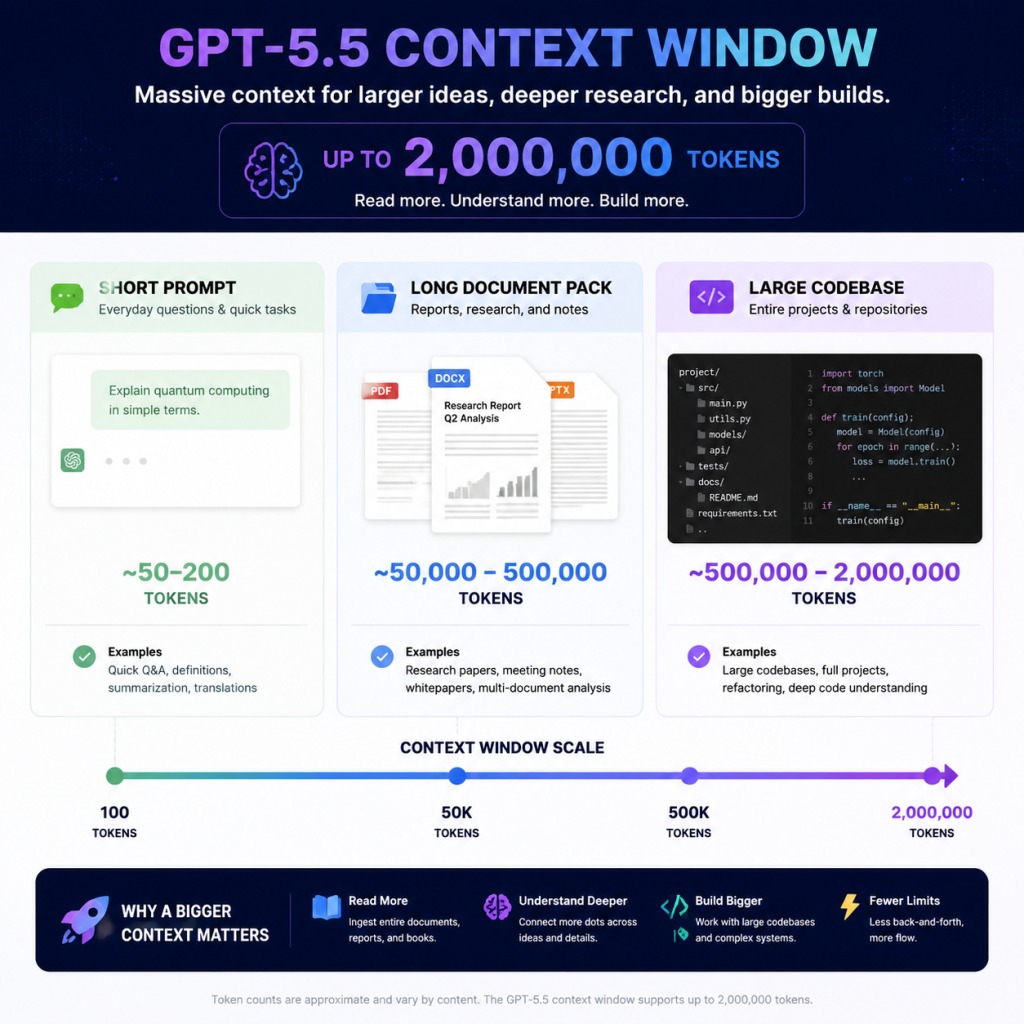
GPT-5.5’s technical specs explain why the model is useful for complex workflows. The two headline numbers are:
- 1.050.000-token contextvenster
- 128,000-token maximum output
Those numbers are powerful, but they should not encourage messy prompting. A large context window is capacity, not a reason to paste everything into the model.
1.Context Window and Output Length
The 1,050,000-token context window allows GPT-5.5 to work with large inputs, zoals:
- Long technical manuals
- Legal documents
- Research packs
- Productspecificaties
- Internal knowledge bases
- Broad codebase context
The 128,000-token maximum output is also significant, but most workflows do not need extremely long responses. They need the right output format:
- A decision memo
- A comparison table
- A concise summary
- A structured JSON result
- A code review
- A step-by-step implementation plan
Practical rule: use long context only when the answer depends on many pieces of evidence. If a few excerpts are enough, retrieval and targeted context selection are usually better.
Prompt tips for long context:
| Doel | Prompt tip |
|---|---|
| Avoid context overload | “Use only the sections relevant to [decision/question], and ignore duplicates.” |
| Force evidence use | “Cite the source section or file name after each key claim.” |
| Control long outputs | “Return a 300-word summary first, then a table of supporting evidence.” |
| Improve retrieval quality | “Before answering, identify the 5 most relevant excerpts and explain why they matter.” |
Short example:
Analyze the attached policy pack. Use only evidence from the documents.
Output: 1) direct answer, 2) evidence table, 3) risks, 4) next action.
Keep the answer under 700 words unless the evidence conflicts.
2.Modalities and Native Output
| Capaciteit | GPT-5,5 |
|---|---|
| Tekstinvoer | Ondersteund |
| Image input | Ondersteund |
| Text output | Ondersteund |
| Audio | Not listed as a native modality |
| Video | Not listed as a native modality |
GPT-5.5 can be part of a workflow that uses image generation, video generation, or audio tools, but that does not mean GPT-5.5 itself is a native video or audio model.
But for users who want to generate images, GPT-5.5 can participate in image-generation workflows through the Responses API, even though image creation is handled by dedicated image-generation tooling.
Prompt tips for images and modalities:
- For image analysis: “Describe what is visible, then separate facts from assumptions.”
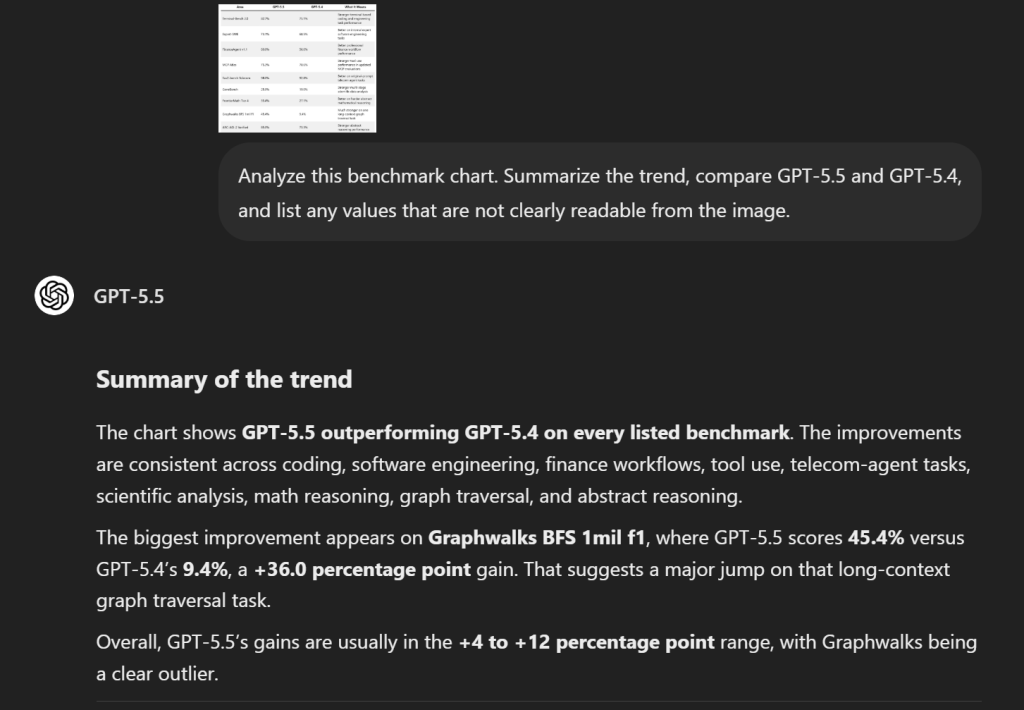
- For chart screenshots: “Extract the data points you can read, and mark unclear values as uncertain.”
- For image generation: “Use the image generation tool to create…” rather than implying GPT-5.5 itself is the image model.
- For video or audio needs: specify the external tool or model that should handle media generation.
Short example:
3.Tools, Structured Outputs, and Fine-Tuning
GPT-5.5 supports developer features that matter for production systems:
| Tool category | Practical use |
|---|---|
| Zoeken op internet | Confirm current information |
| File search | Retrieve evidence from documents |
| Code interpreter | Analyze data or run code |
| Hosted shell | Support tool-based technical workflows |
| Apply patch | Assist code editing workflows |
| Computer use | Work with UI-driven tasks |
| MCP and tool search | Connect to external tools and systems |
Fine-tuning is listed as niet ondersteund for GPT-5.5. If a team needs customized behavior, it should consider prompt design, retrieval, structured outputs, evaluations, or another model that supports fine-tuning.
Prompt tips for tools and structured outputs:
| Behoefte | Prompt tip |
|---|---|
| Gebruik van gereedschap | “Use web search only for current facts; use file search for uploaded documents.” |
| Structured output | “Return valid JSON with these fields: summary, evidence, risks, recommendation.” |
| Human review | “Flag any claim that needs human verification before publishing.” |
| Fine-tuning alternative | “Follow this style guide and use these 3 examples as the output pattern.” |
GPT-5.5 Pricing and Long-Context Costs
GPT-5.5 is a premium model. According to OpenAI, its standard pricing is:
- $5,00 / 1M invoermunten
- $0,50 / 1M invoertokens in cache
- $30,00 / 1M uitvoerfiches
This makes cost planning important. GPT-5.5 can be valuable for expert-level workflows, but it is not automatically the right model for every request.
Standard API Pricing
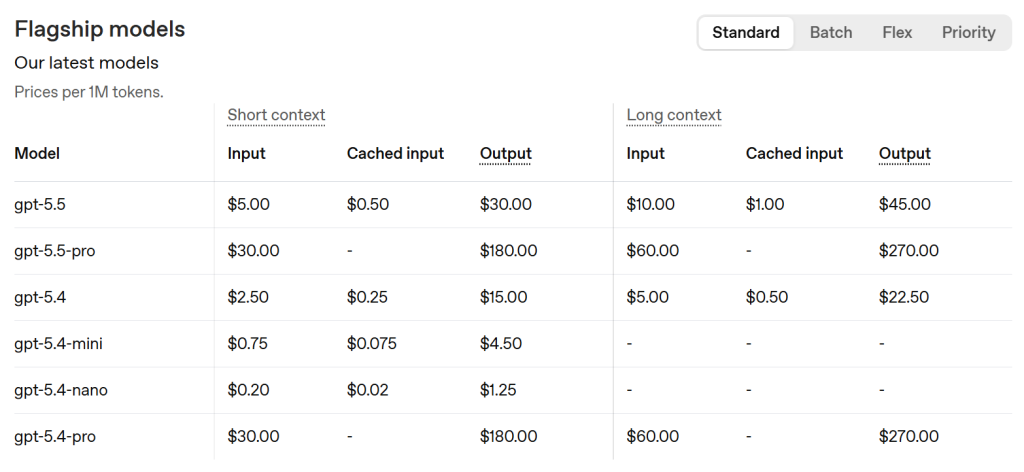
The trade-off is clear:
- GPT-5.5 is more expensive.
- GPT-5.4 may be enough for many standard workflows.
- GPT-5.4 mini may be better for high-volume, lower-complexity tasks.
Output tokens matter most. GPT-5.5 output is priced higher than input, so teams should control response length, avoid unnecessary verbose drafts, and route simpler tasks to cheaper models.
Long-Context Pricing Caveat
OpenAI’s pricing page includes a long-context caveat: prompts above 272K invoertokens are priced at 2x invoer en 1,5x uitvoer for the full session.
That does not mean long context is bad. It means long-context workflows need discipline.
Use large context when:
- The answer depends on many documents.
- The model must compare multiple files or policies.
- Evidence is distributed across a large source set.
- The task has enough value to justify the cost.
Avoid large context when:
- Only a few excerpts matter.
- The task is repetitive or low-stakes.
- Retrieval can find the relevant material first.
- A smaller model can meet the quality bar.
GPT-5.5 vs GPT-5.4
The useful question is not only “Is GPT-5.5 better than GPT-5.4?” A better question is: where does GPT-5.5 improve enough to justify the higher price?
OpenAI directly compares GPT-5.5 and GPT-5.4 across coding, professional work, tool use, academic reasoning, cybersecurity, long context, and abstract reasoning. The pattern is consistent: GPT-5.5 usually leads GPT-5.4 on harder reasoning and execution tasks, while GPT-5.4 can still make sense when cost and scale matter more.
The Main Difference
Het belangrijkste verschil is hard-task reliability. In plain language: GPT-5.5 is the stronger model for difficult work; GPT-5.4 is still useful for standard work where cost control matters.
OpenAI also notes that GPT-5.5 is priced higher than GPT-5.4 but is more token efficient in Codex, where it can deliver better results with fewer tokens for many users. That means the real cost comparison should include not only token price, but also:
- How many retries the task needs
- Whether the first answer is usable
- How much human correction is required
- Whether tool calls succeed
- Whether the model stops too early
Cost, Scale, and Practical Trade-Offs
OpenAI reports several direct GPT-5.5 vs GPT-5.4 evaluation differences:
| Gebied | GPT-5,5 | GPT-5.4 | Wat het betekent |
|---|---|---|---|
| Terminal-Bench 2.0 | 82.7% | 75.1% | Stronger terminal-based coding and engineering task performance |
| Expert-SWE | 73.1% | 68.5% | Better on internal expert software engineering tasks |
| FinanceAgent v1.1 | 60.0% | 56.0% | Better professional finance workflow performance |
| MCP Atlas | 75.3% | 70.6% | Stronger tool-use performance in updated MCP evaluations |
| Tau2-bench Telecom | 98.0% | 92.8% | Better on original-prompt telecom agent tasks |
| GeneBench | 25.0% | 19.0% | Stronger multi-stage scientific data analysis |
| FrontierMath Niveau 4 | 35.4% | 27.1% | Better on harder abstract mathematical reasoning |
| Graphwalks BFS 1mil f1 | 45.4% | 9.4% | Much stronger on one long-context graph traversal task |
| ARC-AGI-2 Geverifieerd | 85.0% | 73.3% | Stronger abstract reasoning performance |
The Terminal-Bench 2.0 results are especially relevant for developers because they test terminal-based engineering tasks, not just short coding prompts.
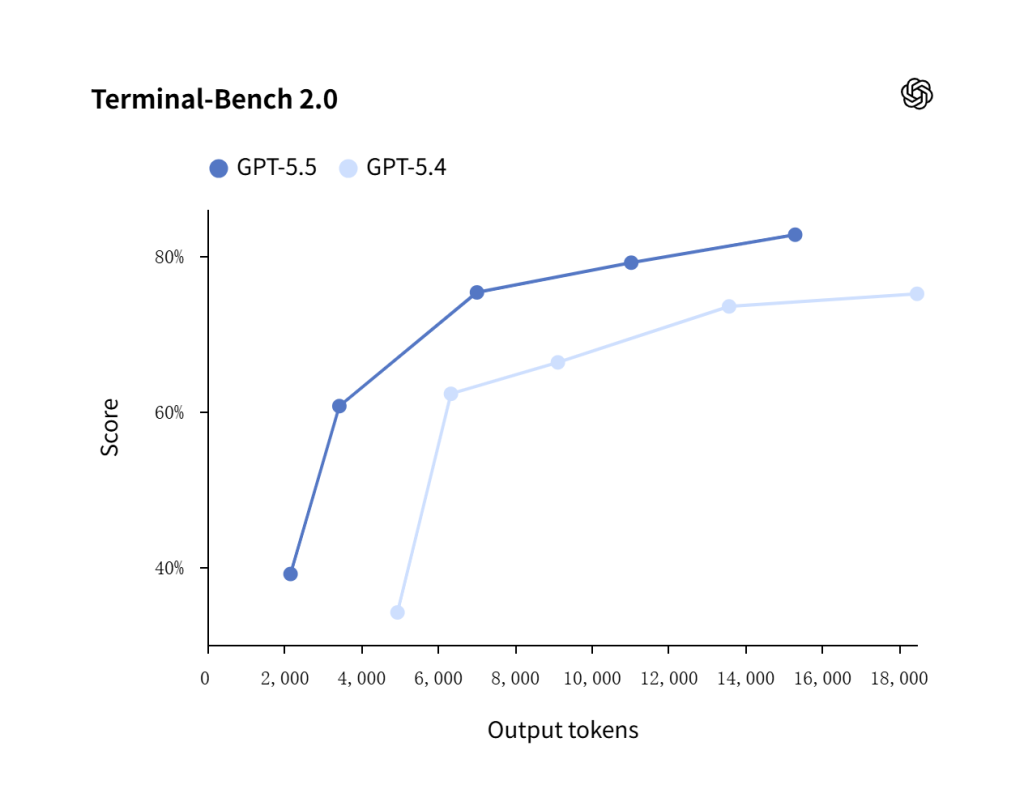
GPT-5.5 shows stronger terminal-based engineering performance than GPT-5.4 across the tested output-token range, supporting its positioning as a stronger model for coding agents and software workflows.
| Gebruikscasus | Een beter uitgangspunt | Waarom |
|---|---|---|
| Complex coding agent | GPT-5,5 | OpenAI reports stronger coding and terminal-task results |
| Uitgebreide samenvatting van het onderzoek | GPT-5,5 | Long-context evals show meaningful gains over GPT-5.4 |
| Scientific or mathematical analysis | GPT-5,5 | GeneBench and FrontierMath results favor GPT-5.5 |
| Tool-heavy production agent | GPT-5,5 | Tool-use evals such as MCP Atlas and Tau2-bench favor GPT-5.5 |
| Simple support drafts | GPT-5.4 or mini | Lower cost may matter more than peak reasoning |
| Bulk content variants | GPT-5.4 or mini | High-volume work needs cost control |
This comparison also shows why a one-model strategy is often inefficient. A mature AI workflow routes tasks by difficulty instead of sending everything to the most powerful model.
Migration Is Not a Drop-In Swap
Moving from GPT-5.4 to GPT-5.5 should not be treated as a simple model-name replacement. A practical migration plan:
- Route only the tasks where GPT-5.5 clearly improves outcomes.
- Selecteer 20 to 50 real examples from production or internal usage.
- Run GPT-5.4 and GPT-5.5 side by side.
- Compare accuracy, latency, cost, and final usefulness.
- Tune reasoning effort and verbosity.
- Update tool descriptions and output formats.
Or you could vergelijken GPT-5.5 with GPT-5.4, or other models such as Claude, Gemini, Perplexity across an one-in-all platform — GlobalGPT. You can test across different models to decide which one to choose with a basic plan starting around $5.8.
Best Use Cases for GPT-5.5
GPT-5.5 is best used where reasoning, context, and execution quality create measurable value.
Coding and Software Engineering
Coding is one of the strongest GPT-5.5 use cases. because software tasks often combine:
- Natural language requirements
- Code
- Files
- Tests
- Gereedschap
- Edge cases
GPT-5.5 can help with:
Product-requirement-to-engineering-task conversion
- Foutopsporing
- Implementation planning
- Beoordeling van een pull-verzoek
- Test generation
- Refactoring suggestions
- Codebase navigation
OpenAI’s Expert-SWE internal benchmark gives a more software-engineering-specific view of GPT-5.5’s advantage over GPT-5.4.
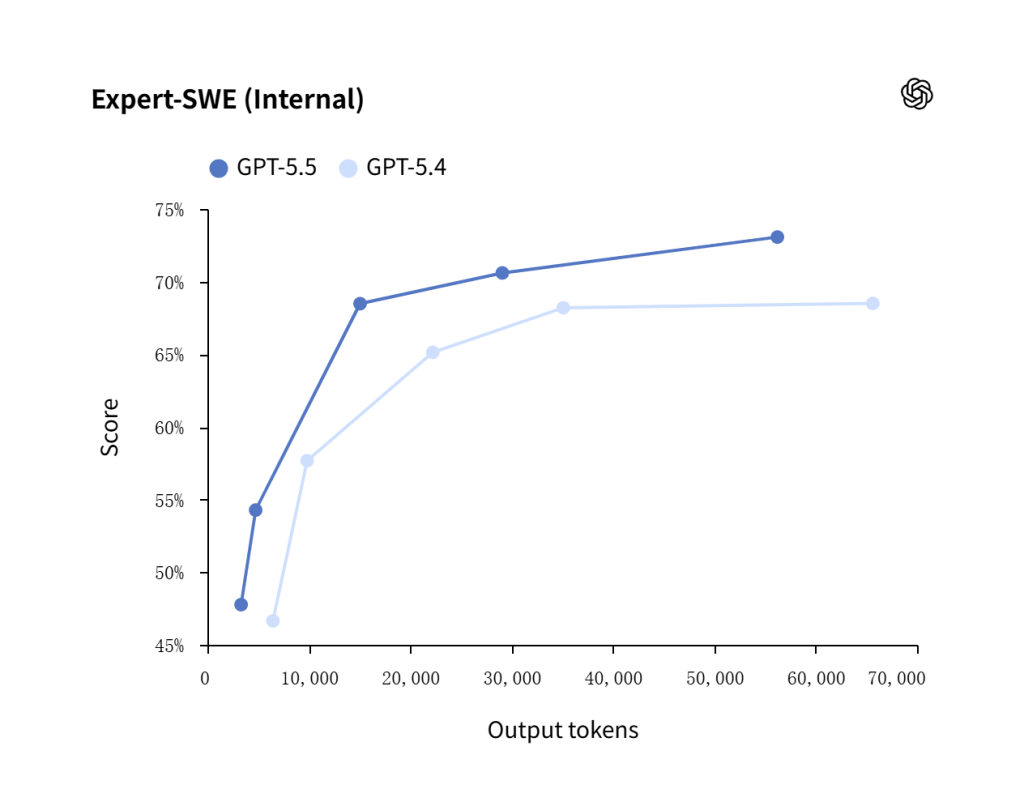
GPT-5.5 outperforms GPT-5.4 on internal expert software engineering tasks, which makes it a stronger starting point for debugging, codebase navigation, branch merges, and implementation planning.
Agents, Tools, and Long-Context Work
GPT-5.5 is well suited for agents that need to use tools and context together.
The GeneBench connects GPT-5.5’s long-context and reasoning strengths to scientific workflows.
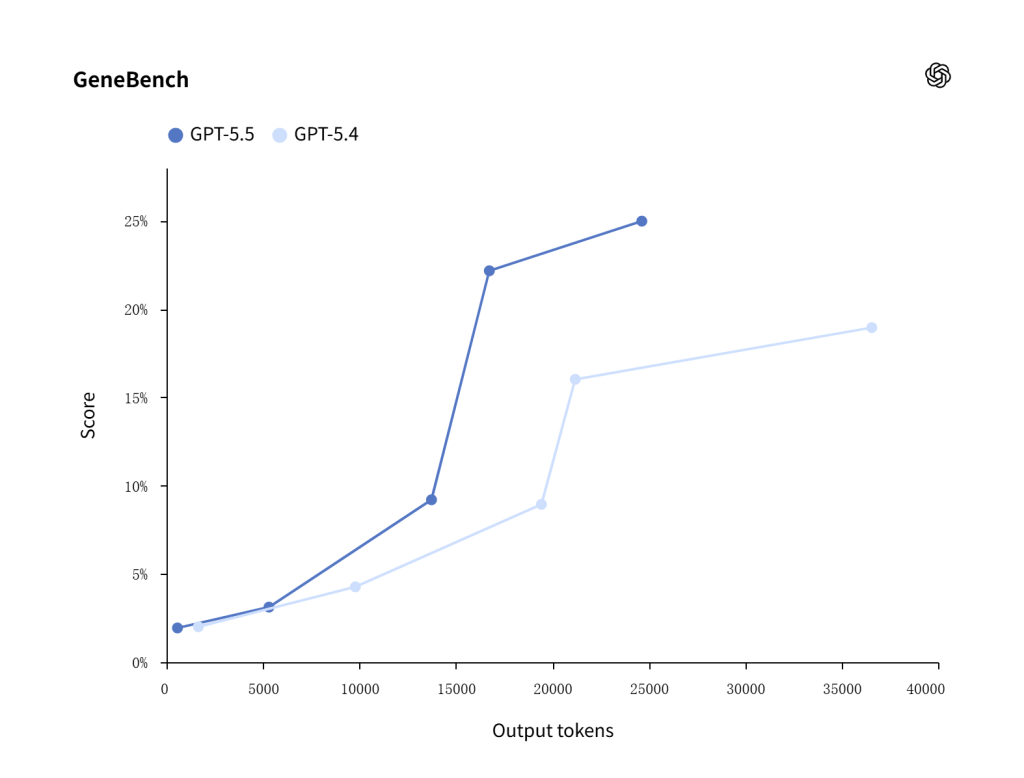
GPT-5.5 scores higher than GPT-5.4 on GeneBench, showing stronger performance on multi-stage scientific analysis tasks such as gene-expression data interpretation.
Practical prompt examples for agents and long-context work:
Long-document review prompt:
Review the uploaded document set and answer the user's question using only the provided sources.
First identify the 5 most relevant sections.
Then return: direct answer, evidence table, conflicts or missing information, and recommended next step.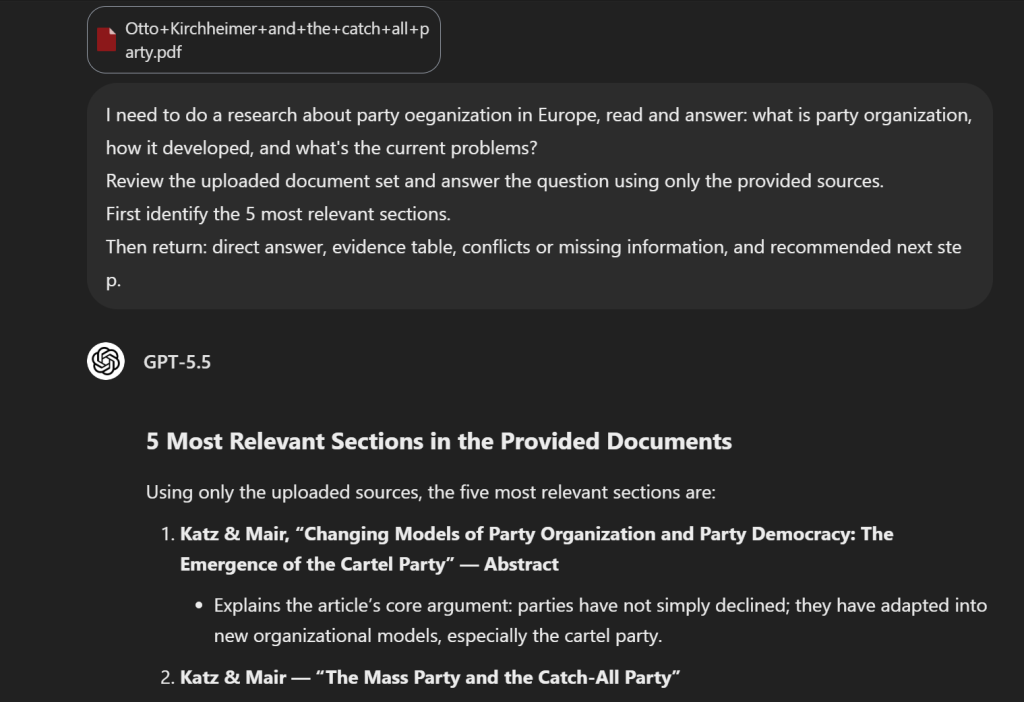
OpenAI also gives two strong long-context examples:
| Voorbeeld | Detail to use carefully |
|---|---|
| K-1 tax form review | OpenAI describes using GPT-5.5 to help review 24,771 K-1 tax forms totaling 71,637 pages over roughly two weeks |
| Weekly business reporting | OpenAI describes GPT-5.5 helping automate weekly reports that previously took 5-10 hours |
These examples show why long context matters. The value is not that GPT-5.5 can accept huge inputs for their own sake. The value is that it can help organize, review, and synthesize large source sets when the workflow has enough structure.
Professional and Customer-Facing Workflows
GPT-5.5 can support professional workflows such as:
- Communications workflow: helping handle a speaking request by working across context and constraints
- Finance workflow: supporting recurring reporting and document-heavy review
- Scientific workflow: assisting with analysis of gene-expression data involving 62 samples and 28,000 genes
- Mathematical visualization: helping build an algebraic geometry application in a short interactive session
For customer-facing workflows, GPT-5.5 can help with polished answers, but the surrounding system still needs:
- Tone rules
- Escalation rules
- Policy boundaries
- Approved knowledge sources
- Human review for high-risk cases
Practical prompt examples for professional workflows:
Executive summary prompt:
Turn these notes into a one-page executive summary.
Include: context, decision needed, options, risks, recommendation, and next action.
Use concise business language and avoid unsupported claims.
Customer support prompt:
Answer the customer using only the approved policy text below.
Tone: clear, calm, and helpful.
If the policy does not answer the question, say what information is missing and escalate.
Keep the answer under 150 words.Internal knowledge-base prompt:
Create a knowledge-base answer from these source documents.
Return: short answer, step-by-step process, exceptions, and links or source names.
Mark any outdated or conflicting information.GPT-5.5 Limitations and Risks
A serious GPT-5.5 article should explain where the model is not the right choice. The biggest risks are kosten, latency, migration quality, en capability boundaries.
Cost and Latency Risks
GPT-5.5 costs more than GPT-5.4 and GPT-5.4 mini. Long-context sessions can also become expensive if prompts exceed OpenAI’s long-context threshold.
Watch for these risks:
- Higher reasoning effort can increase latency.
- Long outputs can increase cost quickly.
- Large prompts can trigger long-context pricing.
- Simple tasks may not benefit enough to justify GPT-5.5.
Practical rule: use higher reasoning only when the task truly needs it. Measure quality, latency, and cost before making GPT-5.5 the default.
Migration and Evaluation Risks
Older GPT-5.4 prompts may not perform optimally with GPT-5.5. A direct model-name swap can miss the model’s strengths or create unexpected changes in style, tool behavior, or output format.
Before production use, evaluate:
- Real examples, not toy prompts
- Edge cases and ambiguous inputs
- Tool-call behavior
- Output length and format
- Human review outcomes
- Cost per successful task
Production teams still need evals. A strong model can still make mistakes, misuse tools, or produce confident answers without enough evidence.
How to Prompt GPT-5.5 Effectively
GPT-5.5 works best when the prompt defines the job clearly. A strong prompt answers four questions:
- What should be accomplished?
- What counts as a good answer?
- What information or tools may be used?
- What should the final output look like?
Start With Outcomes, Not a Long Procedure
Outcome-first prompting means defining the final result and boundaries, not writing a long procedural script.
Voorbeeld:
Doel: Compare GPT-5.5 and GPT-5.4 for a customer support assistant.
Success criteria: Recommend one model for quality-sensitive tickets and one model for high-volume routine tickets.
Evidence rules: Use only official pricing and documented model behavior.
Uitgang: A short decision table followed by a 150-word recommendation.
Tune Reasoning Effort Deliberately
Reasoning effort should match the task. Do not use the highest setting by habit.
| Redeneringsinspanning | Beste voor |
|---|---|
geen | Latency-sensitive tasks that do not need reasoning |
laag | Efficient reasoning for relatively simple tasks |
gemiddeld | Balanced default for many professional workflows |
hoog | Complex analysis, coding, and agent tasks |
xhoog | The hardest asynchronous or evaluation-heavy tasks |
Measure:
- Nauwkeurigheid
- Latentie
- Tool-call quality
- Kosten
- Human review outcomes
Als gemiddeld reasoning gives the same quality as hoog, gemiddeld may be the better production setting.
Control Length, Format, and Voice
GPT-5.5 can produce long outputs, but longer is not always better. Control the answer with:
- Word limits
- Table formats
- Bullet counts
- Schema requirements
- Tone instructions
- Citation rules
Voorbeelden:
- “Answer in under 120 words and include one next step.”
- “Return a decision table plus a short recommendation.”
- “Cite the source after each factual claim.”
- “Use a concise, technical, non-promotional tone.”
GPT-5.5 FAQ
Is GPT-5.5 Better Than GPT-5.4?
GPT-5.5 is better suited for complex professional work, especially coding, long-context retrieval, tool-heavy agents, and reasoning-intensive workflows. GPT-5.4 may still be better for cost-sensitive or lower-complexity tasks.
How Much Does GPT-5.5 Cost?
OpenAI’s API pricing page lists GPT-5.5 at $5,00 per 1M invoertokens, $0,50 per 1M invoer tokens in de cache, en $30,00 per 1M uitvoerfiches. Prompts above 272K input tokens have additional long-context pricing rules.
Does GPT-5.5 Support Images?
Ja. OpenAI’s GPT-5.5 model documentation lijsten text and image input. It lists text output, so image input support should not be confused with native image generation output.
Does GPT-5.5 Generate Images?
GPT-5.5 does not directly generate images as a standalone native image-output model. However, it can help users create images by calling the image generation tool in the Responses API or by working with dedicated image-generation models. OpenAI’s image generation guide explains the tooling used to create images.
Does GPT-5.5 Support Audio or Video?
OpenAI’s GPT-5.5 model page does not list audio or video as native supported modalities for this model. GPT-5.5 may be used inside broader workflows that include media tools, but the model itself is documented with text and image input and text output.
Should I Replace GPT-5.4 With GPT-5.5?
Not automatically. Test GPT-5.5 against GPT-5.4 on real examples. Compare accuracy, latency, tool-call quality, output usefulness, and cost. Use GPT-5.5 where it improves outcomes enough to justify the higher price.